PDFium is not thread-safe at the module level, so two TPdf instances working on two different files in two threads can still corrupt each other. PDFium Component for Delphi handles this in two ways: since v3.125.1, ValidatePdfFilesParallel serializes every native PDFium call behind one process-wide lock, while TPdf.RenderPagesParallel gives each worker its own isolated copy of the PDFium module. The bug that forced the fix was the worst kind of intermittent. A batch validation test passed most of the time, then reported one of two good files as failed, then crashed the next test in the same process with an access violation, and sometimes took the whole runner down with an exit code instead of a stack trace. Nothing was wrong with the test, and nothing was wrong with any single document. The assumption was wrong: one TPdf per thread is not isolation
Why isn't one TPdf per thread enough?
One TPdf per thread is not enough because PDFium keeps its unsafe state in the module, not in the document. Each TPdf owns its own FPDF_DOCUMENT handle, but every handle in the process is served by the same loaded DLL, and that DLL holds process-wide singletons: the font cache, the page module, and other global structures that document loading, parsing and rendering all touch. Two threads loading two unrelated files are two threads writing into the same font cache at the same time. Nobody owns that data on the Delphi side, so nothing on the Delphi side can lock it per document
The component does have a lock, and it is easy to draw the wrong conclusion from it. TPdf wraps its own render paths in an internal critical section (EnterRenderLock / LeaveRenderLock, private methods of TPdf). That lock is per instance. It stops two threads from driving the same TPdf at once, which is a real hazard, but it cannot see a second instance on another thread, so cross-instance concurrency walks straight past it. The general rule is simple enough to state in one line: in a single loaded PDFium module, at most one thread may be inside PDFium at any moment, regardless of how many documents are open
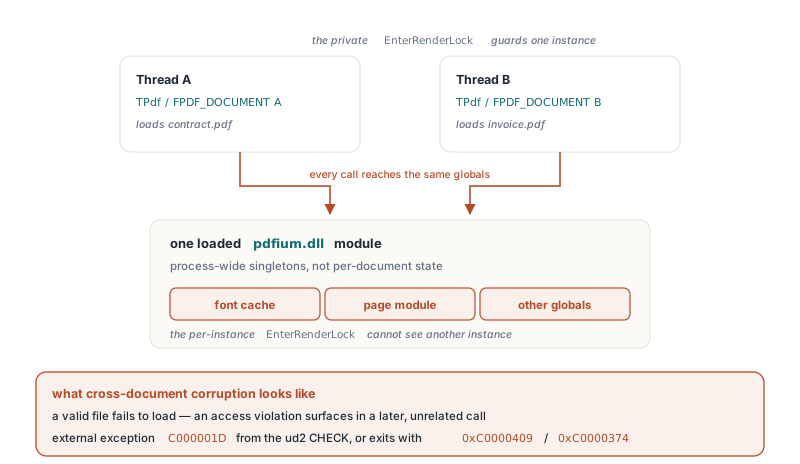
What does cross-document corruption look like in a Delphi process?
Cross-document corruption looks like a random mix of unrelated failures, and the damage outlives the code that caused it. Before v3.125.1, ValidatePdfFilesParallel created one TPdf per worker thread and ran Active := True plus the preflight report build concurrently on the shared module. The symptoms seen on both Delphi and Free Pascal builds covered the whole range:
- A valid file fails to load, or comes back from the batch as failed when it should have passed
- An access violation surfaces in a later, unrelated call, often in a different test or a different document
External exception C000001Dappears in Delphi. That code isSTATUS_ILLEGAL_INSTRUCTION, raised by theud2instruction that PDFium's internalCHECKandIMMEDIATE_CRASHmacros execute when an invariant breaks- The process exits with
0xC0000409(fail-fast, reported as a stack buffer overrun) or0xC0000374(heap corruption), with no Delphi exception at all
The last two points are why the bug was so hard to pin down. The parallel validation finished, the corrupted global state stayed behind, and the next fixture in the same process tripped over it. In one Delphi Win64 regression run, a wave of C000001D failures hit tests that never touched batch validation; they were simply the first code to use PDFium after the damage. The measured numbers make the scale plain. A Delphi probe that ran the same sample through two workers failed 122 of 160 documents in one run and 138 of 160 in another, and one of those runs raised External exception C000001D outright. A stress case of 8 documents, 4 workers and 5 rounds failed or crashed in 5 of 5 runs on Free Pascal Win64. After the fix, the same probe failed 0 of 1,200 documents
How ValidatePdfFilesParallel stays safe since v3.125.1
ValidatePdfFilesParallel now serializes the native half of each job and keeps the managed half parallel. Every worker takes one unit-level critical section before it creates its TPdf, and holds it through FileName, Active := True, the preflight report build, and Free. Creation and destruction are inside the lock on purpose: closing a document calls back into the module just as loading does. Once the worker has a captured TPdfPreflightReport record, it releases the lock and evaluates the validation rules against that record, which touches no PDFium state, so rule evaluation for one file overlaps the PDFium work for the next
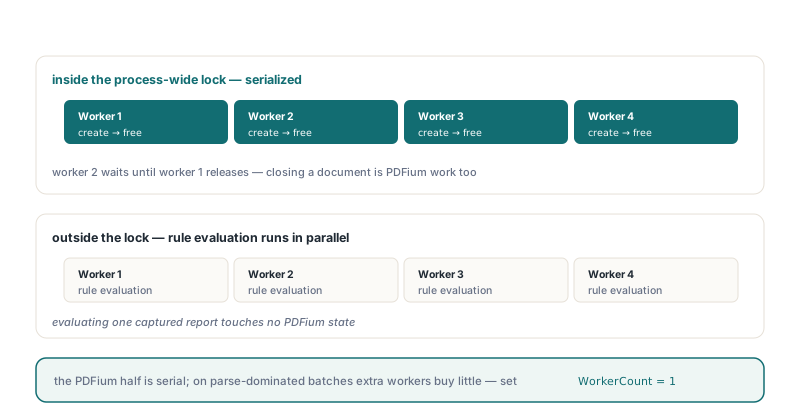
Two smaller changes came with the fix. A load failure now raises EPdfError with LastLoadReport.ErrorMessage, so the item's ErrorMessage names the actual parse problem instead of a secondary "no active document" error. And the cost is stated honestly: the PDFium part of the batch is now serial, so on a batch dominated by parsing and preflight, extra workers buy little. If you are on a version before v3.125.1, set WorkerCount to 1; that removes the concurrency and the corruption with it
uses
  System.SysUtils, PDFium, FPdfPreflightReport;

procedure ValidateBatch(const Files: array of string);
var
  Registry: TPdfValidationRuleRegistry;
  Options: TPdfBatchValidationOptions;
  Report: TPdfBatchValidationReport;
  I: Integer;
begin
  Registry := CreateDefaultPdfValidationRuleRegistry;
  try
    Options := TPdfBatchValidationOptions.Default;
    Options.WorkerCount := 4;          // 0 = processor count, capped at 8
    Options.Standards := [ppsPdfA];
    // With an explicit registry, select the matching profile yourself.
    // An empty Profiles list runs every registered rule, and rules for
    // standards you did not preflight report "did not pass"
    SetLength(Options.ValidationOptions.Profiles, 1);
    Options.ValidationOptions.Profiles[0] := 'PDF/A';
    Report := ValidatePdfFilesParallel(Files, Registry, Options);
  finally
    Registry.Free;
  end;

  for I := 0 to High(Report.Results) do
    case Report.Results[I].Status of
      pbvisPass:  Writeln('PASS  ', Report.Results[I].FileName);
      pbvisFail:  Writeln('FAIL  ', Report.Results[I].FileName);
      pbvisError: Writeln('ERROR ', Report.Results[I].FileName, ': ',
                    Report.Results[I].ErrorMessage);
    else
      Writeln('SKIP  ', Report.Results[I].FileName);   // pbvisCancelled
    end;
  Writeln(Report.PassedDocumentCount, ' passed, ',
    Report.FailedDocumentCount, ' failed, ',
    Report.ErrorDocumentCount, ' errors');
end;
Passing nil as the registry is the shorter route: ValidatePdfFilesParallel then creates the default registry itself, derives the profile list from Options.Standards, and frees the registry when it returns. Results always come back in input order, whatever order the workers finished in. For the report formats and the command-line wrapper around the same engine, see batch PDF preflight reports with the PDFium Component CLI, and for what the PDF/A checks themselves cover, PDF/A preflight validation in Delphi
How does RenderPagesParallel run pages truly in parallel?
TPdf.RenderPagesParallel runs in parallel because its workers never share a PDFium module. The method first saves the active document into a source store on the calling thread. Each worker then copies the loaded PDFium DLL to a uniquely named file in the temp directory, loads that copy with LoadLibrary, and initializes it. Windows treats a DLL loaded from a different path as a different module, so every copy gets its own globals: its own font cache, its own page module, its own everything. The worker opens the saved document in its private module, renders its pages progressively with cancellation checks between steps, then destroys the library, unloads the copy and deletes the file
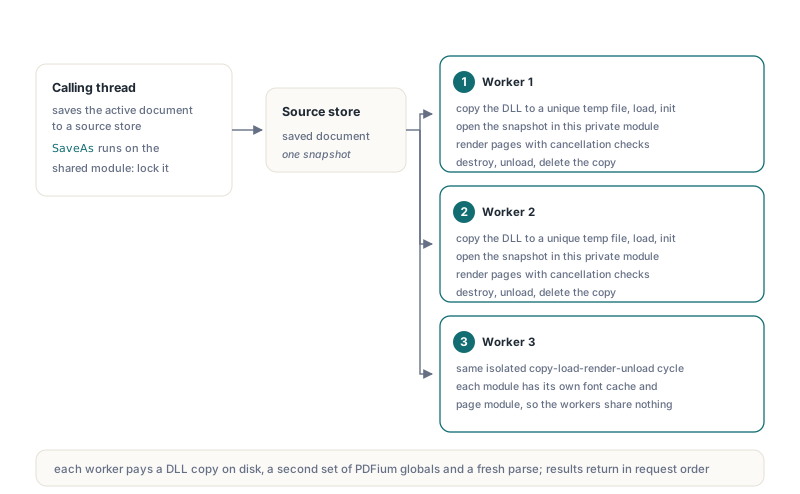
The isolation is not free, and the defaults reflect that. Each worker pays for a DLL copy on disk, a second set of PDFium globals in memory, and a fresh parse of the document. MaxWorkers = 0 means at most 4 workers, MaxPixelsPerPage and MaxTotalOutputBytes cap the raw output, and the inverted and night-duotone render options are rejected because the buffers are returned raw. The result is a TPdfParallelRenderReport whose Results array holds one top-down 32-bit buffer per requested page, in request order
procedure RenderAllPages(Pdf: TPdf);
var
  Options: TPdfParallelRenderOptions;
  Report: TPdfParallelRenderReport;
  Pages: array of Integer;
  I: Integer;
begin
  SetLength(Pages, Pdf.PageCount);
  for I := 0 to High(Pages) do
    Pages[I] := I + 1;                 // page numbers are 1-based

  Options := TPdfParallelRenderOptions.Default;
  Options.Dpi := 150;
  Options.MaxWorkers := 4;

  // The source snapshot is taken on the shared module, so hold the
  // process-wide PDFium lock if other threads also use TPdf
  PdfiumLock.Acquire;
  try
    Report := Pdf.RenderPagesParallel(Pages, Options);
  finally
    PdfiumLock.Release;
  end;

  for I := 0 to High(Report.Results) do
    if Report.Results[I].Status = pprsSucceeded then
      SavePageBuffer(Report.Results[I])   // Width, Height, Stride, PixelFormat, Pixels
    else
      Writeln('Page ', Report.Results[I].PageNumber, ': ',
        Report.Results[I].ErrorMessage);
end;
Note the lock around the call. The worker modules are private, but the snapshot step at the start runs SaveAs on the shared module from the calling thread. If nothing else in your process touches TPdf concurrently you can drop the lock; if anything does, the snapshot needs the same protection as every other shared-module call
| Pattern | Safe across documents | PDFium work runs in parallel | Cost |
|---|---|---|---|
One TPdf per thread, no shared lock | No | Yes, until it corrupts | Intermittent crashes, damaged process state |
| One process-wide lock around all PDFium calls | Yes | No | PDFium part is serial |
ValidatePdfFilesParallel since v3.125.1 | Yes | No; rule evaluation is parallel | Parsing and preflight are serial |
TPdf.RenderPagesParallel | Yes | Yes | DLL copy, memory and a fresh parse per worker |
How should you structure your own multithreaded PDFium code?
Your own threads should share one process-wide lock and hold it for the entire life of every TPdf they use, or else use a component API that isolates the module for you. The lock has to be a single object for the whole process, not one per thread, per form or per document; a lock that two threads do not share protects nothing. The pattern below mirrors what the component does internally since v3.125.1: create, load, read and free inside the lock, then do everything that does not touch PDFium outside it
uses
  System.Classes, System.SysUtils, System.SyncObjs, PDFium;

var
  PdfiumLock: TCriticalSection;        // one lock for the whole process

type
  TTextExtractThread = class(TThread)
  private
    FFileName: string;
    FText: string;
  protected
    procedure Execute; override;
  public
    constructor Create(const AFileName: string);
    property ExtractedText: string read FText;
  end;

constructor TTextExtractThread.Create(const AFileName: string);
begin
  inherited Create(True);
  FFileName := AFileName;
end;

procedure TTextExtractThread.Execute;
var
  Pdf: TPdf;
  Page: Integer;
  Raw: TStringBuilder;
begin
  Raw := TStringBuilder.Create;
  try
    PdfiumLock.Acquire;
    try
      Pdf := TPdf.Create(nil);
      try
        Pdf.FileName := FFileName;
        Pdf.Active := True;
        if not Pdf.Active then
          raise EPdfError.Create(Pdf.LastLoadReport.ErrorMessage);
        for Page := 1 to Pdf.PageCount do
        begin
          Pdf.PageNumber := Page;
          Raw.AppendLine(Pdf.Text);
        end;
      finally
        Pdf.Free;                      // closing the document is PDFium work too
      end;
    finally
      PdfiumLock.Release;
    end;
    // No PDFium below this line, so this part runs in parallel
    FText := Raw.ToString.Trim;
  finally
    Raw.Free;
  end;
end;

initialization
  PdfiumLock := TCriticalSection.Create;
finalization
  PdfiumLock.Free;
A few rules keep the pattern honest in a real application:
- Put
TPdf.CreateandFreeinside the lock, not only the obvious calls. Loading, closing, property reads such asPageCount, page changes, text extraction, rendering and saving all reach into the module - Check
Activeafter assigning it. A failed load leavesActiveatFalse, andLastLoadReport.ErrorMessagesays why - Hold the lock per document rather than per call. Finer locking is possible in principle, but only if no
TPdfmember ever runs outside it, and the coarse version is the one the component itself relies on - Keep slow non-PDFium work, such as database writes, indexing and network calls, outside the lock, or one slow consumer will serialize everything
- Do not treat the private per-instance render lock as a substitute. It guards one
TPdfagainst itself and nothing more
The same caution applies to code you did not write as raw threads. Background futures are a good way to keep long renders off the UI thread, as described in background PDF rendering with cancellable futures, but the future executor does not add a global PDFium lock of its own. If several futures can drive different TPdf instances at the same time, take the same process-wide lock inside each worker, and treat a viewer on the main thread as one more client of the shared module. Cross-instance use through the asynchronous APIs has not been separately audited, so the conservative assumption is that it needs the same serialization as hand-written threads. When you need real PDFium parallelism for something other than page rendering, separate worker processes give each job its own module by construction
Quick reference: PDFium threading rules for Delphi
- PDFium's unsafe state is module-wide: font cache, page module and other globals are shared by every document in the process
- One
TPdfper thread does not isolate anything; two instances on two threads can still corrupt each other - Typical symptoms are load failures, access violations in later code,
External exception C000001D, and exits with0xC0000409or0xC0000374 - Corruption persists in the process, so the failing call is often not the one that caused it
ValidatePdfFilesParallelis safe since v3.125.1; on older versions useWorkerCount := 1TPdf.RenderPagesParallelis genuinely parallel because each worker loads an isolated copy of the PDFium module- Your own threads, tasks and futures need one process-wide lock covering each
TPdffromCreatetoFree
PDFium Component wraps the PDFium engine for Delphi with batch preflight and validation, isolated parallel rendering, cancellable background work and detailed load diagnostics. Details and editions are on the PDFium Component product page