PDFium Component creates new PDF layers from Delphi through TPdf.SaveAsOptionalContentCreated. In one verified save the method adds optional content groups (OCGs), optional content membership dictionaries (OCMDs) and caller-supplied drawing wrapped in Form XObjects whose /OC entry points at a new group, so PDFium and other viewers show or hide that drawing when the layer is toggled
The request is rarely abstract. A plant engineering team wants metric and imperial dimensions on the same drawing sheet, with exactly one set visible. A print shop wants a cutting-line overlay that shows on screen but can be switched off before proof. Neither file has any layers yet, so there is nothing to toggle. Switching existing layers is a different job, covered in toggling existing PDF optional content layers with SaveAsOptionalContentConfigured; this article is about making the layers in the first place
Why can you not just set /OC on a page object with PDFium?
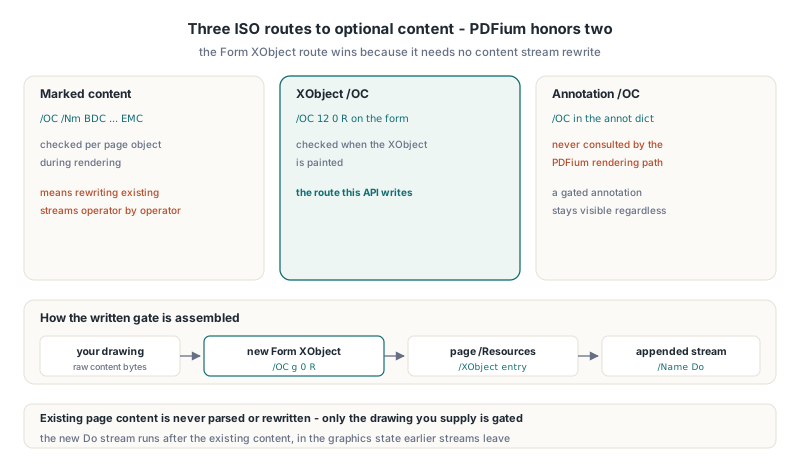
PDFium has no public function for attaching optional content to an existing page object. The public headers contain no FPDFPageObj_SetOC or anything equivalent, so the usual edit-then-FPDFPage_GenerateContent route cannot produce gated content. The gate has to be written into the file structure, and the only question is which structure PDFium will honor when it renders
ISO 32000-1 §8.11.3 gives three ways to make graphics optional, and PDFium handles them differently:
- Page content stream sections wrapped in
/OC /Name BDC...EMCmarked content, checked per page object during rendering - Form XObjects and image XObjects that carry an
/OCentry in their own dictionary, checked when the XObject is painted - Annotations with an
/OCentry in the annotation dictionary, which the PDFium rendering path does not consult at all, so a gated annotation stays visible regardless of the layer state
Marked-content wrapping means rewriting existing content streams operator by operator, and annotations are ruled out by the renderer. That leaves the Form XObject route, and it is the one PDFium Component uses: your drawing goes into a new Form XObject with /OC pointing at the group, the form is registered in the page /Resources /XObject dictionary, and a new content stream holding a single /Name Do is appended to the page /Contents. The existing page content is never parsed or rewritten
Describing groups and gated forms in Delphi
TPdf.SaveAsOptionalContentCreated takes three arrays and returns a report. Both overloads, one writing to a TStream and one to a file name, share the same parameter list: Groups: TPdfOptionalContentCreateGroups, Memberships: TPdfOptionalContentCreateMemberships, Forms: TPdfOptionalContentCreateForms, out Report: TPdfOptionalContentCreateReport, and an optional AllowSignedDocument: Boolean = False. The method arrived in PDFium Component v3.154.0
Each TPdfOptionalContentCreateGroup has a Name, an optional Creator, an Intent of pociView or pociDesign, an InitialStateVisible flag, a Locked flag and a RadioTag. Groups that share the same RadioTag land in one /RBGroups array, which is how a viewer knows that turning one on turns the others off. Each TPdfOptionalContentCreateForm names its gating group by GroupIndex (a zero-based index into your Groups array), a one-based PageNumber, the raw content stream bytes, a bounding box, an optional matrix and an optional ResourceName
var
  Pdf: TPdf;
  Groups: TPdfOptionalContentCreateGroups;
  Forms: TPdfOptionalContentCreateForms;
  Report: TPdfOptionalContentCreateReport;
begin
  Pdf := TPdf.Create(nil);
  try
    Pdf.FileName := 'sheet-a1.pdf';
    Pdf.Active := True;

    SetLength(Groups, 2);            // SetLength zero-fills the records
    Groups[0].Name := 'Dimensions (mm)';
    Groups[0].Intent := pociView;
    Groups[0].InitialStateVisible := True;
    Groups[0].RadioTag := 'Units';
    Groups[1].Name := 'Dimensions (in)';
    Groups[1].Intent := pociView;
    Groups[1].InitialStateVisible := False;
    Groups[1].RadioTag := 'Units';

    SetLength(Forms, 2);
    Forms[0].GroupIndex := 0;
    Forms[0].PageNumber := 1;
    Forms[0].Content := TEncoding.ASCII.GetBytes(
      '0 0 1 RG 1.5 w 72 120 m 540 120 l S');
    Forms[0].BBoxRight := 612;
    Forms[0].BBoxTop := 792;
    Forms[0].ResourceName := 'DimMetric';
    Forms[1] := Forms[0];
    Forms[1].GroupIndex := 1;
    Forms[1].Content := TEncoding.ASCII.GetBytes(
      '1 0 0 RG 1.5 w 72 140 m 540 140 l S');
    Forms[1].ResourceName := 'DimImperial';

    if not Pdf.SaveAsOptionalContentCreated('sheet-a1-layers.pdf',
      Groups, nil, Forms, Report) then
      raise Exception.Create(Report.ErrorMessage);
  finally
    Pdf.Free;
  end;
end;
Notice that the form content is pure vector drawing. The component writes only an empty /Resources dictionary on each form, so the content stream must be self-contained: device colors, paths, clipping and transforms work, but anything that needs a named resource (a font for Tf, an image for Do, an ExtGState for gs) has nothing to resolve against. If you leave ResourceName empty, the forms are named FmOc1, FmOc2 and so on; a custom name may contain only letters, digits, underscore, minus and period
What does an OCMD add over a plain group?
An optional content membership dictionary makes visibility depend on several groups at once. ISO 32000-1 §8.11.2.2 defines two forms: a /OCs list with a /P policy such as /AnyOn or /AllOn, and a /VE visibility expression built from /And, /Or and /Not in the specification. PDFium Component takes a TPdfOptionalContentCreateMembership with MemberGroupIndices, a Policy and an Expression; when Expression.GroupIndices is not empty, the expression wins and /VE is written alongside /OCs
procedure AddUnitMemberships(var Memberships: TPdfOptionalContentCreateMemberships);
begin
  SetLength(Memberships, 2);

  // Visible when either unit layer is on: /OCs [...] /P /AnyOn
  SetLength(Memberships[0].MemberGroupIndices, 2);
  Memberships[0].MemberGroupIndices[0] := 0;
  Memberships[0].MemberGroupIndices[1] := 1;
  Memberships[0].Policy := ocmpAnyOn;

  // Visible only while the imperial layer is off: /VE [ /Not ref ]
  SetLength(Memberships[1].MemberGroupIndices, 1);
  Memberships[1].MemberGroupIndices[0] := 1;
  Memberships[1].Expression.Kind := poceNot;
  SetLength(Memberships[1].Expression.GroupIndices, 1);
  Memberships[1].Expression.GroupIndices[0] := 1;
end;
The supported subset is deliberately narrow. Policies are limited to ocmpAllOn and ocmpAnyOn; ocmpAnyOff and ocmpAllOff are rejected. Expressions are one level deep, with poceAll, poceAny or poceNot over created groups, and /Not requires exactly one group index. poceAll serializes as /And, poceAny as /Or and poceNot as /Not, the only three operators §8.11.2.2 defines. Versions before 3.181.2 wrote /All and /Any, which PDFium evaluates as hidden, so if you created OCMDs with an older build, regenerate them rather than trusting the expression. Every membership also needs at least one entry in MemberGroupIndices, even when an expression is present, because that list becomes the /OCs array. The object numbers of the new dictionaries come back in Report.CreatedMembershipObjectNumbers
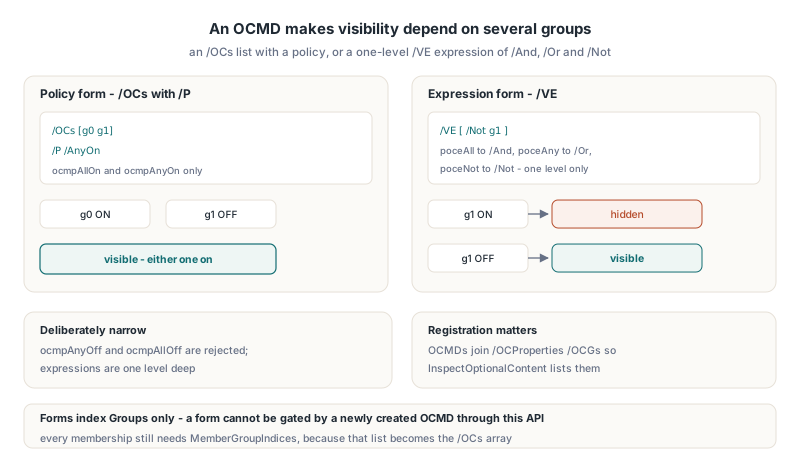
Two behaviors are worth knowing before you build on OCMDs. First, the gated forms in the same call reference groups only: TPdfOptionalContentCreateForm.GroupIndex indexes Groups, not Memberships, so a form cannot be gated by a newly created OCMD through this API. Second, PDFium Component adds each new OCMD to the catalog /OCProperties /OCGs array, while /ON, /OFF and /Order stay group-only. ISO 32000-1 §8.11.4.2 describes /OCGs as the list of groups, but without that registration TPdf.InspectOptionalContent does not enumerate the membership at all. The side effect is that an inventory of the output lists each OCMD as an extra unnamed entry in Inventory.Groups, so match groups by Name rather than by position
How does the component patch an existing /OCProperties?
TPdf.SaveAsOptionalContentCreated either builds /OCProperties from scratch or extends the one already in the catalog, and it extends by appending, never by rebuilding. A document with no layers gets a new dictionary with /OCGs and a default configuration /D carrying /ON, /OFF and /Order, plus /Locked and /RBGroups when any group asks for them, as laid out in ISO 32000-1 §8.11.4.3
For a document that already has layers, every target array is patched by inserting the new references just before its closing bracket. That sounds fussy, and it is there for a reason. A /Order array can hold nested arrays and text labels that shape the layer tree a viewer shows, and an earlier approach that flattened and rebuilt the array lost those labels. Insertion at the end keeps the existing tree intact and simply lists the new groups after it. Arrays that live in their own indirect objects are resolved and patched in place
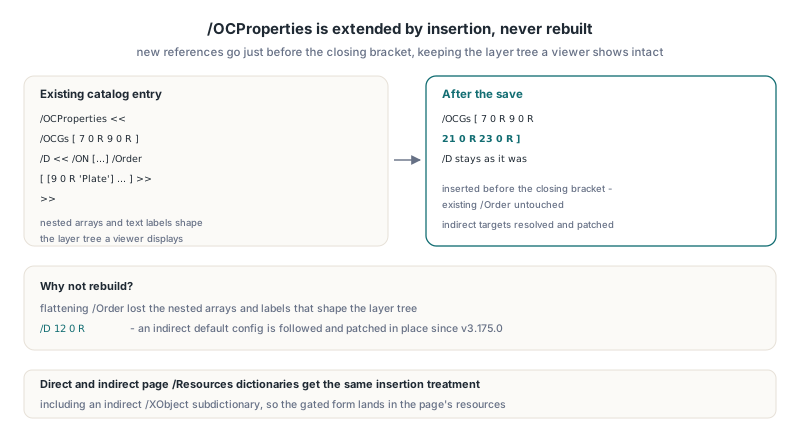
Since v3.175.0 the default configuration itself may also be indirect. Some producers write /OCProperties << /OCGs [...] /D 12 0 R >>, and PDFium Component now follows that reference and patches the target dictionary rather than failing with a malformed-entry error. Direct and indirect page /Resources dictionaries, including an indirect /XObject subdictionary, are handled the same way
Proving the new layers really toggle
A layer that exists in /OCProperties but does not gate anything is easy to produce and hard to notice. During development the first build of the form writer wrapped a stream object that already carried its own N 0 obj header and endobj trailer inside a second header. PDFium could not parse the doubled object, and instead of reporting an error it silently skipped the Do operator. The file opened, the layer panel looked right, and the gated drawing never appeared. What exposed it was a probe that toggled the layer and compared rendered pixels: no difference, so something was wrong
That is why the method verifies before delivering. The output is reopened through a strict load that checks the cross-reference table, and every requested group is read back through InspectOptionalContent to confirm its name, its initial state and its locked registration. Only then is the output copied to your stream, and the file overload writes a temporary file and replaces the target atomically. You can run the same toggle check yourself by reopening the output, finding the group by name and saving a copy with the opposite state
function SaveImperialPreset(const SourceName, TargetName: string): Boolean;
var
  Pdf: TPdf;
  Inventory: TPdfOptionalContentInventory;
  Changes: TPdfOptionalContentStateChanges;
  Options: TPdfOptionalContentConfigureOptions;
  CfgReport: TPdfOptionalContentConfigureReport;
  I: Integer;
begin
  Pdf := TPdf.Create(nil);
  try
    Pdf.FileName := SourceName;
    Pdf.Active := True;
    if not Pdf.InspectOptionalContent(Inventory) then
      raise Exception.Create(Inventory.ErrorMessage);

    for I := 0 to High(Inventory.Groups) do
      if (Inventory.Groups[I].Name = 'Dimensions (mm)') or
         (Inventory.Groups[I].Name = 'Dimensions (in)') then
      begin
        SetLength(Changes, Length(Changes) + 1);
        Changes[High(Changes)].GroupObjectNumber := Inventory.Groups[I].ObjectNumber;
        Changes[High(Changes)].Visible := Inventory.Groups[I].Name = 'Dimensions (in)';
      end;

    Options := TPdfOptionalContentConfigureOptions.Default;
    Result := Pdf.SaveAsOptionalContentConfigured(TargetName, Changes,
      Options, CfgReport);
  finally
    Pdf.Free;
  end;
end;
Render page one of both files and the blue and red lines should swap. If they do not, inspect the group's EffectiveVisible value in the inventory first; it reflects the state PDFium will actually render after configuration arrays and usage rules are applied
Limits and traps to plan around
TPdf.SaveAsOptionalContentCreated is a bounded profile, and most surprises come from treating it as a general layer editor. The constraints below are enforced up front, so a violating call fails with Report.ErrorMessage set and writes no output:
- At least one group is required; groups, memberships and forms are capped at 4096 entries each, group names must be unique and 1 to 255 characters long, and each form accepts at most 16 MiB of content bytes
- Encrypted documents are rejected, and a signed document needs
AllowSignedDocument = True; the output is a full rewrite, so existing signatures will no longer validate - Every
Formsentry becomes its own Form XObject, so putting the same overlay on 200 pages stores the content 200 times rather than once - The new
Dostream is appended after the existing page content, so it runs in whatever graphics state the earlier streams leave behind; well-formed pages restore their state, but a page with unbalancedq/Qcan shift your overlay - Existing page content is never moved into a layer; only the drawing you pass in
Formsis gated
The repetition point is the one to weigh for large documents. If the overlay is heavy and repeats on every page, the shared-object approach in reusable page stamps built on Form XObjects keeps one copy in the file, at the cost of handling the layer gate yourself
FAQ
Can PDFium Component put existing page content into a new layer?
No. TPdf.SaveAsOptionalContentCreated gates only the content you supply in Forms; it does not wrap existing operators in marked content or move them into an XObject. To layer existing artwork, regenerate it as self-contained form content and remove the original drawing in a separate step
Why are my gated annotations still visible when the layer is off?
PDFium does not check the /OC entry of annotation dictionaries on its rendering path, so annotation-level gating has no effect in PDFium-based viewers. That is the reason PDFium Component attaches layer content through Form XObjects, which PDFium does gate
Which object numbers should I use when switching the new layers later?
Report.CreatedGroupObjectNumbers holds the numbers in the file that was just written. When you reopen that file and configure it, take ObjectNumber from TPdf.InspectOptionalContent and match by Name, which stays correct even if a later save renumbers objects
PDFium Component ships SaveAsOptionalContentCreated, SaveAsOptionalContentConfigured and InspectOptionalContent as one optional content toolkit for Delphi and C++Builder, built on the PDFium renderer. Details and downloads are on the PDFium Component product page