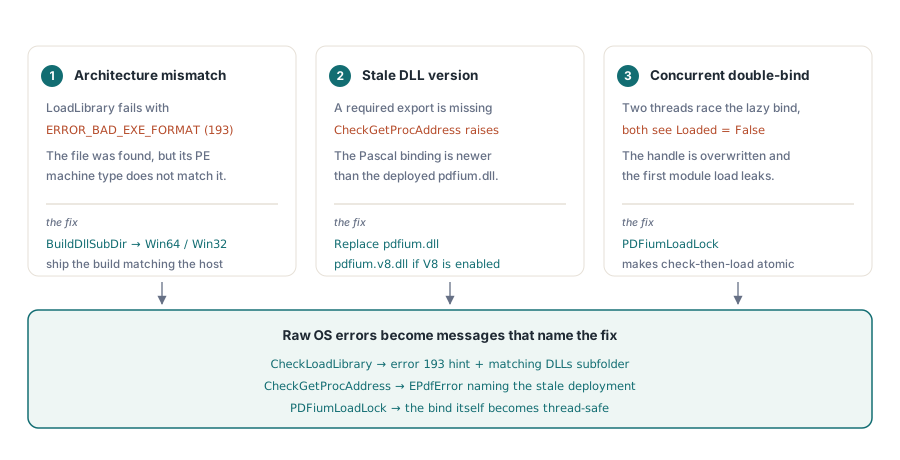
When pdfium.dll refuses to load on a customer machine, the PDFium Component for Delphi and Lazarus turns the cryptic native error into a specific cause. The CheckLoadLibrary routine reads ERROR_BAD_EXE_FORMAT (193) as a 32/64-bit architecture mismatch, and CheckGetProcAddress reports a missing export as a pdfium.dll that is older than the binding. Both messages name the fix instead of leaving you to guess
That matters because a native DLL fails in three distinct ways, and the raw operating-system text conflates all of them. The architecture can be wrong, the deployed binary can be too old for the Pascal binding that calls it, or two threads can race to bind it at the same moment. Each has a different fix, and the whole point of the diagnostics added in the v2.11.0 load-lifecycle work is to tell you which one you are actually looking at
Why does pdfium.dll fail to load with a bad EXE format error?
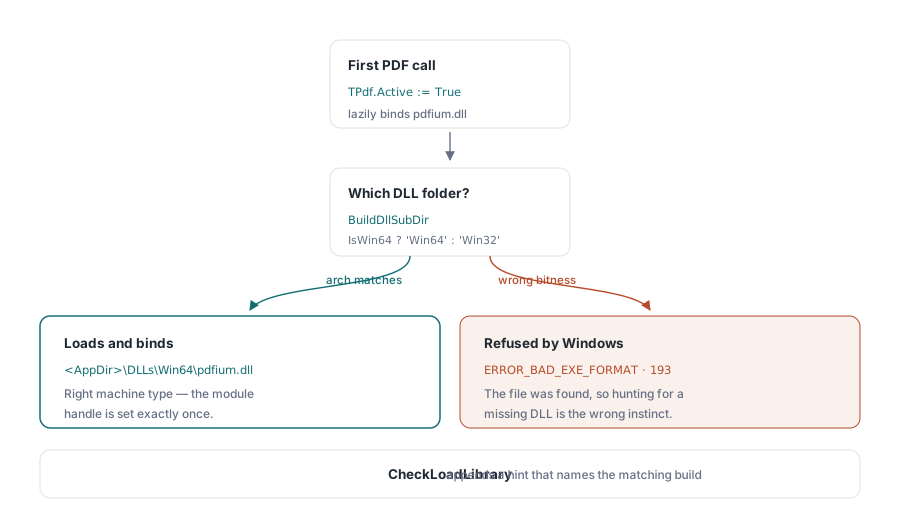
Windows error 193, ERROR_BAD_EXE_FORMAT, means the file was found and opened but its PE machine type does not match the host process. A 64-bit executable cannot load a 32-bit pdfium.dll, and a 32-bit executable cannot load a 64-bit one. The file is present, so the instinct to hunt for a missing DLL sends you in exactly the wrong direction
The PDFium Component intercepts this case in CheckLoadLibrary: when LoadLibrary returns a null handle and GetLastError is 193, it appends a hint that the DLL was found but its architecture does not match the host process, and it points at the matching DLLs/Win32 or DLLs/Win64 build. The subdirectory is chosen by BuildDllSubDir, which returns Win64 when IsWin64 is true and Win32 otherwise. Deploy the DLL under the tree the binding actually searches and the mismatch disappears. One trap sits in the calling code rather than in the deployment: TPdf.SetActive swallows every load failure, so Active := True leaves the component inactive without raising, and an except block wrapped around it never runs. To see the message, call LoadDocument with a TPdfLoadOptions record and an out TPdfLoadReport, which raises the real EPdfError and records plsFailed with the error text in the report. Since PDFiumPas v3.122.1 a failed Active := True also replaces LastLoadReport with such a failure report, so code that keeps the property path can read the cause from LastLoadReport.ErrorMessage instead of guessing
uses
  SysUtils, PDFium;

procedure OpenDocument(const AFileName: string);
var
  Pdf: TPdf;
  Report: TPdfLoadReport;
begin
  // Deploy pdfium.dll next to the executable, matched to the build target:
  //   <AppDir>\DLLs\Win32\pdfium.dll   for a 32-bit host process
  //   <AppDir>\DLLs\Win64\pdfium.dll   for a 64-bit host process
  Pdf := TPdf.Create(nil);
  try
    Pdf.FileName := AFileName;
    try
      // Active := True would swallow the failure and stay False; this
      // overload lazily binds pdfium.dll and raises the real exception
      Pdf.LoadDocument(TPdfLoadOptions.Default(plmCompatible), Report);
    except
      on E: EPdfError do
        // The message already names the real cause: a 32/64-bit mismatch
        // (ERROR_BAD_EXE_FORMAT) or a pdfium.dll older than this binding;
        // Report.Status is plsFailed and Report.ErrorMessage holds the text
        raise Exception.CreateFmt('PDF engine did not start: %s', [E.Message]);
    end;
    RenderFirstPage(Pdf);   // Pdf.Active is True once LoadDocument returns
  finally
    Pdf.Free;
  end;
end;
What does a missing PDFium export tell you?
The second failure class is version skew. PDFium ships new exports over time, and the Pascal binding resolves every function it needs through CheckGetProcAddress during LoadLibrary. If a required export is absent, the binding is newer than the pdfium.dll on disk, and the honest diagnosis is that the deployed DLL is stale rather than corrupt. The CheckGetProcAddress function states precisely that: it raises an EPdfError reporting that the deployed pdfium.dll is older than this build of the PDFiumPas binding, and it names the DLLs/<subdir> path where a matching binary belongs
Two details make that path robust. First, CheckGetProcAddress calls UnloadLibrary before it raises, so a partial bind never leaves half-resolved function pointers behind for the next attempt to trip over. Second, the DLL name it reports comes from BuildDllName, which returns pdfium.dll normally and pdfium.v8.dll when the global EnableV8Engine flag is set. If your application enables the V8 JavaScript engine for XFA or scripted forms, the error text points at the V8 build, not the plain one, so you replace the right file the first time
Is the PDFium DLL safe to load from a background thread?
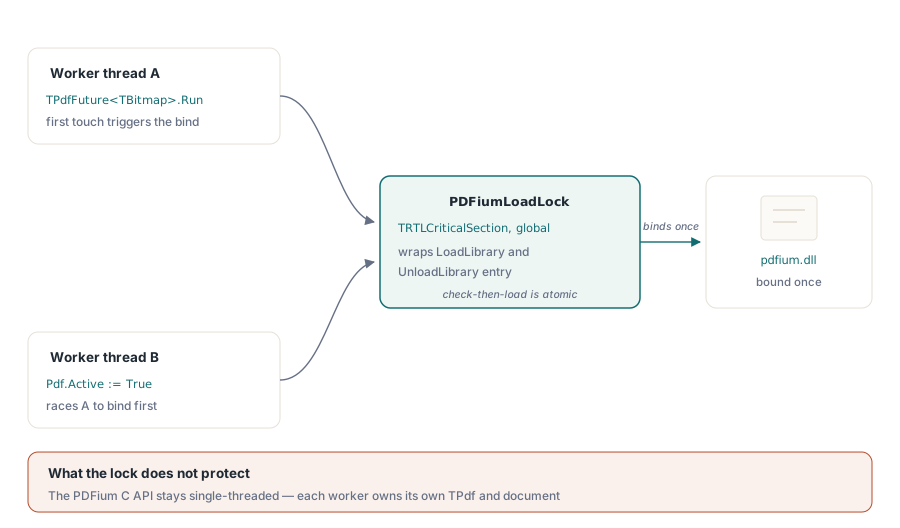
Loading the library is now safe from any thread; calling the PDFium API from several threads is still not. Those are two separate guarantees, and keeping them separate is the difference between a stable worker pool and an intermittent crash. Background rendering typically runs each page render through a TPdfFuture<T> worker, and the first future to touch TPdf is what triggers the lazy bind. Without protection, two workers could both observe an unloaded library, both run the bind sequence, overwrite the module handle, and leak the first load
The v2.11.0 work closes that window with PDFiumLoadLock, a process-global TRTLCriticalSection that wraps the entry to both LoadLibrary and UnloadLibrary. The critical section makes the check-then-load sequence atomic, so no two threads can both see Loaded=False and double-bind, and no thread can free the DLL while another is mid-bind. The lock is created in the unit initialization section and torn down in finalization, guarded by a PDFiumLoadLockReady flag so the pairing is safe even during shutdown. If you need the full worker-and-reply pattern with cancellation, the companion article on background rendering with cancellable futures walks through it end to end
uses
  PDFium, FPdfAsync;

// Worker method runs on a background thread. The first future to bind
// pdfium.dll is serialised by PDFiumLoadLock, so a second concurrent
// worker cannot double-bind or leak the module handle.
function TReportForm.RenderThumbnail(
  const AToken: IPdfCancellationToken): TBitmap;
var
  Pdf: TPdf;
begin
  Pdf := TPdf.Create(nil);
  try
    Pdf.FileName := 'report.pdf';
    Pdf.Active := True;         // safe concurrent bind
    AToken.ThrowIfCancelled;
    Result := Pdf.Thumbnail;    // this TPdf is owned by one thread only
  finally
    Pdf.Free;
  end;
end;

procedure TReportForm.StartRender;
begin
  TPdfFuture<TBitmap>.Run(RenderThumbnail, ThumbnailReady);
end;

procedure TReportForm.ThumbnailReady(
  const AResult: TPdfFutureResult<TBitmap>);
begin
  if AResult.IsSuccess then
    Preview.Picture.Assign(AResult.Value);
end;
What the load lock does not protect
The boundary here is worth stating plainly, because it is easy to over-read the fix. PDFiumLoadLock serializes only the global binding state: the module handle and the FPDF_* function-pointer assignments. The underlying PDFium C API is still not thread-safe, exactly as the upstream headers declare, so calling FPDF_* functions or sharing one FPDF_DOCUMENT across threads remains your responsibility to serialize. The safe shape is the one above: each worker owns its own TPdf and never hands a live document to another thread. For a deeper treatment of that boundary and the ABI rules around it, see hardening the PDFium VCL binding against ABI and memory faults
Why finalization and FPDF_DestroyLibrary matter
A subtler gap sat in the shutdown path. The PDFium unit had no finalization section, which meant FPDF_DestroyLibrary never ran at process exit; the operating system reclaimed the DLL memory and skipped PDFium own cleanup, namely the worker-thread join, the V8 isolate disposal when EnableV8Engine is set, and the font and cache teardown. On a plain rendering workload that is a quiet leak at teardown, but with the V8 engine enabled it leaks a JavaScript isolate every run, which shows up fast under repeated automation
The finalization section now calls UnloadLibrary, which invokes FPDF_DestroyLibrary and frees the module. This lives at unit scope for a reason: TPdf.Destroy only sets Active := False to close the current document, and it deliberately does not unload the global library, so a multi-instance application keeps one shared PDFium binding alive for the whole process lifetime. Putting the teardown in finalization means the shared library is released exactly once, when the unit unloads, and UnloadLibrary checks its Loaded flag first so the call is a harmless no-op if PDFium was never used
A short deployment checklist
Three habits prevent almost every load failure in the field. Match the DLL architecture to the host process and ship it under DLLs/Win32 or DLLs/Win64; keep pdfium.dll in step with the binding version so no required export goes missing; and never share a TPdf or a document handle across threads, even though the bind itself is now atomic. If you build the same source for both Delphi and Lazarus, the packaging differences that trip up cross-target deployment are covered in the notes on Delphi and FPC cross-compiler pitfalls. The diagnostics, the load lock, and the finalization cleanup described here all ship in the PDFium Component for Delphi and C++Builder