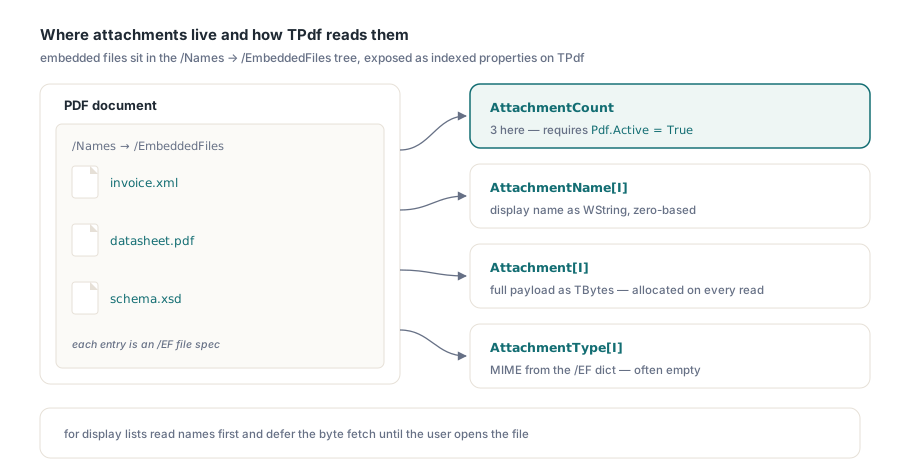
PDF file attachments are stored in the document's embedded-file tree, a structure that most viewers surface as a paperclip panel or an attachments sidebar. From Delphi code, PDFium Component exposes that tree through a small set of indexed properties on TPdf: you iterate by integer index, read names and byte payloads, create new slots, and delete existing ones. The API surface is narrow; there are just a few ordering constraints and one sanitization rule worth knowing before you write production code around it
Reading attachments from an open document
AttachmentCount gives the number of embedded files the document declares. It reads directly from PDFium's underlying call, so it reflects only what the PDF actually contains. From there, AttachmentName[Index] returns the display name as a WString, and Attachment[Index] delivers the raw bytes as a TBytes array. Both are zero-based. The document must be open (Pdf.Active = True) before you query either property; calling them on a closed document gives you zero or an empty result with no exception
One thing to keep in mind: Attachment[Index] allocates and returns the full file payload on every read. For a document carrying a large embedded asset, iterating through all attachments to build a display list means paying that allocation cost on each call. If you only need names for display purposes, read AttachmentName first and defer the byte fetch until the user actually requests the file
procedure ListAttachments(Pdf: TPdf);
var
  I: Integer;
  Data: TBytes;
begin
  if not Pdf.Active then
    Exit;

  for I := 0 to Pdf.AttachmentCount - 1 do
  begin
    Data := Pdf.Attachment[I];
    Writeln(Format('%d: %s (%d bytes)',
      [I, Pdf.AttachmentName[I], Length(Data)]));
  end;
end;
Extracting an attachment to disk
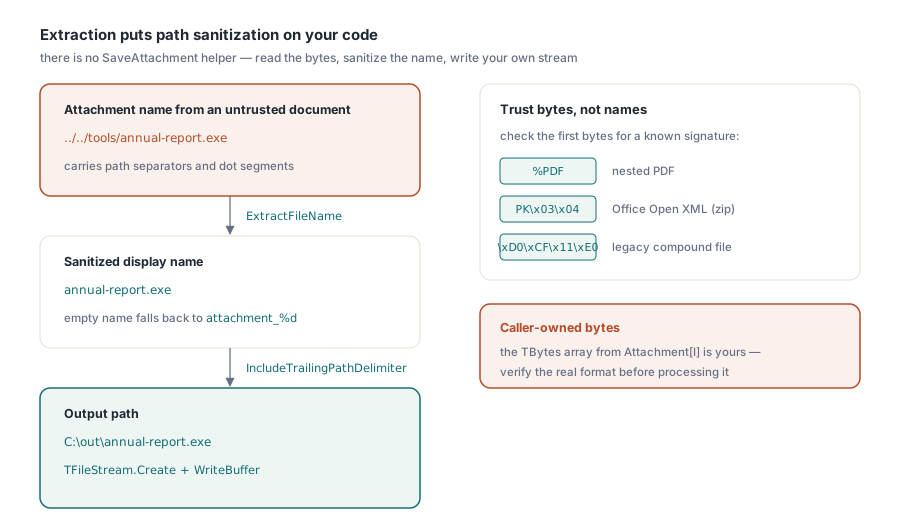
There is no SaveAttachment helper. You read the bytes and write them wherever you need, which puts path construction and sanitization entirely on your code. That matters when attachment names come from untrusted documents. PDF attachment names are strings stored inside the file; they can contain path separators, Unicode lookalikes, and other characters that will produce unexpected results if you pass them directly to TFileStream.Create. Always run the name through ExtractFileName before building any output path, and consider rejecting names that start with a dot or contain characters outside what your system expects
The byte array returned by Attachment[Index] is caller-owned. Write it out with a normal TFileStream and it is yours to do with as you like, including inspecting the first few bytes to verify the actual file format rather than trusting the declared name
procedure ExtractAttachment(Pdf: TPdf; Index: Integer; const OutputDir: string);
var
  SafeName: string;
  OutPath: string;
  Data: TBytes;
  FS: TFileStream;
begin
  SafeName := ExtractFileName(Pdf.AttachmentName[Index]);
  if SafeName = '' then
    SafeName := Format('attachment_%d', [Index]);

  OutPath := IncludeTrailingPathDelimiter(OutputDir) + SafeName;
  Data := Pdf.Attachment[Index];

  FS := TFileStream.Create(OutPath, fmCreate);
  try
    if Length(Data) > 0 then
      FS.WriteBuffer(Data[0], Length(Data));
  finally
    FS.Free;
  end;
end;
Adding attachments and the two-step write
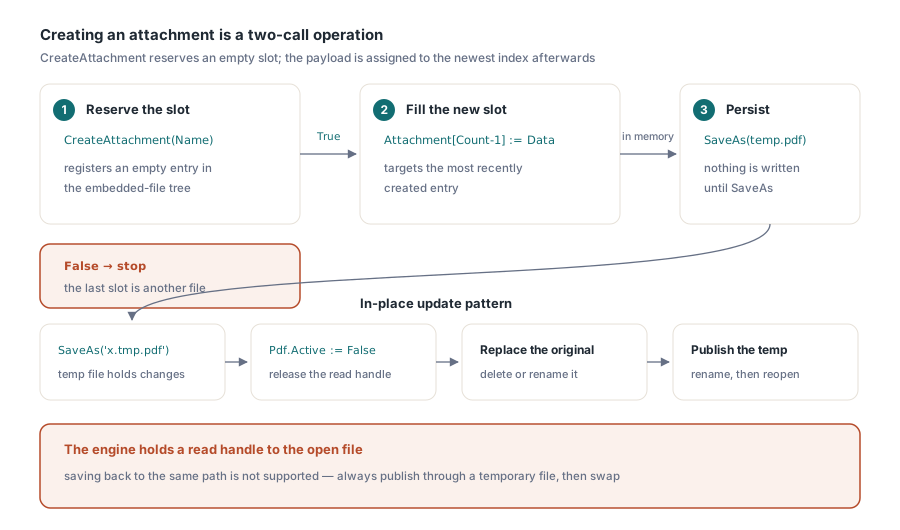
Creating an attachment takes two calls, not one. CreateAttachment(Name) registers a new slot in the embedded-file tree and returns True on success. That slot starts empty. You then assign the payload by writing to Attachment[AttachmentCount - 1], targeting the most recently created entry. If CreateAttachment returns False, the slot was not created and the assignment would corrupt the attachment at whatever index happens to be last
After modifying the attachment list, changes live in memory only. Call SaveAs to write a new file with the updated embedded-file tree. PDFium Component does not support saving back to the same file currently open, because the engine holds a read handle to the source. The standard pattern for an in-place update is to save to a temporary path, close the document, delete or rename the original, then rename the temp file into position and reopen
procedure AddFileAttachment(Pdf: TPdf; const FilePath: string);
var
  FS: TFileStream;
  Data: TBytes;
  AttachName: string;
begin
  if not Pdf.Active then
    Exit;

  FS := TFileStream.Create(FilePath, fmOpenRead or fmShareDenyWrite);
  try
    SetLength(Data, FS.Size);
    if FS.Size > 0 then
      FS.ReadBuffer(Data[0], FS.Size);
  finally
    FS.Free;
  end;

  AttachName := ExtractFileName(FilePath);
  if Pdf.CreateAttachment(AttachName) then
    Pdf.Attachment[Pdf.AttachmentCount - 1] := Data;
end;
Attachment type information
Beyond the name and byte payload, AttachmentType[Index] returns the MIME type string stored in the PDF's embedded-file dictionary, if one was recorded when the file was originally attached. Many generators leave this field empty or set it to a generic value like application/octet-stream, so you cannot rely on it for format detection in a production pipeline. For reliable identification, read the first few bytes of the payload and check for known file signatures: %PDF for a nested PDF, the ZIP local-file header PK\x03\x04 for Office Open XML documents, \xD0\xCF\x11\xE0 for legacy compound-file binaries. Type information from the dictionary is fine to surface in a UI label, but should not drive processing decisions when you have the actual bytes available
Deleting attachments
DeleteAttachment(Index) removes the entry at that position and returns True on success. After deletion, the remaining entries shift down, so if you are deleting multiple attachments in a loop you must iterate from the last index downward, not forward, to avoid skipping entries after each shift. The change is in-memory until you call SaveAs
A common scenario in document processing pipelines is stripping all attachments from an incoming PDF before passing it downstream, for security or size reasons. Count once before the loop and iterate in reverse:
procedure StripAllAttachments(Pdf: TPdf);
var
  I: Integer;
begin
  for I := Pdf.AttachmentCount - 1 downto 0 do
    Pdf.DeleteAttachment(I);
end;
Where PDF attachments appear in practice
The attachment API works on any PDF that PDFium can open, but the documents where you actually encounter embedded files cluster around a few specific cases. PDF/A-3 (ISO 19005-3) explicitly allows conforming embedded files as a mechanism for bundling source data alongside the archival rendition; ZUGFeRD and Factur-X electronic invoices rely on exactly this to embed a structured XML payload inside the human-readable PDF layout. Email-derived PDFs sometimes carry their original message attachments forwarded into the embedded-file tree. Technical documentation that originated in structured authoring systems occasionally bundles supporting assets the same way
When your application processes inbound PDFs from outside your organization, checking AttachmentCount as part of document intake is worth doing for two independent reasons. First, embedded files may carry data you want to extract and process, such as the XML inside an invoice PDF. Second, embedded files can carry arbitrary executable content, so knowing what is present matters even when you never intend to extract it. Neither reason requires you to do anything complicated: read the count, check the names, and decide what to do with the bytes
The attachment properties shown here are part of the PDFium Component for Delphi and C++Builder