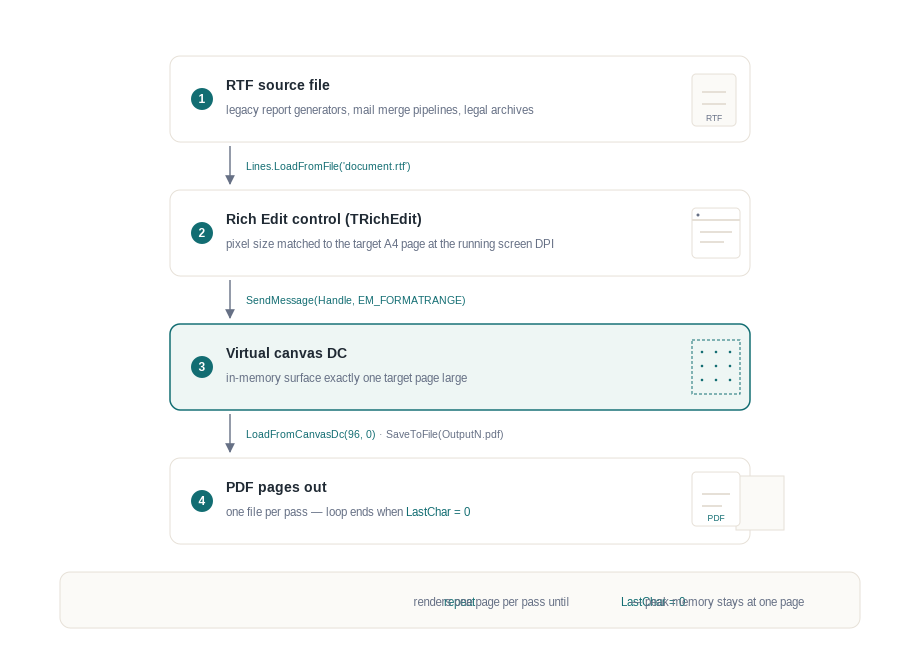
RTF has been around long enough that it shows up in places no one planned for: legacy report generators, mail merge pipelines, legal document archives that predate modern word processors. Converting it to PDF on the fly is a recurring requirement, and the approach that actually works on Windows is not a dedicated RTF parser but the rendering path Windows itself already provides through TRichEdit and EM_FORMATRANGE. The losLab PDF Library exposes a virtual device context that slots directly into that pipeline
The mechanism: virtual DC and EM_FORMATRANGE
Rich Edit controls can paginate their content for any device context, not just a physical printer. The EM_FORMATRANGE message tells the control to lay out a range of characters into a given DC and returns the position of the last character it managed to fit. Call it repeatedly, advancing cpMin each time, and you get page-by-page output. The losLab PDF Library's GetCanvasDC provides an in-memory DC sized to whatever page dimensions you specify; after rendering a page into it, LoadFromCanvasDC captures the result as a new one-page PDF document. That is the whole pipeline
One thing to get right upfront: the TRichEdit control must be sized to match the target page. If the control is smaller or larger than the DC dimensions, the pagination will not line up with what ends up in the PDF. For A4 output the standard approach is to set the control's pixel dimensions to match 210 x 297 mm at the same DPI you will later pass to LoadFromCanvasDC, before loading the RTF file, with the same millimeter-to-pixel conversion you use to size the DC
Delphi implementation
The following uses the PDFlibAX_TLB import unit, the type library import for the ActiveX edition of the library. The form hosts a TRichEdit and a button; the form's OnCreate handler sizes the control and loads the RTF, and the button click drives the conversion loop
unit MainUnit;

interface

uses
  Windows, Messages, SysUtils, Classes, Graphics, Controls, Forms,
  Dialogs, StdCtrls, ComCtrls, PDFlibAX_TLB, ActiveX;

type
  TForm1 = class(TForm)
    RichEdit1: TRichEdit;
    Button1: TButton;
    procedure FormCreate(Sender: TObject);
    procedure Button1Click(Sender: TObject);
  private
    function PrintRtfBox(hDc: HDC; rtfBox: TRichEdit;
      FirstChar: Integer): Integer;
  end;

var
  Form1: TForm1;
  PdfDoc: IPDFlibrary;

implementation

{$R *.dfm}

procedure TForm1.FormCreate(Sender: TObject);
begin
  PdfDoc := CoPDFlibrary.Create;
  // Size the control to A4 at screen DPI so pagination matches the DC
  RichEdit1.Width  := MulDiv(210, Screen.PixelsPerInch * 10, 254);
  RichEdit1.Height := MulDiv(297, Screen.PixelsPerInch * 10, 254);
  RichEdit1.Lines.LoadFromFile(
    ExtractFilePath(Application.ExeName) + 'document.rtf');
end;

procedure TForm1.Button1Click(Sender: TObject);
var
  Dc: HDC;
  PageNumber, LastChar, PdfDocId: Integer;
begin
  PageNumber := 1;
  LastChar   := 0;
  repeat
    // Obtain a virtual DC sized to A4
    Dc := PdfDoc.GetCanvasDC(
      MulDiv(210, Screen.PixelsPerInch * 10, 254),
      MulDiv(297, Screen.PixelsPerInch * 10, 254));
    // Render the next page of RTF content into the DC
    LastChar := PrintRtfBox(Dc, RichEdit1, LastChar);
    // Capture the DC contents as a PDF document
    PdfDoc.LoadFromCanvasDC(Screen.PixelsPerInch, 0);
    PdfDocId := PdfDoc.SelectedDocument;
    PdfDoc.SaveToFile(
      ExtractFilePath(Application.ExeName)
      + 'Output' + IntToStr(PageNumber) + '.pdf');
    PdfDoc.RemoveDocument(PdfDocId);
    Inc(PageNumber);
  until LastChar = 0;
  // Let the control drop the formatting data it cached for the DC
  SendMessage(RichEdit1.Handle, EM_FORMATRANGE, 0, 0);
end;

function TForm1.PrintRtfBox(hDc: HDC; rtfBox: TRichEdit;
  FirstChar: Integer): Integer;
var
  Fr: TFormatRange;
  Dpi, PageWidthTw, PageHeightTw, NextCharPosition: Integer;
begin
  // rc and rcPage are in twips (1/1440 inch), not pixels: convert the
  // page size with the same DPI that sized the DC and the control
  Dpi          := Screen.PixelsPerInch;
  PageWidthTw  := MulDiv(rtfBox.Width,  1440, Dpi);
  PageHeightTw := MulDiv(rtfBox.Height, 1440, Dpi);

  Fr.hdc         := hDc;
  Fr.hdcTarget   := hDc;
  Fr.rcPage      := Rect(0, 0, PageWidthTw, PageHeightTw);
  Fr.rc          := Fr.rcPage;  // draw on the whole page; shrink for margins
  Fr.chrg.cpMin  := FirstChar;
  Fr.chrg.cpMax  := -1;

  NextCharPosition :=
    SendMessage(rtfBox.Handle, EM_FORMATRANGE, 1, LPARAM(@Fr));
  if NextCharPosition < Length(rtfBox.Text) then
    Result := NextCharPosition
  else
    Result := 0;  // signals last page
end;

end.
What the loop is doing
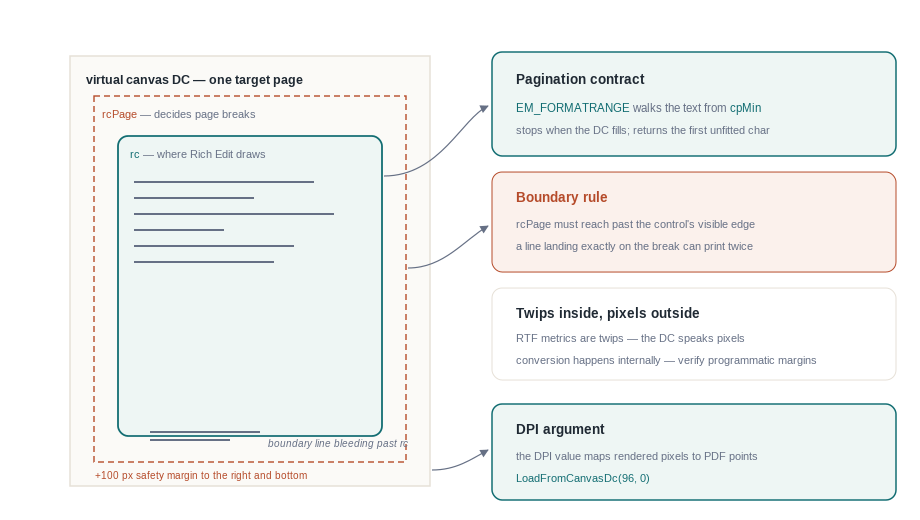
PrintRtfBox fills the TFormatRange structure and passes it to the Rich Edit control via SendMessage. The control renders characters starting at cpMin, stopping when the DC fills, and returns the position of the first character that did not fit. When the return value equals or exceeds the total text length, every character has been rendered and the function returns zero, which terminates the repeat...until loop
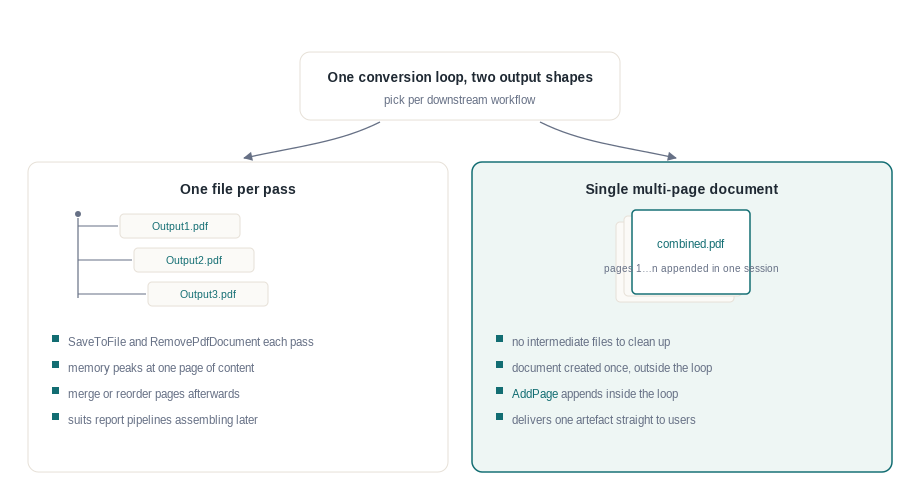
Each iteration produces one PDF file named Output1.pdf, Output2.pdf, and so on. If you want a single multi-page document instead, AddToFileList plus MergeFileList can assemble the per-page files after the fact, or you can restructure the loop so each new page document is folded into the first one with MergeDocument. The per-iteration SaveToFile followed by RemoveDocument pattern above keeps peak memory bounded at one page's worth of content, which matters for very long RTF files
Sizing details that trip people up
The DPI argument to LoadFromCanvasDC tells the library how many of your pixels make an inch: the page comes out as canvas width divided by DPI times 72 points wide, and the same for the height. Get this wrong and text will appear at the wrong size in the output even though the image looks correct on screen
The unit of rc and rcPage is the detail most Delphi samples of this technique get wrong. EM_FORMATRANGE reads both rectangles in twips, 1/1440 of an inch, even though the DC it draws into works in pixels. Fill them with pixel values and the control lays text out on a page fifteen times too small at 96 DPI: a handful of words per pass, and a loop that turns a ten-page document into hundreds of nearly empty PDFs. Converting with MulDiv(Pixels, 1440, Dpi), using the DPI that sized the DC, puts the page break where the canvas actually ends. rcPage is the full page; rc is the area text may occupy, so margins come from shrinking rc inside it, also in twips. When the loop finishes, one more EM_FORMATRANGE with a nil lParam tells the control to free the formatting data it cached for the DC
Finally, the control must already be attached to a visible form window when FormCreate runs so that its window handle is valid before the first call to SendMessage. A TRichEdit created dynamically at runtime needs an explicit HandleNeeded call before the render loop begins if the form has not yet been shown
Handling fonts and RTF features
Because the rendering is done by the Windows Rich Edit engine, font substitution follows the same rules it uses for display and printing. Fonts referenced in the RTF file that are installed on the machine will render faithfully; fonts that are missing will be substituted silently, which can shift line lengths and pagination. For production batch conversion this is worth testing explicitly: load a document with each typeface your RTF sources use and confirm the output page count matches what you expect from a manual print preview
Tables, embedded images, and most Rich Text formatting features work without any extra handling because Rich Edit renders them natively. The one area that can be surprising is text that uses custom paragraph spacing or first-line indents expressed in twips: Rich Edit measures in twips (1/1440 inch), the same unit as the rectangles in TFormatRange, while the DC underneath works in pixels at the current DPI. The control maps one onto the other while drawing, but if you are constructing the RTF programmatically you should verify that your margin values are in twips too
DPI awareness and high-DPI displays
On a display running at 150% scaling (144 DPI), the millimeter-to-pixel conversion returns a larger pixel count than on a 100% display. The PDF Library records whatever pixel dimensions you pass to GetCanvasDC and uses the DPI argument in LoadFromCanvasDC to back-calculate the physical page size in the PDF. As long as the DPI value you pass is the one you used to turn millimeters into pixels, the output page size will be correct regardless of the display scaling
If your application is DPI-unaware (the old default), Windows scales the screen DC and your pixel calculations will be wrong on high-DPI machines. The simplest fix is to declare DPI awareness in the application manifest; the application then receives true device pixels, and the Screen.PixelsPerInch value the sample passes to LoadFromCanvasDC reports the real display DPI instead of assuming 100% scaling
Output structure: one file per page versus a combined document
The loop above writes each page to a separate PDF file. Whether that is what you want depends on the downstream use. Report-generation systems often need individual pages because they assemble the final document later by merging or reordering pages. If you want a single PDF from the start, the library lets you build it in one session: keep the ID of the document the first LoadFromCanvasDC call creates, and on every later pass select it with SelectDocument and call MergeDocument with the new page's document ID instead of SaveToFile, then save once after the loop exits. This avoids the intermediate files and is the right structure for most single-document conversion scenarios
For large RTF files it is worth adding some progress feedback in the loop, since the conversion rate is roughly proportional to page count and a 200-page document can take a few seconds. The repeat...until structure is easy to extend: track the character offset in a progress bar update after each iteration, using LastChar divided by the total character count from RichEdit1.GetTextLen
The GetCanvasDC and LoadFromCanvasDC methods shown here are part of the losLab PDF Library for Delphi and C++Builder