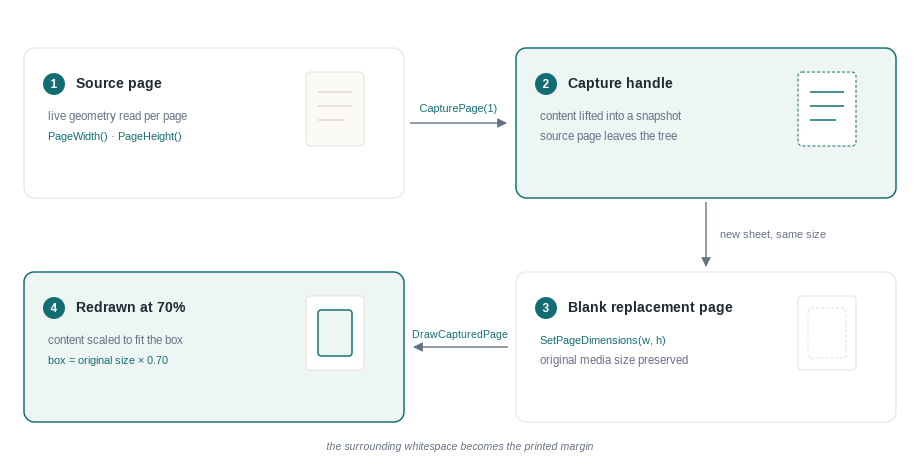
PDF page dimensions are fixed at the time a page is created, so you cannot simply rescale content in place the way you might resize an image. The library model that makes shrinking practical is capture-and-redraw: lift each page's content out of the document into a handle, create a new blank page at the original media size, then draw the captured content back in at a reduced bounding box. The surrounding whitespace becomes the margin. At 70% scale on an A4 page, for instance, 15% of the width falls on each side and the same fraction top and bottom, which is exactly what the border arithmetic below produces
How CapturePage works
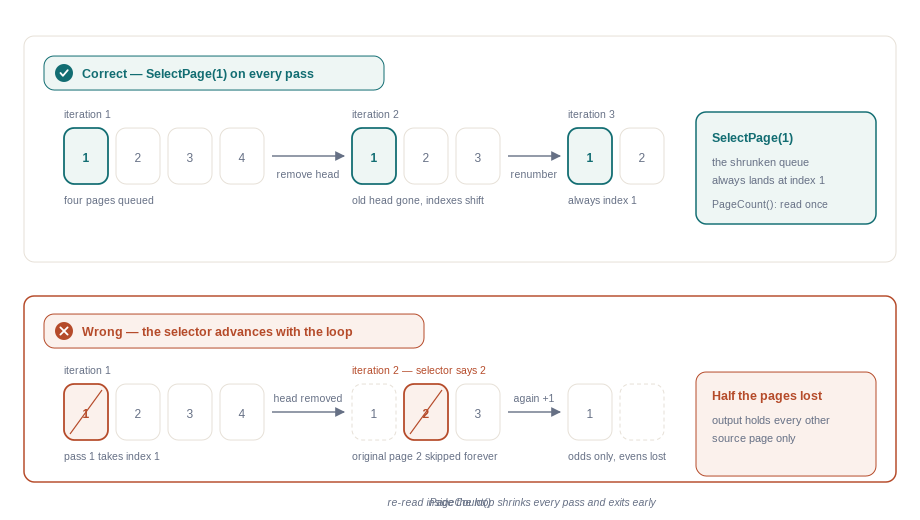
CapturePage takes a page number, promotes that page's content into an in-memory capture object, and removes the page from the document's page tree. That removal is intentional and is the reason the loop always selects page 1 regardless of the iteration index: once page 1 is captured and deleted, what was page 2 becomes the new page 1, and so on. If you increment the page selector along with the loop counter you will skip every other page and end up with half the expected output
The capture handle returned by CapturePage is not a page reference; it is more like a content snapshot. It stays valid after drawing, so the same capture can be placed more than once, until you free it with ReleaseCapturedPage or the document goes away. DrawCapturedPage takes that handle plus a destination rectangle given as left edge, top edge, width, and height, all in points by default. The library scales the captured content to fit that rectangle exactly, preserving aspect ratio only if your rectangle happens to match the original proportions. For uniform scaling you want the rectangle to be the original size multiplied by the scale factor, centered on the page
The centering math
With a 70% scale factor the remaining 30% of each dimension gets split equally between the two sides. So the horizontal inset is pageWidth * (1.0 - 0.70) / 2, which is 15% of the width, and the vertical inset follows the same formula using the page height. The destination rectangle for DrawCapturedPage then starts at (horizBorder, vertBorder) and spans pageWidth - 2 * horizBorder by pageHeight - 2 * vertBorder. That arithmetic is not library-specific; it is just the geometry of fitting a smaller rectangle symmetrically inside a larger one
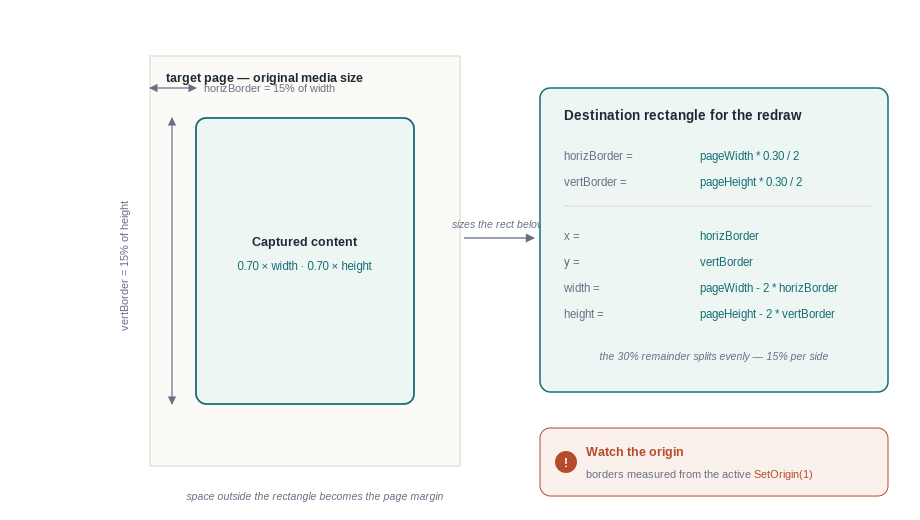
One thing worth noting: SetOrigin(1) puts the coordinate origin at the top-left rather than the bottom-left. The second value you pass to DrawCapturedPage is the top edge of the rectangle, measured from whichever origin you set. That is why the examples call SetOrigin(1) first: with the default bottom-left origin the same vertBorder would put the top edge near the bottom of the page and push most of the content off it
C# example
The following code processes every page of Pages.pdf through the capture-and-redraw cycle and writes the result to newpages.pdf. PDFL is an instance of the PDFlibrary import class that ships with the DLL edition, created with new PDFlibrary("PDFlibDLL64.dll"); the ActiveX edition exposes the same methods through PDFlibAX.PDFlibrary
private void ScalePages_Click(object sender, EventArgs e)
{
    File.Delete("newpages.pdf");

    double pageWidth, pageHeight, horizBorder, vertBorder;
    double scaleFactor = 0.70;
    int capturedPageId, ret;

    PDFL.LoadFromFile("Pages.pdf", "");
    PDFL.SetOrigin(1);

    int numPages = PDFL.PageCount();

    for (int i = 1; i <= numPages; i++)
    {
        // Always select page 1: CapturePage removes the page, so page 2
        // becomes page 1 on the next iteration.
        PDFL.SelectPage(1);

        pageWidth  = PDFL.PageWidth();
        pageHeight = PDFL.PageHeight();

        horizBorder = pageWidth  * (1.0 - scaleFactor) / 2;
        vertBorder  = pageHeight * (1.0 - scaleFactor) / 2;

        capturedPageId = PDFL.CapturePage(1);
        // 0 = nothing captured, e.g. a one-page source: the only page cannot be removed
        if (capturedPageId == 0)
            throw new InvalidOperationException("CapturePage failed on source page " + i);

        PDFL.NewPage();
        PDFL.SetPageDimensions(pageWidth, pageHeight);

        ret = PDFL.DrawCapturedPage(
            capturedPageId,
            horizBorder, vertBorder,
            pageWidth  - 2 * horizBorder,
            pageHeight - 2 * vertBorder);
        if (ret != 1)
            throw new InvalidOperationException("DrawCapturedPage failed on source page " + i);
    }

    PDFL.SaveToFile("newpages.pdf");
}
Delphi example
The Delphi version uses TPDFlib directly rather than through the DLL import class, but the call sequence is identical. One practical difference is the output file guard: FileExists plus DeleteFile instead of File.Delete, because SaveToFile will fail if the destination is locked by a previous run still open in a viewer
procedure TForm1.ScalePagesClick(Sender: TObject);
var
  PDFLib: TPDFlib;
  pageWidth, pageHeight, horizBorder, vertBorder: Double;
  scaleFactor: Double;
  capturedPageId, ret, numPages, i: Integer;
begin
  if FileExists('newpages.pdf') then
    DeleteFile('newpages.pdf');

  scaleFactor := 0.70;

  PDFLib := TPDFlib.Create;
  try
    PDFLib.LoadFromFile('Pages.pdf', '');
    PDFLib.SetOrigin(1);

    numPages := PDFLib.PageCount();

    for i := 1 to numPages do
    begin
      PDFLib.SelectPage(1);

      pageWidth  := PDFLib.PageWidth();
      pageHeight := PDFLib.PageHeight();

      horizBorder := pageWidth  * (1.0 - scaleFactor) / 2;
      vertBorder  := pageHeight * (1.0 - scaleFactor) / 2;

      capturedPageId := PDFLib.CapturePage(1);
      // 0 = nothing captured, e.g. a one-page source: the only page cannot be removed
      if capturedPageId = 0 then
        raise Exception.CreateFmt('CapturePage failed on source page %d', [i]);

      PDFLib.NewPage();
      PDFLib.SetPageDimensions(pageWidth, pageHeight);

      ret := PDFLib.DrawCapturedPage(
        capturedPageId,
        horizBorder, vertBorder,
        pageWidth  - 2 * horizBorder,
        pageHeight - 2 * vertBorder);
      if ret <> 1 then
        raise Exception.CreateFmt('DrawCapturedPage failed on source page %d', [i]);
    end;

    PDFLib.SaveToFile('newpages.pdf');
  finally
    PDFLib.Free;
  end;
end;
What the scale factor actually controls
The value 0.70 here means the rendered content occupies 70% of each page dimension, not that the file is 70% of its original byte size. File size after this operation depends on the complexity of the original content; a page with large images will not shrink proportionally because the pixel data is redrawn at the same resolution into a smaller area. If a smaller file is the goal, look at CompressContent for page content streams that went out uncompressed and at image recompression (OptimizeImages in the Delphi edition), not geometric scaling. LinearizeFile is a different tool: it reorders the file for page-at-a-time loading (Fast Web View), which helps viewers open large files over a network but does not shrink them
The 70% figure is also not a hard limit. Any value between 0.0 and 1.0 works, and values above 1.0 enlarge content beyond the original page boundary, which clips at the media box edge unless you also increase the page dimensions. Mixed-size documents are handled naturally because PageWidth and PageHeight are queried per page before the border calculation, so a document where odd pages are A4 and even pages are A3 will produce correctly centered output on each page size without any special casing
Where things can go wrong
Two failure modes come up in practice. The first is an output file left open in a PDF viewer from a previous run: SaveToFile will fail or write zero bytes depending on the platform, and the new output never lands. The file-delete guard at the top of the function handles that for development, but in a production pipeline writing to a temporary path and renaming on success is safer
The second is page count mismatch. Because CapturePage removes pages from the document as it processes them, the count you read from PageCount() before the loop is the correct bound to iterate against. Calling PageCount() inside the loop does not help either: each pass removes one page and appends one, so the count stays flat and says nothing about how many source pages are left. The loop variable in the examples serves only as a remaining-iterations counter; it is never used to select a page, because the page to select is always 1 for the reason explained earlier
The page manipulation calls shown here, including CapturePage, DrawCapturedPage, and SetPageDimensions, are part of the losLab PDF Library for Delphi, C#, VB.NET, and C++