Pulling text, images, and fonts out of an existing PDF sounds like a solved problem until you run a real corpus through it. Point a search indexer at forty thousand customer files and the breakage sorts into a few recognizable piles. Words run together because nobody told the extractor how wide a gap counts as a space. Other pages come back as gibberish because a subsetted font carries no map from its glyph codes to actual characters. And "the company logo" turns out to be nine separate image objects stacked behind a soft mask. None of that is a bug in the library. It is the difference between calling an extraction function and understanding what the function can and cannot recover from the bytes on disk
losLab PDF Library, the Pascal edition, gives Delphi and C++Builder code more than one way to read each of those three streams, and the levels differ in what they guarantee. The trick is matching the level to the job: a search index, a redaction reviewer, and a PDF/A preflight pass all want different things out of the same page, and reaching for the wrong call wastes effort or produces output you cannot trust
Text extraction levels and what each one promises
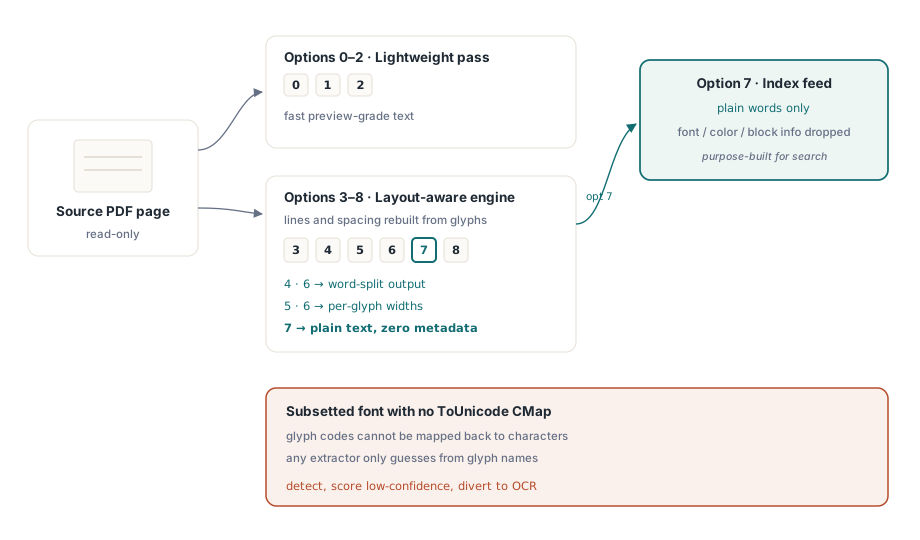
GetPageText takes an options value from 0 through 8, and that number picks an engine rather than a format. Values 0 through 2 run a lightweight pass that is fine for a quick preview. Values 3 through 8 route through the layout-aware engine, which rebuilds lines and spacing from where the glyphs actually sit on the page. Within that range the variations matter: 4 and 6 split the output into words, 5 and 6 emit per-glyph widths, and 7 returns plain text with font, color, and block metadata deliberately dropped. Option 7 is the one to feed a search index, since the index wants words and nothing else
No option setting can rescue a document that never carried the information to begin with. PDF maps character codes to glyph shapes, and the only thing that maps those codes back to readable text is a font's ToUnicode CMap (ISO 32000-1 §9.10). When a subsetted font ships without one, every extractor is stuck. This library, the copy-paste in a viewer, a competing toolkit: all of them are reduced to guessing from glyph names or returning nothing. The practical response is detection, not heroics. Score the page as low-confidence and send it to OCR, because indexing the garbage silently is worse than admitting you cannot read it
For the cases the flat options do not cover, custom tokenization, content-stream forensics, a text funnel built to your own rules, the decoder is available one layer down. TPDFExtractor is constructed over a page's resources dictionary and font collection. Its ExtractTextW method runs raw content-stream text operations back through the same font machinery to recover Unicode, and its OnFindObject event hands you each object as it streams past. Most code never needs to reach this deep. The applications that do are the ones glad the layer is public rather than buried
Positioned blocks: the unit of search hits and redaction review
Plain text tells you what the page says. Sooner or later a product also needs to know where it says it, so it can highlight a search hit, draw a box around a redaction candidate, or anchor an annotation to the right spot. ExtractPageTextBlocks returns a handle to a list of text runs, and each run carries its text, its bounding box, and the font name and size it was set in:
var
  Pdf: TPDFlib;
  Blocks, I: Integer;
begin
  Pdf := TPDFlib.Create;
  try
    if Pdf.LoadFromFile('contract.pdf', '') <> 1 then
      raise Exception.Create('load failed');
    Pdf.SelectPage(1);
    Blocks := Pdf.ExtractPageTextBlocks(0);
    for I := 0 to Pdf.GetTextBlockCount(Blocks) - 1 do
      Writeln(Format('%s  [%s %.1f pt at %.0f,%.0f]',
        [Pdf.GetTextBlockText(Blocks, I),
         Pdf.GetTextBlockFontName(Blocks, I),
         Pdf.GetTextBlockFontSize(Blocks, I),
         Pdf.GetTextBlockBound(Blocks, I, 0),
         Pdf.GetTextBlockBound(Blocks, I, 1)]));
    Pdf.ReleaseTextBlocks(Blocks);
  finally
    Pdf.Free;
  end;
end;
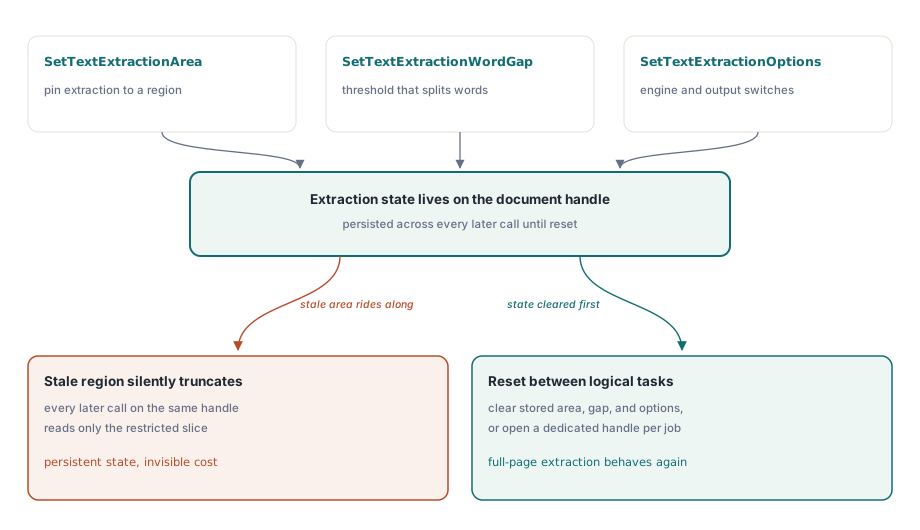
One detail in this area trips up integrations more than any other. SetTextExtractionArea, SetTextExtractionWordGap, and SetTextExtractionOptions are document-level state that persists, not arguments you pass per call. Configure an area restriction for one feature, say reading only the header band to classify a document, and it silently truncates every extraction that follows on the same handle, including the layout-aware GetPageText levels you reach for later. Either reset the extraction state between logical tasks or give each task its own document handle
The word-gap threshold is the lever for that first failure pile, the words that run together. SetTextExtractionWordGap tells the layout engine how much horizontal space, measured against the page's own glyph spacing, separates one word from the next. A dense table wants a smaller gap than a loosely set marketing page, so a threshold tuned per document class beats one global constant. It persists on the document like the rest of the extraction state, so plan to set it deliberately rather than once and forget it
Images: original streams, not screenshots
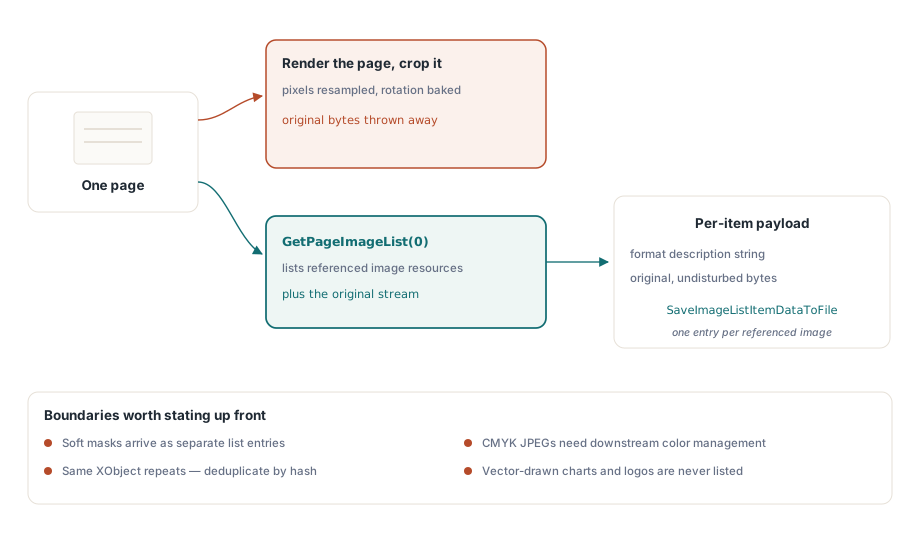
The wrong way to get images out of a PDF is to render the page and crop it. That resamples the pixels, bakes in any rotation, and throws away whatever the original was. GetPageImageList instead enumerates the actual image resources the page references, and each item hands back its properties and its original, undisturbed data:
var
  ImgList, I: Integer;
begin
  Pdf.SelectPage(1);
  ImgList := Pdf.GetPageImageList(0);
  for I := 0 to Pdf.GetImageListCount(ImgList) - 1 do
  begin
    Writeln(Pdf.GetImageListItemFormatDesc(ImgList, I, 0));
    Pdf.SaveImageListItemDataToFile(ImgList, I, 0,
      Format('page1-img%.2d.bin', [I]));
  end;
  Pdf.ReleaseImageList(ImgList);
end;
Check GetImageListItemFormatDesc before you assume anything about an item, because what a page references is rarely one tidy picture per visible image. A soft mask shows up as its own separate entry. The same XObject often repeats across many pages, so deduplicate by content hash before you archive an "all images" export, or you will write the same logo a hundred times. CMYK JPEGs need color management applied downstream, or they render inverted in viewers that take the channels at face value. When you want a document-wide inventory rather than a page at a time, FindImages together with SetFindImagesMode scans the whole file in one pass
There is one boundary worth raising with stakeholders before anyone writes acceptance criteria: image extraction returns raster resources only. A logo or chart drawn as vector paths is not an image in the resource sense and will never turn up in any image list, no matter how clearly it reads as a picture on screen. When the requirement really is to deliver that chart as a file, the honest approach is to render the page region to a bitmap, which is a different operation with different fidelity. The two kinds of output do not belong in the same export folder without a label saying which is which
Fonts: an audit surface, not an export feature
The font API answers questions about fonts. It does not hand you the font files themselves, and that distinction shapes everything you can build on it. After FindFonts scans the document, the enumeration walks the fonts by ID, and the property calls report on whichever font is currently selected:
var
  I: Integer;
begin
  Pdf.FindFonts;
  for I := 1 to Pdf.FontCount do        // font indexes start at 1, not 0
    if Pdf.SelectFont(Pdf.GetFontID(I)) = 1 then
      Writeln(Format('%s  type=%d  embedded=%d  subset=%d',
        [Pdf.FontName, Pdf.FontType,
         Pdf.GetFontIsEmbedded, Pdf.GetFontIsSubsetted]));
end;
Watch the loop bounds. Font indexes run from 1 to FontCount, while the text-block and image-list indexes a few paragraphs up are zero-based. Carry one convention into the other and you get an off-by-one that either skips the first font or runs off the end, and it will pass casual testing because most documents have several fonts and the wrong one still looks plausible. Be clear about scope, too. This API has no byte-level font export. No call returns the embedded font program as a TTF or OTF file, and enumeration plus metadata inspection is the whole intended model. That model still covers what production work actually asks of fonts: subset detection by name pattern, embedding audits before an archival conversion (an unembedded font is a hard PDF/A blocker, as PDF/A and PDF/UA preflight in Delphi goes into), and encoding diagnostics for when extraction confidence drops. There is also a licensing reason the boundary sits here. A subset font program is licensed material and, missing most of its glyphs, useless as an installable font anyway. Treating it as audit metadata rather than an extractable asset is the position you can defend
That last call pulls its weight in triage. Run GetFontEncoding on each font, read it alongside the subset flag, and you can predict extraction quality before pulling a single character. A page whose fonts are all subsetted with non-standard encodings is an OCR candidate on inspection alone, which lets a batch pipeline route it correctly without first wasting a failed extraction pass on it
Extraction at scale without loading documents
In a batch pipeline, loading an entire document just to read one page is wasted I/O, and it adds up fast across a corpus. The single-call variants, ExtractFilePageText and ExtractFilePageTextBlocks, take a file name, password, and page number directly and skip the full load. For gigabyte-scale files there is a lower gear still. The direct-access path opens a file through streaming xref reads, so DAOpenFileReadOnly followed by DAExtractPageText touches only the objects that one page actually needs. It comes with a convention shift worth committing to memory: the DA functions address pages by PageRef, an object-reference handle you get from DAFindPage, never by raw page number. Pass the number where the handle belongs and the call operates on the wrong object without raising an error, which is the worst kind of mistake to debug. The rest of the direct-access toolkit is laid out in large PDF merge, split, and direct access
If there is a single habit that separates extraction code that survives a real corpus from code that limps, it is treating the page as untrusted input rather than a clean data source. Text that disagrees with what the viewer renders is almost always an encoding problem, a ligature collapsing to one glyph or a subset font missing its ToUnicode entries, and the fix is to measure confidence and divert the bad pages to OCR, not to fight the bytes. The font API will never produce a TTF or OTF, by design, so build font workflows around audit questions. And the persistent extraction state, the area rectangle most of all, is a setting you own for the life of a document handle, not a parameter you forget after one call. Get those three reflexes right and the rest of the API behaves
Evaluation builds, demo projects, and the complete extraction API reference are on the losLab PDF Library for Delphi product page