A permission flag is not a security mechanism. The bit that says "no copying" lives inside the same /Encrypt dictionary as the cryptography, which lends it an air of enforcement it does not have, and the moment you treat the two as one thing your audit starts producing wrong answers. The only question worth asking of a PDF is not "is it encrypted." It is more specific and harder: which algorithm, which security handler revision, which of the two passwords was set, which permission bits are claimed, and which parts of the file the encryption actually touches. A file can be formally encrypted and practically open. It can refuse to be read yet leave its metadata in plaintext. It can lock down printing in a flag that any viewer is free to ignore. Auditing a PDF means resolving all of those separately, and PDF Library for Delphi, losLab's PDF engine for Delphi and C++Builder, exposes each of them through both a flat integer-handle API and a typed class layer
What the /Encrypt dictionary actually records
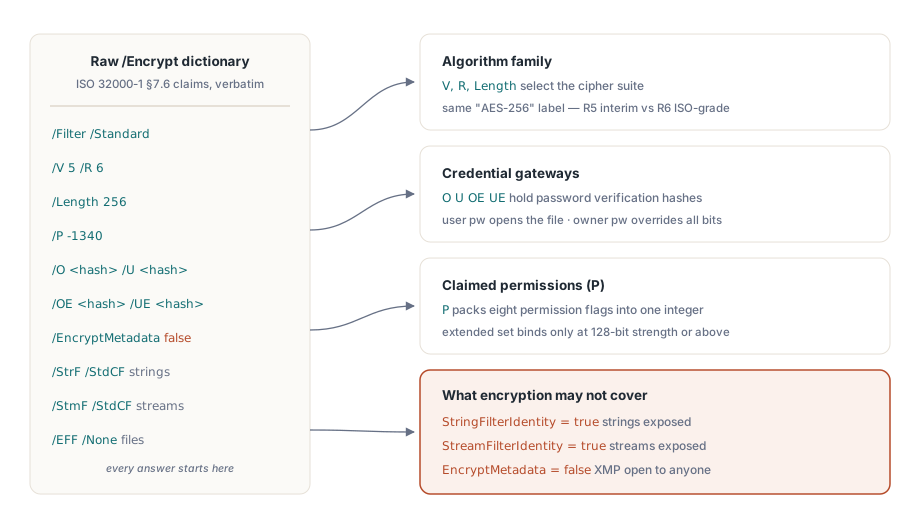
ISO 32000-1 §7.6 defines document security through a handful of dictionary entries, and PDF Library for Delphi mirrors them one-for-one in the TPDFEncryption record. The filter version V and revision R select the algorithm family. Length carries the key size. The permission bits sit in P, the owner and user password validation strings in O and U (with OE and UE added for AES-256), an EncryptMetadata flag rides alongside, and three more fields name the crypt filters applied to strings, streams, and embedded files respectively
The value of this record is that it does not interpret anything for you. It hands back the raw dictionary and lets you draw the conclusions, which is exactly what an audit needs. The plaintext-inside-encrypted case shows up in StringFilterIdentity and StreamFilterIdentity: when either is true, the corresponding data passes through the Identity filter untouched, no matter what the document's encrypted status reports. A scanner that stops at "an /Encrypt dictionary is present" will call such a file protected when its strings and streams are sitting in the clear. The same nuance governs metadata. When EncryptMetadata is false the XMP packet stays readable to any indexer while the page content does not, which is worth knowing the instant your routing rules key off a title or author field
A short security probe with the flat API
For most pipelines, four flat calls answer the everyday questions. LoadFromFile returns 1 on success, and once the document is open the encryption inspectors report against its decrypted state:
var
  PDF: TPDFlib;
begin
  PDF := TPDFlib.Create;
  try
    if PDF.LoadFromFile('contract.pdf', UserPassword) <> 1 then
      raise Exception.Create('Open failed: wrong password or damaged file');
    Writeln('status    : ', PDF.EncryptionStatus);     // decrypted / encrypted / unknown
    Writeln('algorithm : ', PDF.EncryptionAlgorithm);  // RC4 vs AES family
    Writeln('strength  : ', PDF.EncryptionStrength);   // key length class
    Writeln('owner pw? : ', PDF.CheckPassword(CandidatePassword));
  finally
    PDF.Free;
  end;
end;
CheckPassword matters more than its one-line signature suggests. PDF defines two passwords with unequal power. The user password is required to open the file at all. The owner password grants full rights and overrides every permission bit. The bytes on disk are identical either way, but a session opened under the owner password can do things the user-password session cannot, so an audit that does not record which credential was presented is recording half the truth. The class layer makes the distinction queryable. TPDFDocument.HasUserPassword and HasOwnerPassword report what the file requires, while IsUserPassword and IsOwnerPassword report which password actually opened the current session. Log that fact. Never log the password values themselves
The Strength ladder, where "AES-256" means two things
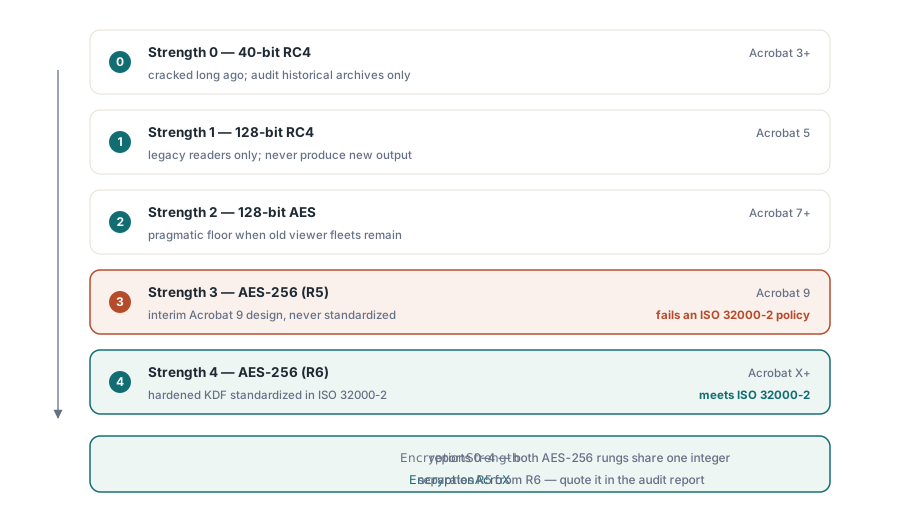
The flat Encrypt and EncryptFile functions take an integer Strength with five meaningful values: 0 for 40-bit RC4, 1 for 128-bit RC4, 2 for 128-bit AES readable from Acrobat 7, 3 for 256-bit AES as introduced with Acrobat 9, and 4 for 256-bit AES as required by Acrobat X and later
The interesting part is that 3 and 4 are both labeled AES-256 and are not the same scheme. Strength 3 maps to security handler revision 5, an interim design that Acrobat 9 shipped and ISO never adopted. Strength 4 maps to revision 6, whose key-derivation function was hardened and standardized in ISO 32000-2. For a document you are creating today there is no reason to pick 3 over 4. For an audit the gap is decisive: a policy that reads "AES-256 per ISO 32000-2" is met by R6 alone, and an R5 file that calls itself AES-256 fails that policy while passing a naive strength check. The class layer keeps the two apart by name, esAES256Bit for R5 against esAES256BitAcroX for R6, and the EncryptionAcroX property answers the revision question with a single boolean
Permission bits and their key-length fine print
EncodePermissions packs eight flags into the integer that Encrypt and EncryptFile expect. Print, copy, change, and add-notes make up the basic set; fill-fields, copy-for-accessibility, assemble, and full-quality print make up the extended set. The fine print, which the library's own encryption demo states outright, is that the extended four take effect only at 128-bit strength and above. The full-quality-print flag falls under the same rule: clear it to force low-resolution printing and a 40-bit document will ignore you, because that downgrade also requires 128-bit or stronger encryption. Encode a "low-resolution print only" policy into a 40-bit file and every viewer prints at full quality anyway
The deeper question is who enforces any of these bits, and the answer is nobody you can trust. Permissions are instructions to conforming readers, not cryptographic restrictions. The decryption key is identical whether copying is allowed or denied, so a locked-down permission set only keeps honest viewers honest. A reader that chooses to ignore the bits faces no cryptographic obstacle at all. If the obligation is to prevent extraction rather than to discourage it, the file needs a user password and the workflow needs process-level controls around it, and an audit report should name which of the two regimes each file is actually under instead of treating a permission flag as a lock
Setting policy and proving it stuck
Applying encryption to existing files does not require loading them into the object tree. EncryptFile processes input to output in a single call, and the audit loop reopens the result to confirm what landed on disk. The shipped encryption demo follows the same write-then-read-back shape:
var
  PDF: TPDFlib;
  R: Integer;
begin
  PDF := TPDFlib.Create;
  try
    R := PDF.EncryptFile('in.pdf', 'out.pdf', 'owner-secret', 'user-secret', 4,
      PDF.EncodePermissions(1, 0, 0, 0,    // print allowed; copy/change/notes denied
                            0, 0, 0, 1));  // extended set: full-quality print only
    if (R = 1) and (PDF.LoadFromFile('out.pdf', 'user-secret') = 1) then
    begin
      Writeln('algorithm = ', PDF.EncryptionAlgorithm);
      Writeln('strength  = ', PDF.EncryptionStrength);
      Writeln('owner pw accepted: ', PDF.CheckPassword('owner-secret'));
    end;
  finally
    PDF.Free;
  end;
end;
Teams working at the document layer get the same operation with typed sets in place of bit packing, which survives code review with far less squinting:
if not Doc.Encrypt('owner-secret', 'user-secret', esAES256BitAcroX,
  [ppCanPrint], [ppCanPrintFull]) then
  raise Exception.Create('Encryption failed');
Either way, the read-back step is not optional ceremony. It catches the deployment mistakes that otherwise surface months later on a customer's machine: an old library build that silently downgrades the requested strength, an output path that was never written because the directory was read-only, a permissions integer whose arguments went in the wrong order. All three pass a local smoke test and fail in the field, and reopening the output turns each of them into an exception you see during the run that created the file. GetEncryptionFingerprint returns a compact value you can store with the job record, so a later comparison can tell whether two outputs share the same encryption configuration without reopening either
Audit false positives worth coding for
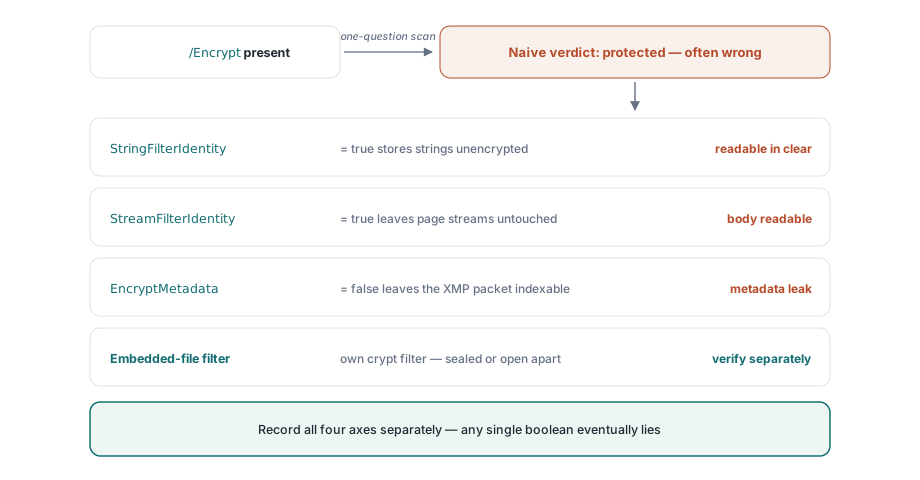
A few patterns reliably push security scanners to the wrong conclusion, and each one comes from collapsing a multi-part question into a yes-or-no answer. The Identity crypt filter is the cleanest example. An /Encrypt dictionary is present, the file reports as encrypted, and yet the strings and streams run through the Identity filter unchanged, so the real content is plaintext. Reading StringFilterIdentity and StreamFilterIdentity before declaring anything protected is the fix
The metadata split is subtler. EncryptMetadata can disagree with the rest of the document in both directions, leaving an encrypted file with a readable XMP packet or, less often, the reverse. "The file is encrypted" says nothing about whether its metadata is, which matters the moment an indexer or a routing rule reaches for the title. Embedded files add a third axis: PDF allows a dedicated crypt filter just for attachments, so the attachments can be the only encrypted part of an otherwise open document, or the only plaintext part of an encrypted one. Capture the three filter assignments as separate fields for strings, streams, and embedded files, and none of these traps can catch you. Store a single boolean and the wrong call is only a matter of time
Removing encryption, and choosing it for new files
An audit often ends in a decision to strip protection, and the mechanics are not the obstacle there. DecryptFile(InputFileName, OutputFileName, Password) writes a decrypted copy without a full load, and the loaded-document Decrypt does the same in memory once a file is already open. Both require a valid password; neither bypasses the cryptography. The real gate is policy rather than code, so make your intake rules state plainly when removal is allowed and record the password class that authorized it, because the technical step itself leaves no trail
The choice for new output is narrower than the five Strength values imply. Use Strength 4, AES-256 revision 6, unless you have to open files in viewers older than Acrobat X. Strength 2, AES-128, is the pragmatic floor for an aging viewer fleet that cannot be upgraded. The RC4 options at 0 and 1 are there so you can read and audit historical archives, not so you can produce anything new with them; reaching for them on a 2026 design is a sign that a requirement upstream is stale
Encryption state feeds straight into signing decisions, since a workbench that validates and signs documents needs the same read-back discipline this audit relies on. That ground is covered in the compliance and signing workbench article. When a batch applies EncryptFile across thousands of large documents, the direct-access guide to large PDFs shows how to hold memory flat while it runs. The complete encryption API reference lives on the PDF Library for Delphi product page