The file opens cleanly on your machine. Acrobat shows it, the print preview looks right, every page is there. Then it goes to the print bureau, or into the archive system that ingests your monthly batch, and it comes back rejected: RGB images in a CMYK job, no /Trapped key, an output intent that does not match the press. Nothing was wrong with the document anyone could see. It was wrong against a profile, and the profile was checked somewhere you were not. Preflight is the prepress name for that check, and the real question is where it belongs when the PDFs are coming out of your own Delphi code rather than off a designer's desktop
HotPDF does not give you a preflight function to call. The component carries a preflight report window in its GUI demo, but there is no API behind it that a service or a build script can invoke, and pretending otherwise would send you looking for a method that is not there. That sounds like a hole until you notice that for files you generate yourself, calling a validator on your own output is the wrong shape anyway. You already control every property a validator would inspect. The useful split is to make the generator incapable of emitting a bad file, then prove it with a tool you did not write
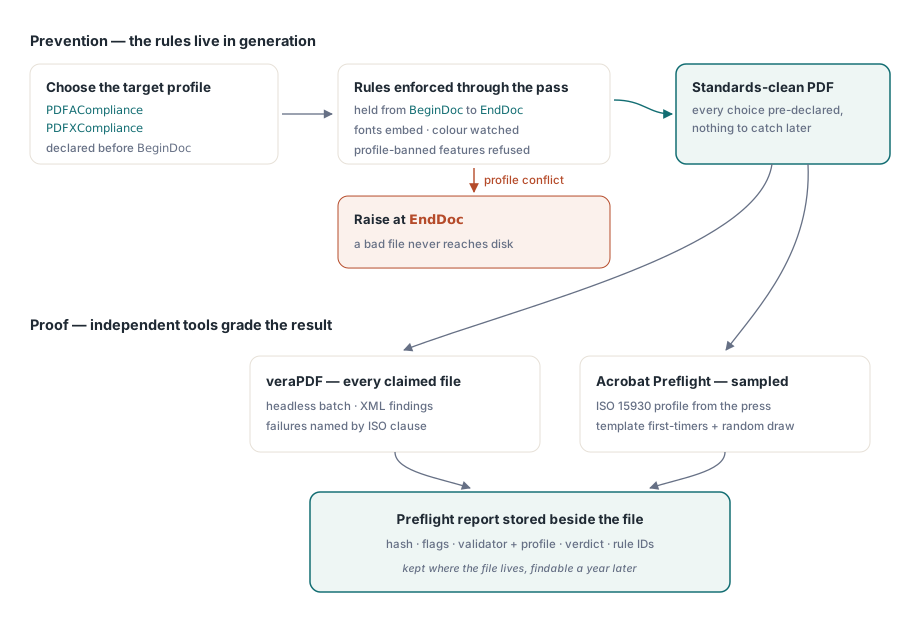
Why you check your own output differently
Traditional preflight assumes a stranger's file. Some designer, some other application, some unknown chain of edits produced it, and you inspect it because you have no idea what is inside. A document your code produced is not a stranger. Font embedding, color space, output intent, the metadata block: your program decided all of it a few milliseconds before the file hit disk. Inspecting it afterward to discover choices you just made is busywork. The cheaper move is to constrain those choices so a non-compliant file never exists to be caught
There is also a credibility reason to keep verification external. A library that blesses its own output is grading its own exam. When a customer's archive system or a print shop's RIP rejects your file, "our component says it is fine" carries no weight. A verdict from veraPDF or Acrobat does, because the other side runs the same tools
Make compliance a setting, not a checklist
The prevention layer is just configuration. Set PDFACompliance or PDFXCompliance before BeginDoc and HotPDF holds the corresponding rules for the whole generation pass: it embeds fonts, watches DeviceRGB and DeviceCMYK usage against the output intent you declared, and refuses features the profile bans. The contradictions surface at EndDoc, where the compliance gates raise rather than quietly shipping something that will fail downstream. Once the file is saved, the same properties read back what was actually enforced, which is the one fact your pipeline log most needs:
// After EndDoc: record the enforced profiles with the run metadata
if Pdf.PDFACompliance <> '' then
  Log('Generated as PDF/A level ' + Pdf.PDFACompliance);
if Pdf.PDFXCompliance <> '' then
  Log('Generated as PDF/X profile ' + Pdf.PDFXCompliance);
Put those flags on the same log line as the input data hash and the HotPDF version. The day a validator and your generator disagree about a file, that line tells you which template produced it and which build of the library was loaded, and the argument that would otherwise eat an afternoon becomes a grep. The output intents, ICC profiles, and tagging that sit behind these flags are spelled out in the guide to PDF/A, PDF/X, and PDF/UA output with HotPDF
A cheap first gate for files you did not generate
Not every pipeline is purely generative. Customers upload PDFs, scanners drop them in a folder, partners attach them to email. Pushing every one of those through a full structural validator wastes queue time on files that will not even open. HotPDF's Direct File API reads enough of a file's structure to answer "is this a usable PDF at all" without loading the whole object tree, which makes it a good place to fail fast:
function TriagePdf(Pdf: THotPDF; const FileName: string): Boolean;
var
  Handle, Pages: Integer;
begin
  Result := False;
  Handle := Pdf.DAOpenFileReadOnly(FileName, '');
  if Handle <= 0 then
    Exit;  // structurally unreadable: quarantine, do not validate
  try
    Pages := Pdf.DAGetPageCount(Handle);
    Result := Pages > 0;
  finally
    Pdf.DACloseFile(Handle);
  end;
end;
Two facts about this API decide how you wrap it. The flat-memory shortcut only holds for unencrypted input; hand DAOpenFileReadOnly a password and it quietly falls back to a full parse, so a file you know is encrypted should go through DecryptFile into a plain working copy before triage. And DAGetPageCount means nothing on a handle that did not open cleanly, so the handle check stays strict and a non-positive result is a rejection, not a retry. More of these patterns live in the Direct File API article for large PDF workflows
veraPDF, run as part of the build
For anything you claim as PDF/A or PDF/UA, veraPDF is the validator to wire in. It runs headless, takes a batch, emits XML or JSON, and names each failure by its ISO clause, so a rule failure against ISO 19005-1 clause 6.2.2 points straight back at a generator setting instead of leaving you to guess. Driving it from Delphi is plain process control:
function RunVeraPdf(const PdfFile, ReportFile: string): Cardinal;
var
  Cmd: string;
  SI: TStartupInfo;
  PI: TProcessInformation;
begin
  Cmd := Format('cmd /c verapdf.bat --format xml "%s" > "%s"',
    [PdfFile, ReportFile]);
  FillChar(SI, SizeOf(SI), 0);
  SI.cb := SizeOf(SI);
  if not CreateProcess(nil, PChar(Cmd), nil, nil, False,
      CREATE_NO_WINDOW, nil, nil, SI, PI) then
    RaiseLastOSError;
  try
    WaitForSingleObject(PI.hProcess, 120000);  // bound the wait per file
    GetExitCodeProcess(PI.hProcess, Result);
  finally
    CloseHandle(PI.hThread);
    CloseHandle(PI.hProcess);
  end;
end;
That timeout earns its keep. A malformed file can drive any parser into a corner it never comes out of, and an open-ended wait inside a queue worker drags the rest of the queue down with it. Bound the wait, give a timeout its own failure code, and set the file aside for a human. When you read the result, parse the XML for rule identifiers, not for the human-readable text. Rule IDs survive validator upgrades; the wording of the messages does not, and a stable code is something a support engineer can search old tickets against
How you run the batch matters as much as whether each file passes. One process per file, not one per batch, so a poisonous input costs you that file's timeout and nothing else. Cap the number of validator processes at the core count, because building the XML report is CPU-bound and oversubscription just thrashes. And put a size ceiling at intake, because a two-gigabyte scanned book will own the queue no matter how patient the parser is. None of that is preflight in the strict sense. It is the difference between a gate that lives through month-end volume and one that gets switched off the first night it stalls the pipeline at 2 a.m

PDF/X is where this falls short. veraPDF does not validate it, so the working check is still Acrobat's Preflight with the ISO 15930 profile your printer named. Acrobat wants a human, which means sampling rather than full coverage: the first file off a new template, plus a small random draw from each batch, while the automated gate handles everything that can be handled without one. A sampled check that actually runs beats a complete automation that stays half-finished forever
A report you will still want in a year
A preflight gate pays off twice. Once when it stops a bad file at the door, and again much later when someone asks why a particular file was let through. That second moment is the one that should dictate the format, because it is the one where a thin report leaves you stranded. For every file checked, keep the input hash, the generator's compliance flags and library version from the log line above, the validator name and version, the profile it was checked against, the pass or fail, and the failed rule IDs with page numbers wherever the validator gives them. Store that report beside the file it describes. Put it in a separate system and that system will be decommissioned before the archive it documents
Exceptions need to be written down too. When a customer insists on shipping a file the gate dislikes, the answer is not to loosen the rule for everyone. Record who approved this file, on what grounds, and through what date, then attach that waiver to its report. A waiver with a name and an expiry is a decision someone owns. A check commented out "temporarily" is an incident waiting for its date
One more habit pays for itself: when a file fails, copy it into a named regression folder before anyone touches it. Nearly every preflight problem worth debugging traces back to one specific input, and the teams that hold onto those inputs fix the recurrence in an hour instead of waiting for it to resurface in production. The compliance properties and Direct File API shown here are part of the HotPDF Delphi Component for Delphi and C++Builder, whose documentation covers each call in full