Since HotPDF v2.764.0, one THotPDF instance can write any number of documents one after another: BeginDoc after EndDoc starts a new, independent document instead of failing. Older releases could not do that, and that failure is what this article was first written about. The first document wrote fine; asking the same instance for a second one ended in an access violation before v2.762.1, and from v2.762.1 until v2.764.0 BeginDoc raised an exception asking for a new instance. The message Please load the document before using BeginDoc belongs to a neighboring guard: LoadFromFile raises it when a document started with BeginDoc has not yet been closed with EndDoc. The real subject is the component lifecycle, and once that clicks both behaviors stop being mysterious
Is a THotPDF instance one document or a document factory?
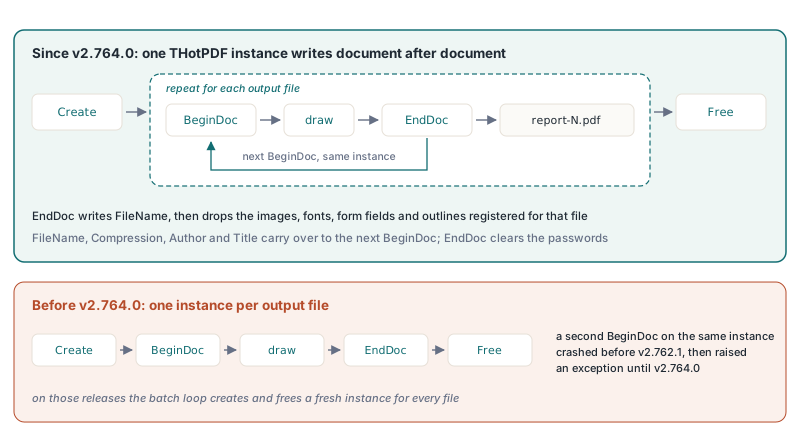
Since HotPDF v2.764.0 a THotPDF instance is a document factory: you can create it once, for example as a component dropped on a form, and feed it documents the way you might keep a database connection open and run query after query through it. BeginDoc opens a document and marks the instance as having a document in progress. EndDoc serializes everything to FileName and then drops everything registered for that file, including its images, fonts, form fields, outlines, document JavaScript, named destinations, page labels, ICC profiles and output intents. The written document's pages and objects stay readable until the next BeginDoc frees them, so ValidatePDFUA2Structure, CurrentPageNumber and PagesCount still work after EndDoc. With ReproducibleOutput on, a second document from a reused instance is byte for byte the same as that document from a new instance
Before v2.764.0 an instance modeled a single document: EndDoc reset a couple of flags but kept the object graph and resource registries of the finished file. A second BeginDoc crashed while setting up the first page, and past the crash the new file would have carried the previous document's objects. HotPDF v2.762.1 turned the crash into an explicit exception that asks for a new instance, and v2.764.0 removed the restriction. On those older releases the fix is not to defeat the guard; it is to create a new instance for each file
The lifecycle, in the order it has to happen
Every document HotPDF writes from scratch follows the same four beats, and the order is not negotiable. Create allocates the component. BeginDoc opens the document and fixes the structural choices, so anything that affects the whole file (page size, compression, encryption, output filename) has to be set between Create and BeginDoc. Then you draw. Then EndDoc writes the bytes to disk. Free releases the instance. Drawing calls placed before BeginDoc have no page to land on; whole-document properties assigned after it are ignored without complaint. On a reused instance, property settings such as FileName, Compression, PDFACompliance, Author and Title carry over to the next document, so set them again before each BeginDoc when they differ
var
  Pdf: THotPDF;
begin
  Pdf := THotPDF.Create(nil);
  try
    Pdf.FileName := 'invoice.pdf';
    Pdf.BeginDoc;                        // opens the document
    Pdf.CurrentPage.SetFont('Arial', [], 11);
    Pdf.CurrentPage.TextOut(50, 760, 0, 'Invoice 2026-042');
    Pdf.EndDoc;                          // writes invoice.pdf, closes it out
  finally
    Pdf.Free;                            // one instance, one document
  end;
end;
Read that as the unit of work: one BeginDoc, one EndDoc, one file on disk. On HotPDF v2.764.0 and later, a second file is a second BeginDoc and EndDoc pair on the same instance; on older releases it means a new instance
What "reuse" means: one instance, or a fresh instance per file
Since v2.764.0 the frugal version works: build the component once, loop over a batch, and call BeginDoc and EndDoc inside the loop. Each iteration produces an independent file, and nothing registered for one document reaches the next. One trap remains for protected output: EndDoc clears UserPassword and OwnerPassword, so with ActivateProtection still on you have to set the passwords again before the next BeginDoc, which otherwise raises an exception instead of protecting the file with empty passwords. On releases before v2.764.0 the second iteration fails, and the version below, which treats each output as its own short-lived object, is the one that works on every release. The allocation cost of creating a component is trivial next to the work of laying out and serializing a PDF, so there is little to save by hoarding the instance either way
procedure WriteBatch(const Names: TArray<string>);
var
  I: Integer;
  Pdf: THotPDF;
begin
  for I := 0 to High(Names) do
  begin
    Pdf := THotPDF.Create(nil);         // new instance each pass
    try
      Pdf.FileName := Names[I] + '.pdf';
      Pdf.BeginDoc;
      Pdf.CurrentPage.SetFont('Arial', [], 12);
      Pdf.CurrentPage.TextOut(50, 760, 0, 'Statement for ' + Names[I]);
      Pdf.EndDoc;
    finally
      Pdf.Free;
    end;
  end;
end;
The try/finally sitting inside the loop is the part worth defending in review. If BeginDoc or any drawing call raises partway through one document, that iteration's instance is still freed before the next begins, so one bad record does not strand a half-built component and poison the rest of the run. On releases before v2.764.0, pulling the Create out above the loop to "optimize" brings back the original bug, now wearing a batch loop; on later releases it works, but a document abandoned halfway by an exception is still a good reason to give the next record a fresh instance
Modifying an existing file is a different entry point
There is a second reading of "reuse" that is entirely legitimate: you do not want a blank document, you want to open a PDF that already exists and change it. That path does not go through BeginDoc at all, which is exactly why the error message names loading. You load the file, edit it, and save under whatever name you choose
var
  Pdf: THotPDF;
  PageCount: Integer;
begin
  Pdf := THotPDF.Create(nil);
  try
    PageCount := Pdf.LoadFromFile('contract.pdf');
    if PageCount > 0 then
    begin
      Pdf.CurrentPage.SetFont('Arial', [fsBold], 10);
      Pdf.CurrentPage.TextOut(40, 30, 0, 'REVIEWED');
      Pdf.SaveLoadedDocument('contract-reviewed.pdf');
    end;
  finally
    Pdf.Free;
  end;
end;
LoadFromFile returns the page count, and a value of zero or below means the load failed, so it is worth checking before you touch CurrentPage. The pairing matters: a document you opened with LoadFromFile is saved with SaveLoadedDocument, not with the BeginDoc/EndDoc pair, which belongs to documents you author from nothing. Mixing the two is the most common way to confuse the same state machine that produced the original error. Keep the two flows mentally separate: BeginDoc ... EndDoc creates, LoadFromFile ... SaveLoadedDocument edits
The file-lock problem is real, and the answer is not to kill viewer windows
The reuse error often travels with a second complaint, and the two get tangled together because they surface in the same regenerate-the-file workflow. A user opens the PDF you just produced, leaves it open in Acrobat or Foxit, then triggers a rebuild. EndDoc tries to write the same path, the operating system refuses because the viewer holds a read share that blocks writers, and you get an access-denied failure. This one is genuinely a Windows file-locking issue rather than a component-state issue, and it deserves a real answer instead of a workaround
The workaround that circulates, enumerating top-level windows and posting WM_CLOSE to anything whose title looks like a PDF viewer, is the wrong instinct. It reaches across process boundaries to close windows your program does not own, it guesses at viewers by title text, and it can throw away a user's unsaved annotations without asking. Treat that whole approach as a smell. The reliable fix is to never write to a path another process might be holding. Serialize to a temporary file in the same directory, then swap it into place with an atomic rename once EndDoc succeeds. If a viewer still has the old file open, the rename either succeeds cleanly or fails loudly, and you surface a clear message rather than fighting the lock
uses
  System.SysUtils, System.IOUtils;

procedure WritePdfAtomically(const FinalPath: string);
var
  Pdf: THotPDF;
  TempPath: string;
begin
  // Temp file in the SAME directory as the target: a rename inside one
  // NTFS volume swaps the name atomically, while a cross-volume move
  // degrades to copy-plus-delete and loses that guarantee
  TempPath := TPath.Combine(TPath.GetDirectoryName(FinalPath),
    TGUID.NewGuid.ToString + '.pdf.tmp');
  try
    Pdf := THotPDF.Create(nil);
    try
      Pdf.FileName := TempPath;
      Pdf.BeginDoc;
      Pdf.CurrentPage.SetFont('Arial', [], 11);
      Pdf.CurrentPage.TextOut(50, 760, 0, 'Invoice 2026-042');
      Pdf.EndDoc;                    // the temp file is complete on disk here
    finally
      Pdf.Free;
    end;

    // Swap into place. TFile.Move refuses to overwrite, so clear a stale
    // target first; if a viewer still holds the old file, the delete is
    // what fails, loudly, before the good bytes are touched
    if TFile.Exists(FinalPath) then
      TFile.Delete(FinalPath);
    TFile.Move(TempPath, FinalPath); // or: RenameFile(TempPath, FinalPath)
  except
    if TFile.Exists(TempPath) then
      TFile.Delete(TempPath);        // never strand a half-written temp file
    raise;
  end;
end;
Two honest footnotes on that code. TFile.Move and the classic RenameFile both map to the same Windows rename, which is atomic only when source and destination sit on the same volume, and that is exactly why the temp file goes into the destination directory rather than TPath.GetTempPath. And the delete-then-move pair is not itself one atomic step: there is a brief window in which neither file exists. For a desktop app regenerating a report that window is irrelevant; readers who need a stronger contract on the same volume can call the Win32 ReplaceFile or MoveFileEx with MOVEFILE_REPLACE_EXISTING directly, which collapses the swap into a single call
For a high-volume server that regenerates documents constantly, the cleaner discipline is to write each output under a unique name (a timestamp or a job id) so two runs never contend for one path, and let a separate retention policy clean up old files. The pattern is one line of naming discipline per request
// One output path per request: two concurrent jobs can never contend
// for the same name, so no rename dance and no lock to lose
OutName := Format('statement-%s-%s.pdf',
  [CustomerId, TGUID.NewGuid.ToString.Trim(['{', '}'])]);
Pdf.FileName := TPath.Combine(OutputDir, OutName);
A request id or job id works just as well as the GUID when the surrounding framework already hands you one, and it makes the file name traceable back to a log line for free. Either way the principle is the same: design so that the file you are writing is yours alone at the moment you write it. The lock disappears not because you forced a window shut but because nothing else is touching the bytes
The shape of the fix
Strip the two problems back to their roots and they are both about respecting boundaries. The state-machine error wants you to honor the document boundary: finish one document with EndDoc before you start or load the next, and on releases before v2.764.0 give each document its own THotPDF. The file-lock error wants you to honor the file boundary: write where nothing else is reading, then move the result into place. Neither calls for patching the library or scripting the desktop. Both fall out of treating each document as a self-contained unit of work, created fresh, written cleanly, and released, which is the same pattern that makes the rest of the component predictable
The BeginDoc, EndDoc, LoadFromFile, and SaveLoadedDocument calls shown here are part of the HotPDF Delphi Component for Delphi and C++Builder