HotXLS watches a workbook on disk with TXLSFileMonitor and raises OnFileChanged when another process saves over the file. Setting Monitor.Active := False from inside that handler used to hang forever, because the worker thread was still blocked waiting for the callback it had just dispatched. The fix is to let the thread object carry the identity of the callback it is currently running
Why does stopping a file monitor inside its own handler hang?
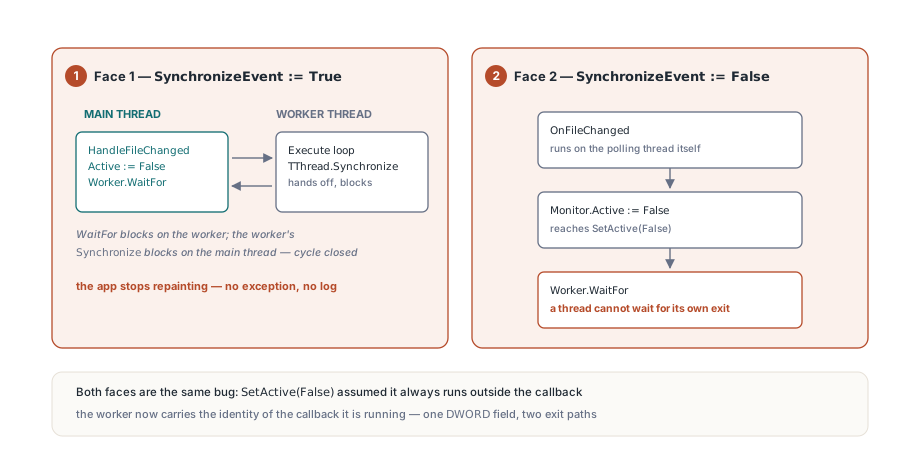
Because the deactivation call and the callback are running on two different threads, and each one is waiting for the other to finish. TXLSFileMonitor ships with SynchronizeEvent set to True, which means the polling thread does not call your handler itself. It calls TThread.Synchronize, hands the method to the main thread, and then blocks until the main thread has run it and signaled completion. That is exactly what you want for a handler that reloads a grid or repaints a form, and it is also what makes the obvious deactivation call a trap
procedure TMainForm.HandleFileChanged(Sender: TObject);
begin
  // We are on the main thread here, courtesy of TThread.Synchronize
  FBook.LoadFromFile(FMonitor.FileName);
  RefreshGrid;
  // The user only wanted one reload, so stop watching
  FMonitor.Active := False;   // used to never return
end;
Trace the two stacks and the cycle is obvious. The main thread is inside SetActive(False), which terminates the worker and then calls Worker.WaitFor to be sure the thread has really exited before the object is freed. The worker thread, meanwhile, is parked inside TThread.Synchronize, waiting for the main thread to return from the very handler that is calling SetActive. Neither side can move. The application does not crash, it does not raise, it simply stops repainting, which is the worst diagnostic signature a bug can have
The same deadlock wears a second face
Turning synchronization off does not avoid the problem, it just relocates it. With SynchronizeEvent set to False — the sensible choice in a service or a console tool with no message loop — TXLSFileMonitor invokes the handler directly on the polling thread. Your handler now runs on the worker, so a call to Monitor.Active := False from inside it reaches Worker.WaitFor on the worker thread itself. A thread cannot wait for its own exit, so it blocks until something outside kills the process. Both variants are the same bug: SetActive(False) assumed it was always being called from somewhere outside the callback. That assumption holds for a Close button or a form destructor and fails for the one call site that people reach for first, which is why it survived so long. Any component that both owns a thread and dispatches user code from it inherits the same hazard, and the resolution is the same in every case — the teardown path has to be able to tell whether it is being run from inside a callback that the thread it is about to join is still holding
Letting the worker thread carry the callback identity
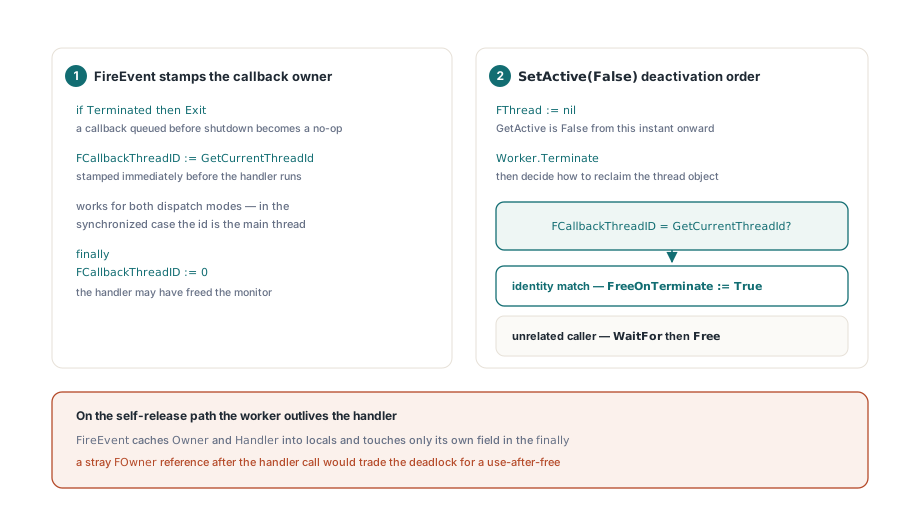
HotXLS solves it by recording, on the thread object itself, which OS thread is currently executing the handler. TXLSFileMonitorThread.FireEvent stamps FCallbackThreadID with GetCurrentThreadId immediately before invoking the handler and clears it in a finally block afterwards. That single field is enough for the deactivation path to distinguish "called from unrelated code" from "called from inside my own callback", and it works identically for both dispatch modes, because in the synchronized case GetCurrentThreadId inside FireEvent already reports the main thread
procedure TXLSFileMonitorThread.FireEvent;
var
  Owner: TXLSFileMonitor;
  Handler: TNotifyEvent;
begin
  // A queued callback may be dispatched by WaitFor during deactivation
  if Terminated then
    Exit;
  Owner := FOwner;
  Handler := Owner.FOnFileChanged;
  if not Assigned(Handler) then
    Exit;
  FCallbackThreadID := GetCurrentThreadId;
  try
    Handler(Owner);
  finally
    // The handler may have destroyed Owner, but this thread stays alive
    FCallbackThreadID := 0;
  end;
end;
The deactivation branch of SetActive then does three things in a deliberate order. It detaches the thread from the monitor by clearing FThread first, so GetActive reports False from that instant onward and a reentrant Active := False inside the same handler exits immediately instead of trying to tear the thread down twice. It calls Terminate. Only then does it decide how to reclaim the thread object
Worker := TXLSFileMonitorThread(FThread);
FThread := nil;            // the monitor is inactive from this point
Worker.Terminate;
FHasBaseline := False;
if Worker.FCallbackThreadID = GetCurrentThreadId then
  // Both direct and synchronized handlers must return before the worker
  // can exit; it releases itself after the callback has unwound
  Worker.FreeOnTerminate := True
else
begin
  Worker.WaitFor;
  Worker.Free;
end;
When the identity matches, HotXLS never waits. It sets FreeOnTerminate := True and returns, letting the handler finish, the Synchronize call complete, Execute observe Terminated, and the RTL free the thread object once the callback stack has fully unwound. When the identity does not match — a Close button, a destructor, a background job — the classic WaitFor plus Free is still the right thing, because it gives you a hard guarantee that no further callback can fire after Active := False returns. Two exit paths, one field to choose between them. One consequence deserves spelling out: on the self-release path the worker outlives the handler. Nothing in the return path of FireEvent may touch the monitor object again, because the handler is entitled to have freed it. That is why FireEvent caches Owner and Handler into locals up front and touches only its own field in the finally clause. A stray FOwner.Something after the handler call would turn a fixed deadlock into a use-after-free, which is a strictly worse outcome
Why must FireEvent check Terminated before it does anything?
Because WaitFor is not a passive wait. On the main thread the RTL implementation of TThread.WaitFor keeps draining the synchronization queue while it blocks, precisely so that a thread parked in Synchronize can complete and exit rather than deadlocking against the shutdown. That is a feature, and it means a callback queued microseconds before you called Active := False from a Close button can still be dispatched during the teardown, after the monitor has already dropped its FThread reference. The guard at the top of FireEvent makes that dispatch a no-op. Without it, an application that closes its main form while a save is landing on the watched file can run a reload handler against half-disposed state, and the resulting access violation looks nothing like a shutdown-ordering problem. If your own component dispatches work through Synchronize, the rule generalizes: every synchronized method needs a Terminated check as its first statement, not because the thread might be gone but because the queue outlives the decision to stop
The same shape of bug in the CSV import path
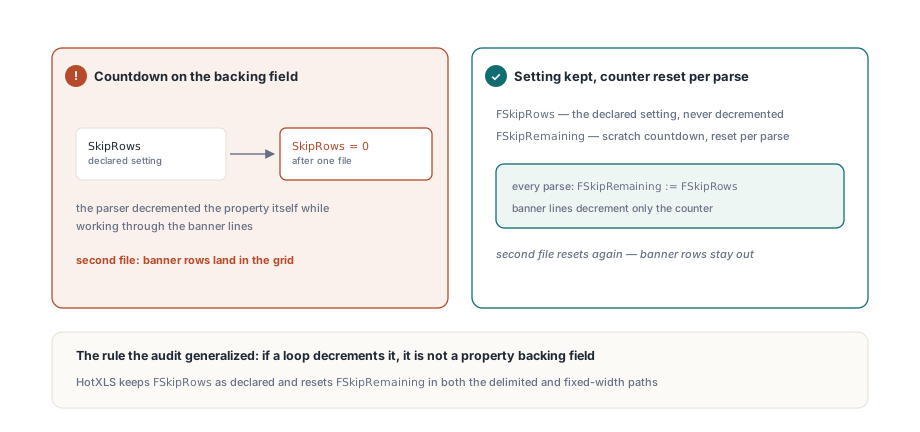
The audit that produced the monitor fix turned up a sibling defect in the text importer, and it is worth reading side by side because the underlying mistake is identical: a piece of configuration being consumed as if it were scratch state. TXLSCSVLoader exposes a SkipRows property for the banner lines that sit above the real header in exported reports. The parser needs a countdown while it works through those lines, and the original implementation counted down on the property backing field itself. Import one file and SkipRows silently became zero; reuse the same loader for a second file and the banner rows landed in the grid
Loader := TXLSCSVLoader.Create;
try
  Loader.SkipRows := 2;             // two banner lines above the header
  Loader.ParseFile('jan-export.csv');
  ReadGrid(Loader);
  // SkipRows is still 2 here: FSkipRemaining is reset per parse
  Loader.ParseFile('feb-export.csv');
  ReadGrid(Loader);
finally
  Loader.Free;
end;
HotXLS now keeps FSkipRows as the declared setting and resets a separate FSkipRemaining counter at the start of each parse, in both the delimited and the fixed-width paths. The general rule is cheap to apply and pays for itself: if a loop decrements it, it is not a property backing field. The same batch also tightened XlsCsvTryParseISODateTime, which had been willing to accept a parseable prefix as a whole date. It now validates the entire field — length, separator positions, and every digit — so that a value such as an order reference that merely begins with something date-shaped stays text instead of becoming a wrong TDateTime. Silent type coercion on import is far more expensive to debug downstream than a rejected field, a theme that also runs through how HotXLS guards a workbook against concurrent readers and writers
What this fix does and does not give you
Be precise about the guarantee. The thread-ownership change makes exactly one previously fatal pattern safe: deactivating or freeing a TXLSFileMonitor from within its own OnFileChanged handler, in either dispatch mode. It is not a general concurrency design, and it does not make the component safe to drive from arbitrary threads
- Property writes are still not thread-safe. Set
FileName,IntervalMs, andSynchronizeEventfrom one thread, normally the one that created the monitor IntervalMsapplies from the next activation, and the worker sleeps in short slices so thatTerminateis honored promptly even with a long poll period- Detection is by last-write time plus size, so a change that preserves both is invisible; a file that vanishes mid-save does not fire, and the event arrives once the new content is in place
- With
SynchronizeEventset toFalseyour handler runs on the worker thread, and every rule about touching VCL controls from a background thread applies to whatever you do inside it - Reloading a workbook from the handler still needs its own discipline, especially if other code holds a reference to the book being replaced
In practice the reload handler is the part that deserves the most care, not the monitor. A change event usually arrives while the writing process is still settling, so a load that opens the file immediately can meet a partially committed save; retrying once after a short delay is more robust than trusting the first stamp. If your own code is the one writing the watched file, the staged temp file and atomic rename described in how HotXLS makes every save crash-safe also give the monitor a clean single-transition event to observe rather than a stream of intermediate sizes. And if several watchers feed the same reload routine, the serialization concerns in the read gate around concurrent ZIP inflation are the next thing to read. The broader lesson survives the specific component. Any class that owns a thread and calls back into user code needs a teardown path that can recognize its own callback frame, because the handler is the most natural place in the world for a user to say stop. Recording the callback thread id costs one DWORD and turns an unexplainable hang into an ordinary object lifetime question. File monitoring, atomic saves, and text import all ship in the HotXLS Delphi Component for Delphi and C++Builder, with no extra configuration to enable any of it