Format 3.14159 with the fraction mask # ??/?? and Excel shows 3 1/7, although 3 14/99 is more than seven times closer, so a Delphi export that searches for the nearest fraction prints a value the user never sees. The reason is that Excel accepts only continued-fraction convergents; in HotXLS, TXLSXCell.FormattedText returns the same 3 1/7, padding spaces and all
Excel stops at continued-fraction convergents
Every approximating fraction mask gives Excel the same job: find a numerator and a denominator for the part after the integer, with the denominator capped by the number of digit slots after the slash. Excel does it by expanding the value as a continued fraction and keeping only the convergents, the fractions you get by cutting that expansion off after each term. For 0.14159 the expansion starts [0; 7, 15, 1, ...], which yields 1/7, then 15/106, then 16/113. The integer 3 changes nothing. With it, 3.14159 runs through the same 22/7, 333/106 and 355/113 found in every table of approximations to pi. Since 106 already overflows a two-digit denominator, Excel keeps 1/7. The closer 14/99 is a semiconvergent, one of the intermediate fractions that sit between two neighboring convergents. Excel never visits those. You do not need a custom code to run into this: the Up to one digit and Up to two digits types in the Format Cells dialog are the built-in format IDs 12 and 13, # ?/? and # ??/??, in the predefined number format list of ECMA-376 Part 1 §18.8.30
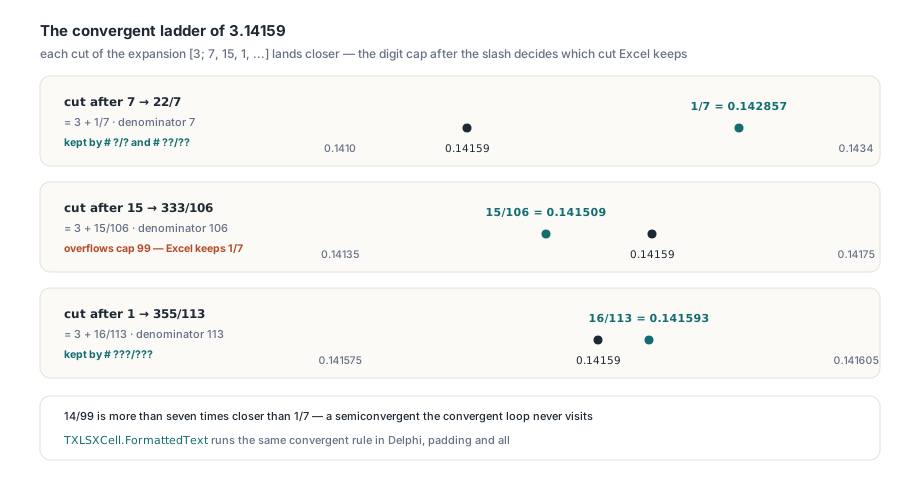
The gap is not limited to pi-like inputs. Best approximation, typically a Stern-Brocot walk or a scan over every allowed denominator, asks which fraction is nearest, while the convergent loop asks which fraction the expansion reaches first while the denominator still fits. On ordinary two-decimal inputs the two rules split often enough to matter, and 0.27 in the code below is one such value. If your code writes fractions into a PDF invoice, an HTML report or a CSV that someone will hold up against the workbook, copy Excel's rule there, even though it is the less accurate one. A reader who sees 3 14/99 on paper and 3 1/7 in Excel does not conclude that your export is more precise. They conclude that one of the two is broken. It will not be Excel
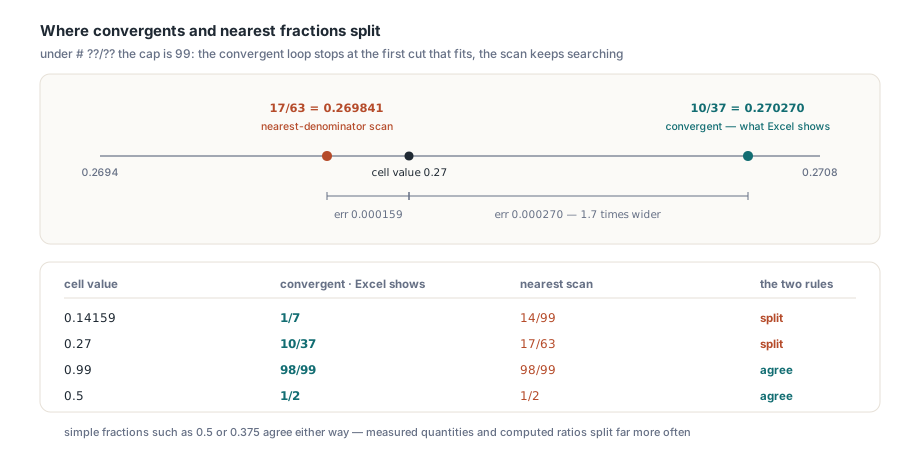
The loop itself is short. Count the digit placeholders after the slash, whether ?, # or 0, and the cap is 9, 99 or 999 for one, two or three of them. A mixed mask such as # ??/?? splits off the integer and expands only the fractional part; an improper mask such as ?/? expands the whole value, which is why 3.14159 under ?/? comes out as 22/7. Each step takes the integer part A of the running value B and folds it into the next convergent. The loop stops once the remainder B − A drops below 5e-8, so a simple fraction plus floating-point noise still lands on that fraction. When a step pushes the denominator past the cap, Excel falls back to the previous convergent, and that fallback can land on 1/1, which a mixed mask carries into the integer, so 12.9999 under # ?/? shows 13. Below, the loop is written out in plain Delphi next to a brute-force nearest-fraction search, so you can see where the two diverge on your own numbers
uses
  SysUtils;

type
  TFraction = record
    Num, Den: Int64;
  end;

// The convergent rule behind Excel's # ?/?, # ??/?? and # ???/??? masks.
// X is non-negative: the fractional part for a mixed mask, the whole value
// for an improper one. MaxDen is 9, 99 or 999.
function ExcelFraction(X: Double; MaxDen: Integer): TFraction;
var
  B, R: Double;
  A, P, Q, P1, Q1, P2, Q2: Int64;
begin
  B := X;
  P2 := 0; Q2 := 1;      // convergent k-2
  P1 := 1; Q1 := 0;      // convergent k-1
  P := 0;  Q := 1;
  while Q1 < MaxDen do
  begin
    A := Trunc(B);
    P := A * P1 + P2;
    Q := A * Q1 + Q2;
    R := B - A;
    if R < 5E-8 then
      Break;               // the remainder counts as zero
    B := 1 / R;
    P2 := P1; Q2 := Q1;
    P1 := P;  Q1 := Q;
  end;
  if Q > MaxDen then       // overshot the cap: step back one convergent
    if Q1 > MaxDen then
    begin
      P := P2; Q := Q2;
    end
    else
    begin
      P := P1; Q := Q1;
    end;
  Result.Num := P;
  Result.Den := Q;
end;

// What a "best approximation" routine returns: the nearest N/D with D <= MaxDen
function NearestFraction(X: Double; MaxDen: Integer): TFraction;
var
  D: Integer;
  N: Int64;
  Err, BestErr: Double;
begin
  Result.Num := Round(X);
  Result.Den := 1;
  BestErr := Abs(X - Result.Num);
  for D := 2 to MaxDen do
  begin
    N := Round(X * D);
    Err := Abs(X - N / D);
    if Err < BestErr then  // strict: the reduced form wins ties
    begin
      BestErr := Err;
      Result.Num := N;
      Result.Den := D;
    end;
  end;
end;

procedure CompareFractionRules;
const
  Samples: array[0..3] of Double = (0.14159, 0.99, 0.27, 0.5);
var
  I: Integer;
  E, N: TFraction;
begin
  for I := Low(Samples) to High(Samples) do
  begin
    E := ExcelFraction(Samples[I], 99);
    N := NearestFraction(Samples[I], 99);
    Writeln(Format('%-8g Excel %d/%d   nearest %d/%d',
      [Samples[I], E.Num, E.Den, N.Num, N.Den]));
  end;
end;

// Expected:
// 0.14159  Excel 1/7   nearest 14/99
// 0.99     Excel 98/99   nearest 98/99
// 0.27     Excel 10/37   nearest 17/63
// 0.5      Excel 1/2   nearest 1/2
The 0.27 line is in the list because an ordinary two-decimal input diverges too, 10/37 against 17/63, with nothing exotic about the value. How often the rules split depends on your data: true simple fractions such as 0.5 or 0.375 come out the same either way, measured quantities and computed ratios far less reliably. Trunc stands in for Floor because the input is never negative. Excel handles the sign outside the fraction. So should your code. And the argument has to be the Double the cell actually stores, for a reason the next section makes concrete
What happens to 0.99 in a two-digit fraction?
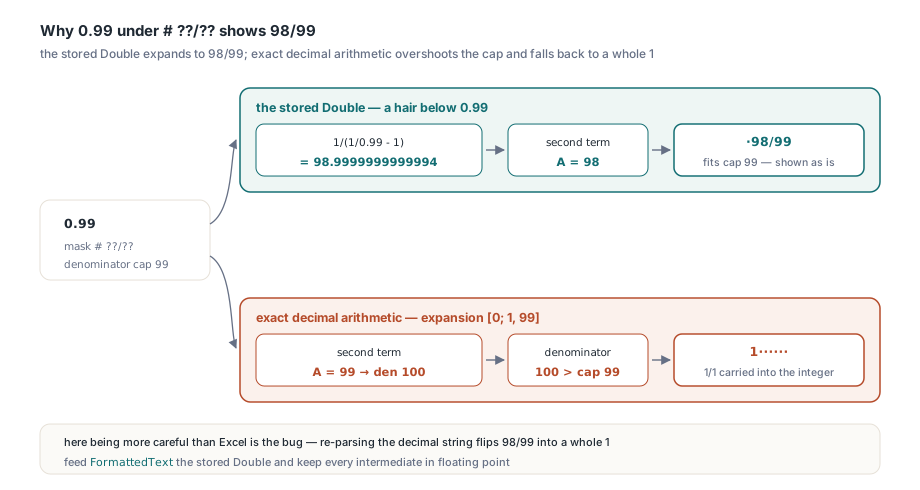
Excel shows 0.99 under # ??/?? as ·98/99 (every · in this article stands for one space character). The cause is binary floating point. The literal 0.99 has no exact Double, and the stored value sits a hair below it. So 1/(1/0.99 − 1) evaluates to roughly 98.9999999999994 instead of 99, the second term of the expansion becomes 98, and the convergent 98/99 fits under the cap. Do the same expansion with exact decimals and you get [0; 1, 99]: that 99 pushes the denominator to 100, the loop falls back to 1/1, and the cell would read 1······. Here, being more careful than Excel is the bug. A report generator that holds amounts as Currency or TBcd, or re-parses the decimal string from the database and expands it with exact arithmetic, prints a whole 1 where Excel prints 98/99. Feed the formatter the stored Double. Keep every intermediate in floating point. The fraction stays a display matter, too: formulas still see 0.99, and HotXLS keeps fraction sections at full precision even in a workbook with precision as displayed switched on
How Excel pads and aligns the fraction area
Excel lays fractions out the way a column of decimals is laid out: the numerator is right-aligned in its slots, the denominator left-aligned, so the slash lands in the same position on every row. Each unused slot is filled according to its placeholder. A ? leaves a space, a 0 writes a zero, a # writes nothing. That is why 3.14159 under # ??/?? reads 3··1/7·: one space is the separator from the mask, one fills the empty numerator slot in front of the 1, and one fills the empty denominator slot after the 7. The table lists the text Excel displays for a set of inputs that cover the layout rules
| Format code | Value | Excel shows |
|---|---|---|
# ?/? | 0.5 | ·1/2 |
# ?/? | 4/3 | 1·1/3 |
# ??/?? | 3.14159 | 3··1/7· |
# ??/?? | 0.99 | ·98/99 |
# ?/? | 12 | 12···· |
# ?/? | 0 | 0···· |
# ?/? | 12.9999 | 13···· |
# #/# | 12 | 12 |
0 ?/? | 0.5 | 0·1/2 |
#,##0 ?/? | 1234.75 | 1,234·3/4 |
?/? | 3.14159 | 22/7 |
?/? | 0 | 0/1 |
??/?? | 12 | 12/1· |
Whole numbers are where hand-written formatters drift furthest from Excel. Under a mixed mask whose numerator uses ?, Excel keeps the integer digits, zero included, and swaps the separator, numerator, slash and denominator for one space each, so 12 under # ?/? becomes 12···· and under # ??/100 it is followed by seven spaces. Switch the numerator placeholder to # and the padding goes away. A zero integer works the other way round: the # slot prints nothing for 0.5 and the separator survives only as a space, while 0 ?/? forces the digit, and improper masks never drop the fraction at all
What to do with that padding depends on where the text goes. Keep it for monospaced text reports and for right-aligned PDF table cells. Lining up the slashes is the whole point there. Trim it for CSV and JSON, where a trailing space turns 12 into a string that no longer parses as a number. HTML needs a decision too, because the browser collapses runs of spaces unless the cell uses white-space: pre; set that or trim, but avoid half-collapsed padding that misaligns some rows and not others
Fixed denominators such as # ?/8
A denominator written as digits starting with 1 to 9 is a fixed value instead of a cap. The arithmetic changes completely: Excel multiplies the value by the denominator, rounds to the nearest whole numerator and leaves the fraction unreduced. Under 0/8, 0.375 shows 3/8 and 0.64 shows 5/8, because 0.64 × 8 is 5.12. The stock As sixteenths type shows 0.5 as 8/16, which is what a machinist reading a drawing expects and what a formatter that reduces every result would turn into 1/2. A rounded numerator can reach the denominator. Then a mixed mask carries it into the integer: 2.97 under # ?/8 is expected to read 3····, since 0.97 × 8 = 7.76 rounds up to a full eight. Choose between the two families by what the denominator means to the reader. Fixed denominators fit anything quoted in fixed steps, such as imperial lengths, drill sizes or old share prices in eighths. Nobody reading lumber dimensions wants 3/7 of an inch. The approximating masks suit ratios and measured values where no particular denominator carries meaning
Reading Excel's fraction text in Delphi with FormattedText
In HotXLS you seldom need the loop yourself. TXLSXCell.FormattedText renders the stored value through the cell's NumberFormat using TXLSFormater.GetDisplayValue from lxStandard.pas, so the convergent choice, the padding and any literal text arrive together in one string. The procedure below assigns pairs of value and mask to cells and prints each result between brackets so trailing spaces stay visible. A new TXLSXWorkbook starts without worksheets, which is why the code calls Sheets.Add before touching a cell; Sheets.Items and Cells[Row, Col] are both 1-based
uses
  SysUtils, lxHandleX;

type
  TFractionCase = record
    Mask: string;
    Value: Double;
  end;

const
  Cases: array[0..8] of TFractionCase = (
    (Mask: '# ??/??';        Value: 3.14159),
    (Mask: '# ??/??';        Value: 0.99),
    (Mask: '# ?/?';          Value: 12),
    (Mask: '# ?/?';          Value: 12.9999),
    (Mask: '# #/#';          Value: 12),
    (Mask: '?/?';            Value: 3.14159),
    (Mask: '0/8';            Value: 0.64),
    (Mask: '"x"# ?/?" y"';   Value: -12),
    (Mask: '# ?/?;(# ?/?)';  Value: -1.5));

procedure ShowFractionText;
var
  Book: TXLSXWorkbook;
  Sheet: TXLSXWorksheet;
  Cell: TXLSXCell;
  I: Integer;
begin
  Book := TXLSXWorkbook.Create;
  try
    Sheet := Book.Sheets.Add('Fractions');   // a new workbook has no sheets yet
    for I := Low(Cases) to High(Cases) do
    begin
      Cell := Sheet.Cells[I + 1, 1];          // rows and columns start at 1
      Cell.Value := Cases[I].Value;
      Cell.NumberFormat := Cases[I].Mask;
      Writeln(Format('%-16s %9g  [%s]',
        [Cases[I].Mask, Cases[I].Value, Cell.FormattedText]));
    end;
  finally
    Book.Free;
  end;
end;

// Expected:
// # ??/??            3.14159  [3  1/7 ]
// # ??/??               0.99  [ 98/99]
// # ?/?                   12  [12    ]
// # ?/?              12.9999  [13    ]
// # #/#                   12  [12]
// ?/?                3.14159  [22/7]
// 0/8                   0.64  [5/8]
// "x"# ?/?" y"           -12  [-x12     y]
// # ?/?;(# ?/?)         -1.5  [(1 1/2)]
The last two cases show what surrounds the fraction. Quoted text and backslash escapes print as plain characters, and a whole value's padding lands before the suffix, so "x"# ?/?" y" turns -12 into -x12·····y. The minus sign goes in front of everything, prefix included, unless an explicit negative section such as (# ?/?) spells the sign itself; fractions follow the same section and minus-sign rules as every other Excel number format. When the value comes from a dataset rather than from a cell, skip the workbook: TXLSFormater has a parameterless constructor, and GetDisplayValue(Value, NumberFormat) is the call FormattedText makes for numeric values
uses
  SysUtils, lxStandard;

function FractionText(const AValue: Double; const AMask: WideString): WideString;
var
  Fmt: TXLSFormater;
begin
  Fmt := TXLSFormater.Create;
  try
    Result := Fmt.GetDisplayValue(AValue, AMask);
  finally
    Fmt.Free;
  end;
end;

// FractionText(0.5, '# ?/?')                Expected: ' 1/2'
// FractionText(1234.75, '#,##0 ?/?')        Expected: '1,234 3/4'
// Trim(FractionText(12, '# ?/?'))           Expected: '12'  (CSV-friendly)
Any fraction your Delphi code prints outside Excel should come from the convergent loop or straight from FormattedText, fed with the cell's own Double. Then the 3 1/7 on paper is the 3 1/7 in the grid, and with the HotXLS Delphi spreadsheet component you get that text without writing the loop at all