Sometimes the deliverable is not a document, it is a picture of a table. A summary block in a status email, a rendered KPI panel in a dashboard, a thumbnail beside a search result: all of them want the cells and none of them want paper. TXLSCellImageExporter in HotXLS takes a classic or XLSX cell rectangle and produces one compact PNG or JPEG with no page size, no margins, no headers or footers, no print titles and no page breaks. Resolution, scale, format and JPEG quality are configurable, objects, gridlines and cell borders have independent switches, the background can be a color or transparent, and the file write goes through an atomic same-folder replacement that leaves an existing target untouched if anything fails
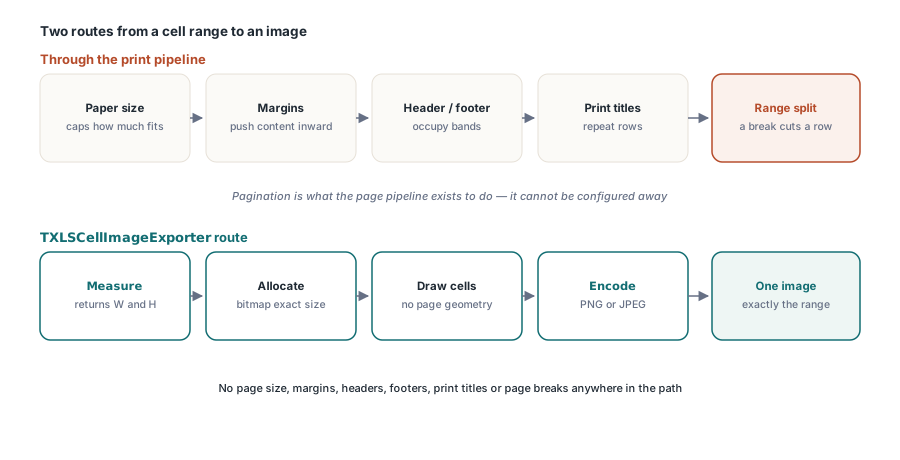
The reason this needs its own exporter rather than a flag on the printing path is that pagination is not an optional layer you can switch off. It is the thing the page pipeline exists to do
Why not render the range through the print pipeline?
Because the print pipeline inserts a page between you and the cells. Paper size decides how much fits, margins push the content inward, headers and footers occupy bands you did not ask for, print titles repeat rows you already have, and page breaks split the range. A summary block that happens to straddle a break comes out as two images with the interesting row cut in half. You can compensate for all of that by setting up a custom page size that exactly matches the range, and people do, but that means recomputing paper geometry every time the range changes and it still leaves the header band and print-title logic in the path
The cell exporter measures the rectangle, allocates a bitmap of exactly that size, draws the cells into it, and encodes. There is no page, so there is nothing to configure away. For the cases where you do want paper, the PDF export path is the right tool and is covered in the worksheet PDF export article
Measure before you render
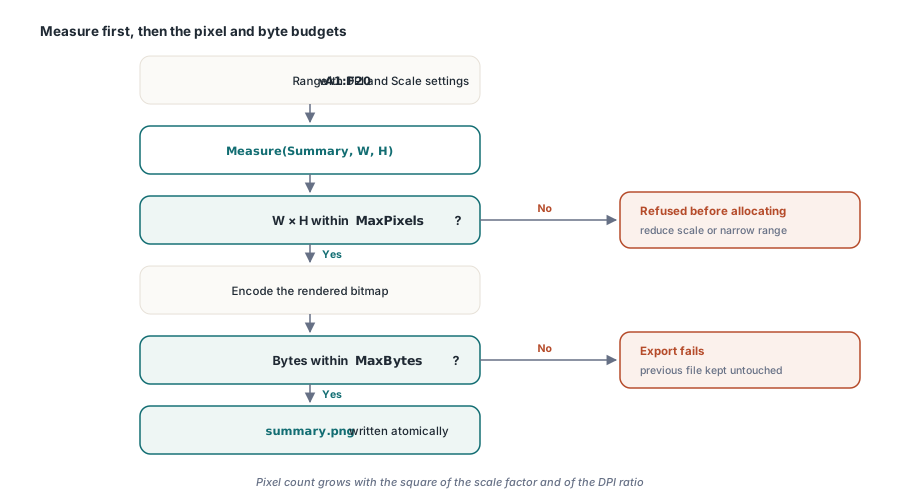
Measure returns the pixel dimensions the current settings would produce without encoding anything. That matters for two reasons. An HTML or email template usually needs the image dimensions before the image exists, so it can reserve the box and avoid layout shift. And a service that renders user-selected ranges needs a way to reject an absurd request before allocating for it
uses
  lxHandleX, lxPagination;

var
  Book: TXLSXWorkbook;
  Sheet: TXLSXWorksheet;
  Exporter: TXLSCellImageExporter;
  Summary: TXLSXRange;
  W, H, Bytes: Integer;
begin
  Book := TXLSXWorkbook.Create;
  try
    Book.Open('quarter.xlsx');
    Sheet := Book.Sheets.ByPos[0];
    Summary := Sheet.Range['A1:F20'];

    Exporter := TXLSCellImageExporter.Create;
    try
      Exporter.ImageFormat := xpifPng;   // PNG keeps thin strokes crisp
      Exporter.DPI := 96;
      Exporter.Scale := 2.0;             // retina-density output
      Exporter.IncludeGridlines := False;
      Exporter.IncludeCellBorders := True;
      Exporter.TransparentBackground := True;
      Exporter.MaxPixels := 40 * 1000 * 1000;
      Exporter.MaxBytes := 8 * 1024 * 1024;

      if not Exporter.Measure(Summary, W, H) then
        raise Exception.Create('range exceeds the configured budget');
      // W and H are now known; reserve the layout box before encoding
      Bytes := Exporter.Save(Summary, 'summary.png');
      if Bytes <= 0 then
        raise Exception.Create('image export failed, previous file kept');
    finally
      Exporter.Free;
    end;
  finally
    Book.Free;
  end;
end;
Budgets, because scale multiplies
MaxPixels and MaxBytes are not defensive decoration. Pixel count grows with the square of the scale factor and with the square of the resolution ratio, so a range that is a reasonable 1200 by 800 at 96 DPI becomes roughly 47 megapixels at 600 DPI, and a user who selects a whole used range instead of a summary block adds another order of magnitude on top of that. Without a cap the failure mode is an allocation the process cannot satisfy, which takes down whatever else that process was doing
With a cap the request fails and the caller gets to choose: refuse, reduce the scale, or narrow the range. That is a much better position for a report server, and it is the same reasoning behind the explicit budgets in the metafile decoder described in the bounded EMF and WMF decoder article
Atomic replacement, and why the folder matters
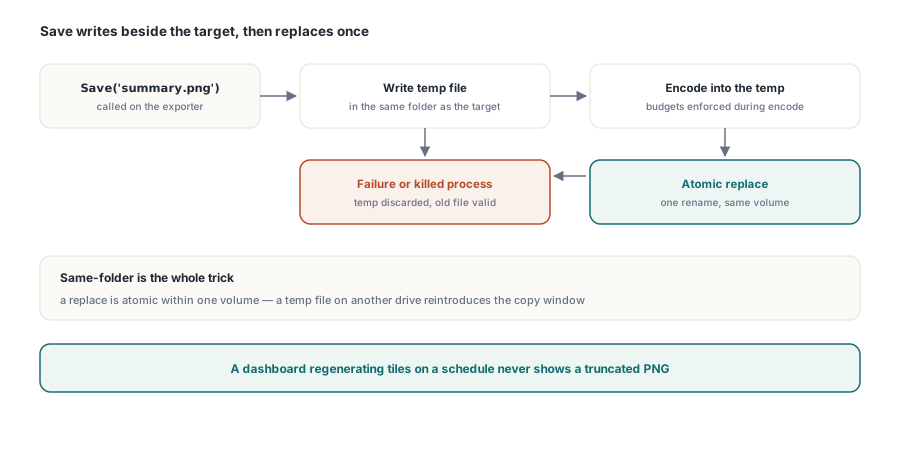
Save to a file name does not write into the target. It writes a temporary file in the same folder, encodes into it, and only then replaces the target. If encoding fails, if the budget is exceeded midway, or if the process is killed, the previous image is still there and still valid. A dashboard that regenerates its tiles on a schedule therefore never shows a truncated PNG, which is the usual symptom of a naive write that opens the destination and starts streaming
The same-folder detail is not incidental. An atomic replace is only atomic within one volume, because across volumes the operating system has to copy and then delete, which reintroduces the window you were trying to close. Any implementation of this pattern that puts its temporary file in the system temp directory is not atomic on a machine where the output lives on a different drive
Paint events draw on the real canvas
Both the range exporter and the page exporter expose leading and trailing paint events, and they receive a full read-only context rather than just a canvas handle. TXLSPagePaintContext carries the live canvas, the pixel bounds, the page size in points, the resolution and scale actually in use, the document page number, the in-sheet page number, the total page count, the sheet name and the originating worksheet in both classic and XLSX flavors. That is enough to draw a watermark that scales correctly, or a page stamp that knows where it is in the run
procedure TReportJob.StampDraft(Sender: TObject;
  const AContext: TXLSPagePaintContext);
begin
  // Scale-aware, so the stamp looks the same at 1x and 3x
  AContext.Canvas.Font.Height := Round(-48 * AContext.Scale);
  AContext.Canvas.Font.Color := clSilver;
  AContext.Canvas.Brush.Style := bsClear;
  AContext.Canvas.TextOut(AContext.Bounds.Left + Round(24 * AContext.Scale),
    AContext.Bounds.Top + Round(24 * AContext.Scale), 'DRAFT');
end;

Exporter.AfterPaint := Job.StampDraft;
Three behaviors are worth relying on. The events fire exactly once per rendered frame, including each frame of a multipage TIFF, so a counter incremented in the handler is trustworthy. They stay silent during measurement, so a handler with a side effect does not run twice for one output. And if the leading event raises, the trailing event does not fire and no partial image bytes are written, so an exception in your own drawing code cannot produce a half-stamped file
Choosing the format
PNG for anything text-heavy. JPEG applies a block transform that produces visible ringing around thin high-contrast strokes, which is exactly what cell borders and small text are, and the artifacts survive at quality settings where a photograph looks perfect. JPEG earns its place when the range is dominated by embedded photographs and file size matters more than edge fidelity. Transparent backgrounds require PNG, since JPEG has no alpha channel, so a tile meant to sit on a colored surface has made the choice for you
If your range contains merged cells, check the output against the sheet: merged regions interact with column widths in ways that surprise people, and the layout rules are covered in the merged cells and report templates article. HotXLS reads and writes XLS, XLSX, ODS and CSV from Delphi and C++Builder with no Excel dependency, and the full exporter surface is documented on the HotXLS Delphi spreadsheet component product page