A grinning-face emoji written into a PDF with an ordinary text call, using Segoe UI Emoji as the font, comes out as a flat black silhouette: right shape, no yellow, no shading. Swap in a CBDT emoji font and the same call may draw nothing at all, because that font keeps its pictures as PNG files and ships little or no outline data. Copy the black shape out of the viewer and the clipboard still holds U+1F600: the character is right, only the color tables were never read
Why does a color emoji print as a black silhouette in PDF?
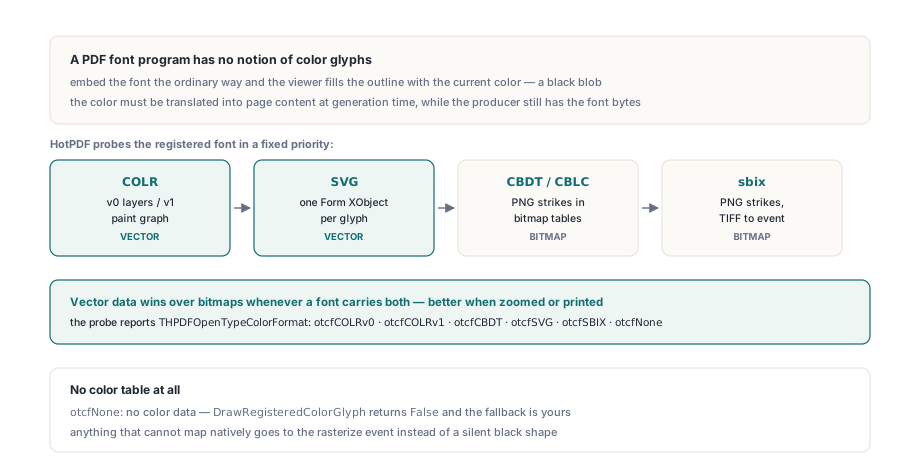
Because a PDF font program has no notion of a colored glyph. ISO 32000-1 treats every glyph as a shape painted with the current fill color, and the color tables OpenType added later (COLR/CPAL, SVG , CBDT/CBLC and sbix) are not part of the PDF imaging model, so no viewer has any reason to read them out of an embedded font. Whatever color the emoji has must be turned into page content while the PDF is being written, at a point where the producer still holds the font bytes and knows exactly which glyph it wants. That translation is different for each format, and real emoji fonts use all four: stacked vector layers, gradient paint graphs, whole SVG documents and PNG strikes
HotPDF does that translation in THotPDF.DrawRegisteredColorGlyph. It reports which format a glyph resolved to as THPDFOpenTypeColorFormat, with the values otcfNone, otcfCOLRv0, otcfCOLRv1, otcfCBDT, otcfSVG and otcfSBIX, and it probes the font in a fixed order: COLR, then SVG, then CBDT, then sbix. A font that carries both vectors and bitmaps therefore gets the vector path. For anything that will be zoomed or printed, that is the right order
Resolving and drawing a single code point
THotPDF.GetRegisteredColorGlyphInfo tells you which path a code point will take; DrawRegisteredColorGlyph takes it. Both look the code point up in the character map of the font most recently passed to RegisterUnicodeTTF, so the emoji font has to be the registered Unicode font at the moment of the call. The draw function returns False when the glyph has no color data or nothing could render it, and the page is left untouched in that case
const
  FormatNames: array[THPDFOpenTypeColorFormat] of string =
    ('none', 'COLR v0', 'COLR v1', 'CBDT', 'SVG', 'sbix');
var
  Pdf: THotPDF;
  Info: THPDFOpenTypeColorGlyphInfo;
begin
  Pdf := THotPDF.Create(nil);
  try
    Pdf.AutoLaunch := False;
    Pdf.FileName := 'emoji.pdf';
    // Palette entry 0xFFFF ("text foreground") resolves to this color
    Pdf.ColorGlyphForegroundColor := clNavy;
    Pdf.BeginDoc;
    Pdf.RegisterUnicodeTTF('C:\Windows\Fonts\seguiemj.ttf');

    // U+1F600, CPAL palette 0, bitmap strike closest to 300 ppem
    if Pdf.GetRegisteredColorGlyphInfo($1F600, 0, 300, Info) then
      Writeln(Format('GID %d via %s',
        [Info.GlyphID, FormatNames[Info.Format]]));

    if not Pdf.DrawRegisteredColorGlyph(Pdf.CurrentPage, $1F600,
      72, 144, 'Segoe UI Emoji', 36, 0, 300) then
    begin
      // No color path: fall back to the monochrome outline
      Pdf.CurrentPage.SetFont('Segoe UI Emoji', [], 36, DEFAULT_CHARSET);
      Pdf.CurrentPage.TextOut(72, 144, 0, WideString(#$D83D#$DE00));
    end;
    Pdf.EndDoc;
  finally
    Pdf.Free;
  end;
end;
PaletteIndex picks a CPAL palette, so a font that ships a dark-background palette can be switched without touching the glyph. Palette entry 0xFFFF is special in the OpenType specification: it means "whatever the text color is", and HotPDF fills it from ColorGlyphForegroundColor and ColorGlyphForegroundAlpha (black and 255 by default). Emoji fonts rarely use that entry. Icon fonts do, and if yours tints glyphs through it, set the property to your text color before drawing
TargetPixelsPerEm matters only for bitmap fonts, and its default is the parameter most worth overriding. Left at zero it becomes Round(FontSize * 96 / 72), a screen resolution: 48 pixels for a 36-point emoji. For a font that declares sbix strikes at 20, 32, 40, 48, 64, 96 and 160 ppem, that default selects the 48-pixel strike, and a 600 dpi printer then has to enlarge it about six times. Ask for 300, which is what 36 points needs at 600 dpi, and the same call takes the 160 strike, the largest one the font has
The signature also fixes the scope. One code point goes in and is mapped through cmap. ZWJ family sequences, skin-tone modifiers and regional-indicator flags are GSUB ligatures, so they have to be shaped to a glyph first, the kind of work covered in the OpenType GSUB alternates article
COLR layers and paint graphs as PDF vectors
COLR v0 is the simple format. Each base glyph lists a stack of layer glyphs, each with a CPAL color, and HotPDF fills each layer's outline in table order. A layer whose CPAL color has alpha below 255 gets its own /ca, so translucent layers blend with the layers beneath them exactly as the font designer intended. In an ordinary document the whole stack is then captured into one isolated transparency group (ISO 32000-1 §11.4). The group is about what happens outside the glyph: an opacity, blend mode or soft mask you set around the emoji is applied once to the finished glyph, instead of being repeated on every layer and doubling up wherever layers overlap
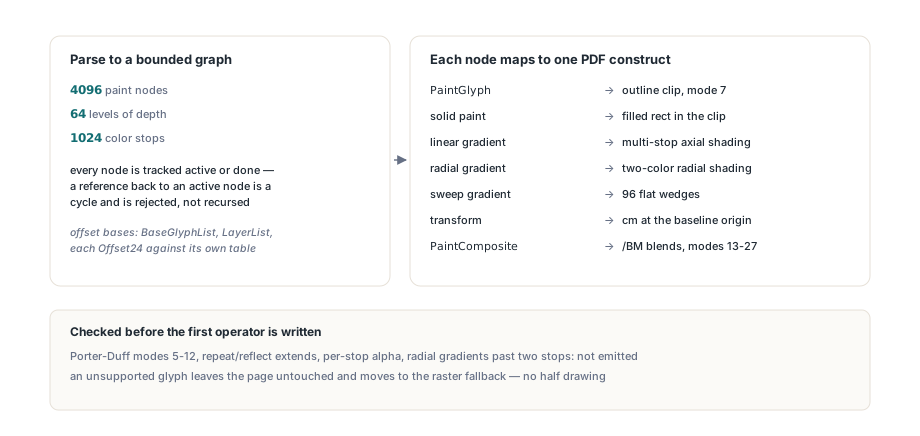
COLR v1 is a different animal: a directed acyclic graph of paint records with gradients, transforms, nested glyph clips and composite modes, where nodes can be shared through PaintColrLayers and PaintColrGlyph. HotPDF parses it into a bounded graph first, capped at 4096 paint nodes, 96 levels of depth and 1024 color stops, and tracks each node while it is being visited so that a reference back into the current path (a cycle a hostile font can build out of layer reuse) is rejected instead of recursed into
Offsets are where hand-written COLR v1 parsers usually break. BaseGlyphPaintRecord offsets are relative to the start of BaseGlyphList, LayerList paint offsets to LayerList, and every Offset24 inside a paint table to that paint table itself. Resolve all three against one base and perfectly legal glyphs fail their bounds checks, which looks exactly like a corrupt font. Once the graph is built, the mapping to PDF is mostly direct:
PaintGlyphturns the glyph outline into a clipping path, and its child paint fills the clipped area- Linear gradients become multi-stop axial shadings and radial gradients become radial shadings (§8.7.4.5)
- Sweep gradients have no PDF shading type, so they are drawn as 96 flat-colored wedges around the center, each sampled from the color line
- Transforms become
cmoperators, with translations scaled byFontSize / UnitsPerEm PaintCompositemodes 13 to 27 map to the PDF blend modes of the same name,/Multiply,/Screen,/Luminosityand the rest (§11.3.5), through an ExtGState/BMentry
Gradients with translucent stops hide one more trap. COLR v1 interpolates colors premultiplied by alpha, while PDF expects straight color and applies alpha itself, so a converter that hands the premultiplied values to PDF gets every semi-transparent band darkened twice. The colors have to be un-premultiplied after interpolation and before they are written
What happens to COLR v1 composite modes under PDF/A-1 or PDF/X-1a?
The Porter-Duff modes in PaintComposite (5 to 12: src_in, dest_out, src_atop, xor, plus and their siblings) have no PDF blend mode with the same name, and the obvious reading of the PDF specification is that they cannot be expressed. That reading is too strong. In/out modes are an alpha soft mask over one operand; atop, xor and plus can be assembled from isolated forms, group alpha, luminosity masks and blend arithmetic. HotPDF builds them that way, so these glyphs stay vector
The cost is that most of those constructions need PDF transparency, and PDF/A-1, PDF/X-1a and PDF/X-3 forbid it. When PDFACompliance is a PDF/A-1 value or PDFXCompliance is 'X-1a' or 'X-3', HotPDF checks the glyph before drawing and routes the cases that cannot be drawn without transparency to the raster event: atop, xor and plus composites, in/out composites whose masked operand is more than a simple opaque paint, solid paints with partial alpha, gradients with translucent stops, and COLR v0 layers with alpha below 255. The in and out modes stay vector when the masked side is a plain solid color or gradient, optionally wrapped in a glyph clip or transform, because that case needs only an opaque grayscale mask. The same applies to COLR v0 when StrictVersionLock pins the file below PDF 1.4
Pdf.PDFACompliance := 'B';   // PDF/A-1b: no transparency allowed
Pdf.BeginDoc;
Pdf.RegisterUnicodeTTF(EmojiFontPath);

if not Pdf.DrawRegisteredColorGlyph(Pdf.CurrentPage, $1F308,
  72, 200, EmojiFontName, 36, 0, 300) then
  // Without an OnColorGlyphRasterize handler, a translucent
  // or composited glyph ends here under PDF/A-1
  LogMissingColorGlyph($1F308);   // your own logging routine
If the archive has to show emoji in color, target PDF/A-2b instead of PDF/A-1b. Part 2 allows transparency, every COLR construct stays vector, and the fallback handler becomes a safety net rather than the main renderer for every translucent emoji. Keep PDF/A-1 for workflows that require it by name
One reader-side setting belongs here too. HotPDF composites COLR v1 groups in a linear-light blend space; some renderers lose very dark channels in such groups and some ignore group blend spaces entirely, so COLRv1DeviceSpaceGroupBlend (default False) lets the groups composite in the ordinary device space. The trade-off is explained in the COLR v1 repeat and reflect gradients article; turn it on if dark translucent tints vanish in the viewer your users actually run
SVG glyphs and bitmap strikes
SVG glyphs go through the same safe builder HotPDF uses for imported SVG files, and the result is registered as a Form XObject (§8.10), as described in the SVG to Form XObject article. The document in the SVG table may be gzip-compressed. Compressed input is capped at 8 MB, decompression runs in 8 KB chunks, and it stops as soon as the expanded size would pass 32 MB. Scripts, foreignObject, javascript: URLs and @import stylesheets make the builder refuse the document outright. The form is scaled so that its longer side equals the font size. One thing to try before production: some fonts pack many glyphs into one shared SVG document, and the builder receives that whole document for each glyph
Bitmap fonts come down to strike choice and placement. For CBDT, HotPDF picks the CBLC size whose vertical ppem is closest to TargetPixelsPerEm, accepts image formats 17, 18 and 19, and reads format 19 metrics from the CBLC index subtable because that format stores none of its own. For sbix the closest strike that actually contains the glyph wins; strike offsets are relative to the table and glyph offsets to the strike. A dupe record reuses another glyph's image but keeps its own origin offsets, and a parser that lets the lookup overwrite the outer origin shifts the image sideways. PNG and JPEG payloads are decoded internally, scaled by FontSize / PixelsPerEmY rather than stretched to the font size, and written with a soft mask (§11.6.5.3) whenever any pixel is less than fully opaque. TIFF payloads in sbix go to the event
Writing the raster fallback handler
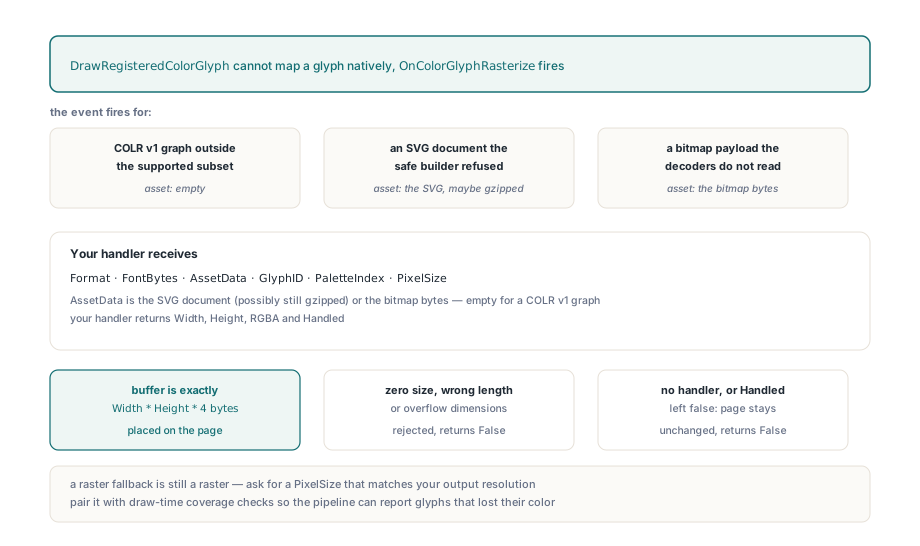
When no native path works, HotPDF raises OnColorGlyphRasterize and places the RGBA bitmap your handler returns. Without a handler, or with Handled left False, DrawRegisteredColorGlyph returns False and nothing is drawn. The handler receives the format, the font bytes, the extracted asset (the SVG document, possibly still gzipped, or the bitmap bytes; empty for COLR), the glyph ID, the palette and the target pixel size
type
  TEmojiFallback = class
  public
    procedure Rasterize(Sender: TObject;
      Format: THPDFOpenTypeColorFormat; const FontBytes: TBytes;
      const AssetData: TBytes; GlyphID: Word;
      PaletteIndex, PixelSize: Integer;
      out Width, Height: Integer; out RGBA: TBytes;
      out Handled: Boolean);
  end;

procedure TEmojiFallback.Rasterize(Sender: TObject;
  Format: THPDFOpenTypeColorFormat; const FontBytes: TBytes;
  const AssetData: TBytes; GlyphID: Word;
  PaletteIndex, PixelSize: Integer;
  out Width, Height: Integer; out RGBA: TBytes;
  out Handled: Boolean);
begin
  Width := 0;
  Height := 0;
  RGBA := nil;
  // RenderWithOwnEngine is your rasterizer, not a HotPDF API.
  // It must return exactly Width * Height * 4 bytes of RGBA
  // with straight (not premultiplied) alpha
  Handled := RenderWithOwnEngine(Format, FontBytes, AssetData,
    GlyphID, PaletteIndex, PixelSize, Width, Height, RGBA);
end;

// Wiring
Pdf.OnColorGlyphRasterize := Fallback.Rasterize;
HotPDF validates the result before the page sees it: zero sizes, a buffer whose length is not exactly Width * Height * 4, or dimensions large enough to overflow are rejected, and the call returns False. For a variable color font the handler gets the static instance at the registered axis values; if it ever receives the original variable font instead, calling GetRegisteredVariableFontAxes on Sender (cast to THotPDF) returns the coordinates to render at. PixelSize is the same TargetPixelsPerEm value, so the print-resolution advice above applies here too
A pipeline that prints arbitrary user text needs to know about two kinds of loss: glyphs the font never had, and glyphs that lost their color. Draw-time coverage tracking from the missing glyph tracking article reports the first; a False from DrawRegisteredColorGlyph reports the second
COLR, SVG and bitmap emoji rendering, OpenType shaping and the safe SVG builder are all part of the HotPDF component for Delphi and C++Builder