The error reads Please load the document before using BeginDoc, and it almost always shows up the second time around. The first document writes fine. Then the same THotPDF instance is asked to start a second one, BeginDoc raises, and the message points at loading a document, which is the opposite of what the code is trying to do. The mismatch between the symptom and the message is what makes this one stick. The real subject is the component lifecycle, and once that clicks the error stops being mysterious
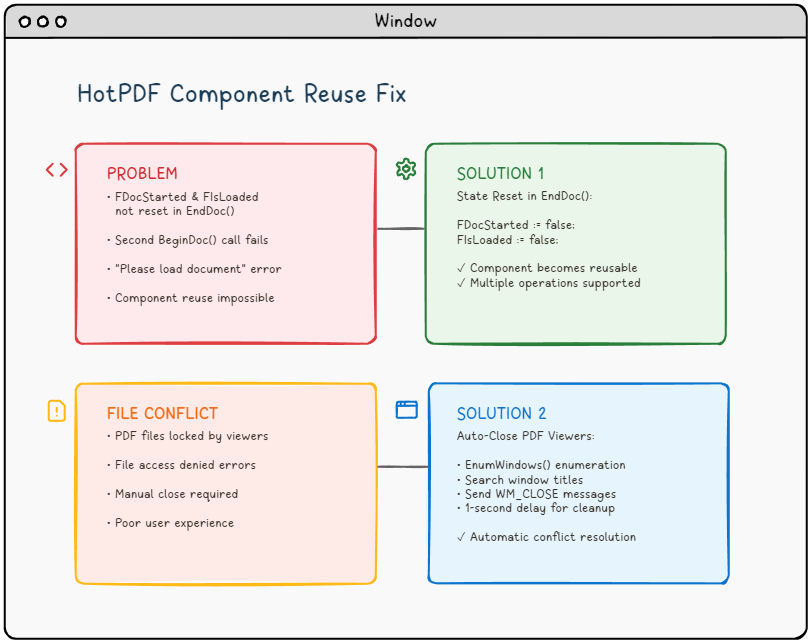
A THotPDF instance is one document, not a document factory
The tempting mental model is that THotPDF is a service object you spin up once and feed documents to, the way you might keep a database connection open and run query after query through it. It is not that. An instance models a single document being built, and its internal state machine carries the assumption that it walks the path once: from empty, through an open document, to a saved file. BeginDoc opens that path and marks the instance as having a document in progress. EndDoc serializes everything to FileName and closes it out. Calling BeginDoc again on the same finished instance asks it to re-enter a state it never left cleanly, and the guard that fires is the one whose message happens to mention loading, because internally the "ready to begin" and "has a loaded document" conditions are checked together
So the message is misleading, but the guard is doing its job. It is refusing to let you start a fresh document on top of a component that still believes it is mid-document. The fix is not to defeat the guard. It is to stop reusing a spent instance
The lifecycle, in the order it has to happen
Every document HotPDF writes from scratch follows the same four beats, and the order is not negotiable. Create allocates the component. BeginDoc opens the document and fixes the structural choices, so anything that affects the whole file (page size, compression, encryption, output filename) has to be set between Create and BeginDoc. Then you draw. Then EndDoc writes the bytes to disk. Free releases the instance. Drawing calls placed before BeginDoc have no page to land on; whole-document properties assigned after it are ignored without complaint
var
  Pdf: THotPDF;
begin
  Pdf := THotPDF.Create(nil);
  try
    Pdf.FileName := 'invoice.pdf';
    Pdf.BeginDoc;                        // opens the document
    Pdf.CurrentPage.SetFont('Arial', [], 11);
    Pdf.CurrentPage.TextOut(50, 760, 0, 'Invoice 2026-042');
    Pdf.EndDoc;                          // writes invoice.pdf, closes it out
  finally
    Pdf.Free;                            // one instance, one document
  end;
end;
Read that as the unit of work. One Create, one BeginDoc, one EndDoc, one Free, one file on disk. The instant you want a second file, you are starting a new unit of work, which means a new instance
What "reuse" should mean: a fresh instance per file
The version that breaks tries to be frugal with allocation: build the component once, loop over a batch, call BeginDoc and EndDoc inside the loop. The second iteration throws. The version that works treats each output as its own short-lived object, and the allocation cost of creating a component is trivial next to the work of laying out and serializing a PDF, so there is nothing to save by hoarding the instance
procedure WriteBatch(const Names: TArray<string>);
var
  I: Integer;
  Pdf: THotPDF;
begin
  for I := 0 to High(Names) do
  begin
    Pdf := THotPDF.Create(nil);         // new instance each pass
    try
      Pdf.FileName := Names[I] + '.pdf';
      Pdf.BeginDoc;
      Pdf.CurrentPage.SetFont('Arial', [], 12);
      Pdf.CurrentPage.TextOut(50, 760, 0, 'Statement for ' + Names[I]);
      Pdf.EndDoc;
    finally
      Pdf.Free;
    end;
  end;
end;
The try/finally sitting inside the loop is the part worth defending in review. If BeginDoc or any drawing call raises partway through one document, that iteration's instance is still freed before the next begins, so one bad record does not strand a half-built component and poison the rest of the run. Pull the Create out above the loop to "optimize" and you are back to the original bug, now wearing a batch loop
Modifying an existing file is a different entry point
There is a second reading of "reuse" that is entirely legitimate: you do not want a blank document, you want to open a PDF that already exists and change it. That path does not go through BeginDoc at all, which is exactly why the error message names loading. You load the file, edit it, and save under whatever name you choose
var
  Pdf: THotPDF;
  PageCount: Integer;
begin
  Pdf := THotPDF.Create(nil);
  try
    PageCount := Pdf.LoadFromFile('contract.pdf');
    if PageCount > 0 then
    begin
      Pdf.CurrentPage.SetFont('Arial', [fsBold], 10);
      Pdf.CurrentPage.TextOut(40, 30, 0, 'REVIEWED');
      Pdf.SaveLoadedDocument('contract-reviewed.pdf');
    end;
  finally
    Pdf.Free;
  end;
end;
LoadFromFile returns the page count, and a value of zero or below means the load failed, so it is worth checking before you touch CurrentPage. The pairing matters: a document you opened with LoadFromFile is saved with SaveLoadedDocument, not with the BeginDoc/EndDoc pair, which belongs to documents you author from nothing. Mixing the two is the most common way to confuse the same state machine that produced the original error. Keep the two flows mentally separate: BeginDoc ... EndDoc creates, LoadFromFile ... SaveLoadedDocument edits
The file-lock problem is real, and the answer is not to kill viewer windows
The reuse error often travels with a second complaint, and the two get tangled together because they surface in the same regenerate-the-file workflow. A user opens the PDF you just produced, leaves it open in Acrobat or Foxit, then triggers a rebuild. EndDoc tries to write the same path, the operating system refuses because the viewer holds a read share that blocks writers, and you get an access-denied failure. This one is genuinely a Windows file-locking issue rather than a component-state issue, and it deserves a real answer instead of a workaround
The workaround that circulates, enumerating top-level windows and posting WM_CLOSE to anything whose title looks like a PDF viewer, is the wrong instinct. It reaches across process boundaries to close windows your program does not own, it guesses at viewers by title text, and it can throw away a user's unsaved annotations without asking. Treat that whole approach as a smell. The reliable fix is to never write to a path another process might be holding. Serialize to a temporary file in the same directory, then swap it into place with an atomic rename once EndDoc succeeds. If a viewer still has the old file open, the rename either succeeds cleanly or fails loudly, and you surface a clear message rather than fighting the lock
uses
  System.SysUtils, System.IOUtils;

procedure WritePdfAtomically(const FinalPath: string);
var
  Pdf: THotPDF;
  TempPath: string;
begin
  // Temp file in the SAME directory as the target: a rename inside one
  // NTFS volume swaps the name atomically, while a cross-volume move
  // degrades to copy-plus-delete and loses that guarantee
  TempPath := TPath.Combine(TPath.GetDirectoryName(FinalPath),
    TGUID.NewGuid.ToString + '.pdf.tmp');
  try
    Pdf := THotPDF.Create(nil);
    try
      Pdf.FileName := TempPath;
      Pdf.BeginDoc;
      Pdf.CurrentPage.SetFont('Arial', [], 11);
      Pdf.CurrentPage.TextOut(50, 760, 0, 'Invoice 2026-042');
      Pdf.EndDoc;                    // the temp file is complete on disk here
    finally
      Pdf.Free;
    end;

    // Swap into place. TFile.Move refuses to overwrite, so clear a stale
    // target first; if a viewer still holds the old file, the delete is
    // what fails, loudly, before the good bytes are touched
    if TFile.Exists(FinalPath) then
      TFile.Delete(FinalPath);
    TFile.Move(TempPath, FinalPath); // or: RenameFile(TempPath, FinalPath)
  except
    if TFile.Exists(TempPath) then
      TFile.Delete(TempPath);        // never strand a half-written temp file
    raise;
  end;
end;
Two honest footnotes on that code. TFile.Move and the classic RenameFile both map to the same Windows rename, which is atomic only when source and destination sit on the same volume, and that is exactly why the temp file goes into the destination directory rather than TPath.GetTempPath. And the delete-then-move pair is not itself one atomic step: there is a brief window in which neither file exists. For a desktop app regenerating a report that window is irrelevant; readers who need a stronger contract on the same volume can call the Win32 ReplaceFile or MoveFileEx with MOVEFILE_REPLACE_EXISTING directly, which collapses the swap into a single call
For a high-volume server that regenerates documents constantly, the cleaner discipline is to write each output under a unique name (a timestamp or a job id) so two runs never contend for one path, and let a separate retention policy clean up old files. The pattern is one line of naming discipline per request
// One output path per request: two concurrent jobs can never contend
// for the same name, so no rename dance and no lock to lose
OutName := Format('statement-%s-%s.pdf',
  [CustomerId, TGUID.NewGuid.ToString.Trim(['{', '}'])]);
Pdf.FileName := TPath.Combine(OutputDir, OutName);
A request id or job id works just as well as the GUID when the surrounding framework already hands you one, and it makes the file name traceable back to a log line for free. Either way the principle is the same: design so that the file you are writing is yours alone at the moment you write it. The lock disappears not because you forced a window shut but because nothing else is touching the bytes
The shape of the fix
Strip the two problems back to their roots and they are both about respecting boundaries. The state-machine error wants you to honor the instance boundary: one THotPDF, one document, then let it go and make another. The file-lock error wants you to honor the file boundary: write where nothing else is reading, then move the result into place. Neither calls for patching the library or scripting the desktop. Both fall out of treating each document as a self-contained unit of work, created fresh, written cleanly, and released, which is the same pattern that makes the rest of the component predictable
The BeginDoc, EndDoc, LoadFromFile, and SaveLoadedDocument calls shown here are part of the HotPDF Delphi Component for Delphi and C++Builder