Dropping a THotPDF onto a form at design time is fine for a quick prototype, but it ties the component to the form's lifetime, which is rarely what production code wants. A report generator that runs once per button click, a service thread that batches overnight exports, a helper class that has no form at all: in each of those situations you want the component to exist for exactly the duration of one PDF job and then disappear. That means runtime allocation, and it changes two things worth understanding before writing the first line: who owns the object, and how cleanup runs when something goes wrong
Owner semantics in VCL
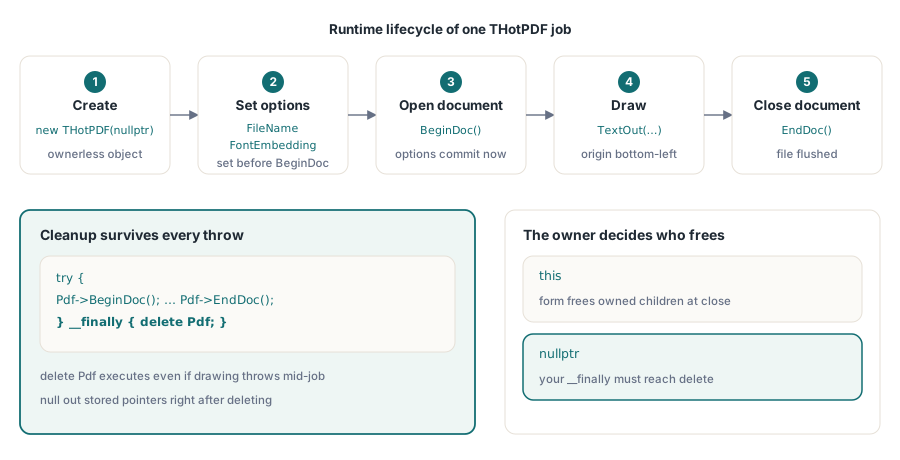
Every VCL component constructor takes an Owner parameter of type TComponent*. Passing this (the form) registers the new object with the form's owned-component list, so if the form is destroyed while the component is still alive, VCL frees it automatically. Passing nullptr means no owner: you take sole responsibility for the pointer, and nothing will clean it up for you if an exception unwinds the stack before your explicit delete
For a one-shot export that completes within a single function, either choice works, but the two have different failure modes. With this as owner, a leak is impossible as long as the form eventually closes; with nullptr, the pointer must reach a __finally block. In practice, the nullptr plus __finally pattern is slightly cleaner for short-lived objects because it makes the lifetime boundary visible at a glance and avoids the form accumulating owned objects that were meant to be temporary
Exception-safe structure
PDF generation can fail for reasons that have nothing to do with the API: the output directory is read-only, a font file is missing, a stream flushes prematurely, or caller-supplied data hits a length limit. Whatever the cause, the cleanup path has to run. The idiomatic C++Builder way to guarantee that is try/__finally:
#include <vcl.h>
#pragma hdrstop
#include "Unit1.h"
#pragma package(smart_init)
#pragma link "HPDFDoc"
#pragma resource "*.dfm"

TForm1 *Form1;

__fastcall TForm1::TForm1(TComponent* Owner)
    : TForm(Owner)
{
}

void __fastcall TForm1::Button1Click(TObject *Sender)
{
    THotPDF* Pdf = new THotPDF(nullptr);
    try
    {
        Pdf->FileName = "output.pdf";
        Pdf->Compression = cmFlateDecode;
        Pdf->FontEmbedding = true;
        Pdf->BeginDoc();
        Pdf->CurrentPage->SetFont("Arial", TFontStyles(), 12);
        Pdf->CurrentPage->TextOut(72, 720, 0, L"Hello from C++Builder");
        Pdf->EndDoc();
    }
    __finally
    {
        delete Pdf;
    }
}
A few things in that listing are worth calling out. The owner is nullptr, making the lifetime explicit. Compression and FontEmbedding are set before BeginDoc: both are document-level options that HotPDF commits when the document opens, and assigning them afterward has no effect. TextOut takes coordinates in points measured from the bottom-left corner of the page, Y increasing upward; the 72, 720 pair places text near the top-left of a letter-size page with a one-inch left margin. The delete Pdf in the __finally block runs whether BeginDoc, drawing, or EndDoc raised an exception or not
Avoid calling any method on Pdf after delete. If the pointer is stored in a member variable, set it to nullptr immediately after deletion so any accidental later access produces a clean crash rather than silent corruption
Project configuration
C++Builder locates THotPDF through a combination of include paths, library paths, and a pragma directive. The generated header lives alongside HPDFDoc.pas in the HotPDF source directory; add that directory to Project > Options > C++ Compiler > Include path. The #pragma link "HPDFDoc" directive tells the linker to pull in the compiled unit without listing it in the project file manually. If you are using the runtime package instead of static linking, install the HotPDF design and runtime packages first; the pragma still applies
Keep the unit name HPDFDoc unchanged. C++Builder derives the header name from the Pascal unit name, so renaming the file or using a path alias in the pragma breaks the lookup silently
Scoping and multi-document jobs
For a single export triggered by user action, a local variable scoped to the button handler is the right answer: it is created, used, and destroyed within one call frame, and the intent is obvious to anyone reading the code later. The design-time alternative is justified when the same form drives a continuous workflow, such as a print-preview panel that rebuilds the document whenever the user changes a setting; in that case, keeping the component alive and calling BeginDoc/EndDoc repeatedly is less disruptive than repeatedly allocating and releasing heap objects
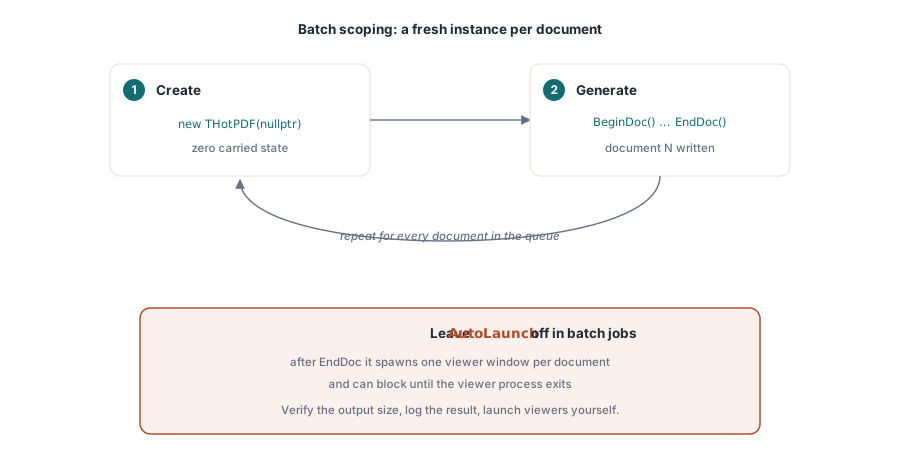
For batch jobs that produce many documents in sequence, scoping one THotPDF per document is worth the allocation overhead. State does not carry between documents if there is no object to carry it, and that is one class of intermittent bug you never have to debug. Allocate, generate, delete, repeat
One property that appears in several HotPDF demos is AutoLaunch, which opens the generated file in the system PDF viewer immediately after EndDoc. It is useful while writing the first draft of a layout. In production, skip it: open the output path explicitly, verify the file exists and has a non-zero size, log the result, and let the calling workflow decide whether a viewer is relevant. In a batch job, AutoLaunch launches one viewer window per document and will block the process on some systems waiting for the viewer to close
The THotPDF component and all drawing calls shown here are part of the HotPDF Delphi Component for Delphi and C++Builder