Range check errors in Delphi code that handles PDF pages earn a reputation for being difficult to pin down because they don't follow a consistent input pattern. The same document produces them on one machine and not another; the same code path fires the exception on a 3-page file but runs clean on a 12-page one. Two things are usually behind it. One is a guard that looks complete but lets a negative index through. The other is an index computed against one page ordering and then used against another, because PDF page objects are not stored in display order
How range checking works in Delphi
With range checking enabled, either under Project Options › Building › Delphi Compiler › Compiling › Range checking or with the {$R+} directive in the unit, the Delphi RTL validates every array index, string subscript, and enumerated assignment at runtime. Neither the Debug nor the Release configuration turns it on by default, so a project can run for years without it and then start raising errors the day someone ticks the box. An out-of-bounds access raises ERangeError rather than silently reading adjacent memory. That behavior is valuable: it surfaces latent bugs early instead of letting them corrupt a data structure that only fails a hundred lines later. The frustrating part is that the exception fires at the access site, not at the point where the index was computed incorrectly. When the call stack shows a deeply nested method in a PDF unit, the real mistake is usually several frames back
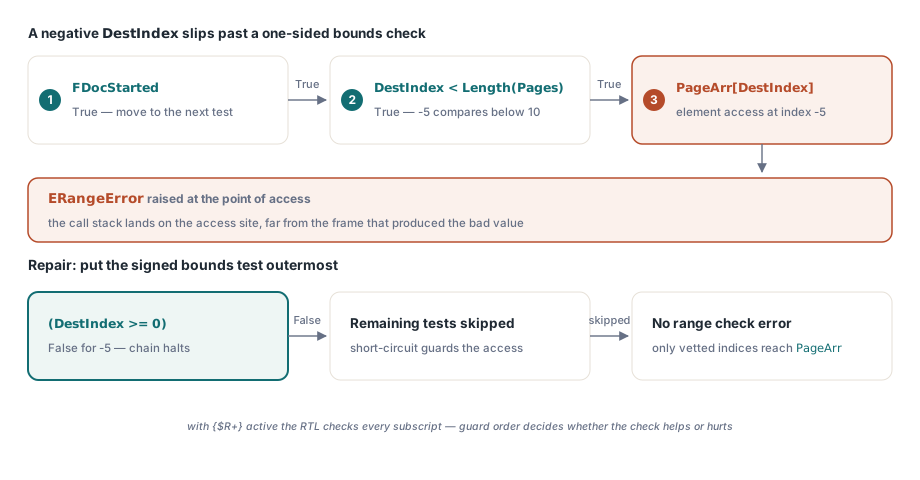
Compound boolean conditions make this worse. Delphi evaluates and expressions left to right with short-circuit semantics, but short-circuiting only skips evaluation when the left side is False. An expression like:
if FDocOpen and (PageIndex < Length(FPages)) and
   (FPages[PageIndex].PageObj <> nil) then
looks safe, but it only guards against an out-of-range index if FDocOpen is True and PageIndex is non-negative. The check PageIndex < Length(FPages) does nothing when PageIndex is negative, because comparing a negative integer to a non-negative length returns True in signed arithmetic and the subsequent array access still fires the range error. Moving the bounds check to the outermost position is the correct fix:
if (PageIndex >= 0) and (PageIndex < Length(FPages)) then
begin
  if FDocOpen and (FPages[PageIndex].PageObj <> nil) then
    Result := FPages[PageIndex].PageObj
  else
    Result := nil;
end
else
  raise ERangeError.CreateFmt(
    'Page index %d is out of range (0..%d)',
    [PageIndex, Length(FPages) - 1]);
This is the mechanical fix. It stops the crash. It does not explain why PageIndex received a value outside the valid range in the first place
Where the bad index usually comes from
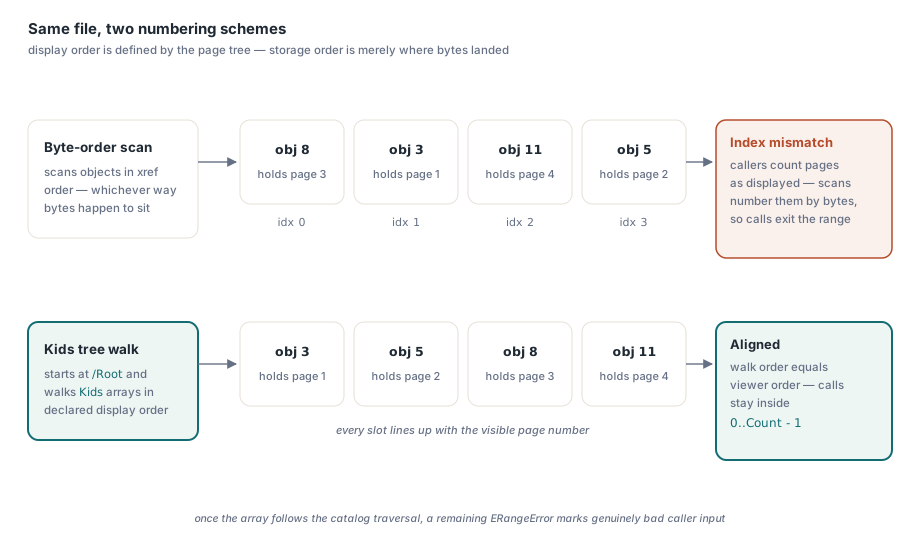
When the index arithmetic involves PDF pages, the usual source is a mismatch between two orderings. ISO 32000-1 §7.7.3 defines page order through the Kids arrays of the page tree; object numbers and byte offsets say nothing about it, and object 20 can hold page 1 while object 3 holds page 2. Code that builds its page list by scanning objects in file or object-number order works on every document whose generator happened to write pages in sequence, and goes wrong on the first one that did not: an edited file with a cover page added later, or output from a tool that reorganized the object graph. Indices that callers compute in display order then land on the wrong page, or past the end of the list. The walkthrough on PDF page order pitfalls shows how to confirm the mismatch with qpdf and how to build the page list from the page tree instead
Tracking it down
If your own parsing or page-handling code shows this pattern, enable range checking in a Release build temporarily and run it against a diverse corpus of PDFs: documents produced by Word, by LaTeX, by scanner firmware, by PDF-to-PDF split utilities. The files that trigger exceptions are the ones whose page object order diverges from the order your code assumes. Each one is a data point, not a separate bug. Resist the urge to answer each file with its own mapping (swap two pages here, apply an offset for that generator there); every such patch fits only the files on hand when it was written and fires at the wrong time on the next source, leaving an index that is wrong twice over
For code that calls a PDF library, treat the library's page count as authoritative and never pass an index derived from arithmetic on external data without first confirming it falls within 0..PageCount - 1. In the HotPDF Delphi component, LoadFromFile returns the page count of the loaded document and LoadedPageCount reports it afterwards; page indices follow the page tree's display order, so that value is safe to use as the upper bound for any index arithmetic