When maintaining a VCL component written in Delphi but consumed by both Delphi and C++Builder users, you quickly realize that the two build systems treat dependencies very differently. A unit that compiles perfectly in Delphi might cause catastrophic linker errors in C++Builder. This discrepancy is a frequent trap for component authors, particularly when adding new internal units to an existing library
Here is a detailed breakdown of why this happens, using real-world examples from the HotXLS Delphi component, and how to bulletproof your cross-compilation process using explicit includes, {$HPPEMIT}, and pragma linking
The Trap: Implicit Compilation vs. Explicit Inclusion
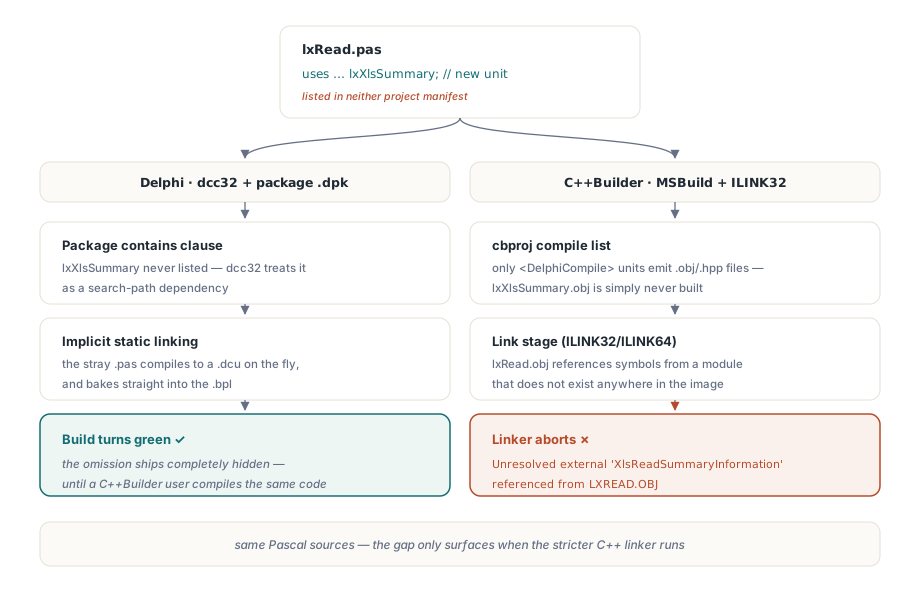
Suppose you create a new Delphi unit, lxXlsSummary.pas, to handle document metadata, and you uses it in your main parsing unit, lxRead.pas. You hit compile in the Delphi IDE, the build turns green, and you ship the update
The next day, your C++Builder users report an error during the linking phase: Unresolved external 'XlsReadSummaryInformation' referenced from lxRead.obj
The Delphi Way (dcc32)
When the Delphi compiler processes a package (.dpk), it looks at the units explicitly listed in the contains clause. If one of those units uses an external unit (like lxXlsSummary.pas) that is not in the contains list, the Delphi compiler performs implicit static linking. It simply finds the .pas file in the search path, compiles it into a .dcu, and bakes it into the resulting .bpl. The build succeeds, completely masking the omission
The C++Builder Way (MSBuild / .cbproj)
C++Builder’s build system is much stricter. It only generates C++ object files (.obj) and headers (.hpp) for the Delphi units explicitly listed in the <DelphiCompile> item group of the .cbproj file. Because lxXlsSummary.pas was never explicitly registered in the project file, no lxXlsSummary.obj is created. When the linker tries to resolve the calls made by lxRead.obj, the symbols are missing, leading to an unresolved external error
Resolving Externals with Pragma Link and HPPEMIT
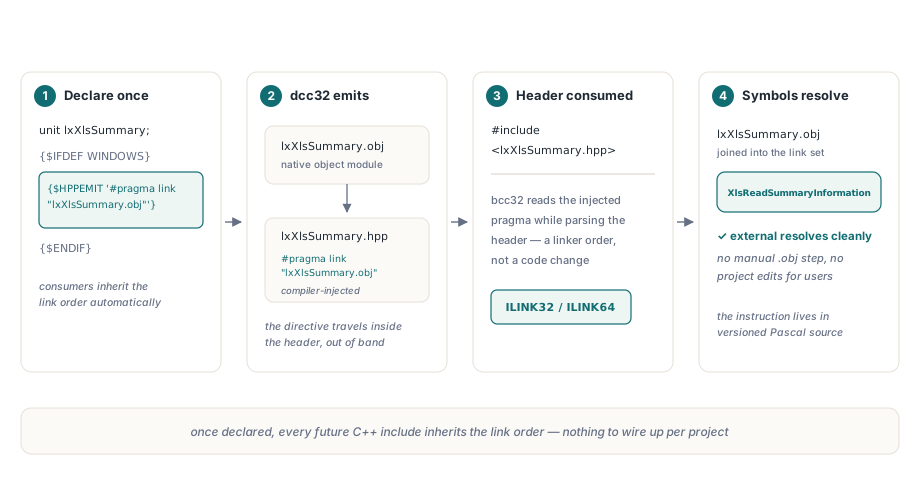
If you want to ensure that a unit is properly linked in C++ without forcing the user to manually add the .obj file to their project, you can use Delphi's {$HPPEMIT} directive. This tells the Delphi compiler to inject a specific C++ #pragma link directive into the generated .hpp file
unit lxXlsSummary;

interface

{$IFDEF WINDOWS}
  // Inject a pragma link into the generated C++ header file
  // This forces the C++ linker to include the corresponding .obj file
  {$HPPEMIT '#pragma link "lxXlsSummary.obj"'}
{$ENDIF}

uses
  SysUtils, Classes;

type
  TXlsSummaryInfo = class(TObject)
  public
    Title: string;
    Author: string;
    CreateTime: TDateTime;
  end;

function XlsReadSummaryInformation(const FileName: string): TXlsSummaryInfo;

implementation

function XlsReadSummaryInformation(const FileName: string): TXlsSummaryInfo;
begin
  Result := TXlsSummaryInfo.Create;
  // Metadata extraction logic here
end;

end.
When C++Builder includes lxXlsSummary.hpp, the compiler encounters the #pragma link and automatically tells the linker (ILINK32/ILINK64) to resolve symbols from lxXlsSummary.obj
The Golden Rule for Component Maintenance
To avoid breaking C++Builder builds entirely, you must adopt a strict registration policy. Whenever a new Pascal unit is added to your library, it must be explicitly registered across all three project file types simultaneously
1. Update the C++Builder Project (.cbproj / .bpk)
Open the .cbproj file in a text editor and add the new unit to the compile list, ensuring you provide a unique build order. If using older C++Builder versions with .bpk files, ensure the <file containerid="PascalCompiler" designclass="" filename="lxXlsSummary.pas" formname="" localcommand="" unitname="lxXlsSummary"></file> tag is added
<DelphiCompile Include="lxXlsSummary.pas">
  <BuildOrder>101</BuildOrder>
</DelphiCompile>
2. Update the Delphi Package (.dpk)
Add the unit to the explicit contains clause. This ensures the Delphi compiler doesn't have to rely on implicit linking, which is generally considered bad practice anyway
package HotXLS;

{$R *.res}
{$ALIGN 8}
{$ASSERTIONS ON}
{$BOOLEVAL OFF}

requires
  rtl,
  vcl;

contains
  lxRead in 'lxRead.pas',
  lxXlsSummary in 'lxXlsSummary.pas';

end.
Continuous Integration Validation
The ultimate defense against this trap is CI/CD validation. Never rely solely on a successful Delphi build before shipping a dual-language component. Your build scripts must invoke MSBuild or the bcc32c command-line tools on the C++Builder projects (e.g., build-Win32-Lib-CB.cmd) and run a complete link of the C++ trial and full demos. Only when the C++ linker succeeds can you be certain that all Delphi units are correctly registered and exposing their symbols to the C++ runtime
Note: Cross-platform compiler compatibility is strictly maintained across the Delphi and C++Builder editions of the HotXLS Delphi VCL Component