Hand-edit a QDF file, slip in a second stream marker for the same object, then run an in-place repair with the most natural Delphi code you can write. The repair step notices the damage and refuses. When you look at the file afterwards it is 0 bytes long, because TFileStream.Create(OutputFileName, fmCreate) truncated that very path one line before the validator ever saw the input. Repairing bytes in memory is the easy half of the job. Putting them back on disk without ever leaving a zero-length, half-written or wrongly permissioned file is the other half, and it has its own failure modes
Why does an in-place repair empty the file?
An in-place repair empties the file because the order of operations is wrong: fmCreate truncates on open, so any refusal that comes after the open arrives too late. When InputFileName and OutputFileName are the same path, a rejected input becomes a lost document. A careful parser cannot save you here. It may leave its output stream untouched when it rejects ambiguous markers, but the caller already destroyed the target a call earlier
// The obvious version: the destination is truncated before anything is validated
Input := TMemoryStream.Create;
try
  Input.LoadFromFile(InputFileName);                       // same path as OutputFileName
  Output := TFileStream.Create(OutputFileName, fmCreate);  // the file is now 0 bytes
  try
    if not MyRepairQDF(Input, Output) then  // your own validator: too late to say no
      raise Exception.Create('QDF structure rejected');
  finally
    Output.Free;
  end;
finally
  Input.Free;
end;
The usual next attempt is to repair into a TMemoryStream and open the output only after the repair succeeded. That closes the bad-input hole and nothing else. The write phase is still truncate-then-copy, so a full disk, a sharing violation halfway through, or an exception between truncation and the last WriteBuffer still leaves the destination damaged. Parsing and publishing are two separate boundaries and each needs its own protection
In PDF Library for Delphi, TPDFlib.RepairQDFFile(InputFileName, OutputFileName) handles both. It reads the input, repairs it entirely in memory, and returns early with nothing opened on the destination if the QDF structure is rejected. Only a successful repair moves on to publication, and publication never opens the destination for writing at all
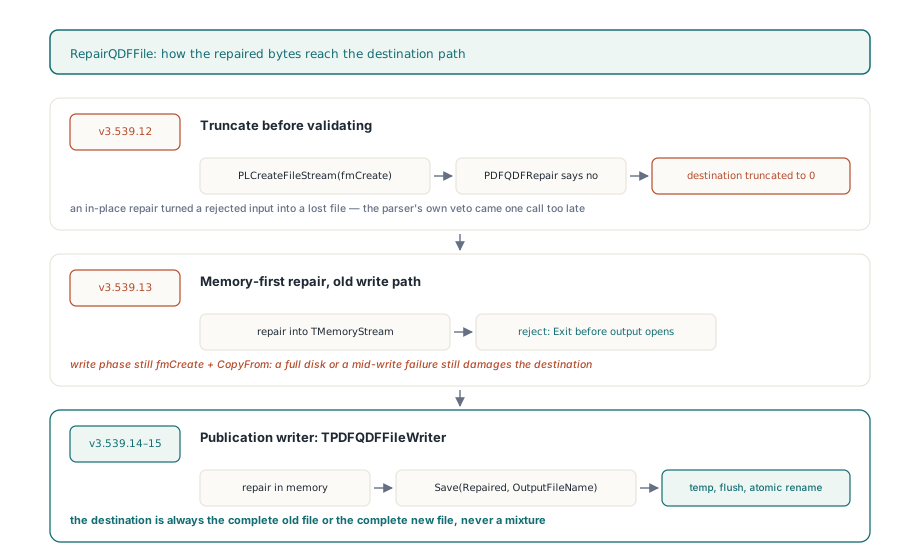
Four steps between the repaired bytes and the destination
RepairQDFFile guarantees that the destination path holds either the complete old file or the complete new file, for every failure the process itself can observe. It gets there in four steps, and none of them starts unless the previous one finished. The destination is resolved to a full path with GetFullPathNameW, called once to learn the required length and again into a buffer of exactly that size, so a long path is not clipped at MAX_PATH. Next a temporary file named .pdflib-qdf- plus a GUID plus .tmp is created in the destination directory with CreateFileW and CREATE_NEW on Windows, or open(2) with O_CREAT or O_EXCL and mode 0600 on POSIX. Both flags make the create fail if the name already exists. Two processes that somehow drew the same GUID cannot end up sharing one handle
The repaired stream is then copied in 64 KiB chunks through WriteBuffer, which raises on a short write instead of returning a count nobody checks. FlushFileBuffers or fsync(2) pushes the data down, and the handle is closed. The close deliberately does not raise: once the flush has succeeded, a failed close is no threat to the data, and an exception there would hide the real write or flush error from whoever has to diagnose it. The last step is the rename
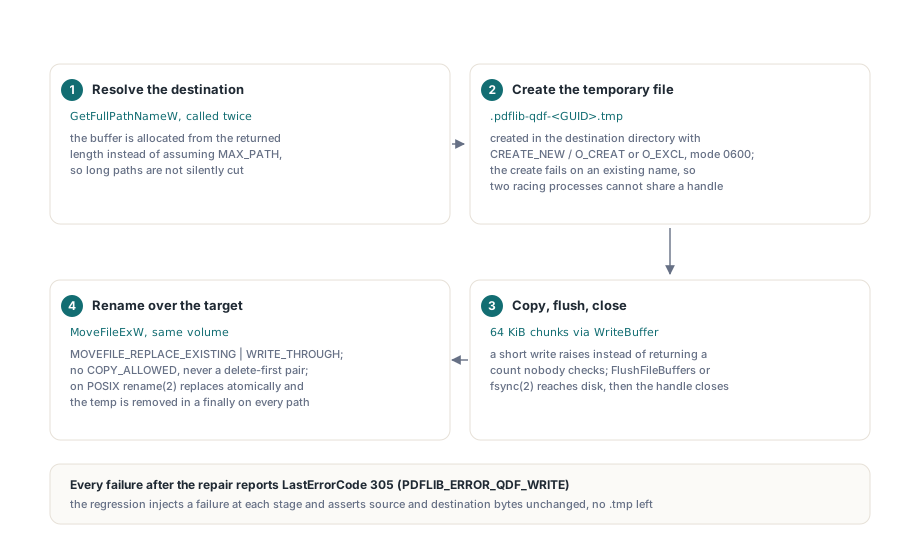
The rename is where most home-grown safe-save routines break. On Windows the temporary file replaces the target through MoveFileExW with MOVEFILE_REPLACE_EXISTING or MOVEFILE_WRITE_THROUGH, which on one volume is a single filesystem operation. MOVEFILE_COPY_ALLOWED is left out on purpose. A cross-volume move silently degrades into copy-then-delete, the exact non-atomic sequence the whole design avoids, and I would much rather see a refused rename than a "successful" copy that was half done when the machine went down. Because the temporary file sits in the destination directory, it is on the destination volume anyway. The old file is never deleted first either; a delete-then-rename pair leaves a window in which the path does not exist, and a crash inside it loses the document. MOVEFILE_WRITE_THROUGH keeps the call from returning before the rename has reached disk. On POSIX, rename(2) already replaces an existing name atomically, and the same-directory placement keeps it clear of EXDEV
Cleanup runs in a finally block on every path. After a successful rename the temporary name no longer exists, so the delete does nothing; after a failure it removes the partial file. The directory ends up with exactly the files it had before the call
Why does a temporary file loosen permissions on Windows?
A file created with a nil security descriptor inherits its DACL from the parent directory; the file it is about to replace has no say. For a brand-new document that default is right. For an in-place repair it is wrong. Picture an operator who locked contract.pdf down to one account with a protected, non-inherited DACL. A plain temporary file next to it picks up the directory's broader permissions, and after the rename the published contract.pdf carries that broad DACL, because NTFS security belongs to the file object rather than to the name. The bytes are correct and the return value is 1. The access restriction the operator set up is simply gone
RepairQDFFile therefore reads the destination's DACL before it creates the temporary file and passes it to CreateFileW through lpSecurityAttributes, so the new file starts life with the old file's permissions and the rename changes nothing an operator would notice. The read is GetFileSecurityW with DACL_SECURITY_INFORMATION, with the buffer sized from the first call's ERROR_INSUFFICIENT_BUFFER answer. When the destination does not exist yet, which is the normal case for a separate output path, no descriptor is passed and the new file inherits from its directory like any other new file
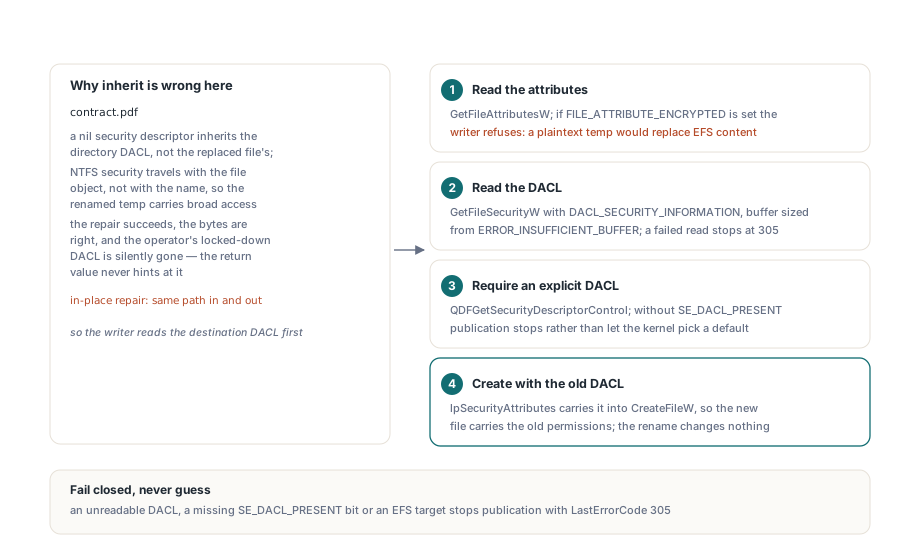
Three conditions stop publication instead of letting the code guess, and each one reports LastErrorCode 305:
- The DACL cannot be read, for example because the calling account lacks
READ_CONTROLon the destination - The returned descriptor does not have
SE_DACL_PRESENTset; handing such a descriptor toCreateFileWwould let Windows fall back to the process default DACL and change access semantics nobody asked to change - The destination carries
FILE_ATTRIBUTE_ENCRYPTED; the temporary file would be plaintext, and renaming it over an EFS-protected file would publish an unencrypted replacement of something the user chose to encrypt
EFS is a filesystem feature and has nothing to do with PDF security handlers, which are covered in the article on encrypted document loading. The failure shape is the same kind of quiet downgrade, though, and refusing it is the correct default. A repair that occasionally says no on an EFS share is a support ticket. A repair that decrypts a file the user encrypted is an incident
If you write a DACL-preservation test yourself, one Windows detail is easy to get wrong. To build the restricted test file, apply an owner-only DACL and set SE_DACL_PROTECTED in the descriptor control explicitly; passing PROTECTED_DACL_SECURITY_INFORMATION to SetFileSecurityW does not turn an unprotected descriptor into a protected one. Afterwards, check that the published file still reports the protected bit and an explicit, non-null DACL, once for a separate output path and once for repair over the source itself
Which LastErrorCode tells you what failed?
RepairQDFFile returns 1 on success and 0 on failure, and TPDFlib.LastErrorCode names the stage that refused. An input that does not exist, cannot be opened, or is larger than 2 GB reports 401, and an exception while reading is also mapped to 401 instead of leaking into the write code. Invalid or ambiguous QDF structure, such as that duplicated stream marker, reports PDFLIB_ERROR_QDF_REPAIR (107); the destination was never opened. Everything after the repair, from resolving the path through flush and rename, reports PDFLIB_ERROR_QDF_WRITE (305). The realistic write failures all land on 305: a destination held open by another handle without delete sharing, a read-only destination, a missing destination directory, plus the DACL and EFS refusals above. In every 305 case no new or partial target is left behind
var
  Pdf: TPDFlib;
begin
  Pdf := TPDFlib.Create;
  try
    // In-place repair: the same path is input and output
    if Pdf.RepairQDFFile('edited.qdf.pdf', 'edited.qdf.pdf') = 1 then
      Log('published; the previous bytes were replaced in one rename')
    else
      case Pdf.LastErrorCode of
        401: Log('could not read the input; it was not modified');
        PDFLIB_ERROR_QDF_REPAIR:
          Log('QDF structure rejected; the destination was never opened');
        PDFLIB_ERROR_QDF_WRITE:
          Log('write, flush or replace refused; the destination keeps its old bytes');
      end;
  finally
    Pdf.Free;
  end;
end;
The 305 path is easy to reproduce from your own test project without hooking any file API. Delphi's fmShareDenyNone opens a file with read and write sharing but without FILE_SHARE_DELETE, and Windows refuses to rename anything over a file held that way. Keep such a handle open across the call and the rename fails at the very last step, after the data has been written and flushed, which is the case you most want to see handled
var
  Before: TBytes;
  Holder: TFileStream;
  Search: TSearchRec;
begin
  Before := TFile.ReadAllBytes(Target);   // System.IOUtils
  Holder := TFileStream.Create(Target, fmOpenRead or fmShareDenyNone);
  try
    Assert(Pdf.RepairQDFFile(Source, Target) = 0);
    Assert(Pdf.LastErrorCode = PDFLIB_ERROR_QDF_WRITE);
  finally
    Holder.Free;
  end;
  // These checks are suggestions for your own test, not library calls
  Assert(BytesEqual(Before, TFile.ReadAllBytes(Target)));  // BytesEqual: your helper
  // No temp file may be left behind
  if FindFirst(ExtractFilePath(Target) + '.pdflib-qdf-*.tmp',
    faAnyFile, Search) = 0 then
  try
    Assert(False, 'temporary file left behind: ' + Search.Name);
  finally
    FindClose(Search);
  end;
end;
For the habit of reading the code instead of trusting the 0 alone, the article on diagnosing silent failures goes through the same pattern across the rest of the API
Where the guarantee stops
The promise covers failures the process can see. If the process is killed between creating the temporary file and the rename, the finally block never runs and a .pdflib-qdf-<GUID>.tmp file stays in the directory. The destination is still intact, which is what matters, but sweeping that debris is up to you. Power loss is a filesystem question: the data is flushed and the rename is write-through, yet the directory entry is not separately synced on POSIX, so durability is whatever the filesystem provides on top of that
A successful rename also produces a new file object, and a few properties of the old one do not travel with it. The DACL is carried across deliberately. Ownership is not, since only DACL_SECURITY_INFORMATION is read, so the published file is owned by the account that ran the repair. The temporary file is created with FILE_ATTRIBUTE_NORMAL, which means hidden, archive and similar attribute bits start fresh, and alternate data streams on the old file are gone. On POSIX the published file keeps the 0600 mode of the temporary file; call chmod afterwards if a group needs read access. The destination's attributes and DACL are read before the temporary file exists, so a second writer to the same path is yours to coordinate
SaveQDFToFile and ConvertFileToQDF write directly
RepairQDFFile is the only QDF entry point that publishes through a temporary file. SaveQDFToFile and ConvertFileToQDF open their output with fmCreate and stream the conversion straight into it, much as the incremental path in the article on appending updates to a stream writes into whatever stream you supply. The split is intentional. Those two calls turn a document that has already been loaded and validated into a new debugging artifact, so there is no untrusted input that could be rejected halfway through, and their output path is normally a fresh file. RepairQDFFile takes a hand-edited, untrusted file and is routinely pointed back at the same path; that combination is what justifies the extra machinery
When you do want atomic replacement for a QDF dump, a short wrapper of your own is enough:
// Your own helper: write the QDF next to the target, then replace it in one rename
function SaveQDFReplacing(Pdf: TPDFlib; const FileName: string): Boolean;
var
  ID: TGUID;
  TempName: string;
begin
  CreateGUID(ID);
  TempName := ExtractFilePath(ExpandFileName(FileName)) +
    '.myapp-qdf-' + GUIDToString(ID) + '.tmp';
  try
    Result := (Pdf.SaveQDFToFile(TempName) = 1) and
      MoveFileExW(PWideChar(WideString(TempName)), PWideChar(WideString(FileName)),
        MOVEFILE_REPLACE_EXISTING or MOVEFILE_WRITE_THROUGH);
  finally
    if FileExists(TempName) then
      DeleteFile(TempName);   // only present when something failed
  end;
end;
This version skips the DACL copy and the explicit data flush that RepairQDFFile performs. For QDF dumps that land in a scratch or debugging folder, I think that is the right amount of machinery; if the dump replaces a file with locked-down permissions, run it through the repair path or copy the security descriptor yourself
Atomic repair output, the QDF conversion calls and the error codes above all ship in PDF Library for Delphi, next to the cross-reference recovery, incremental update and encryption support discussed in other posts here