PDFlibPas (losLab PDF Library) fills PDF block templates from Delphi: a block is a named rectangle on a template page, typed as text, image or PDF, and FillTextBlock, FillImageBlock and FillPDFBlock draw variable data into it. Blocks are found as PDFlibBlock:Text, PDFlibBlock:Image and PDFlibBlock:PDF page annotations, or in a page-piece dictionary under /PieceInfo
The use case is the boring, high-volume kind. A designer lays out a certificate, an event ticket or a dunning letter once, and the program stamps a name, a seat number, a signature image or a pre-rendered barcode page into fixed slots for ten thousand records. Form fields can do part of that, but an AcroForm field is an interactive object with its own appearance stream and its own rules, and you usually end up flattening it anyway. A block is simpler: a rectangle plus a handful of styling hints, consumed once and then thrown away
What exactly is a PDF block in PDFlibPas?
A PDFlibPas block is a page annotation whose /Subtype is PDFlibBlock:Text, PDFlibBlock:Image or PDFlibBlock:PDF, whose /Rect is the placeholder area, and whose /Contents string holds name;key=value;key=value. The first segment is the block name, everything after it is a property list. TPDFlib.AddBlock writes the annotation with /F 4 (Print) and no appearance stream, so an unfilled block occupies no pixels on screen or paper
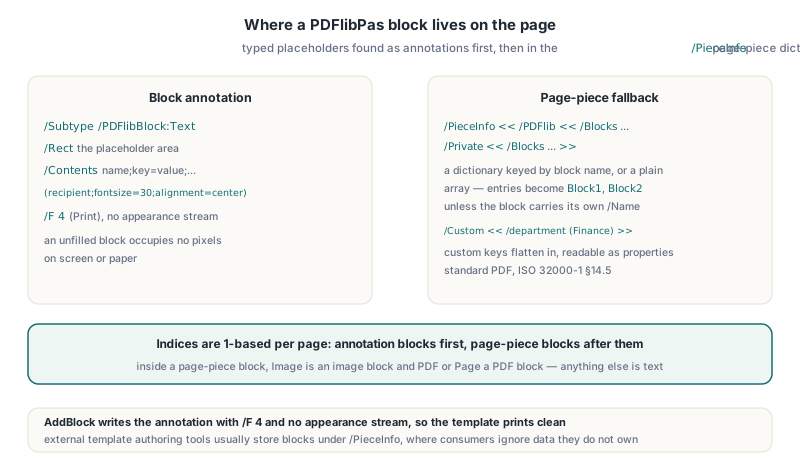
The read side has a second source. After enumerating block annotations, PDFlibPas falls back to the page dictionary path /PieceInfo << /PDFlib << /Blocks ... >> >> and its variant /PieceInfo << /PDFlib << /Private << /Blocks ... >> >> >>. Page-piece dictionaries are standard PDF, defined in ISO 32000-1 §14.5 as the place where an application stores private data attached to a page, and that is where block definitions from external template authoring tools usually live. The /Blocks container may be a dictionary keyed by block name or a plain array; for the array form PDFlibPas names the entries Block1, Block2 and so on unless a block carries its own /Name
Inside a page-piece block, the /Subtype (or /Type) value Image maps to an image block, PDF or Page maps to a PDF block, and anything else is treated as text. Every other key except /Type, /Subtype, /Name, /Rect and /Custom becomes a property, and the keys of a nested /Custom dictionary are flattened in as well, so a /Custom << /department (Finance) >> entry is readable as GetBlockProperty(Page, Index, 'department'). Block indices are 1-based per page, annotation blocks first, page-piece blocks after them
Authoring a block template with AddBlock
TPDFlib.AddBlock(BlockType, BlockName, Left, Top, Width, Height, Properties) adds a block to the currently selected page and returns 1 on success. It returns 0 for an empty name, a zero or negative width or height, or a BlockType other than 'text', 'image' or 'pdf' (case-insensitive). Properties is appended to the name with a semicolon, so it uses the same key=value;key=value syntax as the stored string
var
  Lib: TPDFlib;
begin
  Lib := TPDFlib.Create;
  try
    // static artwork: border, logo, fixed wording ...
    Lib.DrawText(72, 200, 'This certifies that');

    Lib.AddBlock('text', 'recipient', 72, 230, 450, 44,
      'fontname=Times-Bold;fontsize=30;fillcolor={cmyk 0 0.55 1 0.1};alignment=center');
    Lib.AddBlock('text', 'course', 72, 290, 450, 24,
      'fontname=Helvetica;fontsize=14;alignment=center;fitmethod=word');
    Lib.AddBlock('image', 'signature', 360, 600, 160, 60, '');
    Lib.AddBlock('pdf', 'seal', 72, 580, 100, 100, '');

    if Lib.GetBlockCount(1) <> 4 then
      raise Exception.Create('Template blocks missing');
    Lib.SaveToFile('certificate-template.pdf');
  finally
    Lib.Free;
  end;
end;
The property parser is deliberately loose. Keys are matched case-insensitively, values are trimmed but otherwise returned verbatim (a value written as {top left} comes back with its braces), and a missing key returns an empty string. The one hard limit is the separator: a value cannot contain a semicolon, because the semicolon ends the segment
How does FillTextBlock apply font, color and alignment?
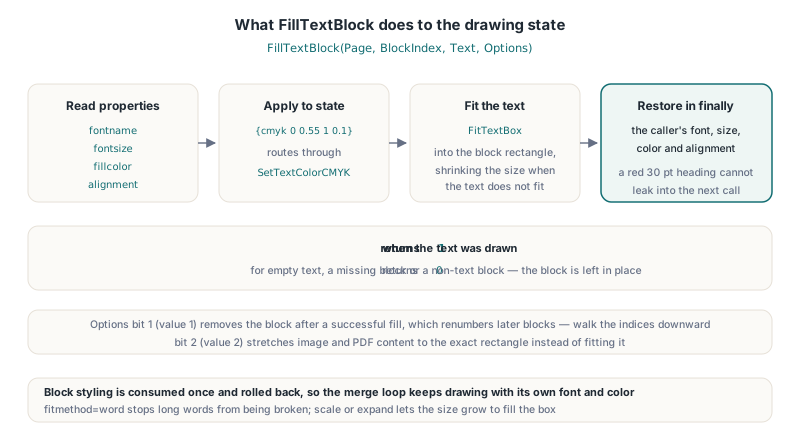
TPDFlib.FillTextBlock(Page, BlockIndex, Text, Options) reads the block properties, applies them to the drawing state, fits the text into the block rectangle with FitTextBox, and then restores the caller's font, text size, text color and alignment in a finally block. That restore matters in a merge loop: a red 30 pt heading block cannot leak its style into the next DrawText call you make on the same page
fontname(orfont): first reuses a font already loaded in the document with that name, then maps the Standard 14 names such asHelvetica-Bold,Times-RomanorCourier, and finally triesAddTrueTypeFontwith the namefontsize(orsize): the text size passed to the fitter, which shrinks it if the text does not fitfillcolor(ortextcolor,color):#RRGGBB,{rgb r g b},{cmyk c m y k},{gray g}, bare 3 or 4 number lists, or the names black, white, red, green, blue and gray; RGB components above 1 are read as 0–255alignment,alignandpositionare read together: left, right, center (or centre) and justify set horizontal alignment, top and bottom set vertical placement, and the default is vertically centeredfitmethod:wordornofitsplitstops long words from being broken,scaleorexpandlets the size grow to fill the box
The CMYK path is the reason print shops care. {cmyk 0 0.55 1 0.1} calls SetTextColorCMYK, so the variable text is emitted in DeviceCMYK and hits the brand color on press without an RGB round trip. FillTextBlock returns 1 when the text was drawn; it returns 0 for an empty Text, a missing block, or a block that is not a text block, and in all of those cases the block is left in place
Filling image and PDF blocks, and the Options bits
FillImageBlock(Page, BlockIndex, ImageID, Options) draws a previously added image, and FillPDFBlock(Page, BlockIndex, SourceDocumentID, SourcePage, Options) imports a page of another loaded document as a Form XObject and draws it, which keeps vector content such as a seal, a QR code page or a letterhead fully vector. Both preserve the source aspect ratio and center the result inside the block rectangle. All three fill functions share the same Options bits: bit 1 (value 1) removes the block after a successful fill, either deleting the annotation or removing the entry from the /Blocks container, and bit 2 (value 2) stretches image and PDF content to the exact rectangle instead of fitting it
function FillCertificate(const TemplateFile, SealFile, SignatureFile,
  OutFile: WideString; Values: TStrings): Boolean;
var
  Lib: TPDFlib;
  SealID, SignatureID, I: Integer;
  BlockName, BlockType: WideString;
begin
  Result := False;
  Lib := TPDFlib.Create;
  try
    if Lib.LoadFromFile(SealFile, '') <> 1 then Exit;
    SealID := Lib.SelectedDocument;          // the real document ID
    if Lib.LoadFromFile(TemplateFile, '') <> 1 then Exit;
    // the template is now the selected document
    SignatureID := Lib.AddImageFromFile(SignatureFile, 0);

    // walk backwards: bit 1 removes each block, which renumbers later ones
    for I := Lib.GetBlockCount(1) downto 1 do
    begin
      BlockName := Lib.GetBlockName(1, I);
      BlockType := Lib.GetBlockType(1, I);
      if BlockType = 'text' then
        Lib.FillTextBlock(1, I, Values.Values[BlockName], 1)
      else if (BlockType = 'image') and (SignatureID <> 0) then
        Lib.FillImageBlock(1, I, SignatureID, 1)
      else if BlockType = 'pdf' then
        Lib.FillPDFBlock(1, I, SealID, 1, 1);
    end;
    Result := Lib.SaveToFile(OutFile) = 1;
  finally
    Lib.Free;
  end;
end;
Two details in that loop are easy to get wrong. The loop runs from the highest index down because removing block 2 turns the old block 3 into block 2; counting upward with bit 1 set skips every other block. And the source document for FillPDFBlock is loaded first and its ID captured before the template is loaded, because image IDs belong to the selected document, so AddImageFromFile has to run while the template is selected. For batch runs where the seal or letterhead changes per record, the Form XObject page stitching and composable watermark templates in PDFlibPas use the same capture-and-draw mechanism on whole pages
Why do the block coordinates come out flipped?
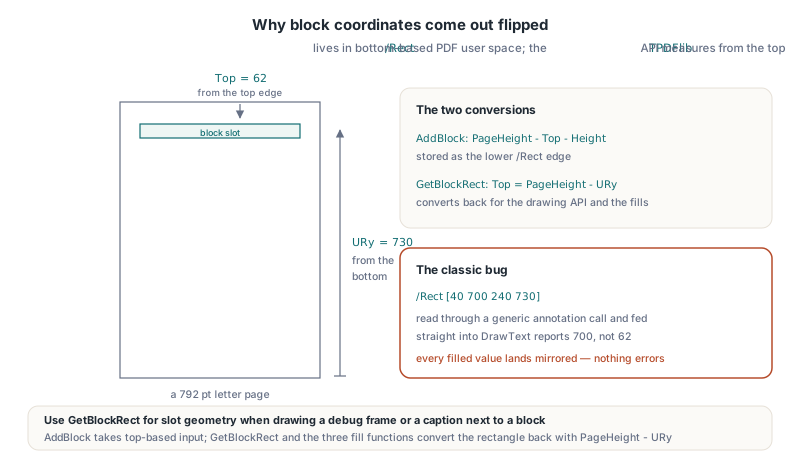
Block rectangles come out flipped when code mixes the two coordinate systems PDFlibPas deals with. An annotation /Rect is stored in PDF user space, measured from the bottom of the page (ISO 32000-1 §12.5.2), while the TPDFlib drawing API measures from the top. AddBlock takes top-based input and stores the lower edge as PageHeight - Top - Height; GetBlockRect and the three fill functions read the rectangle back and convert it with PageHeight - URy
In practice that means: use GetBlockRect(Page, BlockIndex, Left, Top, Width, Height) when you need the slot geometry, for example to draw a debug frame or position a caption next to a block, and do not read /Rect through a generic annotation call and feed it straight into DrawText. A page-piece block with /Rect [40 700 240 730] on a 792 pt letter page reports Top = 62, not 700. The bug this prevents is the classic one where every filled value lands mirrored near the bottom margin and nothing errors
Pitfalls worth learning from
The most instructive bug in the block code was a one-character slip. Block annotations are recognized by a prefix test on the subtype, and 'PDFlibBlock:' is 12 characters long. An early version compared Copy(Subtype, 1, 13) against that 12-character literal, which can never be equal, so GetBlockCount returned 0 for every template and every fill reported "no such block". Nothing crashed and nothing was logged. The lesson generalizes to any template engine: assert the block count of a known template in a test, because silent zero-match enumeration looks exactly like an empty page
The second trap is document IDs. TPDFlib.LoadFromFile returns a status code, 1 for success and 0 for failure, not the ID of the document it just loaded. Passing that 1 as SourceDocumentID to FillPDFBlock fails because 1 is not a valid document ID. Call SelectedDocument right after a successful load to get the real ID, and SelectDocument to switch back to the template if you loaded the source afterwards
A smaller one: FillTextBlock with an empty string does nothing and keeps the block. For a mail merge with optional fields, such as a missing second address line, that is usually what you want, but the unfilled annotation then stays in the output file. Remove it explicitly with DeleteAnnotation or fill a single space with bit 1 if the output must be clean. All block calls save and restore the selected page, so a fill on page 3 does not change where your next drawing call goes
What are the interoperability limits of block annotations?
Block annotations are a private convention, not a standard PDF feature. PDFlibBlock:Text and its siblings are not among the annotation types listed in ISO 32000-1 §12.5.6.1, so a viewer treats them as unknown annotations. Because the Invisible flag is clear and there is no appearance stream, conforming viewers draw nothing for them, but some viewers may still list them in a comments panel, and other PDF tools will neither understand nor preserve their semantics
- Fill with bit 1 set for anything that leaves your system, so the final file contains only ordinary page content
- PDF/A does not allow annotation types outside the PDF specification (ISO 19005-1 §6.5.2), so an archived output must not carry unfilled block annotations
- Page-piece blocks are safer to keep in a template, since
/PieceInfois standard and consumers ignore data they do not own - Blocks are not form fields: there is no interactivity, no field value in the file and no export to FDF or XFDF; for data that must stay editable see FDF, XFDF and XFA form data interchange in PDFlibPas
If the template has to declare its variable fields in a standardized, validator-checkable way for a print workflow, blocks are the wrong tool. That is what PDF/VCR-1 is for, and the PDF/VCR-1 template placeholder manifest in PDFlibPas covers how those placeholders live in the structure tree instead of in annotations
FAQ
Can PDFlibPas fill block templates created by other tools?
Yes, when the tool stores blocks under /PieceInfo /PDFlib /Blocks or /PieceInfo /PDFlib /Private /Blocks, in dictionary or array form, with a /Rect of four numbers. GetBlockCount counts those after any PDFlibBlock:* annotations, and custom keys are exposed through GetBlockProperty
Does FillTextBlock change the font I selected before the call?
No. FillTextBlock saves the selected font, text size, text color and alignment, applies the block's fontname, fontsize, fillcolor and alignment properties, and restores the original state afterwards, even if the fit fails
How do I place a vector logo or barcode page into a block?
Load the source PDF, store SelectedDocument as its ID, select the template document again if needed, and call FillPDFBlock(Page, BlockIndex, SourceID, SourcePage, 1). The page is imported as a Form XObject, so it stays vector and is fitted to the block with its aspect ratio preserved unless you add bit 2
Block templates, Form XObject page import and the rest of the variable data toolkit ship in PDFlibPas, the losLab PDF Library for Delphi, which covers PDF creation, editing and print production for Delphi and C++Builder projects