PDF Library for Delphi writes page label ranges with AddPageLabels, and since v3.539.10 that call also works on loaded files whose /PageLabels number tree is split into /Kids nodes: the root is flattened into a single /Nums leaf before the new range goes in, so the label actually shows up in the viewer instead of being silently ignored. The typical victim is a book-style PDF from a layout tool, with roman numerals in the front matter, arabic numbering in the body and an appendix labeled A-1, A-2, where you only wanted to relabel the appendix and nothing changed
What are PDF page labels and how are they stored?
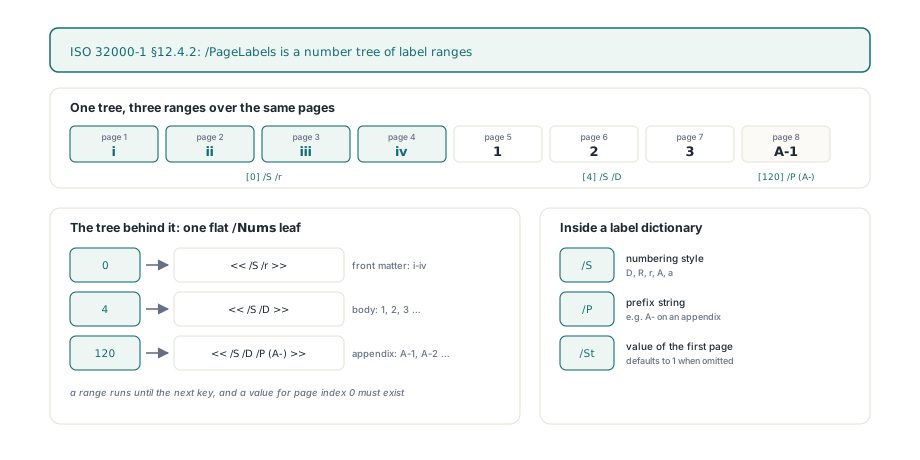
Page labels are the strings a viewer shows in its page box instead of the physical page index, and ISO 32000-1 §12.4.2 stores them as a number tree under the catalog key /PageLabels. Each key is a 0-based page index that starts a labeling range, and each value is a page label dictionary with up to three entries: /S for the numbering style (D, R, r, A or a), /P for a prefix string, and /St for the numeric value of the first page in the range, which defaults to 1. A range runs until the next key, and the specification requires the tree to contain a value for page index 0, so every page is covered by some range
var
  Lib: TPDFlib;
begin
  Lib := TPDFlib.Create;
  try
    if Lib.LoadFromFile('handbook.pdf', '') <> 1 then
      Exit;
    // Pages 1-4: i, ii, iii, iv (lowercase roman)
    Lib.AddPageLabels(1, 3, 1, '');
    // Pages 5-120: 1, 2, 3 ... (decimal)
    Lib.AddPageLabels(5, 1, 1, '');
    // Pages 121 onward: A-1, A-2 ... (decimal with a prefix)
    Lib.AddPageLabels(121, 1, 1, 'A-');
    WriteLn(Lib.GetPageLabel(5));    // 1
    WriteLn(Lib.GetPageLabel(122));  // A-2
    Lib.SaveToFile('handbook-labeled.pdf');
  finally
    Lib.Free;
  end;
end;
TPDFlib.AddPageLabels(Start, Style, Offset, Prefix) maps its arguments onto that dictionary without surprises once you know three rules. Start is 1-based like every other page argument in the library and is written into the tree as Start - 1. Style runs from 0 to 5, where 0 means prefix only and 1 to 5 become /S values D, R, r, A and a; anything outside that range returns 0 and touches nothing. Offset becomes /St only when it is greater than zero, so passing 0 simply omits the key and the viewer falls back to the default of 1. Because page labels arrived in PDF 1.3, the call also runs EnsureMinVersion('1.3', '/PageLabels'), which raises the output version of an older file unless you have explicitly locked the save version
Why do new page labels disappear when the tree has /Kids?
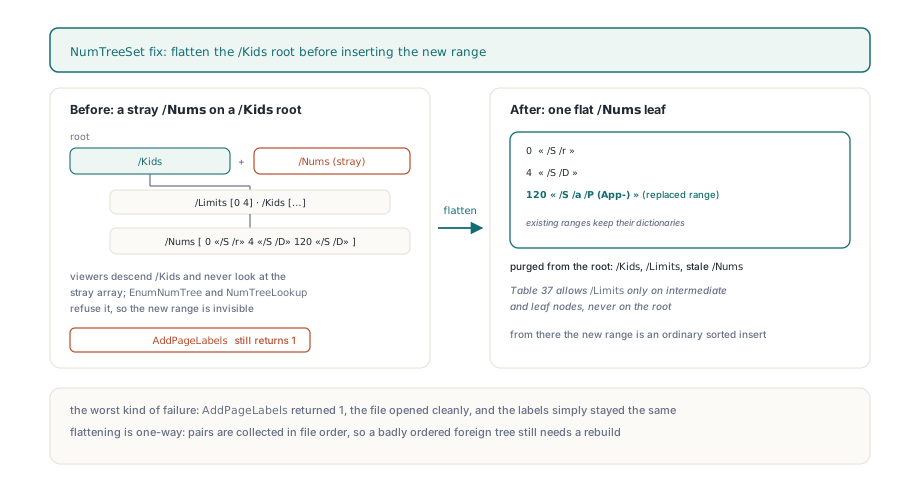
New labels disappear because ISO 32000-1 §7.9.7 (Table 37) makes the root of a number tree carry either /Kids or /Nums, never both, and the earlier NumTreeSet helper only knew how to look for /Nums. Producers that emit long documents often split the tree into intermediate nodes, each with a /Limits pair, and hang them off a root that has only /Kids. The old code found no /Nums on that root, created a fresh one next to the existing /Kids, and inserted the new range there. The result was a root with two mutually exclusive entry points. Viewers descend through /Kids and never look at the stray array, the library's own EnumNumTree also checks /Kids first, and NumTreeLookup refuses a node where HasKids xor HasNums is false. AddPageLabels still returned 1 and the saved file still opened cleanly, which is the worst kind of failure: nothing complains, the labels just stay the same
The fix in NumTreeSet converts the root into a leaf before inserting anything. When the root carries /Kids, EnumNumTree walks every leaf in order and collects each key and value pair, a new flat /Nums array is built from that list, and /Kids, /Limits and any stale /Nums are purged from the root before the flat array is attached. Dropping /Limits is not cosmetic, since Table 37 allows that entry only on intermediate and leaf nodes, never on the root. From that point the insertion is an ordinary sorted insert into one array, and existing ranges survive with their original label dictionaries. The trade-off is deliberate: the tree is not rebuilt into balanced /Kids nodes afterward. For page labels that costs nothing, because even a large reference manual rarely has more than a few dozen ranges, and a single leaf is what most producers write anyway
// Relabel the appendix in a file whose /PageLabels root uses /Kids
if Lib.LoadFromFile('vendor-manual.pdf', '') = 1 then
begin
  WriteLn('Before: ', Lib.GetPageLabel(121));  // e.g. A-1
  // Replace the range that starts at page 121: App-a, App-b ...
  if Lib.AddPageLabels(121, 5, 1, 'App-') = 1 then
    Lib.SaveToFile('vendor-manual-relabeled.pdf');
  // Existing roman and decimal ranges are still in the flattened leaf
  WriteLn('After: ', Lib.GetPageLabel(121));   // App-a
  WriteLn('Front: ', Lib.GetPageLabel(2));     // ii, unchanged
end;
How can a /Nums array be misread as keys?
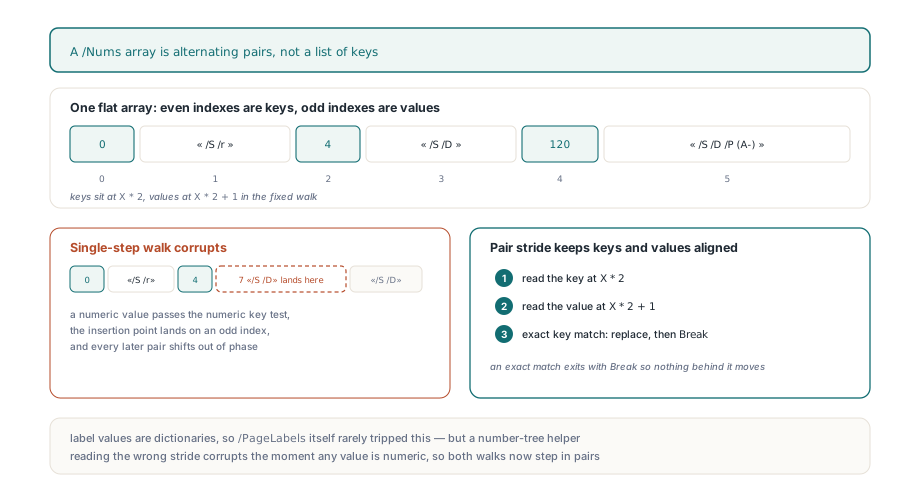
A /Nums array is misread when code walks it one element at a time, because the array is a flat run of alternating pairs, [key0 value0 key1 value1 ...], and only the even positions are keys. The old NumTreeSet loop tested every element for a numeric type, so a value that happened to be a number was compared as if it were a key; a less-than hit could set the insertion point to an odd index and drop the new pair into the middle of an existing one, shifting every later pair out of phase. EnumNumTree had the same single-step walk. Both now iterate pairs with a stride of two, reading the key at X * 2 and the value at X * 2 + 1, and an exact key match replaces the value and exits with Break. In fairness, page label values are dictionaries, so this second bug rarely fired on /PageLabels itself, but a number-tree helper that reads the wrong stride is corrupt the moment any value is numeric, and it was fixed in the same pass
Reading labels back and round-tripping them
TPDFlib.GetPageLabel(Page) returns the label for a 1-based page and has two fallbacks worth knowing. With no /PageLabels entry at all it returns the decimal page number, so a caller can use it unconditionally. With a tree present but no range covering the page it returns an empty string, which is exactly what happens when a file skips the mandatory index 0 entry; the reference documentation says a range starting at page 1 must exist for labels to display correctly, and the code makes that requirement visible. Letter styles follow the specification rather than spreadsheet columns: after Z comes AA, then BB, repeating the letter instead of carrying
var
  P: Integer;
  Data: WideString;
begin
  // Quick audit of what a viewer will show in its page box
  for P := 1 to Lib.PageCount do
    WriteLn(P, ' -> ', Lib.GetPageLabel(P));

  // Option value 4 exports only label ranges as PageLabelBegin records
  Data := Lib.ExportDocumentData(4);
  // Importing replays them through ClearPageLabels + AddPageLabels
  Lib.ImportDocumentData(Data, 0);
end;
For bulk edits, ExportDocumentData with option value 4 writes every range as a PageLabelBegin block with PageLabelNewIndex, PageLabelStart, PageLabelPrefix and PageLabelNumStyle lines, and ImportDocumentData treats the first label record it sees as a full replacement: it calls ClearPageLabels once and then feeds each record to AddPageLabels. That makes a text round trip deterministic even when the original file used a /Kids tree, because clearing removes the whole catalog entry and the rebuilt tree is a single leaf from the start
What does the fix still not guarantee?
The flattening is one-way and trusts the order it finds. EnumNumTree collects pairs in file order, and GetPageLabel applies the last range whose key is less than or equal to the page index, so a foreign file whose leaves are out of order, which §7.9.7 forbids but which does circulate, can still yield wrong labels until you rebuild the ranges with ClearPageLabels and fresh AddPageLabels calls. Labels are also bound to page indices, not page objects, so any operation that changes page count or order leaves the ranges where they were. An in-place swap such as replacing pages while preserving object numbers keeps the count and therefore the labels aligned, whereas a merge like collating interleaved duplex scans produces a new page sequence that deserves a freshly written set of ranges
The page label calls, the number-tree handling and the document data export and import described here all ship in PDF Library for Delphi for Delphi, C++Builder and Lazarus, with the reference entry for AddPageLabels documenting the style values and return codes