PDF Library for Delphi merges two AcroForm documents with an explicit policy for fields that share a name. MergeDocumentEx takes the source document identifier and one of three strategies: dfsReject refuses the merge, dfsMerge keeps the shared name and synchronizes values, and dfsAutoNumber renames the incoming fields deterministically. The name scan happens before any object numbers shift, so a rejected merge leaves both documents fully usable
Anyone who has assembled a PDF application pack has hit this. Three forms, each with a field called Signature or Date or Total, get merged into one file. In an AcroForm, the fully qualified field name is the identity of the field, so two fields with the same name are not two fields at all: filling one fills the other, and a signature applied to one covers a scope nobody intended
Why is the name collision decided before the merge?
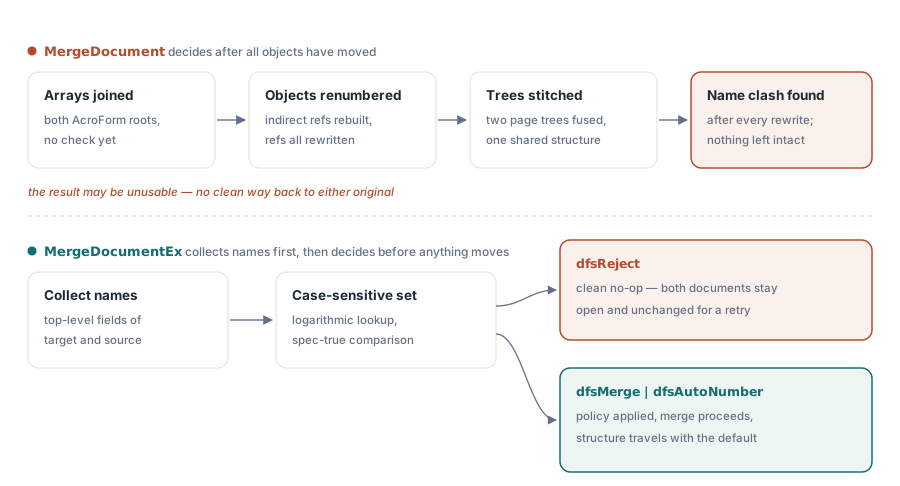
The older MergeDocument concatenates the two AcroForm root field arrays and offers no choice. Worse, when the result is unusable, the discovery happens after object numbers have been renumbered and page trees stitched, which leaves the caller holding a document in a state neither original was in
MergeDocumentEx inverts the order. It collects the top-level field names from both documents, compares them, and applies the strategy before anything moves. A rejection is therefore a clean no-op: the target document is untouched, the source document is untouched, and both remain open and usable, which the merge test verifies by reading a field value back out of the source after a refused merge
The comparison uses an ordered, case-sensitive name set, so the cost is proportional to the combined field count times a logarithmic factor rather than to the product of the two counts. Case sensitivity is the correct choice here because PDF field names are case sensitive; folding them would merge fields the specification treats as distinct
The three strategies, and when each is right
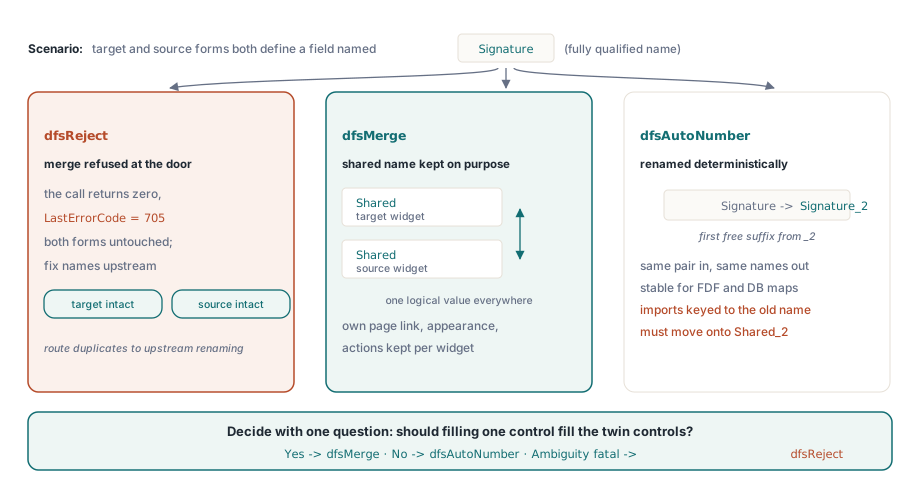
dfsReject is the strategy for automated pipelines that must not produce ambiguous documents. The merge returns zero and LastErrorCode reports 705, a dedicated code so that duplicate names can be distinguished from every other merge failure and routed to a specific remedy, usually renaming fields upstream
dfsMerge keeps the shared name deliberately and synchronizes the target value and default value into the source field, so a conforming viewer treats the several widgets as one logically named field, which is standard AcroForm behavior for a field with multiple widget annotations. What it does not do is fold different field dictionaries into a single object. Each field keeps its own page association, appearance and actions, because collapsing them would silently discard formatting and behavior that belongs to the incoming document
dfsAutoNumber renames incoming duplicates by appending a numeric suffix starting at _2 and taking the first free one. The result is reproducible: it depends only on the names present, never on field object numbers, so merging the same pair of documents twice yields the same names both times. That property matters when downstream code, an FDF import or a database mapping refers to fields by name
uses
  PDFlibrary;

var
  Lib: TPDFlib;
  TargetDoc, SourceDoc: Integer;
begin
  Lib := TPDFlib.Create;
  try
    TargetDoc := Lib.SelectedDocument;
    Lib.LoadFromFile('application-part1.pdf', '');

    SourceDoc := Lib.NewDocument;
    Lib.LoadFromFile('application-part2.pdf', '');

    Lib.SelectDocument(TargetDoc);
    if Lib.MergeDocumentEx(SourceDoc, dfsReject) = 0 then
    begin
      if Lib.LastErrorCode = 705 then
      begin
        // Both documents are still intact - retry with a policy
        Log('duplicate field names; retrying with auto-numbering');
        Lib.MergeDocumentEx(SourceDoc, dfsAutoNumber);
      end;
    end;

    Lib.SaveToFile('application-complete.pdf');
  finally
    Lib.Free;
  end;
end;
Note the two-step pattern in that code, which is only possible because rejection is non-destructive. Try the strict policy first, inspect the error, then decide. With a merge that fails halfway, the fallback would have to start over by reloading both files
What the merged form looks like afterward
Under dfsMerge, a target field named Shared carrying "Target value" and a source field with the same name produce two fields, both named Shared, both reporting the target value, because the target value and default value are synchronized into the incoming field. That is the intended semantics for a shared name: one logical field, several widgets, one value
Under dfsAutoNumber, the same input produces Shared and Shared_2 as separate fields with independent values. Choose between the two by asking a single question: should filling one control fill the other? For a signer name repeated on every part of a pack, yes, and dfsMerge is right. For a total that means something different on each form, no, and auto-numbering is right
// After a merge, enumerate what you actually got
for I := 1 to Lib.FormFieldCount do
  Log(Format('%d: %s = %s',
    [I, Lib.GetFormFieldTitle(I), Lib.GetFormFieldValue(I)]));
Practical notes for assembling form packs
The successful merge consumes the source document: it is removed from the library's document list, which is why DocumentCount drops from two to one. Do not keep using the source identifier afterward. The document version is raised to the higher of the two, so merging a PDF 2.0 form into a 1.7 document yields a 2.0 file
Order matters for names. Merging A into B and merging B into A produce different auto-numbered results, since the document doing the merging keeps its names unchanged. When a pack has a canonical primary form, make that one the target
Signature fields deserve their own consideration. A signature that was applied before a merge covers only the revision it signed, so merging invalidates it in the practical sense that the file has changed since signing. Assemble first and sign the assembled document, rather than merging signed parts. When the merge is about page content rather than forms, the faster path described in fast PDF merge with byte reference shifting is the better tool
Finally, plan the data side of the pack together with the merge. If field values arrive from an external system, decide whether that system addresses fields by name before choosing auto-numbering, because Shared_2 will not match a mapping that expects Shared. Import and export formats are covered in FDF, XFDF and XFA form data interchange, and field-level scripting behavior that can also be affected by renaming is covered in interactive form actions and JavaScript
Form merging, data interchange and signing run in the same library for Delphi, C++Builder and Free Pascal; the complete feature list is on the PDF Library for Delphi page