Dump a JBIG2 Tables segment (type 53) byte by byte and the first surprise is what it leaves out: the Huffman codes themselves. You get a flags byte, two bounds and a run of small numbers, and those numbers are code lengths. Encoder and decoder both rebuild the actual bit patterns from the lengths with the procedure in ITU-T T.88 Annex B.3. Rebuild them in a slightly different order and you still get a valid prefix code, every pattern still decodes, and every value comes out attached to the wrong pattern
On a page coded with Huffman symbol IDs and encoder-supplied tables, that mismatch looks like a bad scan: glyphs a few pixels off, characters built from the wrong symbols, or plausible numbers until a width goes out of range several segments later. Most JBIG2 in PDF files is arithmetic-coded, and most Huffman-coded JBIG2 sticks to the standard tables B.1 to B.15. Files that ship their own tables are rare, and they tend to exercise the table parser, Huffman-coded refinement and uncompressed collective bitmaps all at once
What a Tables segment actually carries
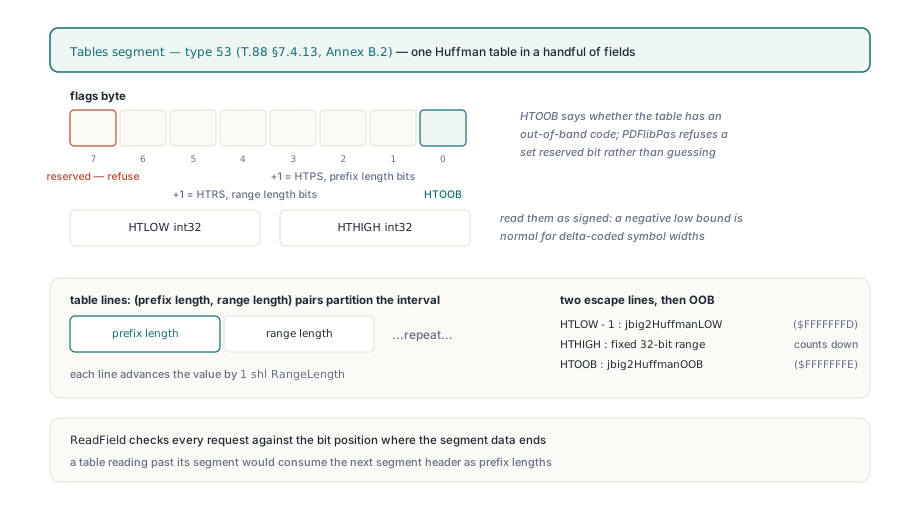
A Tables segment describes exactly one Huffman table. T.88 §7.4.13 and Annex B.2 lay it out as one flags byte, a signed 32-bit HTLOW, a signed 32-bit HTHIGH, and then (prefix length, range length) pairs that tile the interval from HTLOW up to HTHIGH. Bit 0 of the flags is HTOOB, which says whether the table has an out-of-band code. Bits 1 to 3 plus one give HTPS, the width of every prefix length field. Bits 4 to 6 plus one give HTRS, the width of every range length field. Bit 7 is reserved
The bounds are where a hand-written parser usually trips first. Read HTLOW as unsigned and a table that starts at -2, which is ordinary for delta-coded symbol widths and heights, suddenly claims to start just under 4.3 billion. PDF Library for Delphi reads both bounds as signed values, refuses a table whose HTLOW is not below HTHIGH or whose range length exceeds 32, and checks every field read against the bit where the segment's declared data ends. That last check matters more than it sounds: a table that reads past its segment consumes the next segment header as prefix lengths and parses into complete nonsense. A set bit 7 fails with reserved custom Huffman table flag. We prefer that refusal to a guess, because a guessed table produces wrong pixels nobody can trace back to their cause
After the regular lines come the escape lines of Annex B.2. The lower range line starts at HTLOW minus one and counts downward by a 32-bit offset, the upper range line starts at HTHIGH with a 32-bit range, and the out-of-band line exists only when HTOOB is set. These lines carry the same markers the built-in standard tables use, so a custom table and Table B.6 go through one decoding loop. A custom table can hold up to 65,536 lines
Why must prefix codes be assigned in table-line order?
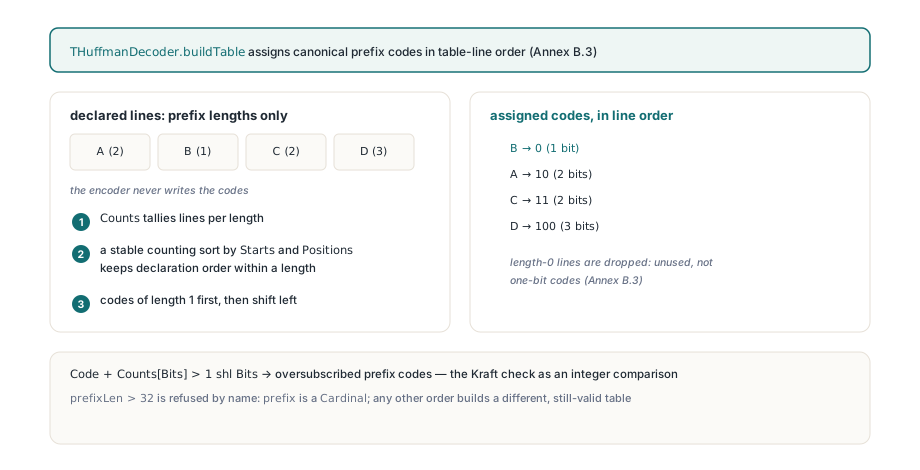
Because declaration order is the only thing that ties a bit pattern to a value range. Annex B.3 counts how many lines use each prefix length, hands out codes of length 1 first, shifts left to move to length 2, and so on; within one length, codes go to lines in the order they appear in the segment. A small table makes this concrete. Six lines, labeled A to F in file order, with these prefix lengths:
| Line | Prefix length | Code (file order kept) | Code if B and D swap |
|---|---|---|---|
| A | 2 | 00 | 00 |
| B | 3 | 100 | 101 |
| C | 2 | 01 | 01 |
| D | 3 | 101 | 100 |
| E | 3 | 110 | 110 |
| F | 0 | unused | unused |
Both columns are valid prefix codes. Only the left one is what the encoder meant: with B and D swapped, the pattern 100 yields D's value range and the decoder keeps going with a number from the wrong interval. Line F has length 0, which B.3 defines as unused; give it a one-bit code and every later assignment shifts
The easy way to get the right-hand column is a general-purpose sort by prefix length. Delphi's TArray.Sort and TList<T>.Sort are not stable, so equal lengths can come back in any order. For canonical codes in your own tooling, walk the lines in file order once per length instead:
uses
  System.SysUtils;

type
  TCodeLine = record
    PrefixLen: Integer;   // as read from the Tables segment
    Code: Cardinal;       // assigned below
  end;

// Annex B.3 canonical assignment, written for your own tooling.
// Equal lengths keep their file order; length 0 gets no code.
procedure AssignCanonicalCodes(var Lines: array of TCodeLine);
var
  LenCount: array[0..32] of UInt64;
  FirstCode: array[0..32] of UInt64;
  NextCode: UInt64;
  CurLen, I: Integer;
begin
  FillChar(LenCount, SizeOf(LenCount), 0);
  for I := 0 to High(Lines) do
  begin
    if (Lines[I].PrefixLen < 0) or (Lines[I].PrefixLen > 32) then
      raise Exception.Create('prefix length out of range');
    Inc(LenCount[Lines[I].PrefixLen]);
  end;
  LenCount[0] := 0;
  FirstCode[0] := 0;
  for CurLen := 1 to 32 do
  begin
    FirstCode[CurLen] := (FirstCode[CurLen - 1] + LenCount[CurLen - 1]) shl 1;
    // Kraft check: more codes than this length can hold
    if FirstCode[CurLen] + LenCount[CurLen] > (UInt64(1) shl CurLen) then
      raise Exception.Create('oversubscribed prefix lengths');
    NextCode := FirstCode[CurLen];
    for I := 0 to High(Lines) do       // file order is the tie-break
      if Lines[I].PrefixLen = CurLen then
      begin
        Lines[I].Code := Cardinal(NextCode);
        Inc(NextCode);
      end;
  end;
end;
Feed it the six lines above and A gets 00, C gets 01, B gets 100, D gets 101 and E gets 110; F keeps no code. PDF Library for Delphi does the same job with a counting pass, which is stable by construction and avoids rescanning the table 32 times, and applies the same two guards. Oversubscribed lengths fail with oversubscribed Huffman prefix codes; let them through and one pattern can match two lines. Prefixes longer than 32 bits fail by name too, although T.88 allows them on paper. We think that ceiling is the right trade: each code fits one machine word, and a file that needs more is far more likely to be damaged than clever
Values need the same care. The lower range line decodes as HTLOW minus one minus a 32-bit unsigned offset, and with a 32-bit Integer intermediate that subtraction can wrap into an ordinary-looking positive width. The decoder does it in 64 bits and raises Huffman value exceeds signed integer range when the true result does not fit
Selector order, and two traps that cover for each other
A text region or symbol dictionary does not name its tables. It carries two-bit selectors, and each selector set to custom takes the next Tables segment from the referred-to list, in referral order. T.88 §7.4.3.1.2 orders text-region selectors as FS, DS, DT, RDW, RDH, RDX, RDY and RSIZE; §7.4.2.1.1 orders symbol-dictionary selectors as DH, DW, BMSIZE and AGGINST. Values 0 and 1 pick standard tables, 3 picks a custom one, and 2 is reserved on fields with only two standard tables. PDF Library for Delphi rejects reserved selector values, and fails with missing custom Huffman table reference when the selectors want more custom tables than the region refers to
If you write your own decoder, two mistakes are easy to make here, and each hides the other. The first bites in Delphi, or FPC in Delphi mode (objfpc mode rejects the code as a duplicate identifier): a flags setter whose parameter has the same name as the field. The parameter shadows the field, Flags := Flags assigns it to itself, and the field stays zero. Every selector then reads zero, a text region uses standard tables B.6, B.8 and B.11 for FS, DS and DT whatever the file asked for, and the custom path never runs
The second sits in the symbol dictionary. A Huffman dictionary can store its symbols as an uncompressed collective bitmap (BMSIZE of zero), where each row ends in a partial byte. The padding value is the number of valid bits in that byte, and it is tempting to read it as the lowest valid bit position:
// Last byte of one collective-bitmap row, bits read MSB first.
// Padding := TotalWidth mod 8  -> number of VALID bits in this byte

// Wrong: treats Padding as the lowest bit index to copy
for BitPos := 7 downto Padding do
  CopyPixel((LastByte shr BitPos) and 1);

// Right: the lowest valid bit index is 8 - Padding (0 when Padding = 0)
for BitPos := 7 downto ((8 - Padding) and 7) do
  CopyPixel((LastByte shr BitPos) and 1);

// CopyPixel stands for whatever writes the pixel in your own decoder
Check the boundary widths. A 63-pixel row has a padding of 7: the wrong loop copies one bit of the last byte, the right loop seven. A 9-pixel row has a padding of 1: the wrong loop copies seven, the right one copies one. At 64 pixels both copy all eight, so multiples of 8 never expose it. Synthetic collective bitmaps 7 and 9 pixels wide pin both sides of the byte boundary. And the damage travels, because refinement uses these symbols as references
If your own decoder has both traps, debugging it gets miserable. Correct the setter alone and the custom path finally runs, straight into broken collective bitmaps, so the page still looks wrong. Correct the padding alone and nothing visible changes, because the custom path is still unreachable. Test both with synthetic inputs before trusting either change. One related detail: a Huffman symbol dictionary whose input and new symbols add up to one gets a symbol code length of 0 from the log2 formula, yet the Huffman variant writes every symbol ID with at least one bit. PDF Library for Delphi raises that length to 1 in Huffman mode
Where does Huffman refinement read its bitmap size?
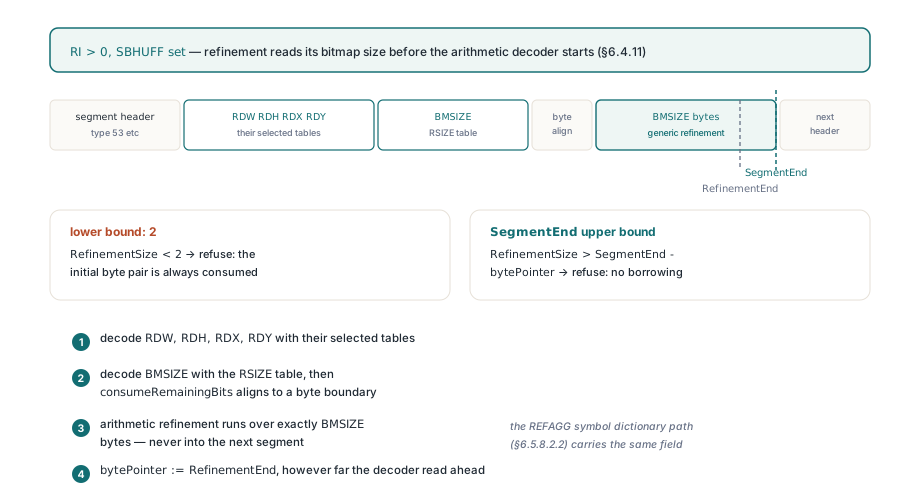
From a BMSIZE field that only exists in Huffman mode, decoded ahead of the arithmetic refinement data. When a text region instance has refinement (RI is non-zero) and SBHUFF is set, T.88 §6.4.11 has the decoder read RDW, RDH, RDX and RDY with their selected tables, then BMSIZE with the RSIZE table, then skip to a byte boundary, and only then run generic refinement decoding over exactly BMSIZE bytes. Arithmetic-mode text regions have no such field, so a decoder that shares one code path between the modes skips it, starts the arithmetic decoder early, and refines every symbol against noise. The symbol dictionary path with REFAGG and a single refinement instance (§6.5.8.2.2) has the same field
PDF Library for Delphi bounds BMSIZE on both sides. The minimum is 2, the initial byte pair the arithmetic decoder always consumes. The maximum is what remains of the current segment, deliberately not of the whole stream: a BMSIZE that only fits by borrowing bytes from the next segment is malformed, and a stream-length check would let the arithmetic decoder read into the following header. Out-of-range sizes fail with invalid refinement bitmap size. Afterwards the Huffman reader resumes exactly BMSIZE bytes past the field, whatever the arithmetic decoder read ahead
The declared segment length is the boundary
Every segment header states how many data bytes follow, and the decoder holds the segment to that number in both directions: reading past the end is an error, finishing early is normal, and the next header is always read from where the file said it starts. Smaller rules follow. The unknown data length of T.88 §7.2.7 is refused up front instead of scanning for a terminator. Referred-to segments must carry smaller numbers than the current one and must already exist. END_OF_PAGE and END_OF_FILE must declare zero data bytes. A Profiles segment (type 52) must be exactly 4 plus 4 times its identifier count; it is then skipped but kept, so later segments can still refer to it, and an unknown profile identifier does not stop the decode
The classic case for finishing early is MMR. An MMR decoder is done once it produces the last pixel of the last row, which can happen ahead of the EOFB terminator that T.88 §6.2.5.7 puts at the end of the data. A reader that assumes it now sits at the next header parses the leftover EOFB bytes as a segment number and fails a few bytes later, far from the real cause. Jumping to the declared end avoids the question. The same habit runs through how PDF Library for Delphi parses untrusted PDF structures in general
Decoding a JBIG2 image stream from Delphi
The decoder lives in the PDFlibJBIG2 unit as TPLJBIG2Decoder. LoadFromByteArray takes the embedded JBIG2 data of a /JBIG2Decode image and, optionally, the data of its /JBIG2Globals stream, which is where custom tables and shared symbol dictionaries usually live. It returns False on any refusal and leaves the reason in LastError; output from an earlier call is cleared at the start of every call, so a failed decode never leaves old pixels behind for the caller to mistake for a result
uses
  System.SysUtils, PDFlibJBIG2;

// ImageBytes: the image stream data with any filters ahead of
//   JBIG2Decode already removed
// GlobalBytes: the /JBIG2Globals stream data, or an empty array
function DecodeAndCountBlack(const ImageBytes, GlobalBytes: TJBIG2ByteArray;
  out BlackPixels: Int64): Boolean;
var
  Decoder: TPLJBIG2Decoder;
  Line: TJBIG2ByteArray;
  Row, Col: Integer;
begin
  BlackPixels := 0;
  Decoder := TPLJBIG2Decoder.Create;
  try
    Result := Decoder.LoadFromByteArray(ImageBytes, GlobalBytes);
    if not Result then
    begin
      // Form: 'JBIG2 segment <n> (type <t>) at byte <offset>: <reason>'
      Writeln('JBIG2 refused: ', Decoder.LastError);
      Exit;
    end;
    for Row := 0 to Decoder.Height - 1 do
    begin
      Decoder.GetScanline(Row, Line);   // one byte per pixel, 0 or 1
      for Col := 0 to Decoder.Width - 1 do
        Inc(BlackPixels, Line[Col]);    // 1 = black in JBIG2
    end;
  finally
    Decoder.Free;
  end;
end;
The black-pixel count is your own check, a cheap fingerprint for comparing against a second renderer. Segment-level failures arrive prefixed with segment number, type and byte offset, so (type 53) in front of oversubscribed Huffman prefix codes points straight at a Tables segment. Keep the two error channels apart: TPLJBIG2Decoder.LastError is this decoder's diagnostic text, while TPDFlib.LastErrorCode is the numeric code of the library-level API. Page selection follows the stream: the decoder returns the bitmap of the first page-information segment it meets and does not look up page association 0, because PDF-embedded JBIG2 carries one page and encoders routinely number it 1
Comparing renderers on these files takes some humility, because independent JBIG2 decoders do not always agree on custom-table files with Huffman refinement. Two decoders disagreeing settles nothing. The format fields do: which tables the selectors chose, what BMSIZE declared, where each segment ends
Encoding is covered in the article on JBIG2 encoder backends and how they are linked. The read path has to take whatever someone else's encoder emitted, and it shares its rules with the built-in TIFF decoder and its BigTIFF and tiled-layout checks: refuse by name, never borrow bytes across a declared boundary, keep intermediate arithmetic wide. If a folder of scanned PDFs keeps tripping other toolkits, check whether the images are Huffman-coded JBIG2 with custom tables, then try them against the native Delphi and C++Builder read path described on the PDF Library for Delphi product page