An honest load/save benchmark for PDF Library for Delphi times LoadFromFile and SaveToFile with QueryPerformanceCounter, keeps the raw ticks and counter frequency, runs baseline and candidate in alternating A/B, B/A, A/B pairs, refuses to start while CPU load sits above 25%, rejects any result whose range-to-median spread exceeds 15%, and throws away every timing whose saved PDF fails structural, rendering, or semantic validation. That list reads like bureaucracy until the first time a "20% faster" claim evaporates on a rerun. What follows is how the dedicated corpus probe and its comparison runner got there, including the run where the machine was simply too busy to measure anything and the harness correctly said so
Why Does a Delphi PDF Benchmark Report Zero Seconds?
A PDF load benchmark reports zero seconds when its clock ticks more coarsely than the operation it measures, and GetTickCount64 is exactly that kind of clock: it returns milliseconds, but on Windows it only advances when the system timer interrupt fires, commonly every 15.6 ms. The FPC port of the huge-file benchmark demo in PDF Library for Delphi used it because TStopwatch is not available in that toolchain, and it records elapsed time to three decimal places. Loading a small CAD drawing or a short tagged document finishes well inside one timer step, so the demo sometimes printed 0.000 for a load that plainly did real work
function ElapsedSeconds(StartTick: QWord): Double;
begin
  Result:= (GetTickCount64- StartTick)/ 1000.0;
end;

// inside the operation loop
Lib:= TPDFlib.Create;
try
  Lib.OnProgress:= Reporter.Progress;
  Started:= GetTickCount64;
  LoadCode:= Lib.LoadFromFile(InputFile, Password);
  ...
A zero is worse than an imprecise number, because every comparison you build on it divides by it. The paired comparison runner treats any arm with a zero minimum as inconclusive with the reason "Zero duration prevents a meaningful ratio", which is the correct refusal, but it also means the demo timings left a measurement gap exactly where short files live. The same demo also installs an OnProgress callback, so its timings include callback overhead that a clean load/save measurement should not carry, and archived demo numbers are not interchangeable with anything measured later
Timing LoadFromFile and SaveToFile with QueryPerformanceCounter
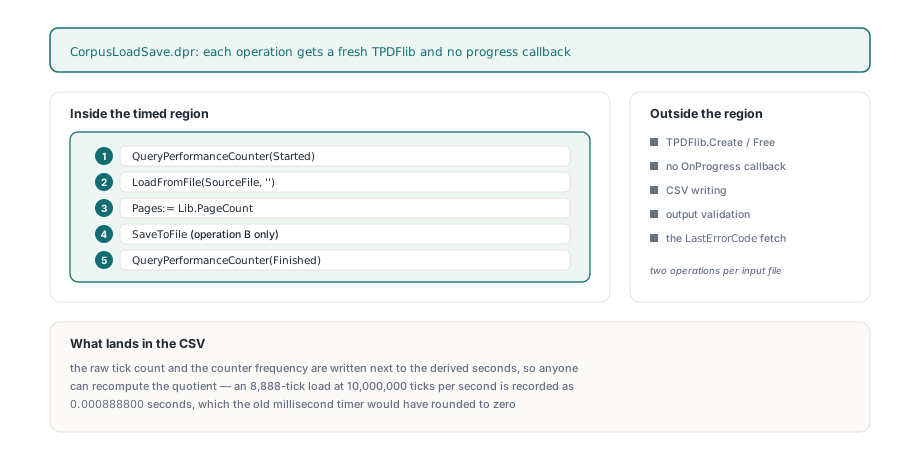
The dedicated console probe, Tests/CorpusLoadSave.dpr, measures two operations per input file with QueryPerformanceCounter: LoadFromFile plus reading PageCount, and LoadFromFile plus PageCount plus SaveToFile. Each operation gets a fresh TPDFlib instance and no progress callback, and the instance constructor and destructor sit outside the timed region, as do CSV writing and all output validation. The counter is read immediately before the load and immediately after the last library call, and LastErrorCode is fetched only after the second reading
Lib:= TPDFlib.Create;
try
  if not QueryPerformanceCounter(Started) then
    raise Exception.Create('Performance counter unavailable');
  Code:= Lib.LoadFromFile(WideString(SourceFile), '');
  if Code= 1 then
  begin
    Pages:= Lib.PageCount;
    if Save then Code:= Lib.SaveToFile(WideString(SavedFile));
  end;
  if not QueryPerformanceCounter(Finished) then
    raise Exception.Create('Performance counter unavailable');
  ErrorCode:= Lib.LastErrorCode;
finally
  Lib.Free;
end;
Ticks:= Finished- Started;
if Ticks< 0 then
  raise Exception.Create('Performance counter moved backwards');
The probe writes the raw tick count and the counter frequency next to the derived seconds, formatted with nine decimal places and a fixed . decimal separator, so anyone can recompute the quotient from the CSV instead of trusting it. On the FPC Win64 build the CAD sample loaded in 8,888 ticks at 10,000,000 ticks per second, recorded as 0.000888800 seconds — an observation the old timer would have rounded to zero. The probe deliberately does not clip short values, substitute a minimum duration, or subtract an estimated timer overhead, and it still writes both rows with a nonzero exit code when a library call fails. Nine digits are not accuracy, though: more recorded precision says nothing about repeatability, and noisy or zero observations still have to be rejected downstream
if not QueryPerformanceFrequency(Frequency) or (Frequency<= 0) then
  raise Exception.Create('Performance counter frequency unavailable');
NumberFormat:= TFormatSettings.Create;
NumberFormat.DecimalSeparator:= '.';
...
Rows.Add(CSV(ExtractFileName(SourceFile))+ ','+ CSV(Operation)+ ','+
  FormatFloat('0.000000000', Ticks/ Frequency, NumberFormat)+ ','+
  IntToStr(Code)+ ','+ IntToStr(ErrorCode)+ ','+ IntToStr(Pages)+ ','+
  IntToStr(Ticks)+ ','+ IntToStr(Frequency));
What Makes a PDF Load/Save Timing Comparison Trustworthy?
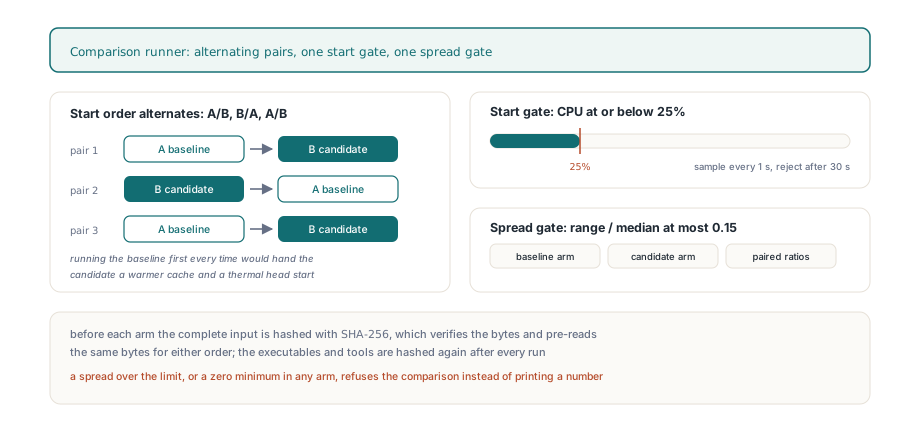
A timing comparison between two builds of PDF Library for Delphi is only trustworthy when start order, start conditions, and spread are all controlled and recorded, so the comparison runner schedules at least three pairs in A/B, B/A, A/B order. Always running the baseline first quietly hands the candidate a warmer file cache and a different thermal state; alternating the order spreads that bias across both arms instead of crediting it to one. Before each arm the runner hashes the complete input file with SHA-256, which both verifies that nothing changed and pre-reads the same bytes for either arm, and it hashes the two executables and the validation tools again after every run so a rebuilt binary cannot slip into the middle of a series
The runner then samples machine-wide CPU utilization once per second and starts the arm only when a sample falls to 25% or below, waiting at most 30 seconds before recording the attempt as rejected. That gate controls the start condition and nothing else: it does not isolate the machine during the run, and power state, thermal throttling, background work, and OS caching can still move the numbers. So the second filter is statistical in the plainest sense. For each operation the runner computes range divided by median for the baseline arm, the candidate arm, and the distribution of paired candidate/baseline ratios, and if any of the three exceeds 0.15 the result is labeled noisy instead of reported as a finding
Why Does a Same-Binary Control Prove Repeatability, Not Speed?
A same-binary control runs identical executables as baseline and candidate, so a ratio near 1.0 can only prove that the measurement setup repeats itself; it can never show that an implementation got faster. The first strict control on 2026-09-21 used the high-resolution FPC Win64 probe against an admitted 70-page tagged guide, and all six starts were rejected because the CPU samples ranged from 26.5% to 93.8%. The report contained failures and no aggregates, which is exactly the outcome you want when the machine is busy. A same-day retry with byte-identical inputs, the same probe executable, and unchanged thresholds accepted all six starts within 3 seconds; every range-to-median spread landed between 0.019 and 0.054, and the ratio medians were 1.0084 for LoadFromFile and 0.9872 for LoadFromFile + SaveToFile
That pair of numbers establishes a qualified observation window and nothing more. When the two binaries differ, a stable run is labeled a descriptive comparison, with the explicit note that the ratios are observations, not statistical significance or a speedup claim. The discipline matters most when you are validating targeted optimizations like the ones described in profiling PDF Library for Delphi and replacing hot paths with hash indexes: a profiler tells you where time goes, but only a controlled paired run on real documents tells you whether the change survived contact with the whole pipeline. One more boundary worth saying out loud — normal-save includes loading, and the peak working set the runner records is process-wide, so none of it is memory attributable to saving alone
Three Output Gates and a Four-Compiler Matrix
No PDF Library for Delphi timing counts unless the file it produced passes three independent gates, because a save that writes a broken PDF quickly is not a faster save. The benchmark first checks that both operations returned 1 and reported the admitted page count, then validates the single saved PDF in this order:
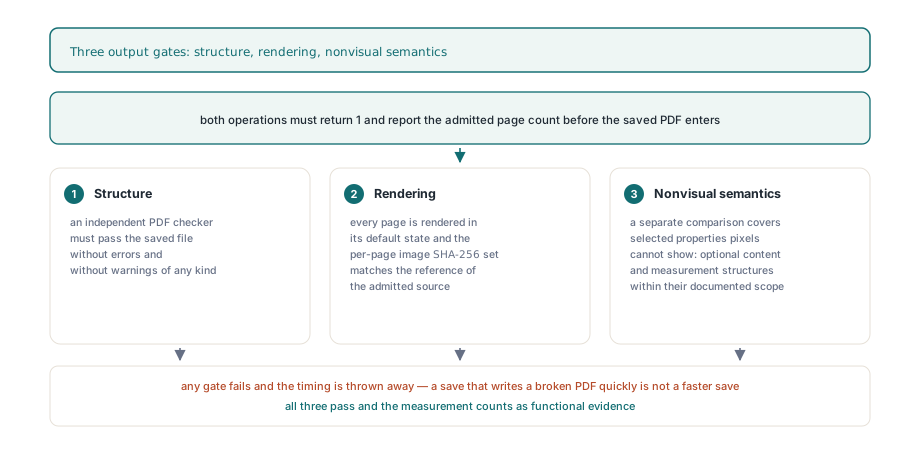
- Structure: an independent PDF checker must pass the saved file without errors or warnings
- Rendering: every page is rendered in its default state, and the per-page image SHA-256 set must exactly match the reference rendering of the admitted source
- Nonvisual semantics: a separate semantic comparison against the source covers selected properties that pixels cannot show, including optional-content and measurement structures within their documented scope
With those gates in place, the full local corpus matrix ran the probe on FPC Win32, FPC Win64, Delphi Win32, and Delphi Win64 over 12 admitted PDFs with 1,612 source pages, giving 48 sample/target pairs and 6,448 validated output pages with no selected semantic differences. All 96 operation measurements retained positive raw counter values consistent with their reported seconds, and those values are deliberately not aggregated into a cross-compiler speed table, because the matrix is functional evidence rather than a controlled comparison. The load/save path also does not claim to decode every embedded image, validate signatures, execute XFA, or certify PDF/UA; if you need to judge rendering throughput rather than load/save cost, the concurrency constraints in parallel page rendering and thread safety in PDF Library for Delphi are the better starting point
The practical takeaway is short: keep raw counters, alternate the order, gate the start, refuse noisy spreads, and never time an output you have not validated. Those rules are what let PDF Library for Delphi say "no measurable change" as confidently as "faster", and the same probe source compiles unchanged on Delphi and FPC for Win32 and Win64. You can review the library, its load/save API, and the supported compilers on the PDF Library for Delphi product page