Take a Link annotation out of a tagged PDF with a page-only editor and the page renders as it should, while the structure tree still holds an OBJR, a ParentTree entry and a Link element for an annotation that is gone. RemovePdfPageAnnotations in PDFium Component withdraws the annotation from the page and, on request, removes those structure pieces with it
Where a tagged annotation is wired into the structure tree
A tagged annotation sits at the junction of four objects, and a clean deletion has to visit all of them. ISO 32000-1 §14.7.4.3 says that when a structure element's content is an entire PDF object, such as an annotation, the element's /K array names it with an object reference dictionary (Table 325): /Type /OBJR, a required indirect /Obj pointing at the annotation, and an optional /Pg that overrides the element's own page. That covers the forward direction, from tree to page
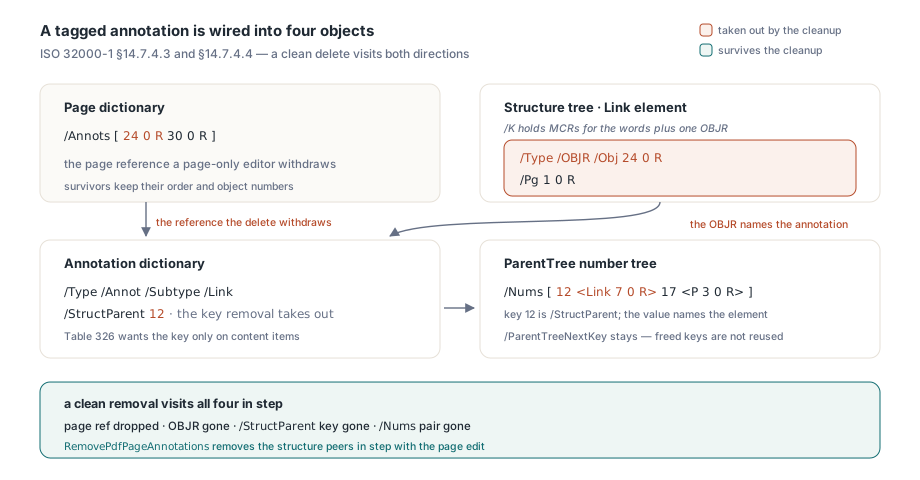
The reverse path is §14.7.4.4. The parent tree is a number tree (§7.9.7) with an entry for every object that is a content item, keyed by the integer that object carries. An annotation carries /StructParent, and its parent tree value is a single indirect reference to the owning element; a page whose content stream holds marked content carries /StructParents instead, and its value is an array indexed by MCID. Table 326 allows at most one of the two keys in any object, because an object is either a content item in its entirety or a container for marked content. For hyperlinks, §14.8.4.4.2 lets a Link element hold both the visible words, as marked-content references (MCRs), and an OBJR to the link annotation. Remove the annotation and the inventory is this:
| Location | What it holds | What a clean removal does |
|---|---|---|
Page /Annots | Indirect reference to the annotation | Drops the reference; survivors keep their order |
Link element /K | OBJR with /Obj and /Pg | Removes the OBJR content item |
| Annotation dictionary | /StructParent integer key | Removes the key, since the object is no longer a content item |
ParentTree /Nums leaf | Key paired with a reference to the Link element | Removes the key and value pair |
| Structure tree root | /ParentTreeNextKey | Leaves it alone |
How a ghost link outlives its annotation
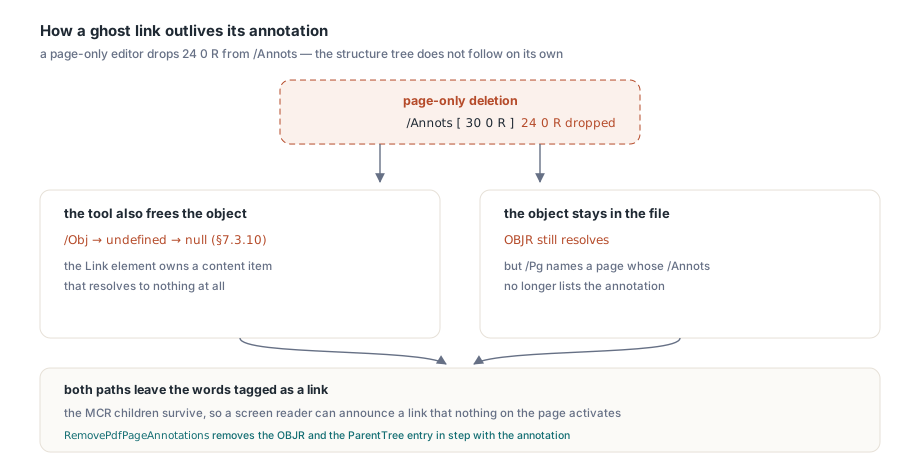
A page-level editor deletes an annotation by taking it out of /Annots, and from there one of two things happens. If the tool also frees the annotation object, the OBJR's /Obj now points at an undefined object, which §7.3.10 tells a reader to treat as null: the Link element owns a content item that resolves to nothing. If the tool leaves the object in the file, the OBJR still resolves, but its /Pg names a page whose /Annots no longer lists it. In both cases the Link element keeps its marked-content children, so the words "Download the datasheet" are still tagged as a link, and a screen reader walking the tree in reading order can announce a link that nothing on the page will activate. PDF/UA checkers such as PAC and veraPDF, which validate against ISO 14289-1, compare what the page lists with what the tree claims, so a disagreement between the two can surface there even when the rendered page looks perfect
Deleting content has its own version of the problem. Remove the text objects inside /P <</MCID 4>> BDC … EMC and keep the operators, and the page holds an empty marked-content sequence whose MCR still sits in a <P> element; the reader gets a paragraph with no words. Remove the BDC but not its EMC and the content stream is broken outright. §14.6 requires every marked-content sequence to be bracketed by BDC or BMC and a matching EMC inside a single content stream, and an orphan EMC leaves every later sequence on the page paired with the wrong opener
Removing annotations with RemovePdfPageAnnotations
RemovePdfPageAnnotations in FPdfDocumentStructure takes a source stream, a zero-based page index in page-tree order, the object numbers of the annotations to remove, a TPdfAnnotationRemovalOptions record and two out parameters for the new file and a TPdfAnnotationRemovalReport. With TPdfAnnotationRemovalOptions.Default it touches only the page: one incremental revision carries the page dictionary with the shortened /Annots array (or no /Annots key once the last annotation goes) plus the unchanged catalog, so object numbers, the document ID and every other page key survive. The annotation object keeps its body, and a caller still holding its number can read it. The structure tree is left as it was, which keeps the tagging intact for the case where you are about to point that Link element at a replacement annotation. Input is checked before anything is written:
- Each number must appear in the selected page's
/Annotsand name a/Type /Annotobject; a number listed twice in one call is refused - Widget annotations are refused, because a widget belongs to its form field and pulling it off the page would leave a field whose widget no page displays
- An encrypted source is rejected, since the structure edit needs decrypted bytes; decrypt the file beforehand
MaxOutputBytes,MaxWorkandCancellationTokenbound the work, and any failure returnsFalsewith no output and anErrorMessagenaming the phase where it stopped
For a tagged document the structure tree already tells you which annotation numbers matter. Every OBJR item in a ReadPdfDocumentStructure snapshot carries the referenced object number, and its page number comes from the OBJR's own /Pg or, failing that, from the element's. The routine below collects every annotation a Link element on one page refers to and removes them with both cleanup options switched on. Keep the page filter: a number taken from another page is refused for the whole batch
uses
  System.SysUtils, System.Classes, System.IOUtils,
  FPdfCompress, FPdfDocumentStructure;

function RemoveTaggedLinks(const InName, OutName: string;
  PageIndex: Integer): TPdfAnnotationRemovalReport;
var
  Source: TMemoryStream;
  Pages: TPdfSparsePageDictionaries;
  ReadOptions: TPdfStructureEditOptions;
  Snapshot: TPdfDocumentStructureSnapshot;
  ReadReport: TPdfStructureEditReport;
  Item: TPdfDocumentStructureContentItem;
  Targets: array of Integer;
  Options: TPdfAnnotationRemovalOptions;
  Report: TPdfAnnotationRemovalReport;
  Output: TBytes;
  N, I, J: Integer;
  Known: Boolean;
begin
  Report := Default(TPdfAnnotationRemovalReport);
  Source := TMemoryStream.Create;
  try
    Source.LoadFromFile(InName);
    if not ReadPdfSparsePageDictionaries(Source, Pages) or
       (PageIndex < 0) or (PageIndex > High(Pages)) then
      raise Exception.Create('Page index is outside the page tree');
    ReadOptions := TPdfStructureEditOptions.Default;
    if not ReadPdfDocumentStructure(Source, ReadOptions, Snapshot, ReadReport) then
      raise Exception.Create(ReadReport.ErrorMessage);

    // Every annotation that a Link element on this page points at
    for N := 0 to High(Snapshot.Nodes) do
      if Snapshot.Nodes[N].RoleName = 'Link' then
        for I := 0 to High(Snapshot.Nodes[N].ContentItems) do
        begin
          Item := Snapshot.Nodes[N].ContentItems[I];
          if (Item.Kind <> psckObjectReference) or
             (Item.PageObjectNumber <> Pages[PageIndex].ObjectNumber) then
            Continue;
          Known := False;
          for J := 0 to High(Targets) do
            if Targets[J] = Item.ReferencedObjectNumber then Known := True;
          if not Known then
          begin
            SetLength(Targets, Length(Targets) + 1);
            Targets[High(Targets)] := Item.ReferencedObjectNumber;
          end;
        end;
    if Length(Targets) = 0 then
      Exit(Report);

    Options := TPdfAnnotationRemovalOptions.Default;
    Options.RemoveOwnedStructurePeers := True;    // OBJR items and ParentTree entries
    Options.RemoveEmptiedStructureNodes := True;  // elements left with nothing inside
    if not RemovePdfPageAnnotations(Source, PageIndex, Targets, Options,
      Output, Report) then
      raise Exception.Create(Report.ErrorMessage);
    TFile.WriteAllBytes(OutName, Output);
    Result := Report;
  finally
    Source.Free;
  end;
end;
What happens to the ParentTree key
With RemoveOwnedStructurePeers set, each OBJR whose /Obj is a removed annotation on that page leaves its element through the structure editor, which keeps the reverse index in step. The key and value pair stored under the annotation's /StructParent is taken out of its /Nums leaf, and the /StructParent key itself is removed from the annotation dictionary, since Table 326 asks for it only on objects that are structural content items. /ParentTreeNextKey is not lowered. §14.7.4.4 only requires it to be greater than every key in use, which a removal cannot break, and number tree keys need not be contiguous, so a writer that follows /ParentTreeNextKey never hands the freed key out again. Every surviving annotation keeps its object number, its position in /Annots and its ParentTree key; the function re-reads the page it wrote and refuses the result if a survivor went missing or changed places. Expected: on a page with one tagged link, Report.RemovedAnnotations and Report.RemovedObjectReferences are both 1, and Report.SourceSha256 and Report.OutputSha256 record which bytes went in and which came out
When the emptied element should go too
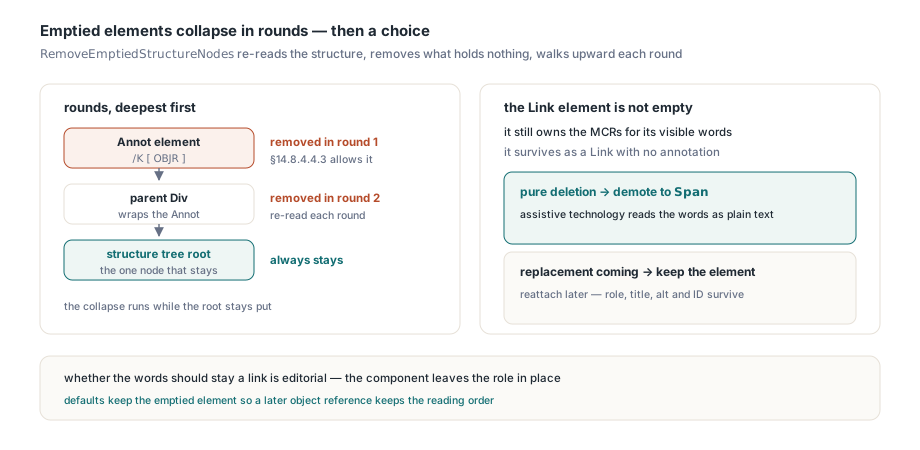
RemoveEmptiedStructureNodes removes the elements that the OBJR removal left with no content items and no child elements, deepest first. It runs in rounds: each round re-reads the structure, removes the elements that are now empty, and adds their parents to the next round's candidates, so a chain of wrappers collapses from the bottom up while the structure tree root always stays. An Annot element tagging a sticky note usually holds nothing but the OBJR (§14.8.4.4.3 allows that), so it empties and goes. A Link element is different. It still owns the marked-content references for its visible words, so it is not empty and it survives, as a Link with no annotation. RemovePdfPageAnnotations does not rename it, because whether those words should remain a link is an editorial question rather than a structural one. For a pure deletion, turn both options on and then demote any Link element left without an OBJR to Span: assistive technology then reads those words as plain text instead of offering a link that goes nowhere
function DemoteUnlinkedLinks(const Data: TBytes; out Fixed: TBytes): Integer;
var
  Source: TBytesStream;
  Options: TPdfStructureEditOptions;
  Snapshot: TPdfDocumentStructureSnapshot;
  Ops: TPdfStructureEditOperations;
  Report: TPdfStructureEditReport;
  N: Integer;
begin
  Result := 0;
  Fixed := Data;
  Source := TBytesStream.Create(Data);
  try
    Options := TPdfStructureEditOptions.Default;
    if not ReadPdfDocumentStructure(Source, Options, Snapshot, Report) then
      raise Exception.Create(Report.ErrorMessage);
    for N := 0 to High(Snapshot.Nodes) do
      if (Snapshot.Nodes[N].RoleName = 'Link') and
         (Snapshot.Nodes[N].ObjectReferenceCount = 0) and
         (Length(Snapshot.Nodes[N].ContentItems) > 0) then
      begin
        SetLength(Ops, Length(Ops) + 1);
        Ops[High(Ops)] := Default(TPdfStructureEditOperation);
        Ops[High(Ops)].Kind := psekSetRole;
        Ops[High(Ops)].NodeID := Snapshot.Nodes[N].NodeID;
        Ops[High(Ops)].Value := 'Span';
      end;
    if Length(Ops) = 0 then Exit;
    // The snapshot digest guards against the bytes changing in between
    if not EditPdfDocumentStructure(Source, Snapshot.SourceSha256, Ops,
      Options, Fixed, Report) then
      raise Exception.Create(Report.ErrorMessage);
    Result := Length(Ops);
  finally
    Source.Free;
  end;
end;
Keep the defaults when the deletion is half of a replacement. An emptied element left in place still carries its role, title, alternate text and element ID, and if a later step attaches a new annotation to it with a psekAddObjectReference operation, which gives the annotation a fresh /StructParent key and advances /ParentTreeNextKey by the same rules that register new MCR and OBJR items in the parent tree, the element keeps its place in the reading order. Removing and recreating that element would discard those values and give it a new object number
Deleting tagged content: ownership runs from BDC to its EMC
Annotations are not page objects, so text, paths and images go through a different API: the batch object editor, PlanStyledPdfObjectEdits and ExecuteStyledPdfObjectEdits in FPdfStyledEdit, whose TPdfObjectEditOptions carries RemoveOwnedStructurePeers and RemoveEmptiedStructureNodes with the same meaning. A tagged marked-content sequence goes away together with its structure entry only when every object between its BDC and the matching EMC is being deleted. In that case both operators leave the content stream, the MCR leaves its element, and that MCID's slot in the page's ParentTree array is set to null rather than closed up, because every other MCID on the page indexes into the same array. A sequence that also wraps surviving content stays, together with its MCR. A page that reuses the removed MCID for surviving content is refused outright, since MCIDs are scoped to the page's content stream and dropping the structure entry would orphan the survivor. With the option left False, the batch keeps the BDC and EMC pairs at the removal boundary instead, so the structure tree keeps resolving and nothing in it changes
Ownership has to be measured from the BDC to the end of its matching EMC. Our first version measured it over the byte range of the BDC operator alone, which is where a parsed mark records its position, and found no enclosed objects at all. A related mistake is to flag the BDC for removal and lose track of its partner, which writes exactly the unbalanced stream described above, so the editor always removes both halves of a pair together. The routine below deletes every top-level object carrying one MCID. ExecuteStyledPdfObjectEdits reloads Pdf with the result unless EditOptions.PreviewOnly is set, and Report.RemovedStructurePeers and Report.RemovedStructureNodes count what left the tree; the function returns that report
uses
  System.SysUtils, PDFium, FPdfStyledEdit;

function DeleteTaggedRun(Pdf: TPdf; PageIndex, Mcid: Integer): TPdfObjectEditReport;
var
  Ops: TPdfObjectEditOperations;
  NoSemanticEdits: TPdfObjectSemanticEdits;
  Options: TPdfObjectEditOptions;
  Plan: TPdfObjectEditPlan;
  Preview: TBytes;
  Report: TPdfObjectEditReport;
  I: Integer;
begin
  Pdf.PageNumber := PageIndex + 1;          // PageNumber is one-based
  for I := 0 to Pdf.ObjectCount - 1 do
    if Pdf.PageObjectMarkedContentID(I) = Mcid then
    begin
      SetLength(Ops, Length(Ops) + 1);
      Ops[High(Ops)] := Default(TPdfObjectEditOperation);
      Ops[High(Ops)].Kind := poekRemove;
      Ops[High(Ops)].ObjectIndex := I;
    end;
  if Length(Ops) = 0 then
    raise Exception.CreateFmt('No object on page %d carries MCID %d',
      [PageIndex + 1, Mcid]);
  NoSemanticEdits := nil;
  Options := TPdfObjectEditOptions.Default;
  Options.RemoveOwnedStructurePeers := True;
  Options.RemoveEmptiedStructureNodes := True;
  Plan := PlanStyledPdfObjectEdits(Pdf, PageIndex, Ops, NoSemanticEdits, Options);
  if not ExecuteStyledPdfObjectEdits(Pdf, Plan, Options, Preview, Report) then
    raise Exception.Create(Report.ErrorMessage);
  Result := Report;
end;
A removed annotation still occupies its object in the file after either call, because only the page reference is withdrawn. Once the OBJR is gone nothing in the catalog's graph reaches it, so TPdf.SaveAsReachable can sweep that orphan object out of a rewritten copy; with the default options the OBJR keeps the annotation reachable and the sweep keeps it too. Run the removal with both structure options on whenever the deletion is final, and the page, the structure tree and the parent tree in the file that PDFium Component for Delphi writes back all describe the same set of annotations