In PDFium Component, the PDFium-based VCL/LCL component for Delphi, C++Builder, and Lazarus, a form field index is not an annotation index. A page carries Link, Text, and Ink annotations next to its widgets, so field enumeration must filter on FPDFAnnot_GetSubtype and expose a zero-based logical index, mapped back to a real annotation position only at the native call
The bug that exposes this is unmistakable once you have seen it. A tester presses Tab in a filled invoice form and the caret vanishes, because focus went to a hyperlink in the footer. Or worse, nothing happens at all: your code records field 3 as focused, the UI panel updates, and FORM_SetFocusedAnnot quietly returned false the whole time. Both symptoms come from the same design mistake, and one of them has a second root cause hiding underneath
The two index spaces PDFium hands you
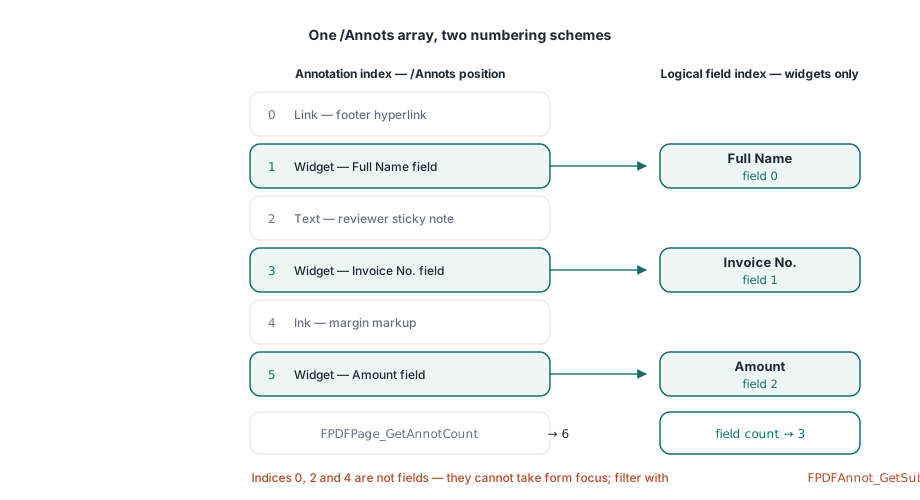
PDFium exposes two numbering schemes over the same page, and they only coincide on documents that happen to contain nothing but form widgets. The first is the annotation index: a position in the page /Annots array, which is what FPDFPage_GetAnnotCount counts and what FPDFPage_GetAnnot takes (ISO 32000-1 §12.5.2). The second is the logical field index that an application-level API should offer, running from zero over the interactive fields a user can actually reach. ISO 32000-1 §12.5.6.19 defines widget annotations as the visual representation of interactive form fields, and §12.7 defines the form itself. Everything else on the page is a different subtype with different semantics: a Link annotation has a destination, an Ink annotation has a stroke list, a Text annotation is a sticky note. None of them belong in a field count, and none of them can accept form focus. Yet in the /Annots array they sit interleaved with the widgets in whatever order the producing application wrote them, which is frequently not the order anything else about the document suggests
Why does Tab land on a hyperlink instead of the next field?
Because the field count was really an annotation count. The original implementation returned FPDFPage_GetAnnotCount directly from FormFieldCount, while the field information accessor, the tab order helper, and the focus helper all treated that same integer as a widget position. On a clean AcroForm page with six widgets and nothing else, six equals six and every test passes. Add a hyperlink in the footer and a reviewer comment in the margin, and the count reports eight fields, indices 6 and 7 resolve to non-form objects, and Tab walks straight into them
The fix at the enumeration end is to count subtypes rather than annotations. Open each annotation, ask for its subtype, keep the widgets, and close the handle in a finally block, because FPDFPage_GetAnnot returns an owned handle that must go back through FPDFPage_CloseAnnot
function WidgetCountForPage(Page: FPDF_PAGE): Integer;
var
  Count, I: Integer;
  Annot: FPDF_ANNOTATION;
begin
  Result := 0;
  if Page = nil then
    Exit;
  Count := FPDFPage_GetAnnotCount(Page);   // every annotation, not just fields
  for I := 0 to Count - 1 do
  begin
    Annot := FPDFPage_GetAnnot(Page, I);
    if Annot = nil then
      Continue;
    try
      if FPDFAnnot_GetSubtype(Annot) = FPDF_ANNOT_WIDGET then
        Inc(Result);
    finally
      FPDFPage_CloseAnnot(Annot);
    end;
  end;
end;
Note what this deliberately does not do. It does not ask the form-fill environment anything, and it does not need a form handle, because the subtype lives in the annotation dictionary and is readable from the page alone. That matters for ordering: the count is available before you have decided whether the document even deserves a form-fill environment, which the article on AcroForm JavaScript and host events covers as a security decision rather than a convenience one
Mapping the logical index back at the native boundary
The rule that keeps the two spaces from leaking into each other is simple: the logical index is the only number that crosses your public API, and it is converted to an annotation index in the last function before the native call. One mapping helper, used by field info, focus, flag setters, and tab order alike, is what makes that rule enforceable
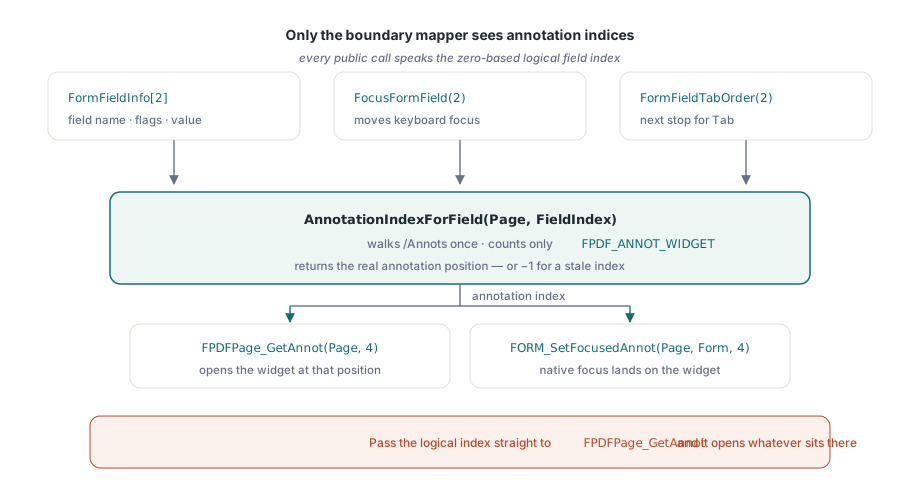
function AnnotationIndexForField(Page: FPDF_PAGE;
  FieldIndex: Integer): Integer;
var
  Count, I, Current: Integer;
  Annot: FPDF_ANNOTATION;
begin
  Result := -1;
  if (Page = nil) or (FieldIndex < 0) then
    Exit;
  Count := FPDFPage_GetAnnotCount(Page);
  Current := 0;
  for I := 0 to Count - 1 do
  begin
    Annot := FPDFPage_GetAnnot(Page, I);
    if Annot = nil then
      Continue;
    try
      if FPDFAnnot_GetSubtype(Annot) = FPDF_ANNOT_WIDGET then
      begin
        if Current = FieldIndex then
          Exit(I);        // real /Annots position: native calls only
        Inc(Current);
      end;
    finally
      FPDFPage_CloseAnnot(Annot);
    end;
  end;
end;
Two properties of this helper are worth stating plainly. It is a linear scan, so a naive loop over every field costs a quadratic number of annotation opens on a page with hundreds of widgets; if you are enumerating the whole page, walk the annotations once and collect the widget handles as you go instead of calling the mapper per field. And it returns -1 rather than raising, which lets the caller decide whether a stale index is a programming error worth an exception or a race worth ignoring, for example after an edit removed an annotation that a cached UI list still refers to
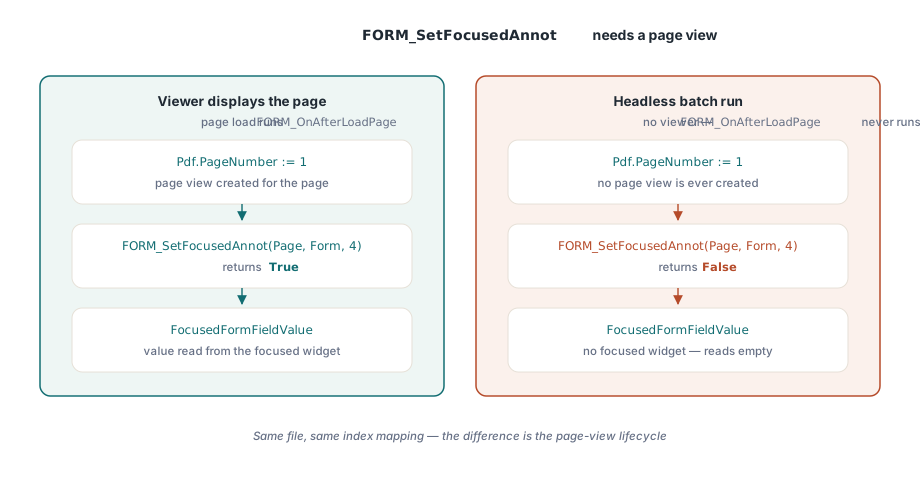
Why does FORM_SetFocusedAnnot fail on a headless page?
Because PDFium refuses to focus a widget whose page view was never marked valid. FORM_SetFocusedAnnot resolves the annotation to a page view inside the form-fill environment, and if that page view does not exist it returns false without any diagnostic. Correcting the index mapping alone therefore fixes Tab landing on a hyperlink but leaves the second symptom untouched: your logical focus record says field 3, the native focused widget is still nothing, and every accessor built on the native focus, focused text, focused value, choice selection state, keeps returning empty. The page view is created by FORM_OnAfterLoadPage and destroyed by FORM_OnBeforeClosePage. In a viewer built around a visual control those calls happen as part of displaying a page, which is why the failure so often looks like a headless-only bug: the same code that works in the GUI demo fails in the batch tool. The lifecycle belongs to the document object, not the viewer, so PDFium Component now issues both calls whenever a page is loaded or unloaded with a form handle present. The C signature takes the page first and the form handle second, which is easy to invert when writing the binding by hand
procedure ReportFirstField(const FileName: string);
var
  Pdf: TPdf;
  Idx: Integer;
begin
  Pdf := TPdf.Create(nil);
  try
    Pdf.FormFill := True;      // form-fill environment, before Active
    Pdf.FileName := FileName;
    Pdf.Active := True;
    Pdf.PageNumber := 1;       // page load also runs FORM_OnAfterLoadPage

    Idx := Pdf.FocusNextFormField;   // logical index, 0-based over widgets
    if Idx < 0 then
      Exit;                    // page holds no widget annotations

    Writeln(string(Pdf.FormFieldInfo[Idx].Name), ' = ',
      string(Pdf.FocusedFormFieldValue));   // reads the native focused widget
  finally
    Pdf.Free;                  // page unload runs FORM_OnBeforeClosePage
  end;
end;
The check that proves the fix is the one that compares the two sides. Call FocusFormField with a logical index, then read a value through an accessor that goes through the native focused widget rather than through your own record, such as FocusedFormFieldValue or FocusedFormOptionSelected. If the logical index round-trips but the native accessor comes back empty, the page view is missing, not the mapping
What the logical field index does not promise
A zero-based field index is a convenience, not a semantic identity, and four limits follow from that. It is per page, not per document, so index 0 on page 2 is a different widget from index 0 on page 1 and comparing them is meaningless. It is positional, so inserting or deleting an annotation invalidates every cached index above the change; treat a stored index as valid only for as long as the page stays loaded and unedited
The third limit is the one that surprises people reviewing a field list. The index enumerates widgets, not fields. A radio group is one field with several widget kids, so a three-button group contributes three consecutive indices that all report the same Name. The TPdfFormFieldInfo record carries GroupCount and GroupIndex for exactly this case, and a list UI that ignores them shows the same field three times. The fourth limit concerns traversal order: the tab order exposed here is the widget enumeration order, which follows the /Annots array, not the page /Tabs entry (ISO 32000-1 §7.7.3.3) and not the AcroForm field tree. For most producers those agree; for a form laid out in two columns by a generator that emitted the right column first, they do not, and the keyboard path described in the form field navigation article will feel wrong even though every index is correct. When a customer file behaves oddly, dump both index spaces side by side before theorising: the annotation view and the field view of the same page, printed together, usually make the cause obvious in one glance
procedure DumpIndexSpaces(Pdf: TPdf);
var
  I: Integer;
  Info: TPdfFormFieldInfo;
begin
  for I := 0 to Pdf.AnnotationCount - 1 do
    Writeln('annot ', I, ': subtype ', Ord(Pdf.Annotation[I].Subtype));

  for I := 0 to Pdf.FormFieldCount - 1 do
  begin
    Info := Pdf.FormFieldInfo[I];
    Writeln('field ', I, ': ', string(Info.Name),
      ' widget ', Info.GroupIndex, ' of ', Info.GroupCount);
  end;
end;
An annotation count far above the field count means the page mixes subtypes, which is normal in reviewed documents and is exactly the situation the mapping exists for; the annotation review workflow article looks at the same page from the markup side. Equal counts on every test file, on the other hand, mean your fixtures cannot detect this class of bug at all, and the honest response is to add a form fixture that carries a link and a sticky note
The field enumeration, focus, and annotation APIs described here ship with PDFium Component for Delphi, C++Builder, and Lazarus, whose product page carries the full form-field reference including the field information record and the focus accessors