In the PDFium Component for Delphi and Lazarus, assigning TPdf.Active := True never raises when a PDF fails to load: TPdf.SetActive catches every exception and leaves the component inactive. To see the real error, call TPdf.LoadDocument(Options, Report) instead. That overload re-raises the original exception and fills a TPdfLoadReport with the load status, the native PDFium error code and whether the cross-reference table had to be rebuilt
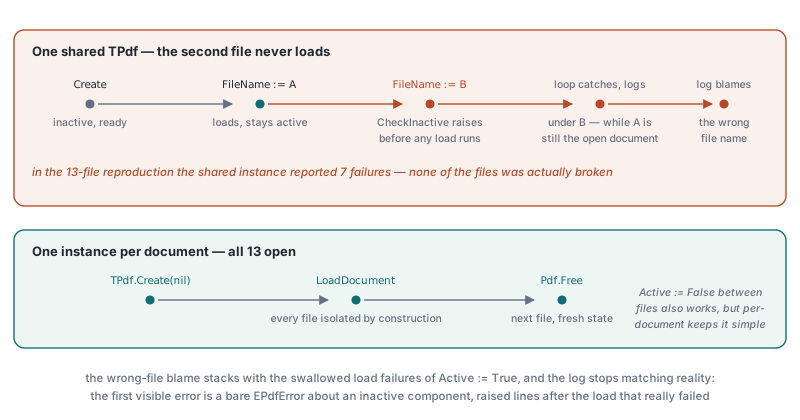
The problem usually surfaces in batch code. A table-extraction job walks a folder of 13 real-world PDFs with one shared TPdf, and 7 of them come back as failures. None of the 7 files is actually broken. The except blocks around the load never fire, the log blames the wrong file names, and the first visible error is a bare EPdfError about an inactive component, raised from a property read several lines after the load that really failed. Two separate behaviours stack up to produce that picture, and both are working as designed
Why does TPdf.Active := True not raise when a PDF fails to load?
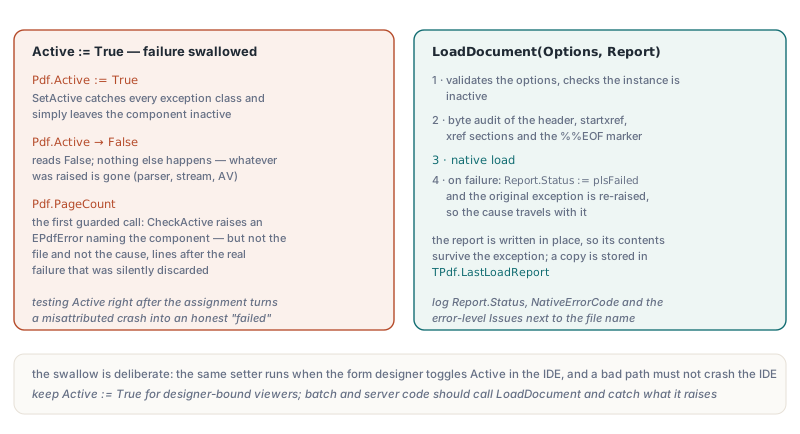
TPdf.SetActive wraps LoadDocument in a try..except that swallows every exception class and simply leaves the component inactive. The swallow is deliberate: the same setter runs when a form designer toggles Active in the IDE, and a bad path must not crash the IDE. At run time TPdf.Active just reports whether a native document handle exists, so after a failed load it reads False and nothing else happens. Whatever was raised is gone, whether it was an EPdfError from the parser, a stream error or an EAccessViolation from a half-bound pdfium.dll. The detailed DLL messages described in diagnosing pdfium.dll load failures in Delphi only reach your handler through a call that does not swallow them
Pdf.FileName := FileName;
try
  Pdf.Active := True;       // SetActive swallows any load exception
except
  on E: Exception do
    Log.Add(FileName + ': ' + E.Message);   // never executes
end;
// The failure surfaces here instead, as a generic EPdfError:
// 'Cannot perform this operation on an inactive Pdf1 component'
Log.Add(Format('%s: %d pages', [FileName, Pdf.PageCount]));

// Minimal fix for existing code: test Active right after the assignment;
// since v3.122.1 LastLoadReport keeps the text of the swallowed error
Pdf.Active := True;
if not Pdf.Active then
  Log.Add(FileName + ': load failed: ' + Pdf.LastLoadReport.ErrorMessage);
The failure finally shows up at the first guarded call. TPdf.PageCount, like most document properties, starts with CheckActive, which raises an EPdfError naming the component but not the file and not the cause. Testing Pdf.Active immediately after the assignment turns a misattributed crash into an honest "failed" entry. Before PDFiumPas v3.122.1 the reason was lost at that point; since v3.122.1 the failed assignment replaces LastLoadReport with a plsFailed report that carries the error text, so the cause survives. The exception object itself and the byte-level audit still require a different entry point
Why does reusing one TPdf fail from the second file onward?
TPdf.FileName can only be assigned while the component is inactive, so a shared instance rejects the second file before it ever tries to load it. TPdf.SetFileName starts with CheckInactive, and the same guard protects Password and FormFill. After the first successful load the instance stays active, the next assignment raises, and if the batch loop catches that exception and moves on, the error lands under the new file name while the old document is still open. Mixed with the swallowed load failures, the log stops matching reality. In the 13-file reproduction a shared instance reported 7 failures, while a fresh TPdf.Create(nil) per document opened all 13. Setting Active := False between files also works, but one instance per document keeps every file isolated by construction
What does TPdf.LoadDocument with a TPdfLoadReport give you?
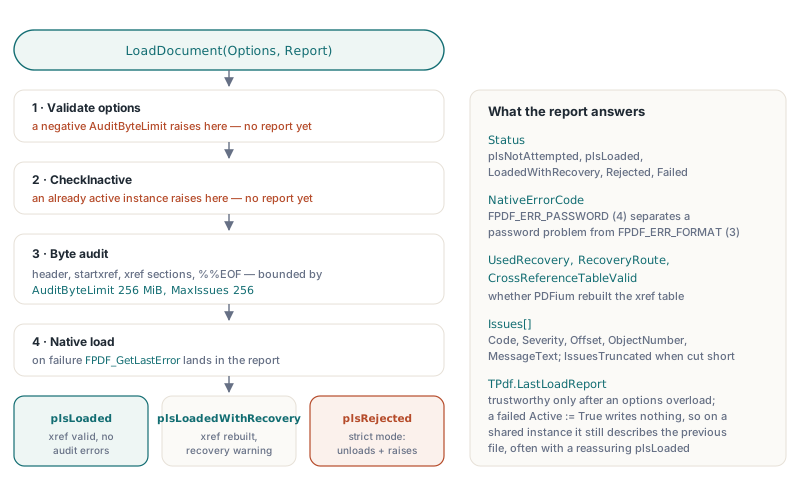
TPdf.LoadDocument(const Options: TPdfLoadOptions; out Report: TPdfLoadReport) raises the real exception and also tells you what happened in structured form. The file overload loads FileName; sibling overloads take TBytes or a pointer and size, and LoadCustomDocument(AStream, AOwnsStream, Options, Report) covers streams. Each one validates the options, checks that the instance is inactive, runs a byte-level audit of the header, startxref, the xref sections and the %%EOF marker, then performs the native load. The audit is bounded by the same kind of limits discussed in parser resource budgets for untrusted PDFs: TPdfLoadOptions.Default sets AuditByteLimit to 256 MiB, MaxIssues to 256, MaxXrefSections to 1024 and MaxXrefEntries to 4,000,000. On failure the method sets Report.Status := plsFailed and re-raises; because Report is written in place, its contents survive the exception, and a copy is stored in TPdf.LastLoadReport
The report fields answer the questions a batch log actually needs. Status is one of plsNotAttempted, plsLoaded, plsLoadedWithRecovery, plsRejected or plsFailed. NativeErrorCode holds FPDF_GetLastError, so FPDF_ERR_PASSWORD (4) separates a missing or wrong password from a damaged file reported as FPDF_ERR_FORMAT (3). UsedRecovery, CrossReferenceTableValid and RecoveryRoute say whether PDFium had to rebuild the xref table, and Issues lists each audit finding with Code, Severity, Offset, ObjectNumber and MessageText, with IssuesTruncated set when MaxIssues cut the list short
uses
  SysUtils, Classes, TypInfo, FPdfView, PDFium;

procedure ProcessBatch(Files, Log: TStrings);
var
  I: Integer;
  Pdf: TPdf;
  Options: TPdfLoadOptions;
  Report: TPdfLoadReport;
begin
  Options := TPdfLoadOptions.Default(plmCompatible);
  for I := 0 to Files.Count - 1 do
  begin
    Pdf := TPdf.Create(nil);          // one instance per document
    try
      Pdf.FileName := Files[I];
      try
        Pdf.LoadDocument(Options, Report);
      except
        on E: Exception do
        begin
          // Report is filled even though LoadDocument raised
          if Report.NativeErrorCode = FPDF_ERR_PASSWORD then
            Log.Add(Files[I] + ': password required')
          else
            Log.Add(Format('%s: %s (%s)', [Files[I],
              GetEnumName(TypeInfo(TPdfLoadStatus), Ord(Report.Status)),
              E.Message]));
          Continue;
        end;
      end;
      if Report.UsedRecovery then
        Log.Add(Files[I] + ': opened after PDFium rebuilt the xref table');
      ExtractTables(Pdf, Log);
    finally
      Pdf.Free;
    end;
  end;
end;
When should you load with plmStrict?
Use plmStrict whenever a silently repaired file is worse than a rejected one, such as archive intake, evidence handling or a signing pipeline. PDFium quietly reconstructs a broken cross-reference table (ISO 32000-1 §7.5.4) by scanning the file for objects, which is great for a viewer and a problem for anything that must process exactly the bytes it was given. After the native load, the component asks FPDF_DocumentHasValidCrossReferenceTable. In plmCompatible mode a rebuild yields plsLoadedWithRecovery plus a plicNativeCrossReferenceRebuild warning. In plmStrict mode the component unloads the document, sets plsRejected, adds plicStrictModeRejected and raises EPdfError with "Strict PDF load rejected the document". Strict mode also rejects any audit error, and TPdfLoadOptions.Default(plmStrict) turns on RequireFinalEndOfFileMarker, which promotes a missing %%EOF or data after the final one (§7.5.5) from warning to error. The xref audit complements the object-level checks in validating object and xref streams with PDFium VCL
function AcceptForArchive(const FileName: string; out Reason: string): Boolean;
var
  Pdf: TPdf;
  Report: TPdfLoadReport;
  I: Integer;
begin
  Result := False;
  Reason := '';
  Pdf := TPdf.Create(nil);
  try
    Pdf.FileName := FileName;
    try
      Pdf.LoadDocument(TPdfLoadOptions.Default(plmStrict), Report);
      Result := True;               // valid xref, no audit errors
    except
      on E: EPdfError do
      begin
        Reason := E.Message;
        for I := 0 to High(Report.Issues) do
          if Report.Issues[I].Severity = plisError then
            Reason := Reason + sLineBreak + Format('  at offset %d: %s',
              [Report.Issues[I].Offset, Report.Issues[I].MessageText]);
      end;
    end;
  finally
    Pdf.Free;
  end;
end;
Where does TPdf.LastLoadReport stop telling the truth?
TPdf.LastLoadReport is complete only after a LoadDocument overload that takes options, because only those overloads run the byte audit. A successful Active := True writes a compatible-mode report with no byte audit, so AuditAttempted stays False. Before PDFiumPas v3.122.1 a failed one wrote nothing, which meant that on a shared instance LastLoadReport still described the previous file, often with a reassuring plsLoaded. Since v3.122.1 every failed load replaces the report: a failed Active := True, which still leaves the component inactive without raising, and a failed plain LoadDocument or LoadCustomDocument call record plsFailed with the error text, again without an audit. Two more gaps matter in practice. Option validation and CheckInactive run before the report is initialised, so a negative AuditByteLimit or an already active instance raises without producing a report. And NativeErrorCode is meaningful only when PDFium actually attempted the parse; for a missing file the wrapper raises before PDFium runs, so log ErrorMessage and the exception text instead
The practical rule is short. Keep Active := True for designer-bound viewers where an inactive component is an acceptable outcome. Everywhere else, and above all in batch and server code, create one TPdf per document, call LoadDocument(Options, Report), catch the exception it raises and log Report.Status, NativeErrorCode and the error-level Issues together with the file name. The cost is a few lines per call site, and every failure gets attributed to the right file with its real cause
The load report API, strict mode and the byte-level audit ship with the PDFium Component for Delphi, C++Builder and Lazarus, alongside rendering, text extraction, form filling and PDF/A validation