The PDFium Component opens a PDF that is still downloading through TPdfProgressiveDocument, a TPdf subclass that wraps PDFium's FPDFAvail_* availability API. BeginProgressiveLoad starts the session, CheckDocumentAvailability reports which byte ranges PDFium still needs, OpenProgressiveDocument opens the file once enough bytes exist, and CancelProgressiveLoad abandons an interrupted download without leaking native handles. The hard part is not the happy path. A viewer on a flaky connection will see users close the tab at 25 percent, change their mind, and open the same link again, and every one of those aborted sessions has a native availability handle, two C callback records, a stream adapter and a set of in-flight range requests that must be released in exactly the right order
How does TPdfProgressiveDocument load a PDF that is still downloading?
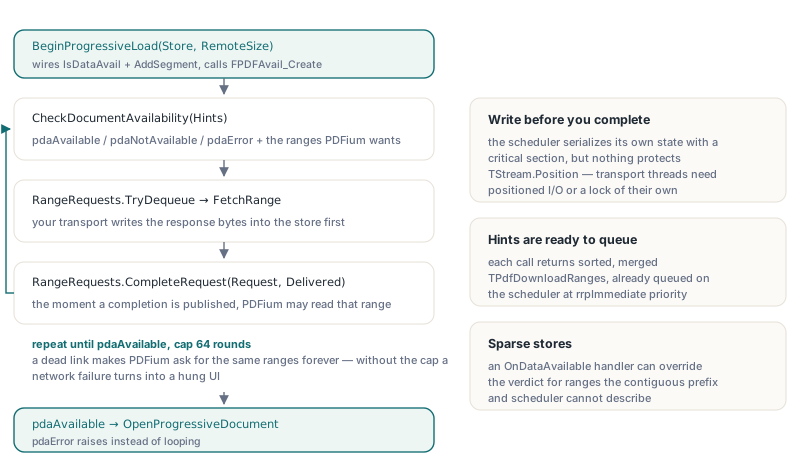
TPdfProgressiveDocument keeps a PDFium availability provider alive while a random-access stream is filled, and asks that provider before every parse step whether the bytes it wants are present. BeginProgressiveLoad(AStream, AFileSize, AOwnsStream, AInitialAvailableByteCount) takes the backing stream plus the logical size of the remote file, wires an IsDataAvail callback and an AddSegment callback into two records, and calls FPDFAvail_Create. When PDFium asks whether a range is present, the component answers yes if the range lies inside the contiguous prefix described by AvailableByteCount or inside a range already completed through the RangeRequests scheduler, and the OnDataAvailable event can override the verdict for sparse stores. Each call to CheckDocumentAvailability returns one of three TPdfDataAvailability values (pdaAvailable, pdaNotAvailable, pdaError) and hands back the ranges PDFium asked for as a sorted, merged TPdfDownloadRanges array, already queued on the scheduler at rrpImmediate priority
// FetchRange is your transport (HTTP Range GET, socket, blob reader):
// it writes Size bytes at Offset into Store and returns how many arrived
function FetchRange(Store: TStream; Offset, Size: UInt64): UInt64; forward;

procedure OpenWhileDownloading(Pdf: TPdfProgressiveDocument; Store: TStream;
  RemoteSize: UInt64);
const
  MaxRounds = 64;
var
  Hints: TPdfDownloadRanges;
  State: TPdfDataAvailability;
  Request: TPdfRangeRequest;
  Round: Integer;
begin
  Pdf.BeginProgressiveLoad(Store, RemoteSize, False);
  State := pdaNotAvailable;
  for Round := 1 to MaxRounds do
  begin
    State := Pdf.CheckDocumentAvailability(Hints);
    if State <> pdaNotAvailable then
      Break;
    // The hints are already queued; write the bytes first, then complete
    while Pdf.RangeRequests.TryDequeue(Request) do
      Pdf.RangeRequests.CompleteRequest(Request,
        FetchRange(Store, Request.Offset, Request.Size));
  end;
  if State <> pdaAvailable then
    raise EPdfError.Create('The document could not be discovered');
  Pdf.OpenProgressiveDocument;
end;
Two details in that loop are load-bearing. The round cap matters because a dead link makes CheckDocumentAvailability ask for the same ranges forever, and an unbounded loop turns a network failure into a hung UI. The ordering matters because the scheduler serialises its own state with a critical section but does nothing for TStream.Position on the backing store: a transport thread must write the response bytes into the stream before calling CompleteRequest, since the moment a completion is published PDFium may read that range, and concurrent writers need positioned I/O or a lock of their own
Why does AvailableByteCount refuse to move backwards?
AvailableByteCount only grows, and the setter raises EPdfError with "Available byte count cannot move backwards" when you try to shrink it. Once the IsDataAvail callback has told PDFium that a range exists, the parser may already have read and cached objects from it, so withdrawing those bytes afterwards would make the availability answers inconsistent with what PDFium has already consumed. The same setter rejects values larger than LogicalFileSize and raises "No progressive load is active" outside a session, which is why bytes you already hold before the load starts belong in the AInitialAvailableByteCount argument of BeginProgressiveLoad instead of a property assignment made too early. If your download store fills out of order, do not try to express it through the prefix at all: complete the ranges through the scheduler or answer through OnDataAvailable
When can a partially downloaded PDF actually open?
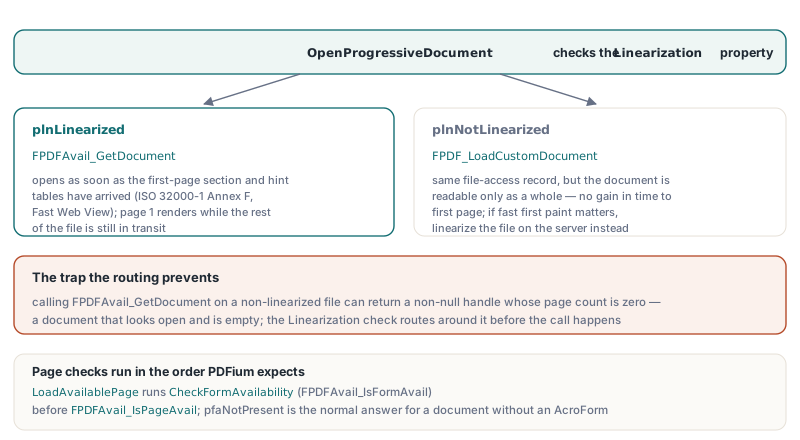
Only a linearised PDF (ISO 32000-1 Annex F, the "Fast Web View" layout) opens before the whole file has arrived; a non-linearised PDF still needs every byte. OpenProgressiveDocument checks the Linearization property (plnUnknown, plnNotLinearized, plnLinearized) and routes accordingly: a linearised file opens through FPDFAvail_GetDocument as soon as the first-page section and hint tables are present, while a non-linearised file is opened through FPDF_LoadCustomDocument on the same file-access record and treated as readable only as a whole. The routing exists for a concrete reason. Calling FPDFAvail_GetDocument on a non-linearised file can return a non-null handle whose page count is zero, a document that looks open and is empty. In the component's own test suite a 51-page linearised fixture reaches pdaAvailable and opens with its full page tree while the sparse download store still does not cover the file
function WaitForPage(Pdf: TPdfProgressiveDocument; Store: TStream;
  PageNumber: Integer): Boolean;
var
  Hints: TPdfDownloadRanges;
  Request: TPdfRangeRequest;
  Round: Integer;
begin
  Result := False;
  for Round := 1 to 64 do
    case Pdf.LoadAvailablePage(PageNumber, Hints) of
      pdaAvailable:
        Exit(True);   // PageNumber is now the active page
      pdaError:
        Exit(False);
      pdaNotAvailable:
        while Pdf.RangeRequests.TryDequeue(Request) do
          Pdf.RangeRequests.CompleteRequest(Request,
            FetchRange(Store, Request.Offset, Request.Size));
    end;
end;
LoadAvailablePage takes a 1-based page number and enforces the order PDFium expects: before the first page check it runs CheckFormAvailability, which wraps FPDFAvail_IsFormAvail, and only after that does it call FPDFAvail_IsPageAvail. A result of pfaNotPresent is the normal answer for a document without an AcroForm and does not block anything. When the page is ready, LoadAvailablePage makes it the active page, so a viewer can render page 1 of a linearised brochure while the remaining pages are still in transit; FirstAvailablePageNumber tells you which page the linearization dictionary designates as the first one, already converted from PDFium's zero-based index
What does CancelProgressiveLoad release, and in what order?
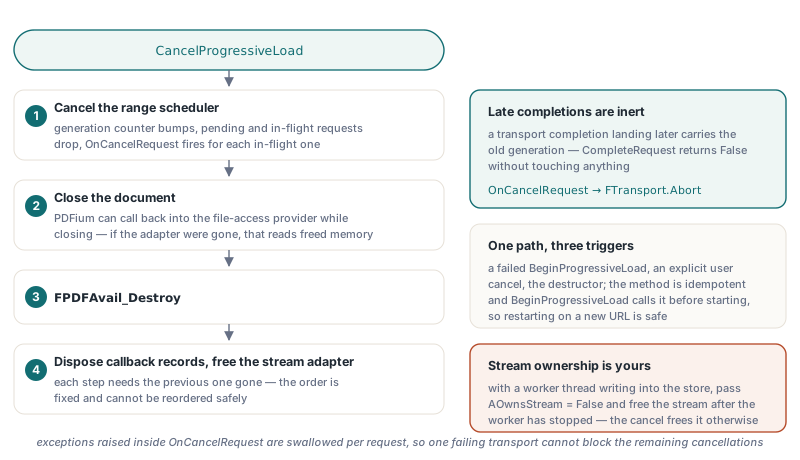
CancelProgressiveLoad tears down a session in four steps that cannot be reordered: cancel the range scheduler, close the document, destroy the availability handle with FPDFAvail_Destroy, then dispose the callback records and free the stream adapter. Cancelling the scheduler first bumps its generation counter, drops every pending and in-flight request, and fires OnCancelRequest for each in-flight one, so a transport completion that lands later carries the old generation and CompleteRequest returns False without touching anything. The document must close before the availability handle and the adapter go away because PDFium can call back into the file-access provider while it closes a document, and if the adapter is already gone that callback reads freed memory
procedure TDownloadForm.FormCreate(Sender: TObject);
begin
  FPdf := TPdfProgressiveDocument.Create(nil);
  // The scheduler lives as long as FPdf, so wire it once
  FPdf.RangeRequests.OnCancelRequest := RangeCancelled;
end;

procedure TDownloadForm.RangeCancelled(Sender: TObject; RequestId: UInt64;
  Attempt: Cardinal);
begin
  FTransport.Abort(RequestId);   // your code: close that socket or request
end;

procedure TDownloadForm.CancelButtonClick(Sender: TObject);
begin
  FPdf.CancelProgressiveLoad;
  // ProgressiveLoading = False, Active = False, AvailableByteCount = 0
end;
The method is idempotent and is the single cleanup path for three situations: a BeginProgressiveLoad that fails halfway through construction, an explicit user cancel, and the destructor. BeginProgressiveLoad also calls it before starting, so restarting the same object on a new URL is safe without an explicit cancel. One ownership decision is yours to get right: if a worker thread writes into the backing stream, pass AOwnsStream = False and free the stream yourself after the worker has stopped, because with ownership handed over the cancel frees the stream while a late write may still be on its way. Exceptions raised inside OnCancelRequest are swallowed per request so one failing transport cannot block the remaining cancellations
How does the lifecycle suite prove the cancel path does not leak?
The PDFium Component lifecycle stress suite exercises an interrupted network-style download on every mixed cycle. Each cycle starts a progressive load whose store holds only a quarter of the fixture bytes, requires pdaNotAvailable with a non-empty hint list, calls CancelProgressiveLoad, and asserts that the object reports neither ProgressiveLoading nor Active; it then runs the same streaming path to completion with full availability, OpenProgressiveDocument, a render and a close. The default mixed run covers 100 measured cycles with 600 opens, 2300 renders and 100 progressive cancellations, and sampled private memory grew by 8.21 MiB against a 32 MiB budget. The suite counts progressive cancellations separately from render-callback cancellations, because an aborted download and a render loop that stops early are different events with different acceptance criteria
Where the progressive path stops helping
A few limits are worth knowing before you build a viewer on top of this. Features that need the original file bytes refuse an incomplete progressive source rather than guess: ReadXmpPacket fails explicitly and signature validation reports Indeterminate until the whole file is present. The default availability test assumes a contiguous prefix, so a transport that fetches ranges out of order must complete them through RangeRequests or answer through OnDataAvailable, or PDFium will keep asking for bytes you already hold. A non-linearised file gains nothing in time to first page, so if fast first paint matters, linearise the file on the server side. And CancelProgressiveLoad does not close your sockets by itself; OnCancelRequest is the hook where that happens
For the plain stream-adapter path that loads a complete local file on demand, see streaming large PDFs on demand with PDFium; for opening a PDF that sits inside a larger buffer, see byte range loading for embedded PDFs. Cancelling a slow render of a page that is already loaded is a separate mechanism, covered in cancellable progressive page rendering. TPdfProgressiveDocument and its range scheduler ship with the PDFium Component for Delphi and C++Builder