A user fills in a PDF form in a Delphi viewer, presses Print, and the sheet comes out with every field empty and the Letter-sized page stretched to fill A4. Both faults sit in the print loop: PDFium Component paints field values only into a bitmap (or bakes them into a flattened copy), and each page wants a single aspect-preserving scale factor
The form layer is a second pass that needs a bitmap
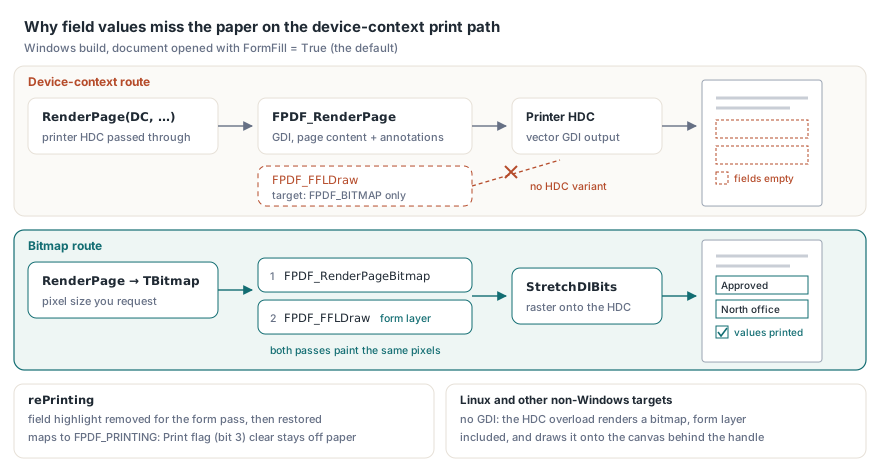
On Windows, the device-context overload TPdf.RenderPage(DC, Left, Top, Width, Height, Rotation, Options) hands the printer's HDC straight to FPDF_RenderPage. That call paints the page content, plus markup annotations when reAnnotations is set. The interactive form layer never reaches the DC — it belongs to PDFium's form-fill environment and is drawn by FPDF_FFLDraw, whose only target is an FPDF_BITMAP. There is no HDC variant. The two bitmap overloads of TPdf.RenderPage run FPDF_RenderPageBitmap and FPDF_FFLDraw on the same pixels whenever the document was opened with FormFill set to True, the default. With rePrinting in the options, PDFium Component removes the field highlight before the form pass and restores the default highlight colour and alpha afterwards, so the tinted boxes around editable fields stay on screen. rePrinting also maps to the engine's FPDF_PRINTING flag, which marks the output as print — the case ISO 32000-1 §12.5.3 (Table 165) addresses with annotation flag bit 3: a conforming reader leaves an annotation whose Print bit is clear off the paper however it looks on screen
Platform decides the rest. In the PDFium engine, FPDF_RenderPage draws through Windows GDI into a device context and exists only in Windows builds, while FPDF_FFLDraw draws into a bitmap and nothing else, on every platform. On Linux and the other non-Windows targets there is no GDI call to make, so the HDC overload is served by rendering a bitmap — form layer included — and drawing it onto the canvas behind the handle. The device-context call therefore carries field values off Windows and leaves them out on Windows. Keep the branch explicit in code shared between Delphi and Lazarus: when the document has a form environment and its values belong on paper, ask for a bitmap on every platform
Which path should a print job take?
Pick by what the paper must carry. Live form values point to the bitmap path, vector output to the HDC path, and a flattened copy gives you both for the price of a save and a reload. SetPdfPrintMode is library-wide, so change it between jobs, never between pages
| Route | Form values on paper | Output | Cost |
|---|---|---|---|
RenderPage(DC, …) | No, on Windows | Vector GDI; SetPdfPrintMode selects EMF (the default) or a PostScript level | Smallest spool, fastest |
RenderPage to a TBitmap, then StretchDIBits | Yes, including unsaved edits | Raster at the pixel size you request | Width × Height × 4 bytes per page, plus the DIB copy |
RenderPageBanded | Yes | Raster, one strip at a time | One band in memory instead of the whole sheet |
Flattened copy, then RenderPage(DC, …) | Yes, as baked page content | Vector | Save, reload, GenerateFormAppearances, FlattenAllPages(FLAT_PRINT) |
A full A4 sheet at 600 dpi is about 4960 × 7016 device pixels, and at 32 bits per pixel that is 139,197,440 bytes for one page; copying it into a DIB for StretchDIBits doubles the peak, a heavy load for a 32-bit process. For a viewer's Print button the bitmap path is still the right default: a user who types into a field and presses Print expects to see that value on paper, and banding keeps the memory bounded. Documents that leave the application, such as archived statements, are better served by the flattened copy — the values become ordinary page content and the printer receives vector output
uses
  System.SysUtils, System.IOUtils, PDFium, FPdfUtils;  // FPdfUtils: FLAT_PRINT

function OpenFlattenedPrintCopy(Source: TPdf; out TempName: string): TPdf;
begin
  TempName := TPath.Combine(TPath.GetTempPath, TPath.GetRandomFileName + '.pdf');
  if not Source.SaveAs(TempName) then
    raise Exception.Create('Could not write the print copy');
  Result := TPdf.Create(nil);
  try
    Result.FileName := TempName;   // FormFill stays True (the default)
    Result.Password := Source.Password;  // the copy keeps its encryption
    Result.Active := True;
    if not Result.Active then      // a failed load leaves TPdf inactive
      raise Exception.Create('Could not reopen the print copy');
    Result.GenerateFormAppearances;          // rebuild /AP from current /V
    if not Result.FlattenAllPages(FLAT_PRINT) then
      raise Exception.Create('Flattening failed');
  except
    Result.Free;
    TFile.Delete(TempName);
    raise;
  end;
end;
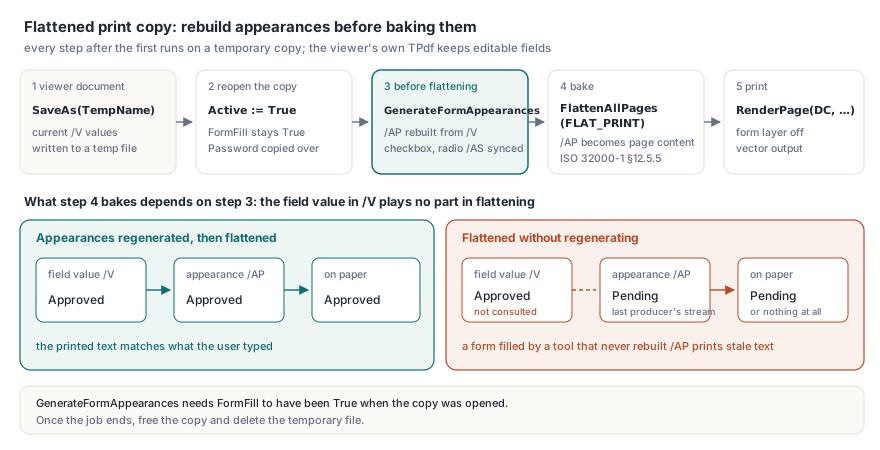
The flatten route has an ordering rule that matters more than the flag. FlattenAllPages bakes each widget's appearance stream (ISO 32000-1 §12.5.5) into the page content, and an appearance stream is whatever the last producer wrote; the field value in /V plays no part. A form filled by a tool that never regenerated its appearances flattens to the old text or to nothing, so GenerateFormAppearances runs first: it rebuilds text-field appearances from the current values and synchronises checkbox and radio /AS states, and it needs FormFill to have been True when the document was opened. Do all of this on a copy, because flattening rewrites the pages of whichever TPdf it runs on, and an open viewer wants its fields to stay editable. The copy goes through the vector branch of the print routine below with the form layer switched off; free it and delete the temporary file once the job ends
Fitting each page to the printable area
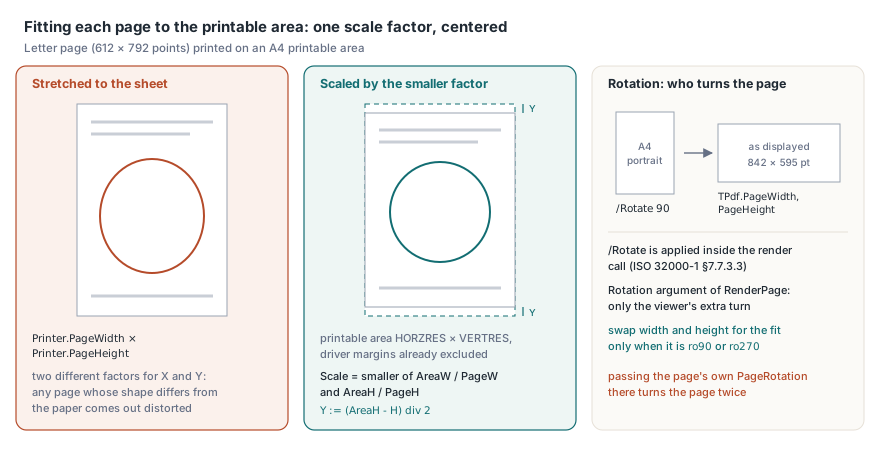
Scale once, by the smaller of the two factors, and centre the result. Stretching to Printer.PageWidth × Printer.PageHeight distorts every page whose shape differs from the paper, a Letter page (612 × 792 points) on A4 or a landscape page on a portrait sheet. The printer side is the printable area in device pixels (HORZRES by VERTRES), with the driver margins already excluded. On the PDF side, TPdf.PageWidth and PageHeight already report the page as displayed: an A4 portrait page stored with /Rotate 90 comes back as 842 × 595 points. ISO 32000-1 §7.7.3.3 (Table 30) says the page shall be rotated by /Rotate when displayed or printed, PDFium applies it inside the render call, and the Rotation argument of RenderPage is only the extra turn a viewer adds when the user rotates the view. Pass the page's own PageRotation there and the page turns twice. Swap width and height for the fit only when that extra rotation is 90 or 270 degrees, the same pair of rules that governs thumbnail fit and zoom under rotation; the routine below extends the basic loop for printing PDF documents with PDFium Component with a form-value branch and a cancel path that discards the job
uses
  Winapi.Windows, System.SysUtils, Vcl.Graphics, Vcl.Forms, Vcl.Printers, PDFium;

procedure FitRect(PageW, PageH: Double; Swap: Boolean;
  AreaW, AreaH: Integer; out X, Y, W, H: Integer);
var
  T, Scale: Double;
begin
  if Swap then
  begin
    T := PageW; PageW := PageH; PageH := T;
  end;
  if (PageW <= 0) or (PageH <= 0) then
  begin
    X := 0; Y := 0; W := AreaW; H := AreaH;
    Exit;
  end;
  Scale := AreaW / PageW;
  if AreaH / PageH < Scale then
    Scale := AreaH / PageH;
  W := Round(PageW * Scale);
  H := Round(PageH * Scale);
  X := (AreaW - W) div 2;
  Y := (AreaH - H) div 2;
end;

procedure BlitBitmap(DC: HDC; Bitmap: TBitmap; X, Y: Integer);
var
  InfoSize, ImageSize: DWORD;
  Info: PBitmapInfo;
  Bits: Pointer;
begin
  GetDIBSizes(Bitmap.Handle, InfoSize, ImageSize);
  Info := AllocMem(InfoSize);
  try
    Bits := AllocMem(ImageSize);
    try
      GetDIB(Bitmap.Handle, 0, Info^, Bits^);
      StretchDIBits(DC, X, Y, Bitmap.Width, Bitmap.Height, 0, 0,
        Bitmap.Width, Bitmap.Height, Bits, Info^, DIB_RGB_COLORS, SRCCOPY);
    finally
      FreeMem(Bits);
    end;
  finally
    FreeMem(Info);
  end;
end;

function PrintPages(Pdf: TPdf; FromPage, ToPage: Integer; FormLayer: Boolean;
  ExtraRotation: TRotation; var Cancel: Boolean): Boolean;
const
  Opts: TRenderOptions = [reAnnotations, rePrinting];
var
  Page, X, Y, W, H: Integer;
  Bitmap: TBitmap;
begin
  Result := False;
  Printer.BeginDoc;
  try
    for Page := FromPage to ToPage do
    begin
      if Page > FromPage then
        Printer.NewPage;
      Pdf.PageNumber := Page;
      FitRect(Pdf.PageWidth, Pdf.PageHeight, ExtraRotation in [ro90, ro270],
        Printer.PageWidth, Printer.PageHeight, X, Y, W, H);
      if FormLayer then
      begin
        Bitmap := Pdf.RenderPage(0, 0, W, H, ExtraRotation, Opts);
        if Bitmap <> nil then          // nil for a degenerate page size
        try
          BlitBitmap(Printer.Canvas.Handle, Bitmap, X, Y);
        finally
          Bitmap.Free;
        end;
      end
      else
        Pdf.RenderPage(Printer.Canvas.Handle, X, Y, W, H, ExtraRotation, Opts);
      Application.ProcessMessages;     // lets a Cancel button set the flag
      if Cancel then
        Break;
    end;
    Result := not Cancel;
  finally
    if Result then
      Printer.EndDoc                   // commits the job to the spooler
    else
      Printer.Abort;                   // cancel or exception: nothing prints
  end;
end;
A viewer calls this with Pdf.FormFill as FormLayer; the flattened copy passes False. EndDoc is the commit, not a cleanup step. After BeginDoc, Printer.EndDoc hands everything rendered so far to the spooler as a valid job, so an unconditional EndDoc in finally turns a cancelled print into a half-printed one. The routine decides in finally from the success flag instead: EndDoc after the last page, Abort after a cancel or an exception. The loop exit needs similar care, because Delphi and Free Pascal both evaluate a for loop's end value once, on entry. Setting ToPage or a copy count to zero from a Cancel handler does not stop a loop that is already running; test the flag and Break, and with nested copy and collation loops, break out of each level. And since Application.ProcessMessages lets menu shortcuts fire too, disable Open, Save and Print while the job runs
Keeping the raster path within memory
TPdf.RenderPageBanded renders a page in horizontal strips of a height you choose and passes each strip to a callback. Each strip is a slice of the full-size page — nothing is rescaled — and it carries the same field values as a full-page bitmap. With 512-row bands, a page 4960 pixels wide needs about 10 MB per band instead of 139 MB for the sheet. Roughly a fourteenth of the memory. TPdfBandCallback is a method pointer that receives the band index, the band's top offset in page pixels and the bitmap, and returns True to continue; RenderPageBanded returns the band count, 0 on failure
type
  TBandPrinter = class
  private
    FDC: HDC;
    FLeft, FTop: Integer;
  public
    constructor Create(DC: HDC; Left, Top: Integer);
    function PrintBand(BandIndex, BandTopY: Integer; Bitmap: TBitmap): Boolean;
  end;

constructor TBandPrinter.Create(DC: HDC; Left, Top: Integer);
begin
  inherited Create;
  FDC := DC;
  FLeft := Left;
  FTop := Top;
end;

function TBandPrinter.PrintBand(BandIndex, BandTopY: Integer;
  Bitmap: TBitmap): Boolean;
begin
  BlitBitmap(FDC, Bitmap, FLeft, FTop + BandTopY);
  Result := True;                      // False stops the remaining bands
end;

// called from the page loop in place of the full-page bitmap branch
procedure PrintPageBanded(Pdf: TPdf; Page, X, Y, W, H: Integer;
  ExtraRotation: TRotation);
var
  Bands: TBandPrinter;
begin
  Bands := TBandPrinter.Create(Printer.Canvas.Handle, X, Y);
  try
    if Pdf.RenderPageBanded(W, H, 512, Bands.PrintBand, ExtraRotation,
      [reAnnotations, rePrinting]) = 0 then
      raise Exception.CreateFmt('Page %d could not be rendered', [Page]);
  finally
    Bands.Free;
  end;
end;
What should the host do with ViewerPreferences and permission bits?
Read them and act on them in your own code; PDFium reports them and renders the page regardless. A producer can store print hints in the catalog's /ViewerPreferences dictionary (ISO 32000-1 §12.2, Table 150), and TPdf surfaces the ones that shape a print dialog:
PrintScaling(Boolean) is False when the file says/PrintScaling /None, which means print at actual size, and True for/AppDefaultor a missing entry. The standard wants it honoured even when no print dialog is shownPrintPaperHandling(TPrintPaperHandling) carries/DuplexasphSimplex,phDuplexFlipShortEdge,phDuplexFlipLongEdgeorphUndefined.SetPdfPrintPaperHandlingDevModewrites it intoDEVMODE.dmDuplexand setsDM_DUPLEX; forphUndefinedit returns False and leaves the record alone, so the driver default survivesPrintCopies(Integer) is/NumCopies, the copy count to put in the dialog
Permission bits follow the same rule. For the standard security handler, ISO 32000-1 §7.6.3.2 (Table 22) assigns bit 3 of /P to printing and, for revision 3 and later handlers, bit 12 to printing at full fidelity; with bit 3 set and bit 12 clear, printing is limited to a low-level representation of the appearance, possibly degraded. TPdf.GrantedPermissions decodes the mask into permPrint and permPrintHighQuality, and HasPermission tests one value; the engine renders whatever you ask for, so enforcement is the host's job, normally a disabled Print button. When only permPrint is granted, the reading that matches the standard is the bitmap path at a modest resolution rather than the vector or PostScript output a full grant allows. The bits describe the document as opened: a file unlocked with its owner password reports full access, and UserHasPermission answers for the user-level bits alone
uses
  Winapi.Windows, System.SysUtils, Vcl.Dialogs, Vcl.Printers, PDFium;

procedure PreparePrintJob(Pdf: TPdf; Dialog: TPrintDialog;
  out ActualSize, HighQuality: Boolean);
var
  Device, Driver, Port: array[0..MAX_PATH] of Char;
  DevModeHandle: THandle;
  DevMode: PDeviceMode;
begin
  if not Pdf.HasPermission(permPrint) then
    raise Exception.Create('This document does not permit printing');
  HighQuality := Pdf.HasPermission(permPrintHighQuality);
  ActualSize := not Pdf.PrintScaling;            // /PrintScaling /None

  Printer.GetPrinter(Device, Driver, Port, DevModeHandle);
  if DevModeHandle <> 0 then
  begin
    DevMode := GlobalLock(DevModeHandle);
    try
      SetPdfPrintPaperHandlingDevMode(DevMode^, Pdf.PrintPaperHandling);
    finally
      GlobalUnlock(DevModeHandle);
    end;
    Printer.SetPrinter(Device, Driver, Port, DevModeHandle);  // dialog starts from it
  end;

  Dialog.MinPage := 1;
  Dialog.MaxPage := Pdf.PageCount;
  Dialog.Options := Dialog.Options + [poPageNums];
  if Pdf.PrintCopies > 1 then
    Dialog.Copies := Pdf.PrintCopies;
end;

// used instead of FitRect when ActualSize is True
procedure ActualSizeRect(Pdf: TPdf; out X, Y, W, H: Integer);
begin
  // 72 points per inch on the PDF side, device pixels per inch on the printer
  W := Round(Pdf.PageWidth / 72 * GetDeviceCaps(Printer.Handle, LOGPIXELSX));
  H := Round(Pdf.PageHeight / 72 * GetDeviceCaps(Printer.Handle, LOGPIXELSY));
  X := (Printer.PageWidth - W) div 2;  // negative when the page is larger
  Y := (Printer.PageHeight - H) div 2; // than the printable area: edges clip
end;
Running will-print and did-print actions at the real print boundary
Document-level print scripts run when the host runs them. The catalog's additional-actions dictionary (ISO 32000-1 §12.6.3, Table 197) defines WP, a JavaScript action performed before printing, and DP, performed after. PDFium Component exposes both through ExecuteDocumentLifecycleAction(dlaWillPrint, ErrorMessage) and dlaDidPrint, and keeps them out of the render calls: thumbnails, snapshots and conversions render too, and none of them should look like a user's print to a document script. The order is yours to get right. A will-print script that stamps a date or fills a "printed by" field changes form values, so run it before the first page is rendered and, on the flatten route, before the copy is saved; fire did-print only after EndDoc has committed the job. The call returns False with a message when the form environment is missing or LifecycleActionPolicy refuses it; for untrusted files, lapDisabled switches document actions off. The wider scripting picture is in running AcroForm JavaScript with host events
On Windows, a job that has to carry form values belongs on the bitmap branch: RenderPage into a TBitmap at ordinary resolutions, RenderPageBanded at 600 dpi and above. Keep the device-context overload of PDFium Component for flattened copies and for documents without fields, where its vector output is the better result