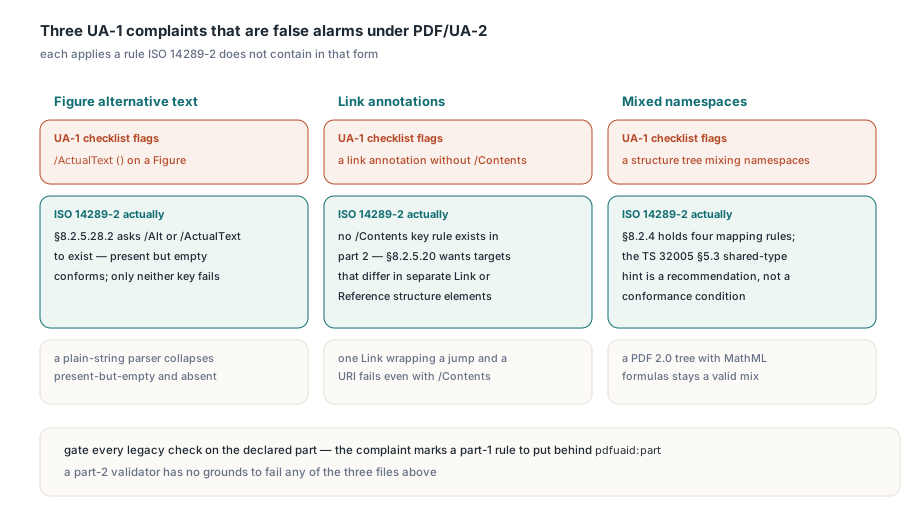
An in-house PDF/UA-1 checklist rejects a PDF/UA-2 export that veraPDF passes, flagging a figure tagged /ActualText (), link annotations without /Contents and a structure tree that mixes namespaces. Each of them conforms to ISO 14289-2:2024, so the rule set must follow the part each file declares, which is the first thing TPdf.ValidatePdfUa in PDFium Component reads
The declared part decides which rules apply
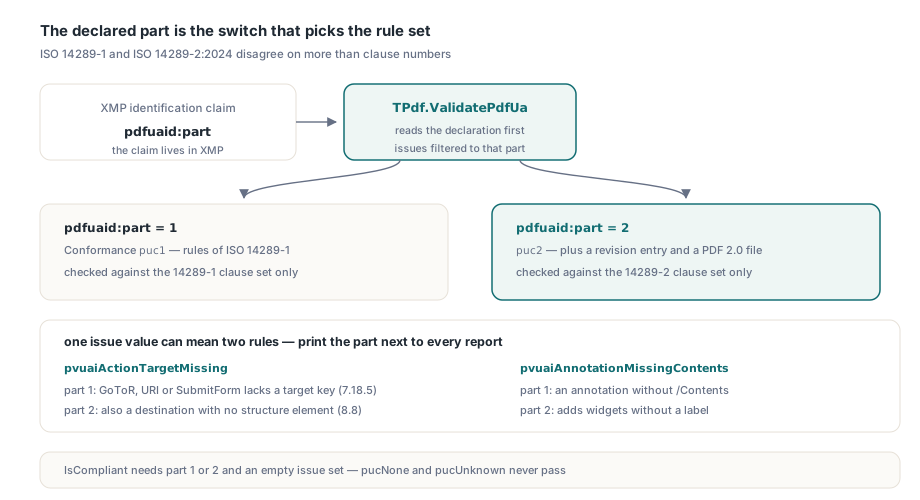
Every PDF/UA file names its part in XMP metadata with pdfuaid:part, and PDF/UA-2 adds two conditions of its own: a revision entry and a file that declares PDF 2.0. That declaration is the switch. TPdf.ValidatePdfUa returns a TPdfUaValidationResult whose Conformance field reports puc1 or puc2, pucNone for a file confirmed not to claim PDF/UA, or pucUnknown when the claim cannot be determined, and whose Issues set holds only the findings that apply to that part. Some issue values stand for one rule in part 1 and a wider one in part 2. pvuaiActionTargetMissing on a part-1 file means a GoToR, URI or SubmitForm action lacks its target key (§7.18.5); on a part-2 file it can also mean a destination that does not lead to a structure element (§8.8). pvuaiAnnotationMissingContents on a part-2 file includes widgets that have no label. So print the part next to every report:
uses
  SysUtils, TypInfo, PDFium, FPdfPdfua;

procedure ReportPdfUa(const FileName: string);
const
  PartNames: array[TPdfUaConformance] of string =
    ('unknown', 'not PDF/UA', 'PDF/UA-1', 'PDF/UA-2');
var
  Pdf: TPdf;
  Report: TPdfUaValidationResult;
  Issue: TPdfUaValidationIssue;
begin
  Pdf := TPdf.Create(nil);
  try
    Pdf.FileName := FileName;
    Pdf.Active := True;
    if not Pdf.Active then
      raise Exception.CreateFmt('Cannot open %s', [FileName]);

    Report := Pdf.ValidatePdfUa;
    Writeln(Format('%s: %s, compliant=%s', [ExtractFileName(FileName),
      PartNames[Report.Conformance], BoolToStr(Report.IsCompliant, True)]));
    for Issue := Low(TPdfUaValidationIssue) to High(TPdfUaValidationIssue) do
      if Issue in Report.Issues then
        Writeln('  ', GetEnumName(TypeInfo(TPdfUaValidationIssue), Ord(Issue)));
  finally
    Pdf.Free;
  end;
end;
IsCompliant is true only when the part is 1 or 2 and the issue set is empty, so a file with no PDF/UA claim never reports as compliant by accident. Comparing against veraPDF has one catch of its own. The command-line tool exits with code 1 for a non-conforming file. It still writes the complete XML report to standard output, and a script that stops at the exit code throws away the rule numbers. Read the report
Which UA-1 complaints are false alarms under PDF/UA-2?
Each complaint in the opening example applies a rule that PDF/UA-2 does not contain in that form. Start with the figure, where the mistake usually sits in the parsing code. ISO 14289-2 §8.2.5.28.2 asks a Figure to carry an /Alt or /ActualText key, and the test is whether the key exists: /ActualText () conforms, and only a figure with neither key fails. A reader that keeps both values in plain strings collapses "present but empty" and "absent" into the same '', and the checker then reports missing alternative text on a figure that has it. Store a presence flag beside each string when you parse the structure element. An empty /ActualText is a weak description that a human reviewer may still want to see, but a part-2 validator has no grounds to fail it
The link rule is gone. PDF/UA-1 §7.18.5 requires every link annotation to carry /Contents; PDF/UA-2 puts no annotation-key rule in its place and constrains the structure in §8.2.5.20. Annotations that lead to different targets must sit in separate Link or Reference structure elements, so a single Link element that wraps both a jump to chapter 2 and a URI to an external site fails part 2 even when both annotations carry /Contents. The two parts are testing different things — the text on the annotation in one, the grouping in the tree in the other. PDFium Component applies the link /Contents requirement only to files that declare part 1
The namespace complaint comes from reading the wrong document. ISO 14289-2 §8.2.4 holds four rules: a non-standard structure type must map to a standard type, no mapping may be circular, no type may map within the same explicit namespace, and no standard type may be remapped to a non-standard one. ISO/TS 32005 §5.3 adds a recommendation for documents that mix namespaces — use the PDF 2.0 namespace for the types they share — and that recommendation is not among the PDF/UA-2 conformance conditions. A checklist that hard-fails on §5.3 rejects valid mixed trees, such as a PDF 2.0 tree that carries MathML formulas. Resolving a custom type through /RoleMapNS to a standard one is its own piece of work, shown in PDF/UA-2 validation with role maps and namespaces
Rules PDF/UA-2 added or tightened
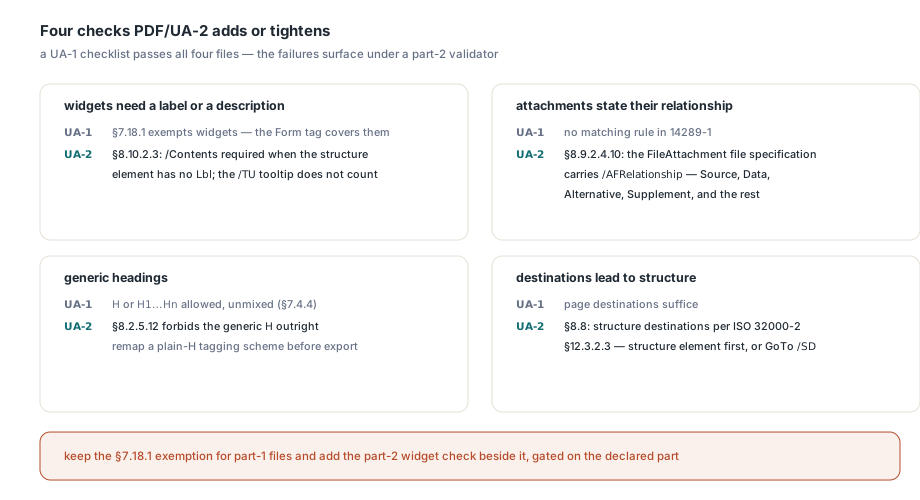
The reverse direction is the expensive one. A UA-1 checklist passes the files below, and the failures appear only when someone runs a part-2 validator:
- Widgets need a label or a description. PDF/UA-1 §7.18.1 exempts widget annotations from
/Contentsbecause theFormtag of §7.18.4 covers them. PDF/UA-2 §8.10.2.3 requires/Contentson any widget whose structure element has noLblchild. The field's/TUtooltip does not count as a label - File attachments state their relationship. §8.9.2.4.10 requires the file specification of a
FileAttachmentannotation to carry/AFRelationship— Source, Data, Alternative, Supplement and the other values PDF/A-3 already uses for associated files and AFRelationship - Headings are numbered. PDF/UA-1 accepts the generic
Htag or numberedH1…Hnheadings, provided one document does not mix them (§7.4.4). PDF/UA-2 §8.2.5.12 forbids the genericHoutright, so a tagging scheme built on plainHelements needs remapping before the export can claim part 2 - Destinations lead to structure. §8.8 requires navigation targets to be structure destinations in the sense of ISO 32000-2 §12.3.2.3: a destination array whose first element is a structure element, or a GoTo action with
/SD
Leave the old rules alone. When a checklist grows part-2 coverage, the obvious edit is to delete the §7.18.1 widget exemption so that widgets without /Contents get flagged, and that edit makes conforming part-1 forms fail a rule their standard never had. Add the part-2 widget check beside the exemption and gate it on the declared part. That is how PDFium Component reports the widget rule — the part-1 exemption stays in force, and a part-2 widget without a label or /Contents appears as pvuaiAnnotationMissingContents
How do you test for a structure destination without false hits?
Read the key the specification says wins. ISO 32000-2 Table 202 makes /D required on every GoTo action and /SD optional, and says the structure destination should take precedence when both are present. A conforming part-2 link therefore often carries a page destination such as /D [6 0 R /Fit] for older readers and /SD [19 0 R /Fit] beside it. A home-made check that reads /D finds a page, reports a destination that is not a structure destination, and fails the file. For actions, look at /SD. For a bare destination array, follow its first element and ask whether the referenced dictionary is a structure element, which in byte terms means a dictionary with a top-level /S key
Top-level is the hard part. A page dictionary routinely carries /Group << /S /Transparency >> for its transparency group, and a key search that does not skip nested dictionaries finds that inner /S and decides the page is a structure element, so a plain page destination passes. Scan only the outer dictionary's keys and skip each value as one complete object, nested dictionaries and arrays included. The ParentTree, which maps an annotation's /StructParent back to its structure element, asks for the same care. Its /Nums array may pair a key with a single reference (0 26 0 R) or with an array (0 [null 20 0 R]), and in the array form the position inside the array is added to the key to reach the /StructParent value. A parser that knows only the first form leaves annotations in the second without a structure parent, and the §8.2.5.20 grouping rule then has nothing to compare. Run these checks on the bytes as loaded, too: a re-saved or normalised copy can renumber annotation objects and rebuild the number tree, the same tree you rewrite whenever you keep /ParentTree and /StructParents in sync after editing pages
Which language tags pass the /Lang check?
The grammar did not change between the parts (ISO 14289-1 §7.2, ISO 14289-2 §8.4.4); loose checklists miss it all the same. veraPDF expresses it as ^[a-zA-Z]{1,8}(-[a-zA-Z0-9]{1,8})*$: a first subtag of one to eight letters, then any number of subtags of one to eight letters or digits, each introduced by a hyphen. The limits are sharp. portugue-pt passes and portugues-pt fails on its nine-letter first subtag; nl-1234abcd passes and nl-1234abcde fails; 1-pt and -pt fail on the first character. A check that only tests for letters, digits and hyphens accepts all four failures. The catalog /Lang and every structure element's /Lang need one shared test, or the same tag earns two verdicts in one file. A tag stored as a UTF-16BE string, such as <FEFF0045004E002D00550053>, is decoded first; that one reads EN-US and passes. Bad tags often come from somewhere mundane: locale strings from Java, ICU or database settings use underscores, and pt_BR is not a valid tag. IsPdfUaLanguageTagValid applies the same shape test, so you can repair a tag before it is written:
uses
  SysUtils, PDFium;

// Turn a platform locale such as pt_BR into a tag PDF/UA accepts,
// or return '' when a simple substitution cannot repair it
function LocaleToPdfLang(const Locale: string): string;
begin
  Result := StringReplace(Trim(Locale), '_', '-', [rfReplaceAll]);
  if not IsPdfUaLanguageTagValid(Result) then
    Result := '';
end;

procedure CheckTags;
const
  Samples: array[0..6] of string = ('en-US', 'pt_BR', 'zh_CN',
    'portugue-pt', 'portugues-pt', 'nl-1234abcd', 'nl-1234abcde');
var
  S: string;
begin
  // Expected:
  //   en-US, portugue-pt, nl-1234abcd   valid as written
  //   pt_BR, zh_CN                      invalid, repaired to pt-BR / zh-CN
  //   portugues-pt, nl-1234abcde        invalid, repaired to ''
  for S in Samples do
    Writeln(Format('%-14s valid=%-5s repaired=%s', [S,
      BoolToStr(IsPdfUaLanguageTagValid(S), True), LocaleToPdfLang(S)]));
end;
Call the conversion where the tag enters your pipeline, before it reaches the catalog or any structure element. An empty result is the signal to fall back to a language the document is known to use. Writing the raw locale string anyway only moves the failure downstream, where it surfaces as pvuaiLangInvalidFormat for the catalog or pvuaiStructElementLangInvalid for an element, far from the code that produced it
Start the migration with the export from the opening paragraph. Run it through ReportPdfUa from the first listing using the PDFium Component for Delphi: the header line should name PDF/UA-2, and neither pvuaiFigureMissingAlt, pvuaiLinkMissingContents nor pvuaiNamespaceReuseInvalid should appear under it. Any complaint your old checklist still raises on that file marks a part-1 rule to put behind the declared part