Two complaints arrive the week after a compression feature ships: the scanned contract now has stair-stepped, furry letterforms, and the transparent logo on the cover page sits inside a pale halo. PDFiumPas answers both in one place. TPdf.OptimizeImages measures each image before it shrinks it, then picks a resampling kernel and accumulates colour in alpha-aware form
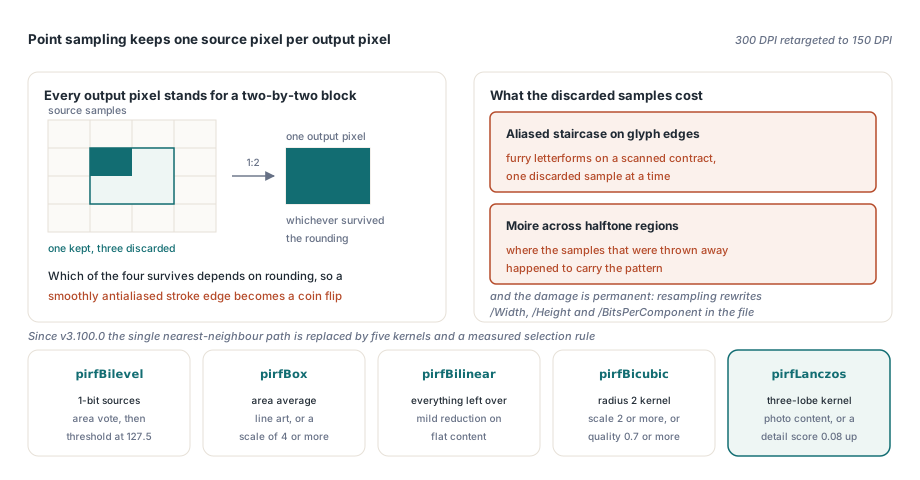
That was not always true. Before v3.100.0 the same method downsampled every non-bilevel image with a fixed nearest-neighbour step, which is exactly the algorithm that produces both complaints: it point-samples one source pixel per output pixel, and it treats the RGB sitting under a fully transparent pixel as if a reader would ever see it. The rewrite in v3.100.0 replaces that single path with five kernels, a measured selection rule, and an explicit working-memory budget
Why does downsampling make scanned text look ragged?
Because point sampling answers the wrong question. When a 300 DPI scan is retargeted to 150 DPI, every destination pixel stands for a two-by-two block of source pixels, and nearest neighbour keeps one of the four and discards the rest. Which one survives depends on rounding, so a stroke edge that was smoothly antialiased in the source becomes a coin flip per pixel. The result is the classic aliased staircase along glyph edges, plus moire on halftone regions where the discarded samples happened to carry the pattern. This matters more in a PDF than on screen because the damage is permanent. An image XObject carries its sample data alongside /Width, /Height and /BitsPerComponent (ISO 32000-1 §8.9.5), and resampling rewrites all three inside the file. A bad zoom in a viewer is a frame you can redraw, and PDFiumPas has separate machinery for that in render cache and zoom performance. A bad downsample is a new document you hand to the customer
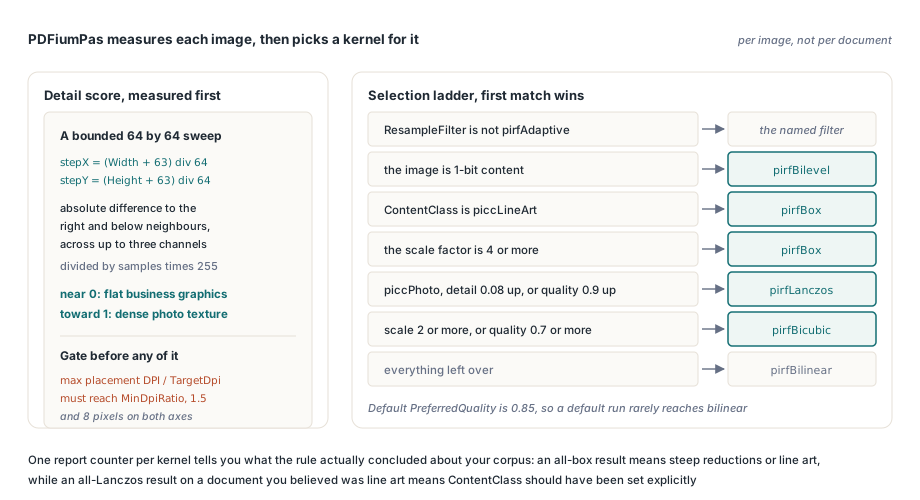
How PDFiumPas measures detail and picks a kernel
PDFiumPas decides per image, not per document. Before choosing a kernel it computes a normalised luminance detail score from a bounded sampling grid: the horizontal and vertical steps are (Width + 63) div 64 and (Height + 63) div 64, so a 12000-pixel scan and a 300-pixel thumbnail both cost about the same 64-by-64 sweep. At each sampled position it sums the absolute difference to the neighbour on the right and the neighbour below, across up to three channels, then divides by the sample count times 255. The score lands in 0 to 1, where flat business graphics sit near zero and dense photographic texture climbs
The selection ladder then runs in a fixed order. If ResampleFilter is anything other than pirfAdaptive, that filter is used verbatim. Otherwise: 1-bit content takes pirfBilevel; a ContentClass of piccLineArt takes pirfBox; a scale factor of 4 or more takes pirfBox as well, because at that reduction an area average is both the cheapest and the most correct answer; piccPhoto, a detail score of 0.08 or higher, or a PreferredQuality of 0.9 or higher takes pirfLanczos with its three-lobe kernel; a scale of 2 or more or a quality of 0.7 or higher takes pirfBicubic at radius 2; everything left over takes pirfBilinear. Since TPdfImageOptimizeOptions.Default sets PreferredQuality to 0.85, a default run never falls back to bilinear unless the reduction is mild and the content is flat
uses
  PDFium;

procedure ShrinkScannedPdf(const InputFile, OutputFile: string);
var
  Pdf: TPdf;
  Options: TPdfImageOptimizeOptions;
  Report: TPdfImageOptimizeReport;
begin
  Pdf := TPdf.Create(nil);
  try
    Pdf.FileName := InputFile;
    // Defaults: TargetDpi 150, MinDpiRatio 1.5, PreserveBilevel True,
    // MinDimension 8, pirfAdaptive, piccAuto, quality 0.85, 64 MiB budget.
    Options := TPdfImageOptimizeOptions.Default;
    Options.TargetDpi := 150;
    Options.MinDpiRatio := 1.5;
    Options.ContentClass := piccAuto;
    Options.PreferredQuality := 0.85;
    if Pdf.OptimizeImages(Options, Report) and (Report.OptimizedCount > 0) then
      Pdf.SaveAs(OutputFile);
  finally
    Pdf.Free;
  end;
end;
An image is only touched when the larger of its horizontal and vertical placement DPI, divided by TargetDpi, reaches MinDpiRatio. That guard exists so a 160 DPI photo aimed at a 150 DPI target is not re-encoded for a six percent gain that costs a generation of quality. Images below MinDimension on either axis, 8 by default, are skipped as icons or rules
Why do transparent logos pick up a white fringe?
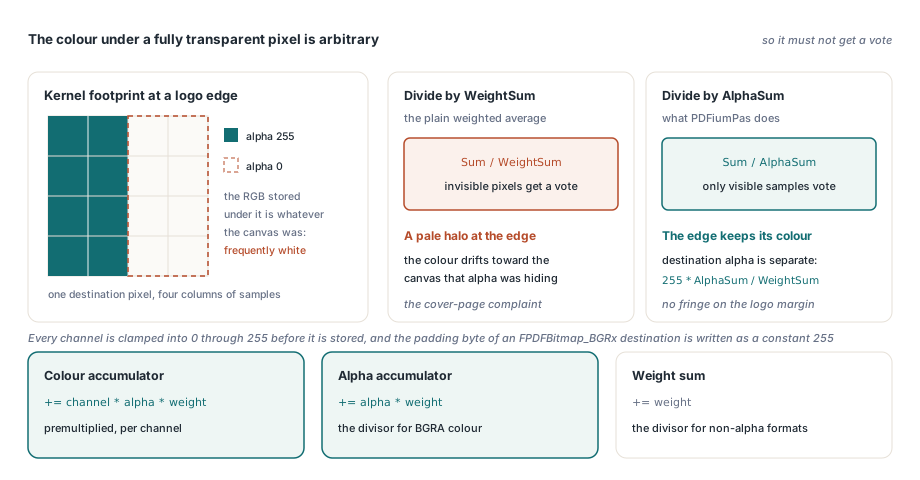
Because the colour underneath a fully transparent pixel is arbitrary, and a plain weighted average lets it vote. Export a logo from a design tool and the invisible margin is frequently white, or black, or whatever the canvas was; the alpha channel hides it, and a straight sum over the kernel footprint promptly mixes it back into the visible edge. PDFiumPas avoids this by accumulating BGRA samples in premultiplied form and undoing the premultiplication only at the destination pixel
Concretely, each contributing sample adds channel * alpha * weight to the colour accumulator, alpha * weight to an alpha accumulator, and weight to the weight sum. The destination colour is then divided by the alpha accumulator rather than by the weight sum, and that is the step that matters: dividing by the weight sum would drag the colour towards the invisible pixels, while dividing by the accumulated alpha reconstructs the colour that the visible samples actually agreed on. The destination alpha is a separate quantity, 255 * AlphaSum / WeightSum. Non-alpha formats divide by the weight sum as usual, the padding byte of a FPDFBitmap_BGRx destination is written as a constant 255, and every channel is clamped into 0 to 255 before it is stored. That alpha normally originates from a soft mask entry in the image dictionary (ISO 32000-1 §11.4), which PDFium has already composited into the BGRA buffer the resampler receives
// Shape of the inner accumulation loop, per contributing source sample
if SrcFormat = FPDFBitmap_BGRA then
  Alpha := PByte(PAnsiChar(Pixel) + 3)^ / 255
else
  Alpha := 1;
for Channel := 0 to Min(BytesPerPixel, 3) - 1 do
  Accumulated[Channel] := Accumulated[Channel] +
    PByte(PAnsiChar(Pixel) + Channel)^ * Alpha * Weight;
AlphaSum := AlphaSum + Alpha * Weight;
WeightSum := WeightSum + Weight;

// ... and at the destination pixel, unpremultiply against the alpha sum
if SrcFormat = FPDFBitmap_BGRA then
begin
  if Abs(AlphaSum) > 1E-12 then
    ValueSum := Accumulated[Channel] / AlphaSum
  else
    ValueSum := 0;
end
else
  ValueSum := Accumulated[Channel] / WeightSum;
Keeping 1-bit line art out of the grey zone
Any continuous kernel applied to a bilevel scan produces grey, and grey is precisely what a fax-style image is not allowed to contain. PDFiumPas therefore leaves 1-bit images alone by default: PreserveBilevel is True in TPdfImageOptimizeOptions.Default, and such images land in SkippedCount untouched. Set it to False and the pirfBilevel path takes over instead of a smoothing kernel. It walks the exact source rectangle covering each destination pixel, averages luminance with the 0.114, 0.587 and 0.299 weights in BGR memory order, and thresholds the result at 127.5 into a flat 0 or 255. Nothing intermediate can be written, so edges stay crisp and no grey halo forms around thin strokes; the alpha channel of a BGRA source is averaged normally, and a BGRx destination gets the constant 255. If you need the underlying pixels rather than a smaller document, extracting images from PDF documents is the separate path
What happens when an image exceeds the working-memory budget?
It is left exactly as it was, and it is counted. MaxWorkingBytes defaults to 64 MiB and is enforced twice. Before the destination bitmap is created, PDFiumPas rejects the image if width times height times bytes per pixel exceeds the budget. After FPDFBitmap_CreateEx succeeds it checks again using the real stride times height, because row padding can push an allocation past a limit that the naive product cleared. Either rejection destroys the destination and returns nothing. Be clear about the degradation this implies: an over-budget image is not resampled at a lower quality, and it is not split into tiles. The original stays in the document, BudgetExceededCount and SkippedCount both increase, and a run can therefore report success while a document is only partly optimised. That is deliberate fail-safe behaviour, but it means the report is not optional reading. A distinct failure mode also exists: images whose bitmap PDFium cannot produce at all, such as CMYK, JPX, JBIG2 or masked sources, increase FailedCount instead and are likewise left untouched
procedure OptimizeBatch(const Files: array of string);
var
  Pdf: TPdf;
  Options: TPdfImageOptimizeOptions;
  Report: TPdfImageOptimizeReport;
  I: Integer;
begin
  Options := TPdfImageOptimizeOptions.Default;
  Options.PreserveBilevel := False;              // use the bilevel area vote
  Options.ContentClass := piccPhoto;             // force Lanczos for photo sets
  Options.MaxWorkingBytes := 256 * 1024 * 1024;  // headroom for large scans
  Pdf := TPdf.Create(nil);
  try
    for I := Low(Files) to High(Files) do
    begin
      Pdf.FileName := Files[I];
      if not Pdf.OptimizeImages(Options, Report) then
      begin
        WriteLn('optimize failed: ', Report.ErrorMessage);
        Continue;
      end;
      if Report.BudgetExceededCount > 0 then
        WriteLn(Files[I], ': ', Report.BudgetExceededCount,
          ' image(s) over budget and kept at full size');
      if Report.FailedCount > 0 then
        WriteLn(Files[I], ': ', Report.FailedCount,
          ' image(s) could not be decoded to a bitmap');
      if Report.OptimizedCount > 0 then
        Pdf.SaveAs(ChangeFileExt(Files[I], '.opt.pdf'));
    end;
  finally
    Pdf.Free;
  end;
end;
Reading the report before you ship the file
TPdfImageOptimizeReport is built to be diagnosed, not merely logged. Alongside OptimizedCount, SkippedCount and FailedCount it exposes one counter per kernel, so BoxFilterCount, BilinearFilterCount, BicubicFilterCount, LanczosFilterCount and BilevelFilterCount tell you what the adaptive rule actually concluded about your corpus. An all-box result means the reductions were steep or the content was classified as line art; an all-Lanczos result on a document you believed was line art is a sign that ContentClass should be set explicitly. AverageDetailScore is the number to compare against the 0.08 Lanczos threshold when tuning PreferredQuality, and PeakWorkingBytes shows how much of MaxWorkingBytes the run really needed. Invalid options fail loudly rather than silently: a non-positive TargetDpi, a MinDpiRatio below 1, a PreferredQuality outside 0 to 1, or a non-positive MaxWorkingBytes raises EPdfError before any page is touched. And OptimizeImages edits the in-memory document only; each modified page is committed with FPDFPage_GenerateContent, after which you still call SaveAs yourself. To eyeball what changed, render the before and after documents to bitmaps as described in converting PDF pages to JPEG images and compare them at full zoom
Adaptive resampling is one of those features that is invisible when it works and generates support tickets when it does not, which is why the measurement, the alpha handling and the memory budget had to land together rather than as three separate refinements. If you are evaluating this for a Delphi, C++Builder or Lazarus product, the full API surface and licensing details are on the PDFiumPas Delphi PDFium component page