Merge and split are the two page operations everyone reaches for first, and they cover a lot of ground. They do not cover everything. There is a separate family of work that rearranges pages rather than moving whole files: lay four slides onto one sheet for a handout, drag a page from the back of a document to the front, or pull pages 3, 7, and 12 into a short excerpt without touching the rest. PDFium exposes three methods for exactly this, and each one behaves differently from the merge and split you already know. This article walks through what they do, where the output points live, and one ownership detail that has caused a crash in the field
The three are ImportNPagesToOne for N-up imposition, MovePages for in-place reordering, and ImportPagesByIndex for subset extraction. Merge stacks documents end to end and leaves the page count equal to the sum of the inputs. Split writes several output files from one input. The three operations here sit in between: one of them changes how many source pages share a sheet, one of them changes the order inside a single document, and one of them copies a chosen handful of pages into another document. Knowing which is which saves you from forcing a merge-and-delete dance where a single call would do
What N-up imposition actually does
Imposition is the prepress term for arranging several source pages onto one larger sheet so that the printed and folded result reads in the right order. The everyday version is the 2-up handout, the 4-up booklet signature, or the contact sheet that fits a dozen thumbnails on a page. PDFium handles the geometry through one call:
function ImportNPagesToOne(
  OutputWidth, OutputHeight: Single;
  NumX, NumY               : Cardinal): TPdf;
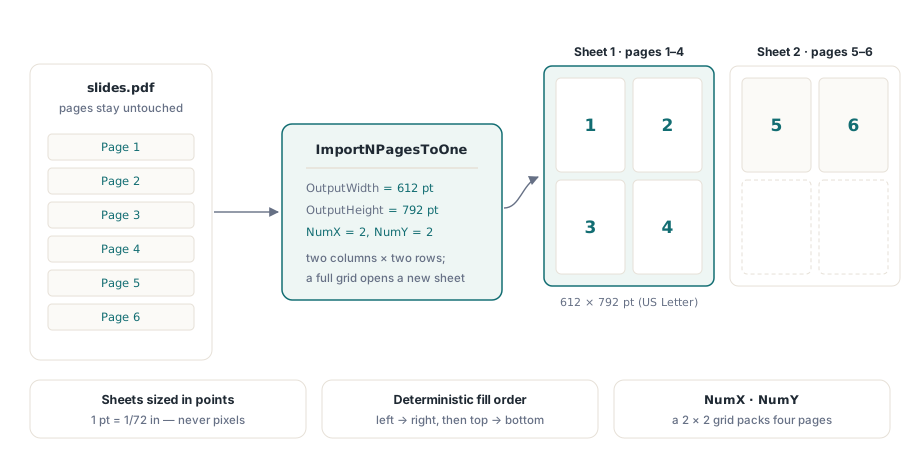
NumX and NumY describe the grid. A value of 2, 1 places two source pages side by side; 2, 2 packs four into a quadrant layout; 4, 3 builds a twelve-up contact sheet. PDFium reads the source pages in order, scales each one down to fit its cell, and fills the grid left to right, top to bottom, starting a fresh output sheet whenever the current grid is full. The source pages are not modified. What you get back is a new document whose pages are composites
Output size is in points, not pixels
OutputWidth and OutputHeight are PDF user units, and a PDF user unit is one point, which is one seventy-second of an inch. The unit declares the physical size of the output sheet, and it has nothing to do with screen pixels or render DPI. This is the single most common place to get an imposition wrong, because a developer used to bitmaps reaches for a pixel count and ends up with a sheet the size of a postage stamp or a billboard
The numbers worth memorising are the two page sizes you will use most. US Letter is 612 by 792 points, because 8.5 inches times 72 is 612 and 11 inches times 72 is 792. A4 is roughly 595 by 842 points, from its 210 by 297 millimetre dimensions. The binding's own header states the rule plainly, that one unit is one seventy-second of an inch, and the unit ships a PointsPerInch constant equal to 72 if you would rather compute a size from inches in code than write the literal
const
  LetterW = 612.0;   // 8.5 in * 72
  LetterH = 792.0;   // 11  in * 72
var
  Source, Composite: TPdf;
begin
  Source := TPdf.Create(nil);
  Composite := nil;
  try
    Source.FileName := 'slides.pdf';
    Source.Active := True;

    // Four source pages per Letter sheet, 2 by 2 grid.
    Composite := Source.ImportNPagesToOne(LetterW, LetterH, 2, 2);
    if Composite = nil then
      raise Exception.Create('PDFium rejected the imposition arguments');

    Composite.SaveAs('slides-4up.pdf');
  finally
    Composite.Free;   // see the next section: this is mandatory
    Source.Free;
  end;
end;
The returned handle is yours to free
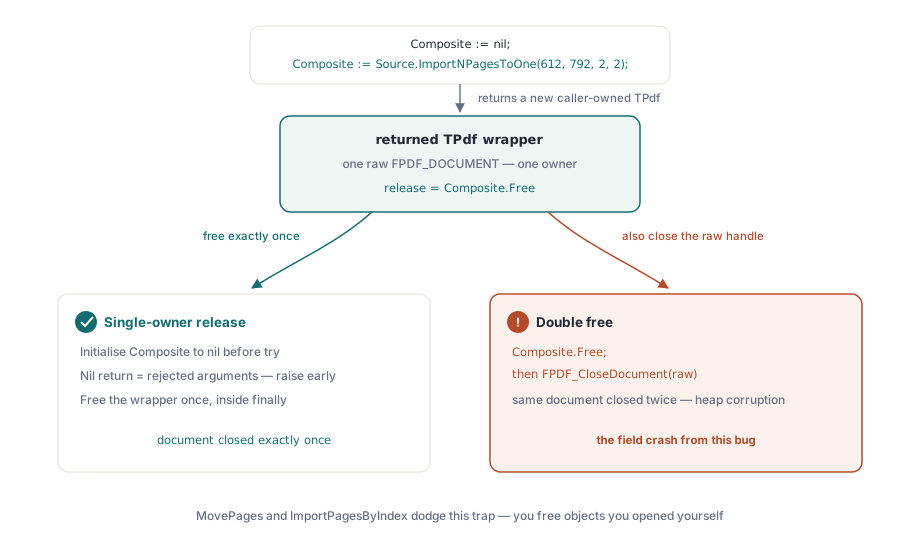
Read the signature again. ImportNPagesToOne returns a TPdf, not a Boolean. That return value is a brand-new document handle, allocated separately from the source, and the caller owns it. The source TPdf you called the method on is untouched and still owns its own handle; the composite is a second, independent object. If you let the returned TPdf go out of scope without freeing it, you leak a whole PDFium document
The more dangerous mistake runs the other way. Underneath, the method asks PDFium for a fresh FPDF_DOCUMENT through FPDF_ImportNPagesToOne, then wraps that raw handle inside the returned TPdf so the wrapper's lifetime governs the handle's. From that point on there is exactly one owner of the handle, and exactly one place it should be closed: when you Free the returned object. A careless error path that both frees the wrapper and also calls FPDF_CloseDocument on the raw handle it captured closes the same PDFium document twice. That is a double-free, and it is the specific bug that bit a caller here once. The rule that prevents it is short. Close the document on one path only, by freeing the TPdf the method handed you, and never reach past the wrapper to close the handle it already adopted
Two corollaries fall out of this. First, the method returns nil when PDFium rejects the arguments, such as a zero on either grid axis or an allocation failure, so a nil check belongs before you touch the result. Second, initialise your output variable to nil before the try and free it in finally, as the sample above does, so a failure midway through cannot leave you freeing an undefined reference or skipping the free entirely
Reordering pages without rewriting them
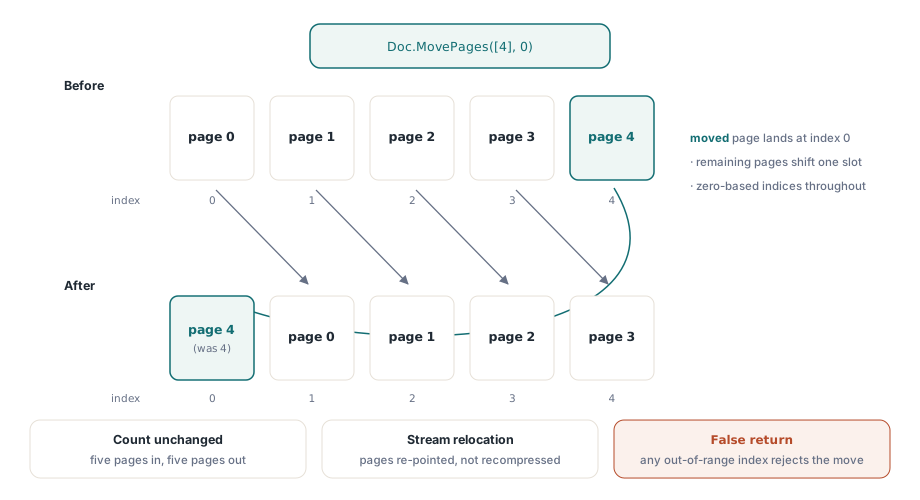
Imposition builds a new document. Reordering changes one document in place. MovePages lifts a set of pages out of their current positions and drops them at a destination, shifting everything else around the moved block so the page count stays the same:
function MovePages(
  const PageIndices: array of Integer;
  DestPageIndex    : Integer): Boolean;
The indices are zero-based. PageIndices lists the pages to move, in the order they should end up, and DestPageIndex is the index the first moved page lands on after the move settles. Because PDFium relocates the pages rather than copying and recompressing their content, the operation is cheap and lossless: the page objects keep their streams, their resources, and their fidelity. This is the call behind a drag-to-reorder page panel, where a user pulls a thumbnail to a new slot and you commit the new order with one move. It returns False when an index is out of range, so validate the result instead of assuming the rearrange took
var
  Doc: TPdf;
begin
  Doc := TPdf.Create(nil);
  try
    Doc.FileName := 'report.pdf';
    Doc.Active := True;

    // Move the last page (index 4 in a 5-page file) to the very front.
    if not Doc.MovePages([4], 0) then
      raise Exception.Create('MovePages rejected the index');

    Doc.SaveAs('report-reordered.pdf');
  finally
    Doc.Free;
  end;
end;
Pulling a subset by index
The third operation copies an explicit set of pages from one document into another. ImportPagesByIndex takes the source document and a zero-based index array, and inserts those pages into the target at a chosen position:
function ImportPagesByIndex(
  Source           : TPdf;
  const PageIndices: array of Integer;
  InsertAt         : Integer= 0): Boolean;
You call it on the target document and pass the source as the first argument. PageIndices names the source pages to pull, in the order you want them; InsertAt is the zero-based slot in the target where the first imported page goes, so 0 places them before the existing first page and the target's current page count appends. An empty array imports every page, which makes the call a full copy when you need one. It returns False if any index is out of range in the source
This is where the contrast with split matters. Split writes separate files, one operation producing many outputs on disk. ImportPagesByIndex does the opposite shape of work: it gathers a chosen set of pages into a single target document in memory, which you then save once. When the job is "give me pages 3, 7, and 12 as one short PDF", this is the direct route, and it wraps FPDF_ImportPagesByIndex underneath
var
  Source, Excerpt: TPdf;
begin
  Source := TPdf.Create(nil);
  Excerpt := TPdf.Create(nil);
  try
    Source.FileName := 'manual.pdf';
    Source.Active := True;
    Excerpt.CreateDocument;   // start an empty target

    // Pull pages 3, 7 and 12 (zero-based 2, 6, 11) into the excerpt.
    if not Excerpt.ImportPagesByIndex(Source, [2, 6, 11], 0) then
      raise Exception.Create('A requested page index is out of range');

    Excerpt.SaveAs('manual-excerpt.pdf');
  finally
    Excerpt.Free;
    Source.Free;
  end;
end;
Putting it together cleanly
The end-to-end shape is the same across all three: open the source by setting FileName and switching Active to True, perform the operation, save with SaveAs, and free what you own. The one branch that needs care is which calls allocate a new document. MovePages mutates the document you already hold, so there is one object to free. ImportPagesByIndex writes into a target you created yourself, so you free the source and the target you opened. ImportNPagesToOne is the outlier, because the new document is the method's return value rather than something you constructed, and forgetting that it is a separate, caller-owned handle is how both the leak and the double-free happen. Initialise the result to nil, check it after the call, and free it on a single path
If the work you actually have is combining whole files rather than rearranging pages, see merging multiple PDF files into one document. If it is the reverse, breaking one document into several files, see splitting PDF documents into multiple files. The imposition and reordering methods described here ship as part of the PDFium Component for Delphi and C++Builder, alongside the loading, rendering, and editing APIs covered elsewhere on this blog