Open the same invoice PDF on Windows and on a phone, and the line breaks, fonts and logo land in identical spots. A PDF file is a set of numbered objects plus a byte-offset index, and a reader such as the PDFium engine inside PDFium Component opens it from the end: startxref, xref table, catalog, page tree, content streams, then pixels
So what is a PDF file, and why does it look the same everywhere? Word and RTF documents store text and styles and leave the layout to whichever machine opens them, so a missing font or a different printer driver reflows the pages. PDF stores the finished result instead. Every glyph and line has an absolute position in a coordinate space measured in points, the font programs travel inside the file, and images carry their own colour data and compression filters. Nothing is laid out at viewing time, which is why any conforming renderer on any operating system paints the same page. The format began as PDF 1.0 with Acrobat in 1993, built on the PostScript imaging model, and each revision added part of the machinery described below:
- PDF 1.1 to 1.4 brought encryption, interactive forms, digital signatures with logical structure, and transparency
- PDF 1.5 added object streams and cross-reference streams; PDF 1.6 added AES encryption
- PDF 1.7 became ISO 32000-1:2008, and PDF 2.0 became ISO 32000-2:2017, revised in 2020
- PDF/A (ISO 19005), PDF/X (ISO 15930) and PDF/UA (ISO 14289) restrict that base for archiving, print production and accessibility
What happens when a reader opens a PDF file?
Opening a PDF is a chain of lookups that starts at the last bytes of the file and ends with a bitmap. Almost every link in that chain is a dictionary, one of the basic object types in ISO 32000-1 §7.3, and dictionaries point at each other with indirect references such as 7 0 R (object 7, generation 0). The file therefore behaves like a graph of objects rather than a sequence of pages. The header, body, cross-reference table and trailer are laid out in the PDF file structure overview, and a minimal PDF annotated line by line shows what obj, endobj and stream look like in a text editor. Here is the order every reader follows
- Seek to the end of the file and read the byte offset written after the
startxrefkeyword - Load the cross-reference data at that offset, which maps every object number to a position in the file
- Read the trailer and follow
/Rootto the document catalog - Follow the catalog's
/Pagesentry down the page tree to the requested page object - Decode the page's content stream and interpret its operators in order
- Resolve the fonts, images and form XObjects those operators name through
/Resources - Rasterise paths, glyph outlines and images into pixels at the device resolution
Step one: startxref and the cross-reference table
A reader never scans a PDF from the top. A well-formed file ends with the keyword startxref, a decimal number such as 48211, and %%EOF, and that number is the byte offset of the cross-reference data. A naive backward search for xref stops inside startxref, so search for the full keyword. The classic table uses fixed-width entries (§7.5.4), which lets a reader jump straight to the entry for any object number without parsing the others; the byte layout of each entry is covered in the structure overview. The trailer after the table names /Size, /Root, and optionally /Encrypt, /ID and /Prev
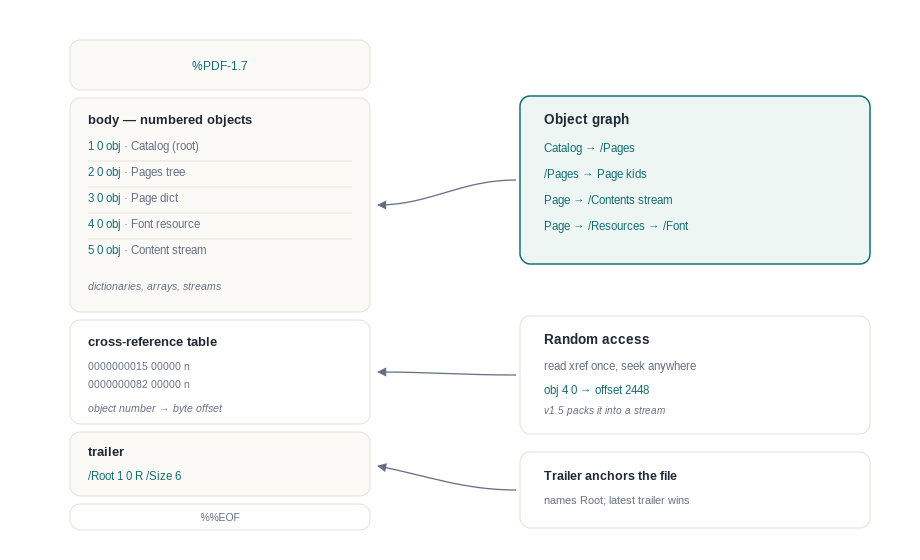
Every entry is an absolute byte position, so anything that shifts bytes, such as an editor rewriting line endings, leaves the index pointing at the wrong places. Readers with a repair pass rebuild it by scanning for obj keywords; readers without one refuse the file, which is why a damaged PDF can open in one viewer and fail in another. What sits at the startxref offset tells you which case you are in: the keyword xref for a classic table, an N 0 obj header for a PDF 1.5 cross-reference stream, and anything else for a stale offset. The helper below is your own code, built on plain RTL streams
uses
  System.SysUtils, System.Classes;

// Your own helper: Offset is the number written after startxref.
// Classifies what the reader will find at that position
function DescribeXrefAt(const FileName: string; Offset: Int64): string;
var
  FS: TFileStream;
  Buf: TBytes;
  Head: string;
begin
  FS := TFileStream.Create(FileName, fmOpenRead or fmShareDenyWrite);
  try
    if Offset >= FS.Size then
      Exit('offset beyond end of file: the file needs a repair pass');
    FS.Position := Offset;
    SetLength(Buf, 32);
    SetLength(Buf, FS.Read(Buf[0], Length(Buf)));
  finally
    FS.Free;
  end;
  Head := TEncoding.ASCII.GetString(Buf);
  if Head.StartsWith('xref') then
    Result := 'classic cross-reference table'
  else if Head.Contains(' obj') then
    Result := 'cross-reference stream (PDF 1.5 or later)'
  else
    Result := 'stale offset: the file needs a repair pass';
end;
A cross-reference stream (§7.5.8) is a compressed object with /Type /XRef, a /W array giving the byte width of each column, and binary rows that point either at a byte offset or into an object stream (§7.5.7). The trailer keys move into its dictionary, so the file has no trailer keyword at all. HotPDF writes this form when UseXRefStream is set on THotPDF. For files that leave your control, such as mail attachments or print shop uploads, the classic table remains the safer choice because readers that predate PDF 1.5 still parse it. PDF/A-1 settles the question for archives: ISO 19005-1 builds on PDF 1.4, and its §6.1.4 states that cross-reference streams shall not be used, so HotPDF writes a classic table whenever a PDF/A-1 profile is active
48 0 obj
<< /Type /XRef /Size 49 /Root 1 0 R
   /W [1 3 1] /Index [0 49]
   /Filter /FlateDecode /Length 162 >>
stream
...binary rows: 1 + 3 + 1 bytes each...
endstream
endobj
startxref
48211
%%EOF
From /Root to the right page: catalog and page tree
The trailer's /Root points at the document catalog, and the catalog's /Pages points at the root of the page tree. Every intermediate /Pages node carries a /Count of the leaf pages beneath it, so a reader looking for page 5,000 subtracts counts as it descends and skips whole subtrees unopened. ISO 32000-1 §7.7.3 does not require a balanced tree; a single /Kids array with 10,000 entries is legal, just slower to search. Code that reads only the leaf falls into one trap. /Resources, /MediaBox, /CropBox and /Rotate are inheritable (§7.7.3.4), so a page without its own /MediaBox is still valid because the value lives on an ancestor
12 0 obj
<< /Type /Page
   /Parent 3 0 R
   /MediaBox [0 0 612 792]
   /Resources << /Font << /F1 7 0 R >> >>
   /Contents 13 0 R
>>
endobj
The media box sets the coordinate space for everything drawn on the page: origin at the lower-left, Y running upward, one unit equal to 1/72 inch unless a PDF 1.6 /UserUnit scales it. PDFium Component performs the whole descent when you ask for a page by number. TPdf.PageMetrics returns the page size in points with inherited boxes already resolved, plus the page rotation, so the listing below reports correct sizes even for files whose leaf pages carry no box of their own
uses
  System.SysUtils, PDFium;

// Prints the page count and the size of every page in points
procedure ListPages(const FileName: string);
const
  Degrees: array[TRotation] of Integer = (0, 90, 180, 270);
var
  Pdf: TPdf;
  I: Integer;
  M: TPdfPageMetrics;
begin
  Pdf := TPdf.Create(nil);
  try
    Pdf.FileName := FileName;
    Pdf.Active := True;           // parses the xref data, trailer and catalog
    if not Pdf.Active then        // a failed load leaves Active = False
      raise Exception.Create('Cannot open ' + FileName);
    Writeln(Pdf.PageCount, ' pages');
    for I := 1 to Pdf.PageCount do
    begin
      M := Pdf.PageMetrics[I];    // 1-based; loads the page through the tree
      Writeln(Format('Page %d: %.1f x %.1f pt, /Rotate %d',
        [I, M.Width, M.Height, Degrees[M.Rotation]]));
    end;
  finally
    Pdf.Free;
  end;
end;
How does a PDF draw a page on screen?
A page's visible content is a small program: postfix operators in one or more content streams, interpreted in order after the reader runs the decoder named in /Filter, most often /FlateDecode. BT opens a text object, Tf selects a font resource and size, Td moves the text position, Tj paints a string, and ET closes the object. Paths are built with m, l, c and re, then filled with f or stroked with S. The graphics state (§8.4) holds what those operators read implicitly, such as the transformation matrix, colours and the clipping path. q pushes a copy and Q pops it, so a transform set inside the pair cannot leak into later content
q
1 0 0 1 72 700 cm     % shift the origin to (72, 700)
BT
  /F1 12 Tf           % font resource F1 at 12 points
  0 0 Td
  (Invoice 2026-0417) Tj
ET
0.2 0.2 0.8 RG        % stroke colour, scoped by q/Q
0 -6 m 140 -6 l S
Q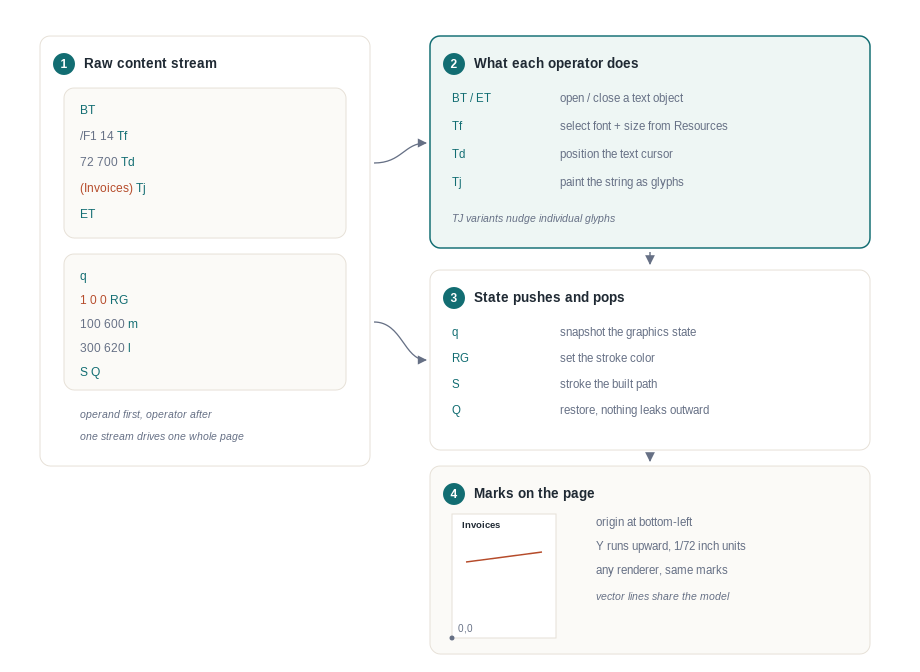
Names such as /F1 are keys into the page's /Resources. A font dictionary leads through its font descriptor (§9.8) to the embedded font program, and an image is painted with a single Do once its JPEG or Flate data is decoded. Rasterisation comes last. The renderer applies the transformation matrix to every path and glyph outline, maps points to device pixels, and fills the result with anti-aliasing. Because the page is still vector data at that point, zooming to 400 per cent re-runs the content stream at a larger scale instead of stretching a bitmap. The target resolution is chosen by the caller: 96 or 150 pixels per inch for a screen, 300 or more for print. In PDFium Component that stage is TPdf.RenderPage, which takes the output size in pixels
uses
  System.SysUtils, Vcl.Graphics, PDFium;

// Renders page 1 of FileName at Dpi pixels per inch and saves it as a BMP
procedure RenderFirstPage(const FileName: string; Dpi: Integer);
var
  Pdf: TPdf;
  Bmp: TBitmap;
  W, H: Integer;
begin
  Pdf := TPdf.Create(nil);
  try
    Pdf.FileName := FileName;
    Pdf.Active := True;
    if not Pdf.Active then
      raise Exception.Create('Cannot open ' + FileName);
    Pdf.PageNumber := 1;        // 1-based
    // PageWidth and PageHeight are in points (1/72 inch)
    W := Round(Pdf.PageWidth * Dpi / 72);
    H := Round(Pdf.PageHeight * Dpi / 72);
    Bmp := Pdf.RenderPage(0, 0, W, H, ro0, [reAnnotations]);
    try
      Bmp.SaveToFile(ChangeFileExt(FileName, '-p1.bmp'));
    finally
      Bmp.Free;                 // the function form returns a new bitmap
    end;
  finally
    Pdf.Free;
  end;
end;
Why does copy-paste return garbage when the page looks fine?
Copy-paste fails when the file records which glyph to draw but not which character it stands for. Rendering needs only glyph shapes from the embedded font program. Extraction needs Unicode, which comes from a standard encoding or a /ToUnicode CMap on the font dictionary (§9.10.3). A composite font with /Encoding /Identity-H writes raw glyph IDs into the content stream, and without a ToUnicode map those IDs have no defined relationship to any character. The screen looks perfect whilst the clipboard fills with symbols. Subset fonts make this more likely, since they keep only the glyphs the document uses and are easy to spot by the six-letter prefix in names such as /BaseFont /AAAAAA+ArialMT (§9.6.4). The PDF font handling guide covers CJK fonts and broken extraction in depth
Incremental updates and the signature byte range
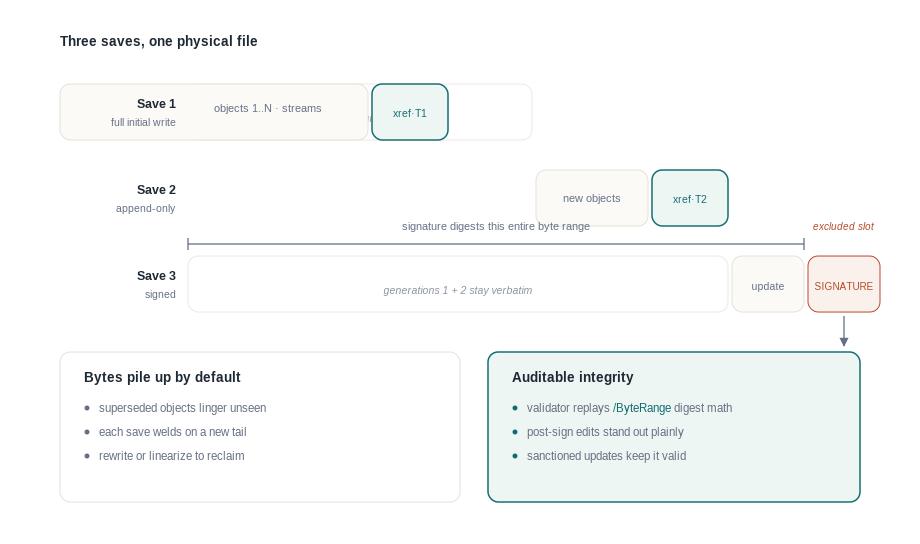
Signatures depend on the append-only way PDFs are edited: an incremental update (§7.5.6) adds objects and a new cross-reference section after the last %%EOF, and the structure overview explains the /Prev chain and why deleted content survives in earlier revisions. A signature dictionary's /ByteRange, written as [0 a b c], hashes everything except the /Contents hex string that holds the CMS signature, so the signed revision ends at byte b + c and a validator rebuilds it by truncating the file there. Later revisions land after that point, whilst a full rewrite, a lineariser or an optimisation pass moves the bytes the signer hashed and invalidates every existing signature at once
When a Delphi or Lazarus application needs this whole pipeline, from parsing the cross-reference data and walking the page tree to rendering and text extraction, the PDFium Component for Delphi and Lazarus wraps it in the TPdf document component used in the listings above and the TPdfView viewer control for on-screen display