RTF has been around long enough that it turns up in places nobody planned for: legacy report generators, mail merge pipelines, legal document archives that predate modern word processors. Converting it to PDF on the fly is a recurring requirement, and the approach that genuinely works on Windows is not a dedicated RTF parser but the rendering path Windows itself already provides through TRichEdit and EM_FORMATRANGE. The losLab PDF Library DLL edition exposes a virtual device context that slots directly into that pipeline
The mechanism: virtual DC and EM_FORMATRANGE
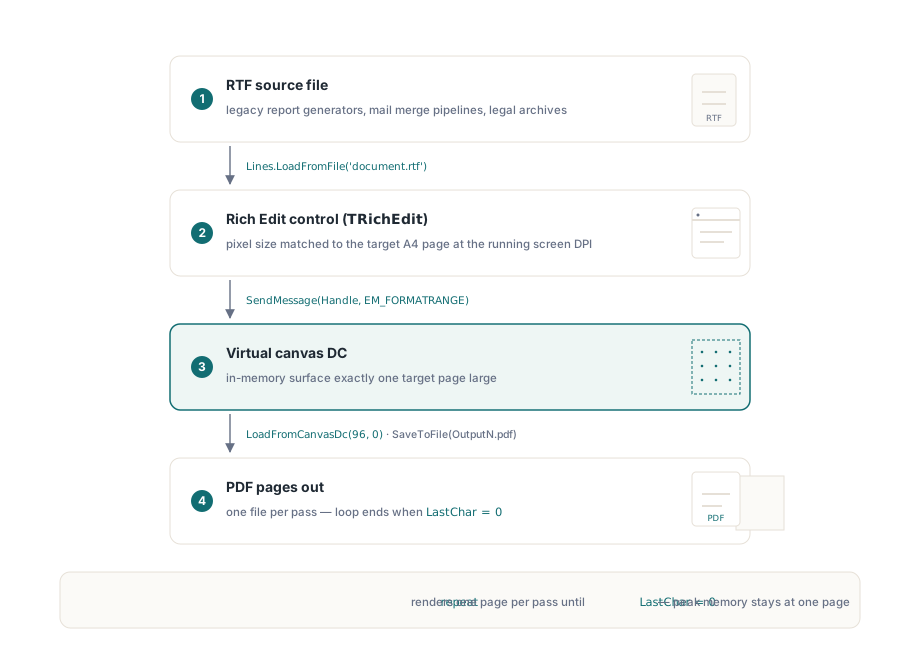
Rich Edit controls will paginate their content for any device context, not merely a physical printer. The EM_FORMATRANGE message tells the control to lay out a range of characters into a given DC and returns the position of the last character it managed to fit. Call it repeatedly, advancing cpMin as you go, and you get page-by-page output. The losLab PDF Library's GetCanvasDC provides an in-memory DC sized to whatever page dimensions you specify; after rendering a page into it, LoadFromCanvasDc captures the result as a PDF page. That is the whole pipeline
One thing to get right up front: the TRichEdit control must be sized to match the target page. If the control is smaller or larger than the DC dimensions, the pagination will not line up with whatever ends up in the PDF. For A4 output the usual approach is to set the control's pixel dimensions to match 210 x 297 mm at 96 DPI before loading the RTF file, using the same scale helpers you will use to size the DC
Delphi implementation
The following uses the PDFlibAX_TLB import unit, which wraps the DLL edition of the library. The form hosts a TRichEdit and a button; the form's OnCreate handler sizes the control and loads the RTF, and the button click drives the conversion loop
unit MainUnit;

interface

uses
  Windows, Messages, SysUtils, Classes, Graphics, Controls, Forms,
  Dialogs, StdCtrls, ComCtrls, PDFlibAX_TLB, ActiveX;

type
  TForm1 = class(TForm)
    RichEdit1: TRichEdit;
    Button1: TButton;
    procedure FormCreate(Sender: TObject);
    procedure Button1Click(Sender: TObject);
  private
    function PrintRtfBox(hDc: HDC; rtfBox: TRichEdit;
      FirstChar: Integer): Integer;
  end;

var
  Form1: TForm1;
  PdfDoc: TPDFLibrary;

implementation

{$R *.dfm}

procedure TForm1.FormCreate(Sender: TObject);
begin
  PdfDoc := TPDFLibrary.Create(Self);
  // Size the control to A4 at screen DPI so pagination matches the DC
  RichEdit1.Width  := Round(ScaleX(210, mmPixel));
  RichEdit1.Height := Round(ScaleY(297, mmPixel));
  RichEdit1.Lines.LoadFromFile(
    ExtractFilePath(Application.ExeName) + 'document.rtf');
end;

procedure TForm1.Button1Click(Sender: TObject);
var
  Dc: HDC;
  PageNumber, LastChar, PdfDocId: Integer;
begin
  PageNumber := 1;
  LastChar   := 0;
  repeat
    // Obtain a virtual DC sized to A4
    Dc := PdfDoc.GetCanvasDC(
      Round(ScaleX(210, mmPixel)),
      Round(ScaleY(297, mmPixel)));
    // Render the next page of RTF content into the DC
    LastChar := PrintRtfBox(Dc, RichEdit1, LastChar);
    // Capture the DC contents as a PDF document
    PdfDoc.LoadFromCanvasDc(96, 0);
    PdfDocId := PdfDoc.SelectedPdfDocument;
    PdfDoc.SaveToFile(
      ExtractFilePath(Application.ExeName)
      + 'Output' + IntToStr(PageNumber) + '.pdf');
    PdfDoc.RemovePdfDocument(PdfDocId);
    Inc(PageNumber);
  until LastChar = 0;
end;

function TForm1.PrintRtfBox(hDc: HDC; rtfBox: TRichEdit;
  FirstChar: Integer): Integer;
var
  RcDrawTo, RcPage: TRect;
  Fr: TFormatRange;
  NextCharPosition: Integer;
begin
  RcPage.Left   := 0;
  RcPage.Top    := 0;
  RcPage.Right  := rtfBox.Left + rtfBox.Width  + 100;
  RcPage.Bottom := rtfBox.Top  + rtfBox.Height + 100;

  RcDrawTo.Left   := rtfBox.Left;
  RcDrawTo.Top    := rtfBox.Top;
  RcDrawTo.Right  := rtfBox.Left + rtfBox.Width;
  RcDrawTo.Bottom := rtfBox.Top  + rtfBox.Height;

  Fr.hdc         := hDc;
  Fr.hdcTarget   := hDc;
  Fr.rc          := RcDrawTo;
  Fr.rcPage      := RcPage;
  Fr.chrg.cpMin  := FirstChar;
  Fr.chrg.cpMax  := -1;

  NextCharPosition :=
    SendMessage(rtfBox.Handle, EM_FORMATRANGE, 1, LPARAM(@Fr));
  if NextCharPosition < Length(rtfBox.Text) then
    Result := NextCharPosition
  else
    Result := 0;  // signals last page
end;

end.
What the loop is doing
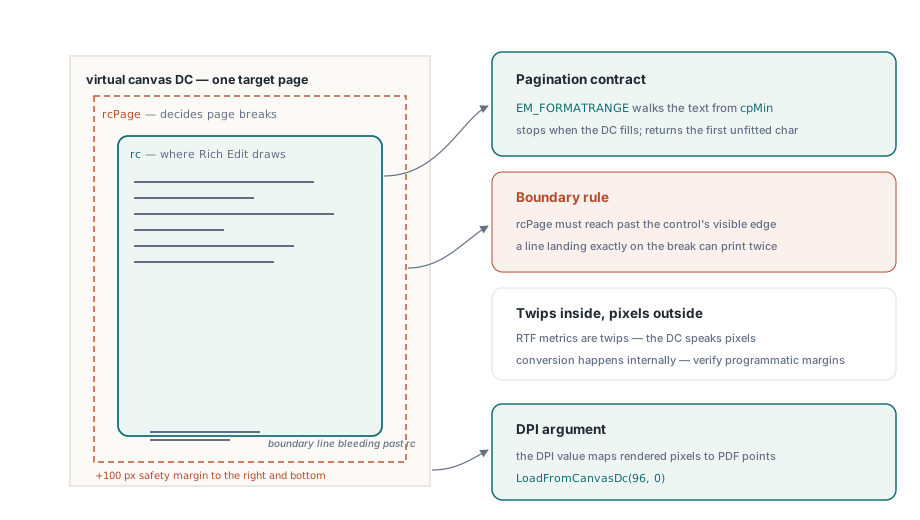
PrintRtfBox fills the TFormatRange structure and passes it to the Rich Edit control via SendMessage. The control renders characters from cpMin onwards, stops once the DC fills, and returns the position of the first character that would not fit. When the return value equals or exceeds the total text length, every character has been rendered and the function returns zero, which terminates the repeat...until loop
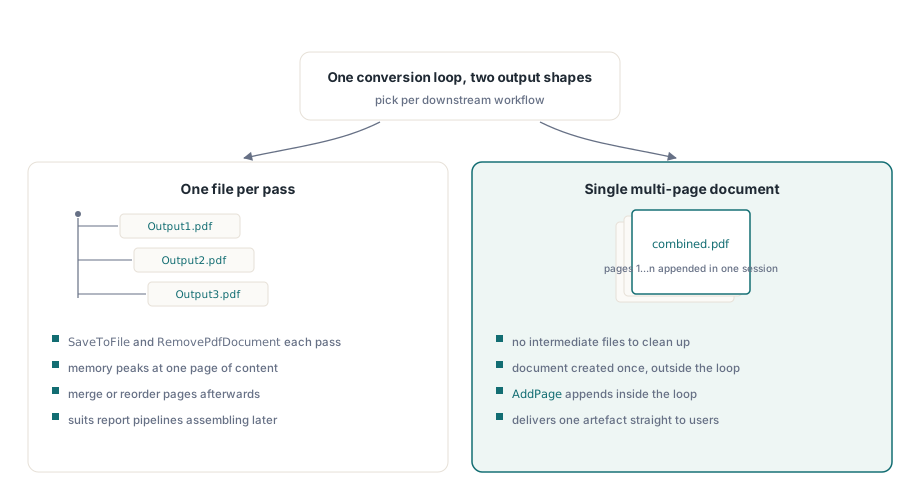
Each iteration produces one PDF file named Output1.pdf, Output2.pdf and so on. If you would rather have a single multi-page document, the library's page-append API lets you assemble them afterwards, or you can restructure the loop to call AddPage within one document session. The per-iteration SaveToFile followed by RemovePdfDocument pattern above keeps peak memory bounded at one page's worth of content, which matters for very long RTF files
Sizing details that trip people up
The 96 DPI argument to LoadFromCanvasDc tells the library at what screen resolution the DC was rendered, so it can calculate the correct point-to-pixel mapping for the PDF page. Get this wrong and the text comes out at the wrong size even though the image looks perfectly fine on screen
The +100 added to RcPage.Right and RcPage.Bottom is a small margin beyond the control's visible edge. Rich Edit uses the rcPage rect to decide where to split pages; with no margin, a line falling exactly on the boundary can end up duplicated across two pages. It is not a magic constant: you want it large enough that the page boundary lands cleanly inside the control's layout area rather than on the last pixel
Finally, the control must already be attached to a visible form window when FormCreate runs so that its window handle is valid before the first call to SendMessage. A TRichEdit created dynamically at runtime wants an explicit HandleNeeded call before the render loop starts, should the form not have been shown yet
Handling fonts and RTF features
Because the rendering is done by the Windows Rich Edit engine, font substitution follows the same rules it uses for display and printing. Fonts referenced in the RTF file that are installed on the machine render faithfully; missing ones are substituted silently, which shifts line lengths and pagination. For production batch conversion this is worth testing deliberately: load a document with each typeface your RTF sources use and confirm the output page count matches what you expect from a manual print preview
Tables, embedded images and most Rich Text formatting features work with no extra handling, because Rich Edit renders them natively. The one area that catches people out is text using custom paragraph spacing or first-line indents expressed in twips: Rich Edit's internal coordinate system is in twips (1/1440 inch), whilst the DC coordinates you set in TFormatRange are in pixels at the current DPI. The control converts internally, but if you are constructing the RTF programmatically it is worth checking that your margin values are in the right unit
DPI awareness and high-DPI displays
On a display running at 150% scaling (144 DPI), ScaleX(210, mmPixel) will return a larger pixel count than on a 100% display. The PDF Library records whatever pixel dimensions you pass to GetCanvasDC and uses the DPI argument in LoadFromCanvasDc to back-calculate the physical page size in the PDF. Provided the DPI value you pass matches the DPI your application is actually running at, the output page size comes out correct whatever the display scaling
If your application is DPI-unaware (the old default), Windows scales the screen DC and your pixel calculations will be wrong on high-DPI machines. The tidiest fix is to declare DPI awareness in the application manifest; the application then receives true device pixels and the 96 you pass to LoadFromCanvasDc should be replaced with the actual display DPI obtained from GetDeviceCaps(GetDC(0), LOGPIXELSX). The code sample above hardcodes 96 because it is appropriate for a 100% scaling environment and keeps the example short
Output structure: one file per page versus a combined document
The loop above writes each page to a separate PDF file. Whether that is what you want depends on the downstream use. Report-generation systems often want individual pages because they assemble the final document later by merging or reordering them. If you want a single PDF from the outset, the library lets you create a document with multiple pages in one session: create the document once outside the loop, call the page-add method instead of SaveToFile inside the loop, and save the complete document after the loop exits. This avoids the intermediate files and is the right structure for most single-document conversion scenarios
For large RTF files it is worth adding some progress feedback in the loop, since the conversion rate is roughly proportional to page count and a 200-page document takes a few seconds. The repeat...until structure is easy enough to extend: track the character offset in a progress bar update after each iteration, using LastChar divided by the total character count from RichEdit1.GetTextLen
The GetCanvasDC and LoadFromCanvasDc methods shown here are part of the losLab PDF Library for Delphi and C++Builder