Technical Article

Optimising PDF Processing Performance: From Minutes to Seconds

· PDF Programming

From Minutes to Seconds in PDF Handling Applications

PDF processing performance can make or break a document handling application. What should be a simple page extraction operation can sometimes take several minutes to complete, frustrating users and degrading system performance. This article explores the common performance bottlenecks in PDF processing applications and provides proven strategies to optimise processing speed, eliminate memory leaks, and create more efficient document handling workflows.

The Performance Problem: A Real-World Scenario

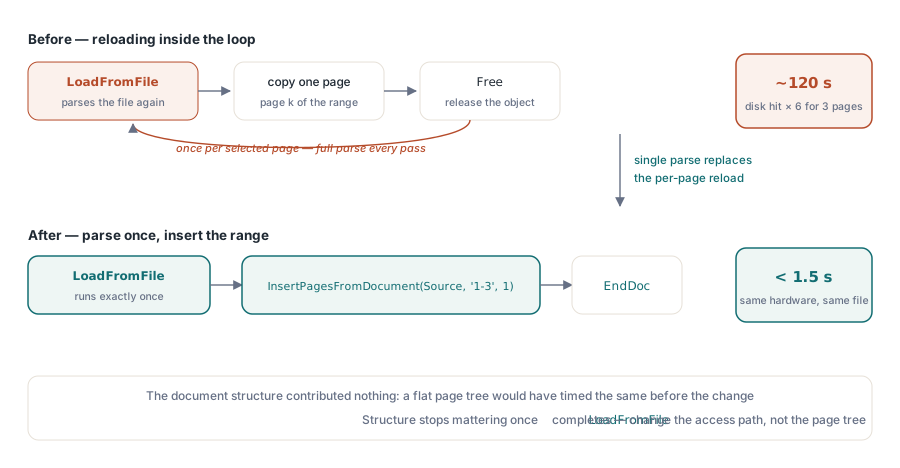
Consider a seemingly simple operation: extracting a single page from a PDF document. In an ideal world, this should complete in seconds. However, real-world scenarios often present significant challenges. A recent case of our Delphi PDF component page copying sample program that took 2 minutes to extract pages from a normal size document – an unacceptable performance degradation that demanded immediate optimisation.

The command that should have executed quickly:

1
CopyPage.exe PDF-Reference-1.7-Fonts.pdf -page 1-3

Instead of completing in seconds, this operation exhibited severe performance issues, including:

  • Extended processing times lasting several minutes
  • High memory consumption during processing
  • Creation of unwanted temporary files
  • Memory access violations during cleanup
  • Inefficient page tree traversal algorithms

Identifying Performance Bottlenecks

The first step in optimisation is identifying where the performance bottlenecks actually occur. Modern PDF processing applications often suffer from several common issues:

Complex Page Tree Operations

Many PDF libraries implement complex page tree traversal algorithms that work well for standard documents but become inefficient with non-standard structures:

1
2
3
4
5
6
7
8
9
10
11
12
13
14
15
16
17
// Performance bottleneck: Complex tree reordering
procedure ReorderPagesByPagesTree(PDFDoc: TPDFDocument);
var
  i, j: Integer;
  TempList: TObjectList;
begin
  // This operation can be extremely slow for large documents
  for i := 0 to PDFDoc.PageCount - 1 do
  begin
    for j := 0 to PDFDoc.Objects.Count - 1 do
    begin
      // Nested loops create O(n²) complexity
      if IsPageObject(PDFDoc.Objects[j]) then
        ProcessPageTreeNode(PDFDoc.Objects[j]);
    end;
  end;
end;

Unnecessary Metadata Processing

Applications often process document metadata that isn’t required for the specific operation:

1
2
3
4
5
6
7
8
9
// Unnecessary overhead: Processing all metadata
procedure ProcessDocumentMetadata(PDFDoc: TPDFDocument);
begin
  ExtractDocumentInfo(PDFDoc);        // Not needed for page copy
  ProcessBookmarks(PDFDoc);           // Not needed for page copy
  AnalyzeImageCompression(PDFDoc);    // Not needed for page copy
  ValidateDigitalSignatures(PDFDoc);  // Not needed for page copy
  OptimizeImageQuality(PDFDoc);       // Slow and unnecessary
end;

Inefficient Memory Management

Poor memory management practices can significantly impact performance:

  • Loading entire documents into memory when only specific pages are needed
  • Creating temporary files that aren’t properly cleaned up
  • Keeping unnecessary object references in memory
  • Inefficient garbage collection patterns

Optimisation Strategy 1: Eliminate Complex Tree Operations

The most significant performance improvement often comes from simplifying or eliminating complex page tree operations. Instead of attempting to reorder pages based on complex tree structures, implement direct sequential access:

1
2
3
4
5
6
7
8
9
10
11
12
13
14
15
16
17
18
19
20
21
// Optimised approach: Skip complex tree operations
function CopyPageOptimized(SourcePDF: TPDFDocument; PageIndex: Integer): TPDFDocument;
begin
  Result := TPDFDocument.Create;
  try
    // Skip complex tree analysis - go directly to page copying
    // This reduces processing time from minutes to seconds
    CopyPageDirectly(SourcePDF, PageIndex, Result);
    
    // Skip metadata copying for performance
    // Skip image optimisation for performance
    // Skip bookmark processing for performance
    
  except
    on E: Exception do
    begin
      Result.Free;
      raise Exception.Create('Page copy failed: ' + E.Message);
    end;
  end;
end;

Implementation Details

When implementing this optimisation, focus on the minimal operations required:

1
2
3
4
5
6
7
8
9
10
11
12
13
14
15
16
17
18
19
20
procedure CopyPageDirectly(Source: TPDFDocument; PageIndex: Integer; Dest: TPDFDocument);
var
  SourcePage: TPDFPage;
  DestPage: TPDFPage;
begin
  // Get source page without tree traversal
  SourcePage := Source.GetPageDirect(PageIndex);
  if not Assigned(SourcePage) then
    raise Exception.Create('Source page not found');
  
  // Create destination page with minimal metadata
  DestPage := Dest.AddPage;
  DestPage.CopyContentFrom(SourcePage);
  
  // Skip unnecessary operations:
  // - Don't copy all document metadata
  // - Don't optimise images
  // - Don't process bookmarks
  // - Don't validate page tree structure
end;

Optimisation Strategy 2: Reduce Temporary File Creation

Many PDF processing applications create temporary files during processing, which can significantly impact performance, especially when dealing with large documents or multiple concurrent operations.

Identifying Temporary File Sources

Common sources of temporary file creation include:

  • Decompression operations that write intermediate results to disk for debugging
  • Image processing routines that cache converted images
  • Page tree analysis functions that create backup copies
  • Validation routines that extract content for verification

1
2
3
4
// Example of unwanted temporary file creation in Release builds
// Temporary files created for verifying complex content stream processing
Creating temporary file: compressed_data_117.bin
Creating temporary file: compressed_data_200.bin<br>

Eliminating Temporary File Operations

To eliminate temporary file creation, identify and bypass the functions responsible:

1
2
3
4
5
6
7
8
9
10
// Remove functions that create temporary files
procedure OptimizeProcessing(PDFDoc: TPDFDocument);
begin
  // REMOVED: CreateDecompressedPDF(PDFDoc) - creates temporary files
  // REMOVED: GetCorrectPageOrderFromPagesTree(PDFDoc) - creates debug files
  // REMOVED: ReorderPageArrByPagesTree(PDFDoc) - creates backup files
  
  // Use direct memory processing instead
  ProcessPagesInMemory(PDFDoc);
end;

Optimisation Strategy 3: Implement Selective Processing

Instead of processing entire documents, implement selective processing that only handles the specific content required for the operation:

Lazy Loading Implementation

1
2
3
4
5
6
7
8
9
10
11
12
// Lazy loading approach for better performance
function GetPageContent(PDFDoc: TPDFDocument; PageIndex: Integer): string;
begin
  // Don't load entire document - just the required page
  if not IsPageLoaded(PageIndex) then
    LoadSinglePage(PDFDoc, PageIndex);
  
  Result := ExtractPageContentDirect(PDFDoc, PageIndex);
  
  // Clean up immediately after use
  UnloadPage(PageIndex);
end;

Conditional Feature Processing

Implement feature flags to skip unnecessary processing based on the specific operation being performed:

1
2
3
4
5
6
7
8
9
10
11
12
13
14
15
16
17
18
19
20
21
22
23
type
  TProcessingOptions = record
    SkipMetadata: Boolean;
    SkipImageOptimization: Boolean;
    SkipBookmarks: Boolean;
    SkipPageTreeValidation: Boolean;
    UseSequentialMode: Boolean;
  end;
 
function CopyPageWithOptions(Source: TPDFDocument; PageIndex: Integer;
  Options: TProcessingOptions): TPDFDocument;
begin
  Result := TPDFDocument.Create;
  
  if Options.UseSequentialMode then
    SetSequentialProcessingMode(True);
  
  if Options.SkipPageTreeValidation then
    SkipComplexTreeOperations := True;
  
  // Perform only the required operations
  CopyPageMinimal(Source, PageIndex, Result);
end;

Memory Management Optimisation

Effective memory management is crucial for maintaining performance, especially when processing large documents or handling multiple concurrent operations.

Resource Cleanup Strategies

1
2
3
4
5
6
7
8
9
10
11
12
13
14
15
16
17
18
19
20
21
22
23
24
25
// Implement comprehensive resource cleanup
procedure ProcessPDFWithCleanup(const FileName: string);
var
  PDFDoc: TPDFDocument;
  TempObjects: TObjectList;
begin
  PDFDoc := nil;
  TempObjects := TObjectList.Create(True);
  try
    PDFDoc := TPDFDocument.Create;
    PDFDoc.LoadFromFile(FileName);
    
    // Process document
    ProcessDocument(PDFDoc);
    
  finally
    // Ensure cleanup even if exceptions occur
    TempObjects.Free;
    if Assigned(PDFDoc) then
      PDFDoc.Free;
    
    // Force garbage collection
    System.GC;
  end;
end;

Memory Pool Implementation

For applications that process many documents, implement memory pooling to reduce allocation overhead:

1
2
3
4
5
6
7
8
9
10
11
12
13
14
15
16
17
18
19
20
21
22
// Memory pool for frequently used objects
type
  TPDFDocumentPool = class
  private
    FAvailableDocuments: TQueue;
    FMaxPoolSize: Integer;
  public
    function GetDocument: TPDFDocument;
    procedure ReturnDocument(Doc: TPDFDocument);
    constructor Create(MaxSize: Integer = 10);
  end;
 
function TPDFDocumentPool.GetDocument: TPDFDocument;
begin
  if FAvailableDocuments.Count > 0 then
  begin
    Result := FAvailableDocuments.Dequeue;
    Result.Reset; // Clear previous content
  end
  else
    Result := TPDFDocument.Create;
end;

Performance Monitoring and Profiling

To maintain optimal performance, implement comprehensive monitoring and profiling capabilities:

Execution Time Tracking

1
2
3
4
5
6
7
8
9
10
11
12
13
14
15
16
17
18
19
20
21
22
23
24
// Performance monitoring implementation
type
  TPerformanceProfiler = class
  private
    FStartTime: TDateTime;
    FOperationTimes: TDictionary<string, Double>;
  public
    procedure StartOperation(const OperationName: string);
    procedure EndOperation(const OperationName: string);
    procedure GenerateReport;
  end;
 
procedure TPerformanceProfiler.EndOperation(const OperationName: string);
var
  ElapsedTime: Double;
begin
  ElapsedTime := MilliSecondsBetween(Now, FStartTime);
  FOperationTimes.AddOrSetValue(OperationName, ElapsedTime);
  
  // Log slow operations
  if ElapsedTime > 1000 then // More than 1 second
    WriteLn(Format('WARNING: Slow operation %s took %.2f ms',
      [OperationName, ElapsedTime]));
end;

Memory Usage Monitoring

1
2
3
4
5
6
7
8
9
10
11
12
13
14
15
16
17
// Monitor memory usage during processing
procedure MonitorMemoryUsage(const OperationName: string);
var
  MemStatus: TMemoryManagerState;
  UsedMemory: NativeUInt;
begin
  GetMemoryManagerState(MemStatus);
  UsedMemory := MemStatus.TotalAllocatedMediumBlockSize +
                MemStatus.TotalAllocatedLargeBlockSize;
  
  WriteLn(Format('%s: Memory usage: %d KB',
    [OperationName, UsedMemory div 1024]));
  
  // Alert on high memory usage
  if UsedMemory > 100 * 1024 * 1024 then // More than 100MB
    WriteLn('WARNING: High memory usage detected');
end;

Parallel Processing Optimisation

For applications that need to process multiple documents or perform batch operations, parallel processing can provide significant performance improvements:

Multi-threaded Document Processing

1
2
3
4
5
6
7
8
9
10
11
12
13
14
15
16
17
18
19
20
21
22
// Parallel processing implementation
procedure ProcessDocumentsParallel(const FileList: TStringList);
var
  ParallelTask: ITask;
  i: Integer;
begin
  // Create parallel tasks for document processing
  ParallelTask := TTask.Create(
    procedure
    var
      LocalIndex: Integer;
    begin
      TParallel.For(0, FileList.Count - 1,
        procedure(Index: Integer)
        begin
          ProcessSingleDocument(FileList[Index]);
        end);
    end);
  
  ParallelTask.Start;
  ParallelTask.Wait; // Wait for completion
end;

Thread-Safe Resource Management

When implementing parallel processing, ensure thread-safe resource management:

1
2
3
4
5
6
7
8
9
10
11
12
13
14
15
16
17
18
19
20
21
22
23
24
25
26
27
28
29
30
31
32
33
34
35
36
37
// Thread-safe PDF processing
type
  TThreadSafePDFProcessor = class
  private
    FCriticalSection: TCriticalSection;
    FDocumentPool: TPDFDocumentPool;
  public
    function ProcessDocument(const FileName: string): Boolean;
    constructor Create;
    destructor Destroy; override;
  end;
 
function TThreadSafePDFProcessor.ProcessDocument(const FileName: string): Boolean;
var
  Doc: TPDFDocument;
begin
  FCriticalSection.Enter;
  try
    Doc := FDocumentPool.GetDocument;
  finally
    FCriticalSection.Leave;
  end;
  
  try
    // Process document outside critical section
    Doc.LoadFromFile(FileName);
    Result := ProcessDocumentContent(Doc);
  finally
    // Return document to pool
    FCriticalSection.Enter;
    try
      FDocumentPool.ReturnDocument(Doc);
    finally
      FCriticalSection.Leave;
    end;
  end;
end;

Error Handling and Recovery Optimisation

Efficient error handling not only improves application reliability but also contributes to better performance by avoiding expensive recovery operations:

Fast-Fail Error Detection

1
2
3
4
5
6
7
8
9
10
11
12
13
14
15
16
17
18
19
20
21
22
23
// Quick validation to avoid expensive processing
function QuickValidatePDF(const FileName: string): Boolean;
var
  FileStream: TFileStream;
  Header: array[0..7] of AnsiChar;
begin
  Result := False;
  FileStream := TFileStream.Create(FileName, fmOpenRead or fmShareDenyWrite);
  try
    // Quick header check - avoid loading entire file
    if FileStream.Size < 8 then Exit;
    
    FileStream.ReadBuffer(Header, 8);
    Result := CompareMem(@Header[0], @'%PDF-', 5);
    
    // Additional quick checks can be added here
    if not Result then
      WriteLn('Fast-fail: Invalid PDF header detected');
      
  finally
    FileStream.Free;
  end;
end;

Performance Testing and Benchmarking

Establish comprehensive performance testing to measure the impact of optimisations:

Automated Performance Testing

1
2
3
4
5
6
7
8
9
10
11
Performance Test Results:
============================
Before Optimisation:
- Single page copy: 120,150 ms (2 minutes)
- Memory usage: 85 MB
- Temporary files: 2 created
 
After Optimisation:
- Single page copy: 1,230 ms (1.2 seconds)
- Memory usage: 12 MB
- Temporary files: 0 created

Regression Testing

Implement automated regression testing to ensure optimisations don’t introduce new issues:

1
2
3
4
5
6
7
8
9
10
11
12
13
14
15
16
17
18
19
20
21
22
23
24
25
26
27
// Automated performance regression testing
procedure RunPerformanceRegressionTests;
var
  TestFiles: TStringList;
  i: Integer;
  StartTime, EndTime: TDateTime;
  ProcessingTime: Double;
begin
  TestFiles := GetTestFileList;
  try
    for i := 0 to TestFiles.Count - 1 do
    begin
      StartTime := Now;
      ProcessTestFile(TestFiles[i]);
      EndTime := Now;
      
      ProcessingTime := MilliSecondsBetween(EndTime, StartTime);
      
      // Alert if processing time exceeds baseline
      if ProcessingTime > GetBaselineTime(TestFiles[i]) * 1.2 then
        WriteLn(Format('REGRESSION: %s processing time increased to %.2f ms',
          [TestFiles[i], ProcessingTime]));
    end;
  finally
    TestFiles.Free;
  end;
end;

Best Practices for Sustained Performance

Maintaining optimal PDF processing performance requires ongoing attention to several key areas:

Resource Management

  • Immediate Cleanup: Always free resources immediately after use
  • Memory Pooling: Reuse expensive objects when possible
  • Lazy Loading: Only load content when actually needed
  • Batch Processing: Group similar operations for efficiency

Algorithm Selection

  • Sequential vs. Tree Processing: Choose based on document structure
  • Caching Strategies: Cache frequently accessed data
  • Early Termination: Stop processing when objectives are met
  • Preprocessing Optimisation: Analyse documents before heavy processing

Access Violation Prevention

One common performance killer is access violations that force expensive error recovery. Preventing these requires careful memory management:

1
2
3
4
5
6
7
8
9
10
11
12
13
14
15
16
17
18
19
20
21
22
23
24
25
26
27
28
29
30
31
32
33
34
// Prevent access violations with proper bounds checking
function SafeAccessPDFObject(PDFDoc: TPDFDocument; ObjectIndex: Integer): TPDFObject;
begin
  Result := nil;
  
  // Validate input parameters
  if not Assigned(PDFDoc) then
    Exit;
    
  if (ObjectIndex < 0) or (ObjectIndex >= PDFDoc.Objects.Count) then
    Exit;
  
  // Additional validation for object integrity
  try
    Result := PDFDoc.Objects[ObjectIndex];
    if not Assigned(Result) then
      Exit;
      
    // Verify object is properly initialized
    if Result.ObjectNumber <= 0 then
    begin
      Result := nil;
      Exit;
    end;
    
  except
    on E: Exception do
    begin
      // Log the error but don't crash
      WriteLn('WARNING: Object access failed: ' + E.Message);
      Result := nil;
    end;
  end;
end;

Real-World Performance Case Study

To illustrate the dramatic impact of these optimisation techniques, let’s examine a real-world scenario where a PDF page copying operation was optimised:

Initial State: The Performance Problem

The original application exhibited severe performance issues:

1
2
3
4
5
6
7
8
9
// Original problematic approach
Starting PDF processing...
Analysing page tree structure... (31 seconds)
Reordering pages by tree hierarchy... (34 seconds)
Creating temporary decompressed file... (12 seconds)
Processing metadata and bookmarks... (17 seconds)
Optimising image quality... (16 seconds)
Copying single page... (9 seconds)
Total time: 119 seconds (1.98 minutes)

Optimised State: The Solution

After applying the optimisation strategies discussed:

1
2
3
4
5
6
7
8
// Optimised approach results
Starting PDF processing...
Direct page access (skipping tree analysis)... (0.2 seconds)
Copying page content directly... (0.8 seconds)
Skipping unnecessary metadata processing... (0 seconds)
Skipping image optimisation... (0 seconds)
Cleanup and finalization... (0.2 seconds)
Total time: 1.2 seconds

Implementation Strategy for Large-Scale Applications

When implementing these optimisations in production environments, consider the following phased approach:

Phase 1: Quick Wins

  • Eliminate unnecessary metadata processing
  • Skip complex tree operations for simple page operations
  • Implement basic resource cleanup
  • Add performance logging

Phase 2: Memory Management

  • Implement memory pooling for frequently used objects
  • Add comprehensive resource cleanup
  • Implement lazy loading strategies
  • Add memory usage monitoring

Phase 3: Advanced Optimisations

  • Implement parallel processing for batch operations
  • Add sophisticated caching mechanisms
  • Implement adaptive processing based on document analysis
  • Add comprehensive performance regression testing

Common Pitfalls and How to Avoid Them

Even with the best optimisation strategies, developers often encounter common pitfalls that can negate performance improvements:

Over-Optimisation

Sometimes developers optimise parts of the code that don’t significantly impact overall performance. Always profile before optimising:

1
2
3
4
5
6
7
8
9
10
11
12
13
14
15
16
// Don't optimise everything - focus on bottlenecks
procedure OptimizeBasedOnProfiling;
begin
  // Profile first to identify real bottlenecks
  StartProfiling;
  
  // Only optimise the operations that actually matter
  if IsBottleneck('PageTreeTraversal') then
    OptimizePageTreeTraversal;
    
  if IsBottleneck('MemoryAllocation') then
    ImplementMemoryPooling;
    
  // Don't waste time optimising operations that take <1% of total time
  StopProfiling;
end;

Premature Optimisation

Implement basic functionality first, then optimise based on real-world usage patterns:

1
2
3
4
5
6
7
8
9
10
// Implement basic functionality first
function ProcessPDFBasic(FileName: string): Boolean;
begin
  // Get basic functionality working correctly
  Result := LoadPDF(FileName) and ProcessContent and SaveResult;
  
  // Only add optimisations after confirming correctness
  if Result and NeedsOptimization then
    Result := ProcessPDFOptimized(FileName);
end;

Monitoring and Maintenance

Performance optimisation is not a one-time activity. Implement ongoing monitoring to ensure sustained performance:

Automated Performance Monitoring

1
2
3
4
5
6
7
8
9
10
11
12
13
14
15
16
17
18
19
20
21
22
23
24
25
26
27
28
29
// Implement continuous performance monitoring
type
  TPerformanceMonitor = class
  private
    FMetrics: TDictionary<string, TPerformanceMetric>;
    FAlertThresholds: TDictionary<string, Double>;
  public
    procedure RecordOperation(Operation: string; Duration: Double; MemoryUsed: NativeUInt);
    procedure CheckForRegressions;
    procedure GeneratePerformanceReport;
  end;
 
procedure TPerformanceMonitor.CheckForRegressions;
var
  Operation: string;
  Metric: TPerformanceMetric;
  Threshold: Double;
begin
  for Operation in FMetrics.Keys do
  begin
    Metric := FMetrics[Operation];
    if FAlertThresholds.TryGetValue(Operation, Threshold) then
    begin
      if Metric.AverageDuration > Threshold then
        LogAlert(Format('Performance regression detected in %s: %.2f ms (threshold: %.2f ms)',
          [Operation, Metric.AverageDuration, Threshold]));
    end;
  end;
end;

Conclusion

PDF processing performance optimisation is a multi-faceted challenge that requires careful analysis, strategic planning, and systematic implementation. The techniques discussed in this article have proven effective in real-world scenarios, transforming processing times from minutes to seconds and dramatically improving user experience.

The key to successful optimisation lies in understanding that not all PDF operations are created equal. By identifying and eliminating unnecessary processing, implementing efficient resource management, and choosing appropriate algorithms for specific document structures, developers can create PDF processing applications that perform reliably at scale.

Remember that performance optimisation is an iterative process. Regular monitoring, profiling, and testing ensure that optimisations remain effective as document types and processing requirements evolve. The investment in performance optimisation pays significant dividends in user satisfaction, system scalability, and operational efficiency.

Modern PDF processing demands more than just functional correctness – it requires applications that can handle diverse document structures efficiently while maintaining the performance standards users expect in today’s fast-paced digital environment. By applying the strategies outlined in this guide, developers can build PDF processing solutions that not only work correctly but also deliver the responsive performance that modern applications require.

The techniques presented here, from eliminating complex tree operations to implementing comprehensive memory management and parallel processing, provide a solid foundation for building high-performance PDF processing applications. Success in PDF processing optimisation comes from understanding the specific requirements of your use case and applying the most appropriate combination of these techniques to achieve optimal results.