Hello World from Delphi HotPDF Component
Welcome to the comprehensive guide for the Delphi HotPDF Component HelloWorld demonstration program!
About HotPDF Component
HotPDF Component is a powerful and versatile PDF processing library designed specifically for Delphi and C++Builder developers. This comprehensive component provides an extensive API that enables developers to create, manipulate, and modify PDF documents with ease and precision.
Key Features of HotPDF Component:
- PDF Creation & Generation: Create PDF documents from scratch with full control over layout, formatting, and content
- Text & Graphics Support: Add text, images, shapes, and complex graphics to PDF pages
- Multilingual Support: Full Unicode support for international text rendering
- Font Management: Embed fonts for consistent document appearance across different systems
- Compression Options: Use compression algorithms to optimise file size
- Security Features: Document encryption, password protection, and permission controls
- Document Manipulation: Merge, split, and modify existing PDF documents
- Table & Form Support: Create complex tables and interactive forms
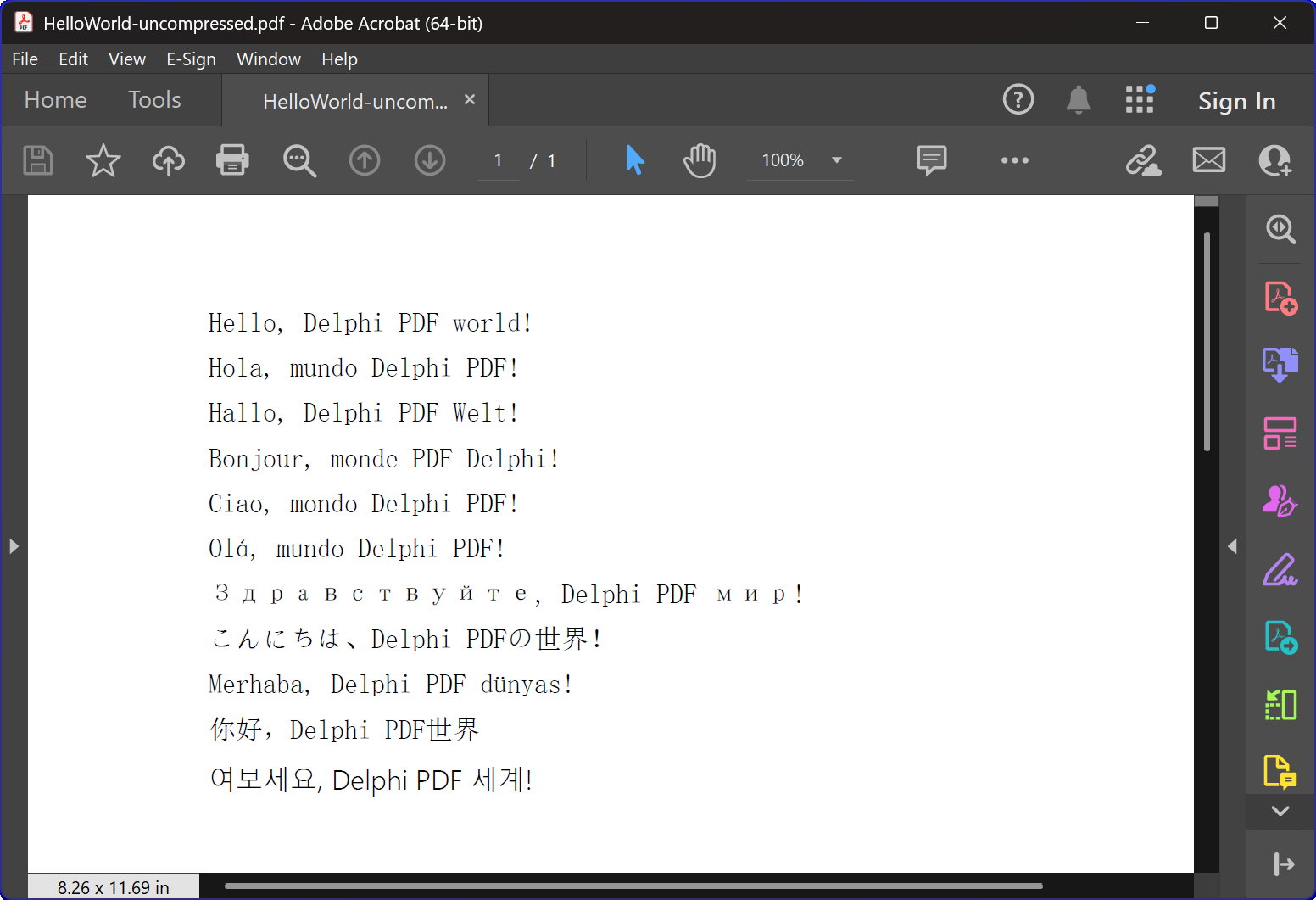
HelloWorld.dpr Program Overview
The HelloWorld.dpr example program serves as an excellent introduction to the HotPDF Component’s
most basic and important feature: The TexOut function. This demonstration program also showcases the basic PDF creation functionality.
Core Functionality:
1. PDF Document Creation
The program’s primary function is to generate PDF documents containing multilingual “Hello World” text. The CreatePDF procedure demonstrates:
- Component Initialization: Proper setup and configuration of the THotPDF component
- Document Properties: Setting metadata such as compression options and font embedding
- Multilingual Text Rendering: Displaying text in 11 different languages including English, Spanish, German, French, Italian, Portuguese, Russian, Japanese, Turkish, Chinese, and Korean
- Font Management: Using Arial Unicode MS font for multilingual display support
- Compression: Creating compressed PDF document
2. Window Management & System Integration
The program includes sophisticated window enumeration functionality that demonstrates:
- System Window Enumeration: Using the Windows API
EnumWindowsfunction to iterate through all top-level windows - Window Title Matching: Implementing substring matching to identify target applications
- Automated Window Closure: Sending
WM_CLOSEmessages to close PDF viewers that might have files open - Conflict Prevention: Ensuring no file access conflicts occur when creating new PDF files
3. Error Handling & Resource Management
The program demonstrates best practices for:
- Memory Management: Proper creation and disposal of component instances
- Exception Safety: Using try-finally blocks to ensure resource cleanup
- User Feedback: Providing console output to inform users of program progress
Technical Implementation Details:
Compression Technology
The program create a PDF document with FlateDecode compression
Font Handling Strategy
The program employs a sophisticated font selection strategy:
- Arial Unicode MS: Used for most languages due to its broad character support
- Font Embedding: Ensures consistent appearance across different systems
Cross-Version Compatibility
The code includes conditional compilation directives to support both modern and legacy Delphi versions:
- XE2+ Support: Uses namespaced units (WinApi.Windows, System.SysUtils, etc.)
- Legacy Support: Falls back to traditional unit names for older Delphi versions
Educational Value
This HelloWorld example serves multiple educational purposes:
- Component Introduction: Provides a gentle introduction to HotPDF Component usage
- Best Practices: Demonstrates proper resource management and error handling
- System Integration: Shows how to integrate PDF generation with Windows system operations
- Internationalization: Illustrates multilingual text handling in PDF documents
Getting Started
To run this example program:
- Ensure HotPDF Component is properly installed in your Delphi IDE
- Open the HelloWorld.dpr project file
- Compile and run the program
- The program will automatically create a PDF file with compression
- Examine the generated files to see the multilingual text rendering
Source Code
Below is the complete, well-documented source code for the HelloWorld demonstration program:
|
1 2 3 4 5 6 7 8 9 10 11 12 13 14 15 16 17 18 19 20 21 22 23 24 25 26 27 28 29 30 31 32 33 34 35 36 37 38 39 40 41 42 43 44 45 46 47 48 49 50 51 52 53 54 55 56 57 58 59 60 61 62 63 64 65 66 67 68 69 70 71 72 73 74 75 76 77 78 79 80 81 82 83 84 85 86 87 88 89 90 91 92 93 94 95 96 97 98 99 100 101 102 103 104 105 106 107 108 109 110 111 112 113 114 115 116 117 118 119 120 121 122 123 124 125 126 127 128 129 130 131 132 133 134 135 136 137 138 139 140 141 142 143 144 145 146 147 148 149 150 151 152 153 154 155 156 157 158 159 160 161 162 163 164 165 166 167 |
{************************************************************} // HotPDF PDF Component // Copyright(c)2007-2025, https://www.loslab.com {************************************************************} // HelloWorld Demo Program for HotPDF Component // This program demonstrates basic PDF creation capabilities // including multilingual text support and compression options {************************************************************} program HelloWorld; {$APPTYPE CONSOLE} // Console application type {$I ..\..\..\Lib\HotPDF.inc} // Include HotPDF configuration file uses // EurekaLog units for memory leak detection and debugging (optional) {$IFDEF EurekaLog} EMemLeaks, // Memory leak detection EResLeaks, // Resource leak detection EDebugJCL, // JCL debugging support EDebugExports, // Export debugging information EFixSafeCallException, // SafeCall exception handling EMapWin32, // Win32 mapping support EAppConsole, // Console application support EDialogConsole, // Console dialog support ExceptionLog7, // Exception logging {$ENDIF EurekaLog} // System units - different namespaces for XE2+ vs older versions {$IFDEF XE2+} WinApi.Windows, // Windows API functions WinApi.Messages, // Windows message constants System.SysUtils, // System utilities System.Classes, // Base classes (TStringList, etc.) Vcl.Graphics, // Graphics support {$ELSE} Windows, // Windows API functions (older Delphi) Messages, // Windows message constants (older Delphi) SysUtils, // System utilities (older Delphi) Classes, // Base classes (older Delphi) Graphics, // Graphics support (older Delphi) {$ENDIF} HPDFDoc; // HotPDF main component unit // Creates a compressed PDF file with multilingual "Hello World" text // Parameters: // FileName: Output PDF file name procedure CreatePDF(const FileName: string); var HotPDF: THotPDF; // Main HotPDF component instance begin // Create HotPDF component instance HotPDF := THotPDF.Create(nil); try // Configure PDF properties HotPDF.AutoLaunch := true; // Automatically open PDF after creation HotPDF.FileName := FileName; // Set output file name // Enable FlateDecode compression HotPDF.Compression := cmFlateDecode; // Enable FlateDecode compression WriteLn('Creating compressed PDF: ', FileName); HotPDF.FontEmbedding := true; // Embed fonts for better compatibility HotPDF.BeginDoc; // Start PDF document creation // Set Unicode font for multilingual text support // Arial Unicode MS supports most languages except Korean // procedure SetFont ( FontName: AnsiString; FontStyle: TFontStyles; ASize: Single; FontCharset: TFontCharset = DEFAULT_CHARSET; IsVertical: boolean = false); // DEFAULT_CHARSET: 1 - Font is chosen based on Name. If the described font is not available on the system, Windows will substitute another font HotPDF.CurrentPage.SetFont('Arial Unicode MS', [], 12, 1, False); // Display "Hello World" in multiple languages // TextOut parameters: (X, Y, Angle, Text) HotPDF.CurrentPage.TextOut(80, 50, 0, 'Hello, Delphi PDF world!'); // English HotPDF.CurrentPage.TextOut(80, 70, 0, 'Hola, mundo Delphi PDF!'); // Spanish HotPDF.CurrentPage.TextOut(80, 90, 0, 'Hallo, Delphi PDF Welt!'); // German HotPDF.CurrentPage.TextOut(80, 110, 0, 'Bonjour, monde PDF Delphi!'); // French HotPDF.CurrentPage.TextOut(80, 130, 0, 'Ciao, mondo Delphi PDF!'); // Italian HotPDF.CurrentPage.TextOut(80, 150, 0, 'Olá, mundo Delphi PDF!'); // Portuguese HotPDF.CurrentPage.TextOut(80, 170, 0, 'Здравствуйте, Delphi PDF мир!'); // Russian HotPDF.CurrentPage.TextOut(80, 190, 0, 'こんにちは、Delphi PDFの世界!'); // Japanese HotPDF.CurrentPage.TextOut(80, 210, 0, 'Merhaba, Delphi PDF dünyası!'); // Turkish HotPDF.CurrentPage.TextOut(80, 230, 0, '你好,Delphi PDF世界'); // Chinese HotPDF.CurrentPage.TextOut(80, 250, 0, '여보세요, Delphi PDF 세계!'); // Korean HotPDF.EndDoc; // Finalize and save the PDF document WriteLn('PDF created successfully: ', FileName); finally HotPDF.Free; // Clean up HotPDF component end; end; // Global variables for window enumeration and PDF creation var Title: String; // Individual title string (unused in current implementation) Titles: TStrings; // List of window titles to search for Window: HWND; // Window handle (unused in current implementation) WindowText: array [0 .. 255] of Char; // Buffer for window text (unused in current implementation) WindowTitle: String; // Window title string (unused in current implementation) I: Integer; // Loop counter (unused in current implementation) // Callback function for EnumWindows API // This function is called for each top-level window in the system // Parameters: // hWnd: Handle to the current window being enumerated // lParam: User-defined data (in our case, pointer to TStrings with target titles) // Returns: True to continue enumeration, False to stop function EnumWindowsProc(HWND: HWND; lParam: lParam): BOOL; stdcall; var Titles: TStrings; // List of target window titles I: Integer; // Loop counter WindowText: array [0 .. 255] of Char; // Buffer to store window text WindowTitle: String; // Current window's title as string begin Result := true; // Continue enumeration by default Titles := TStrings(lParam); // Cast lParam back to TStrings // Get the window title text if GetWindowText(HWND, WindowText, SizeOf(WindowText)) > 0 then begin WindowTitle := String(WindowText); // Convert char array to string // Check if window title contains any of our target strings for I := 0 to Titles.Count - 1 do begin // Use Pos function to check if target string is contained in window title if Pos(Titles[I], WindowTitle) > 0 then begin // Send WM_CLOSE message to close the window PostMessage(HWND, WM_CLOSE, 0, 0); Break; // Exit loop after finding first match end; end; end; end; // Main program execution begins here begin // Close any existing PDF files that might be open in PDF viewers // This prevents file access conflicts when creating new PDFs with same names Titles := TStringList.Create; try // Define list of window title substrings to search for // Any window containing these strings will be closed // This will close Adobe and Foxit PDF reader & editor and many other PDF apps Titles.CommaText := '"HelloWorld.pdf", "Foxit"'; // Enumerate all top-level windows and close matching ones // EnumWindows calls our callback function for each window EnumWindows(@EnumWindowsProc, lParam(Titles)); finally Titles.Free; // Clean up string list end; // Display program header WriteLn('=== HotPDF HelloWorld Demo ==='); WriteLn('This demo creates a compressed PDF file with multilingual text.'); WriteLn(''); // Create compressed PDF CreatePDF('HelloWorld.pdf'); // Display completion message WriteLn(''); WriteLn('PDF file created successfully!'); WriteLn('The PDF file uses FlateDecode compression for optimal file size.'); WriteLn(''); WriteLn('Press Enter to exit...'); ReadLn; // Wait for user input before closing console end. |