Generate a workbook from Delphi, annotate a cell with the classic comment API, and Excel 365 files your text under Notes: an old-style yellow box with no Reply field, no author avatar, no resolve button. HotXLS writes genuine Excel 365 threaded comments through AddThreadedComment and AddThreadedReply on the XLSX engine, emitting the dedicated xl/threadedComments/threadedCommentN.xml part per sheet and registering every author in the workbook-level person part, so the conversation your code writes is the same object a reviewer replies to in Excel
The distinction matters because the two features only look alike. A note is a floating text box; a threaded comment is a conversation record with stable identifiers, a reply tree, an author registry, and a resolved flag — the things a review workflow actually runs on. This article walks the OOXML structure first, because once you see the two storage models side by side, every behaviour difference in Excel stops being mysterious
Why do my comments show as notes in Excel 365?
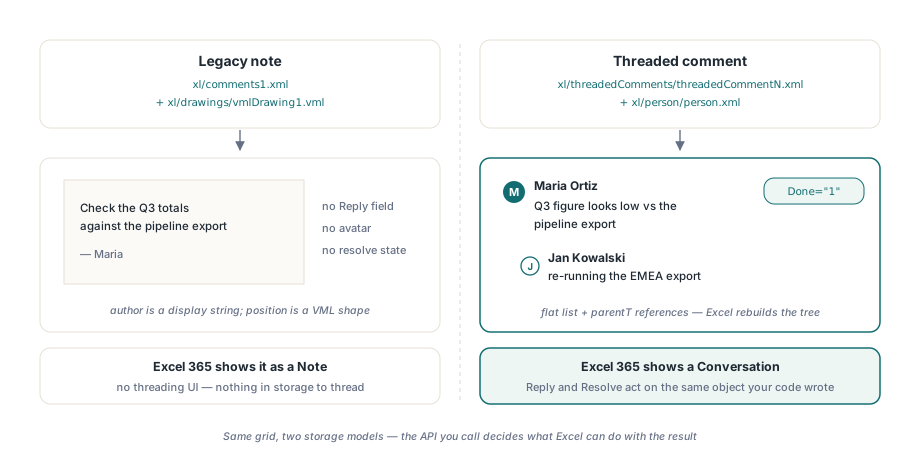
The short answer: two generations of comment share one grid, and they live in entirely different parts of the package. The legacy model — the one AddComment targets — stores text in xl/comments1.xml (content type application/vnd.openxmlformats-officedocument.spreadsheetml.comments+xml) and positions the balloon through a companion VML drawing part, xl/drawings/vmlDrawing1.vml. That pair predates the ribbon; Excel 365 still reads it faithfully, but it renders the result as a "note" and offers no threading UI on it, because there is nothing in the storage to thread. Author is a display string, position is a VML shape, and that is the whole model
Threaded comments, introduced with Excel 365, ignore the VML layer completely. Each sheet with a conversation carries its own xl/threadedComments/threadedCommentN.xml part under the content type application/vnd.openxmlformats-officedocument.spreadsheetml.threadedComments+xml, and the workbook carries a single xl/person/person.xml part (content type ...spreadsheetml.people+xml) listing every participant once. HotXLS exposes both models on the same worksheet: AddComment keeps writing the legacy pair, AddThreadedComment writes the new parts. If your output shows up as notes, you called the first API and wanted the second. The legacy model is still the right tool for some jobs — the earlier article on cell comments and hyperlinks in review workflows covers it in depth, including the XLS side — but nothing in it upgrades into a thread
What HotXLS writes into the package
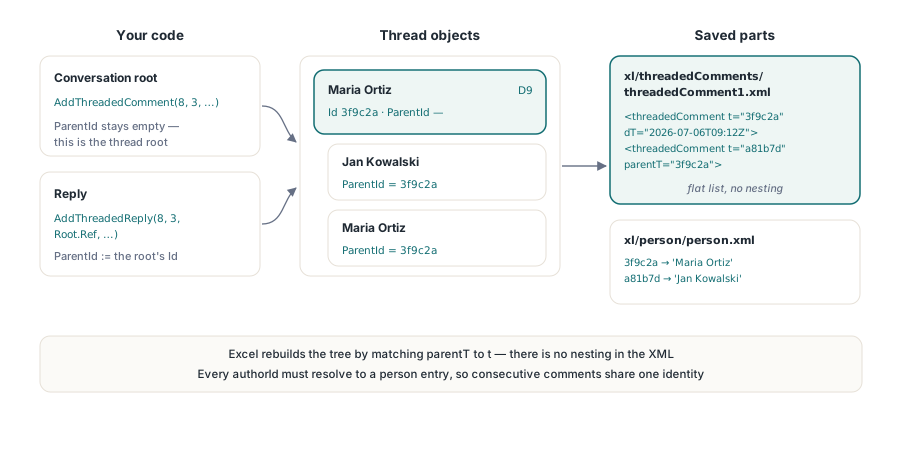
HotXLS models each reply as a TXLSXThreadedComment object carrying a cell anchor (Ref), a GUID-style identifier (Id), an optional ParentId, an AuthorId that resolves through the person list, a DisplayName mirror, the text body, a Done flag, and an ISO-8601 DateTime. On save, every entry becomes a <threadedComment> element whose t attribute holds the identifier, whose dT attribute holds the timestamp, and whose parentT attribute — present only on child replies — names the parent identifier. Excel reconstructs the conversation tree by matching parentT to t; there is no nesting in the XML, just a flat list plus references
The person part is the piece most hand-rolled implementations forget. Every authorId in a threaded comment must resolve to a <person> entry in xl/person/person.xml, wired into the workbook relationships, with its own content-type override — otherwise Excel has no display name to show. HotXLS handles the registration automatically: AddThreadedComment looks the author up on the workbook's Persons list by display name and creates an entry with a fresh GUID when none exists, so consecutive comments by the same author share one identity. The worksheet relationships get the threadedComments relationship, the workbook relationships get the person relationship, and the content-types manifest gets both overrides, without any of it appearing in your code
Building a reply chain with AddThreadedComment and AddThreadedReply
AddThreadedComment creates the conversation root: its ParentId stays empty, which is what marks it as the top of the thread. AddThreadedReply takes a ParentRef parameter — the cell reference where the root lives — finds the root at that anchor, and stamps the new reply's ParentId with the root's Id. Both return the new TXLSXThreadedComment, so you can set the timestamp or resolved state on the object you just created:
var
  Book: TXLSXWorkbook;
  Sheet: TXLSXWorksheet;
  Root: TXLSXThreadedComment;
begin
  Book := TXLSXWorkbook.Create;
  try
    Book.Open('forecast.xlsx');
    Sheet := Book.Sheets[0];

    // Conversation root; ParentId stays empty
    Root := Sheet.AddThreadedComment(8, 3,
      'Q3 figure looks low against the pipeline export', 'Maria Ortiz');
    Root.DateTime := '2026-07-06T09:12:00Z';

    // Replies anchor at the same cell; ParentRef names the root cell
    Sheet.AddThreadedReply(8, 3, Root.Ref,
      'Pipeline export missed the EMEA renewals, re-running', 'Jan Kowalski');
    Sheet.AddThreadedReply(8, 3, Root.Ref,
      'Confirmed, refreshed figure lands tomorrow', 'Maria Ortiz');

    Book.SaveAs('forecast-reviewed.xlsx');
  finally
    Book.Free;
  end;
end;
Two details in that listing repay attention. First, Root.Ref is passed rather than a hand-built string: the reference the library generated is guaranteed to match what AddThreadedReply will look up, which removes a whole class of off-by-one anchor bugs. Second, both authors were passed as plain display names — the person registry, the GUID identities, and the authorId wiring all happened behind the calls. Open the saved file in Excel 365 and cell anchoring, the reply order, and the two distinct participants are all live: click Reply and Excel appends to the same thread your code started
Reading a conversation back: round-trip behaviour
HotXLS round-trips threaded comments as of version 2.122.0: reopening a saved package rebuilds each sheet's conversation list and the workbook participant list from the parts, so identifiers, reply links, and display names survive a full read→write cycle. The reader parses person.xml before any sheet content, which is what lets every authorId resolve to a display name at load time; parsed person identifiers are preserved as-is rather than regenerated, so a workbook that shuttles between your code and Excel keeps stable author identities across arbitrarily many round trips
var
  i: Integer;
  Cmt: TXLSXThreadedComment;
begin
  Book.Open('forecast-reviewed.xlsx');
  Sheet := Book.Sheets[0];
  for i := 0 to Sheet.ThreadedComments.Count - 1 do
  begin
    Cmt := Sheet.ThreadedComments[i];
    if Cmt.ParentId = '' then
      Writeln('Root at ', Cmt.Ref, ' by ', Cmt.DisplayName, ': ', Cmt.Text)
    else
      Writeln('  reply by ', Cmt.DisplayName, ': ', Cmt.Text);
  end;
  Writeln('Participants: ', Book.Persons.Count);
end;
The flat-list-plus-references storage shows through here deliberately: ThreadedComments enumerates replies in part order, and an empty ParentId identifies each root. If you need the tree shape — say, to export a review log — group by Ref first and then chain ParentId to Id within each cell's group. This preserve-what-you-parsed behaviour is one instance of a broader policy in the library; the article on lossless round-tripping of themes, extension lists, and the calc chain covers how the same principle applies to the rest of the package
Resolved state, timestamps, and author identity
Three attributes carry the review semantics, and all three are writable on the returned objects. Done maps to the done attribute — Excel shows a resolved thread collapsed with a Reopen link. DateTime is the ISO-8601 UTC creation stamp (dT); HotXLS substitutes a fixed placeholder when you leave it empty so the part always validates, but a real timestamp is what makes the thread history readable, so set it. On the identity side, each TXLSXPerson exposes ProviderId — typically None for locally authored entries — and a UserId you can fill with a UPN or email when your application knows it:
var
  Root: TXLSXThreadedComment;
  Person: TXLSXPerson;
begin
  Root := Sheet.ThreadedComments.FindAt('D9');
  if Root <> nil then
    Root.Done := True;   // saved as done="1"; Excel shows the thread resolved

  Person := Book.Persons.FindByDisplayName('Maria Ortiz');
  if Person <> nil then
    Person.UserId := '[email protected]';
end;
One boundary to state plainly: HotXLS writes the <mentions> element empty. @-mention records — the machinery that lights up a colleague's name inside the comment text and triggers a notification in Microsoft 365 — are not modelled, so text containing an @ sign is stored as plain text. For a generated review workbook that is rarely a loss, but if your workflow depends on mention notifications, plan for a human to add those inside Excel. Author identity in the person part pairs naturally with the workbook-level provenance fields covered in workbook metadata and document properties, which is where the rest of a generated file's audit trail lives
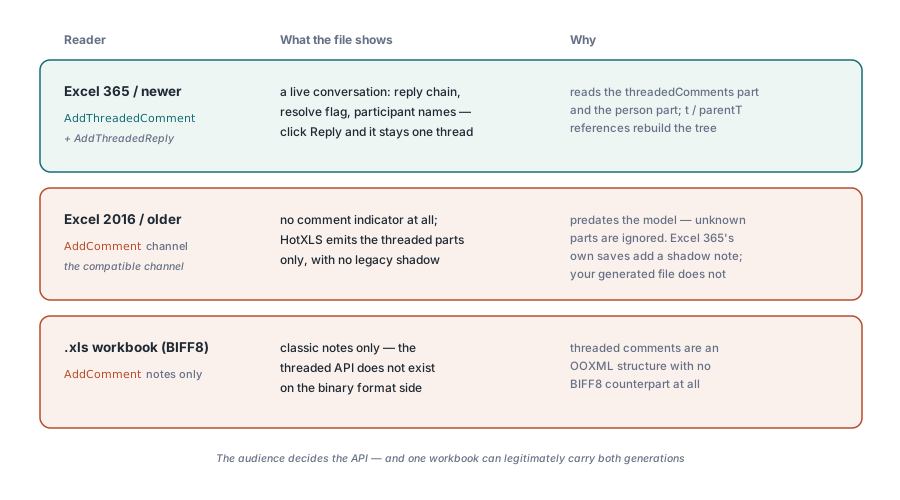
What do older Excel versions do with threaded comments?
Excel 2016 and earlier predate the threaded model, and they simply ignore parts they do not understand. When Excel 365 itself saves a threaded conversation, it also writes a legacy comment shadow — a placeholder note reading "[Threaded comment]…" — precisely so older versions show something at the anchored cell. HotXLS emits the threaded parts only, with no legacy shadow, so a file written by your code shows no comment indicator at all when opened in Excel 2016. If your audience includes pre-365 installations and the annotation must be visible there, the legacy AddComment API remains the compatible channel; just avoid stacking both models on the same cell without testing every Excel version you ship to, because how a reader reconciles a note and a thread on one cell is the reader's decision, not yours
The other hard boundary is the file format itself. Threaded comments are an OOXML structure with no BIFF8 counterpart, so the .xls side of HotXLS has no threaded API — a workbook that must stay in the legacy binary format is limited to classic notes. In practice the decision table is short: writing .xlsx for Excel 365 or web/mobile Excel readers, use AddThreadedComment and get real conversations; targeting Excel 2016 or .xls, use AddComment and accept the note model; auditing a file you received, check both ThreadedComments and Comments, because a workbook that has lived in both worlds can legitimately carry both. The full API surface for both generations is documented on the HotXLS Delphi Excel Component product page