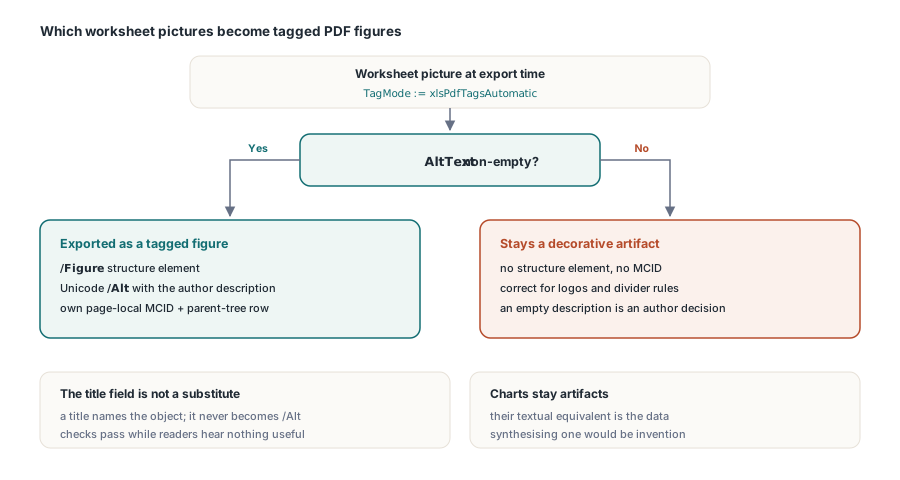
When HotXLS exports a worksheet to PDF with automatic tagging enabled, worksheet pictures that carry alternative text now emit as independent /Figure structure elements with a Unicode /Alt entry, dense page-local marked-content identifiers and exact parent-tree entries. Pictures with no alternative text stay decorative artifacts, and charts stay artifacts as well. That precise scope matters: it makes informative images reachable to a screen reader, and it is not the same thing as full PDF/UA conformance
The mechanics behind it are more interesting than the feature description, because two of them are the kind of detail that silently produces a structurally valid PDF whose structure points at the wrong content
What counts as an informative image?
Only a non-empty AltText. The TXLSXImage.AltText property round-trips the OOXML descr attribute of the picture non-visual properties, which is where Excel stores the text a user types into the alt-text pane. That is the only signal in the file that the author considered the picture to carry information rather than decoration, so it is the only signal the exporter trusts
Two near-misses are deliberately not accepted. The title field, stored separately from the description, is not a substitute: a title is a name for the object, not a textual equivalent of it, and promoting it into /Alt would produce a document that passes an automated check while announcing "Picture 3" to a screen reader. An empty description is also not a gap to be filled with a placeholder; it means the image stays an artifact, which is the correct outcome for a logo or a divider rule. Charts also remain artifacts for now, because a chart's textual equivalent is its data and synthesising one from the series would be invention rather than extraction
uses
  lxHandleX, lxPDF;

var
  Book: TXLSXWorkbook;
  Sheet: TXLSXWorksheet;
  Exporter: TXLSPDFExport;
  I: Integer;
begin
  Book := TXLSXWorkbook.Create;
  try
    Book.Open('regional-review.xlsx');
    Sheet := Book.Sheets.ByPos[0];

    // Audit before exporting: an image without a description
    // will be exported as a decorative artifact
    for I := 0 to Sheet.Images.Count - 1 do
      if Sheet.Images[I].AltText = '' then
        Sheet.Images[I].AltText := DescribeImage(Sheet.Images[I].Name);

    Exporter := TXLSPDFExport.Create;
    try
      Exporter.TagMode := xlsPdfTagsAutomatic;
      Exporter.DocumentLanguage := 'en-US';
      Exporter.SaveAsPDF(Sheet, 'regional-review.pdf');
    finally
      Exporter.Free;
    end;
  finally
    Book.Free;
  end;
end;
Why does the page need a single MCID allocator?
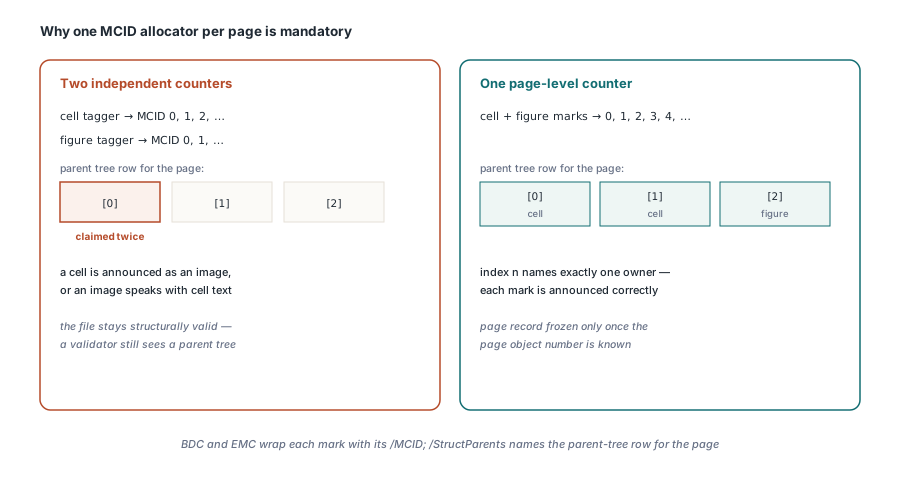
Because the parent tree is an array indexed by marked-content identifier, and two allocators produce two entries claiming the same slot. Tagged PDF connects content to structure in both directions. On the content side, a span of the page content stream is wrapped in BDC and EMC operators carrying an /MCID number that is unique within that page. On the structure side, the page dictionary carries a /StructParents key naming a row of the document /ParentTree, and that row is an array whose element at index n is the structure element owning MCID n
A worksheet page contains table cells and, now, figures. If the cell tagger counts its identifiers from zero and the figure tagger also counts from zero, the first figure claims the slot the first cell already owns. Nothing about the resulting file is malformed enough for a parser to reject: the structure tree is intact, the marked content is balanced, and a validator sees a document with a parent tree. What a screen reader gets is a table cell announced as an image, or an image announced with the text of a cell. The exporter therefore allocates from one page-level counter shared by both taggers, and freezes the page record only once the page object number is known, since the parent-tree row cannot be written before the page it refers to has an identity
The Figure must wrap the whole visible instance
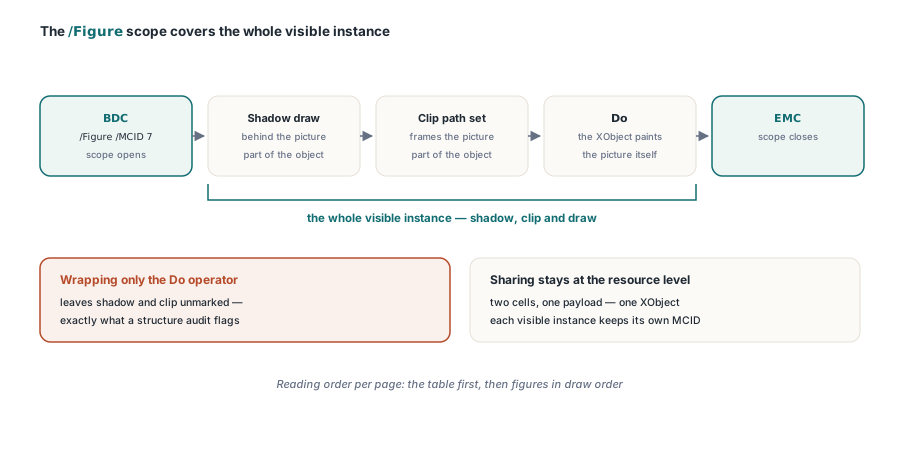
The naive placement is to wrap the Do operator that invokes the image XObject, since that is the operator that draws the picture. It is not enough. A worksheet picture is often drawn with a shadow behind it and a clipping path around it, and those marks are part of the visible object. Left outside the /Figure scope they become unmarked content, which is exactly the state a structure audit flags
So the marked-content scope opens before the shadow and closes after the image draw, covering the clip as well. Sharing is preserved where sharing is correct: two cells showing the same picture payload still reference one image XObject, because that is a resource-level optimisation and has nothing to do with semantics. What each visible instance gets is its own MCID and its own structure element, because two occurrences of the same logo in different places are two things a reader encounters. Image placement and the EMU geometry that positions these objects is covered in the image geometry article
Reading order on a worksheet page
Reading order is a decision the exporter has to make, because a spreadsheet has no authored flow the way a document does. The rule adopted is stable and easy to explain: for each page, the table comes first, then figures in draw order. A reader therefore hears the tabular content of the page and then its images, rather than having images interleaved at whatever position the drawing objects happened to occupy in the file
That order is per page rather than per document, which matters on a workbook that paginates into dozens of pages: each page's structure branch is self-contained, so a reader moving between pages does not jump back into an earlier table. If you need control over how the sheet paginates in the first place, the page-setup and print-area interaction is described in the protection and page setup article
What this certifies, and what it does not
It certifies that informative pictures reach assistive technology with their author-supplied description, and that the content-to-structure mapping is correct rather than merely present. It does not make the output PDF/UA conformant, and describing it that way would be a claim the implementation cannot support: charts are still artifacts, and a full conformance statement requires an audit of every structure type, every font, and the document metadata as a whole
If your requirement is an archival or conformance profile rather than accessibility improvement, that is a different export configuration and a different set of checks, described in the PDF/A archival export article. The two combine, but they answer different auditors
One practical suggestion for a reporting pipeline: audit alternative text at the point where the workbook is generated, not at export time. The generator knows what each chart image or embedded diagram represents, and can write a real description into AltText; an export-time pass can only tell you that a description is missing. HotXLS reads and writes XLS, XLSX, ODS and CSV natively from Delphi and C++Builder with no Excel dependency, and its export configuration options are listed on the HotXLS Delphi spreadsheet component product page