HotXLS Delphi Component stores an ODS row that carries table:number-rows-repeated and a row height as a single TXLSXRowHeightRun record — first row, last row, one height — instead of one height entry per repeated row, and folds the blank-cell style those rows inherit into a single interval style overlay. That is the whole reason HotXLS 2.382.2 opens a spreadsheet whose tail repeats 1,048,530 blank rows in 0.02 seconds where 2.382.1 timed out, and why the same file saves back to ODS with the repeat count intact rather than as a million literal rows
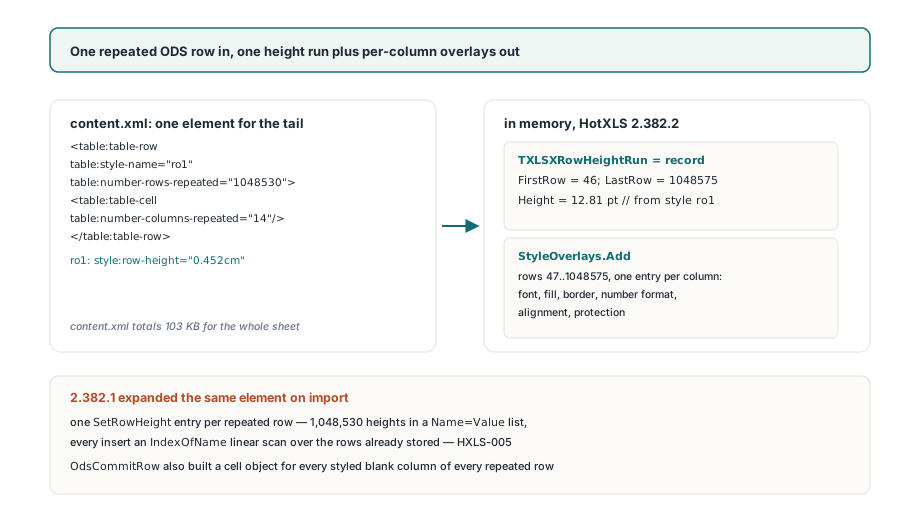
The file in question is ordinary. LibreOffice Calc writes a fourteen-column sheet with 45 rows of data, then describes everything below them with one element: <table:table-row table:style-name="ro1" table:number-rows-repeated="1048530"><table:table-cell table:number-columns-repeated="14"/></table:table-row>. Style ro1 sets style:row-height="0.452cm", and each <table:table-column> carries a table:default-cell-style-name that every blank cell in the run inherits. The whole content.xml is 103 KB. Nothing about the file says "expensive"; the expense was entirely ours
Why does one repeated row time out an ODS import?
Because the importer used to expand it. In 2.382.1 the row finisher looped SetRowHeight(RowIndex + i, RowHeight) once per repeated row, writing each height into a Name=Value string list keyed by row number. Every insert into that list ran an IndexOfName lookup over everything already in it, so a million heights cost a million linear scans — the quadratic list search HXLS-005 was filed against. At the same time OdsCommitRow materialised a cell object for every column that inherited a style, on every one of the repeated rows, because a styled blank cell still counted as a cell
The save side had its own version of the problem. The LibreOffice file ends with one more ro1 row after the big repeat, so the highest styled row sat at the very bottom of the sheet, and OdsBuildTableXml walked every row up to it emitting <table:table-row> elements one at a time. Even a workbook that had been imported cheaply would have written expensively. Fixing the import without fixing the export would have moved the timeout, not removed it
What is a row-height run in HotXLS?
A run is the smallest thing that can describe "rows 46 through 1,048,575 are all 12.81 points tall" without saying it 1,048,530 times. TXLSXRowHeightRun is a record of FirstRow, LastRow and Height; TXLSXRowHeightRuns is a dynamic array of them, and each TXLSXWorksheet keeps one in FRowHeightRuns beside the existing per-row height list. On ODS import the row finisher now branches on the repeat count: a count of 1 still calls SetRowHeight, anything larger calls XlsxAssignRowHeightRun once for the whole span. The span is clamped to XlsxMaxRow, which is 1,048,576, so a repeat count that overshoots the sheet is truncated rather than rejected
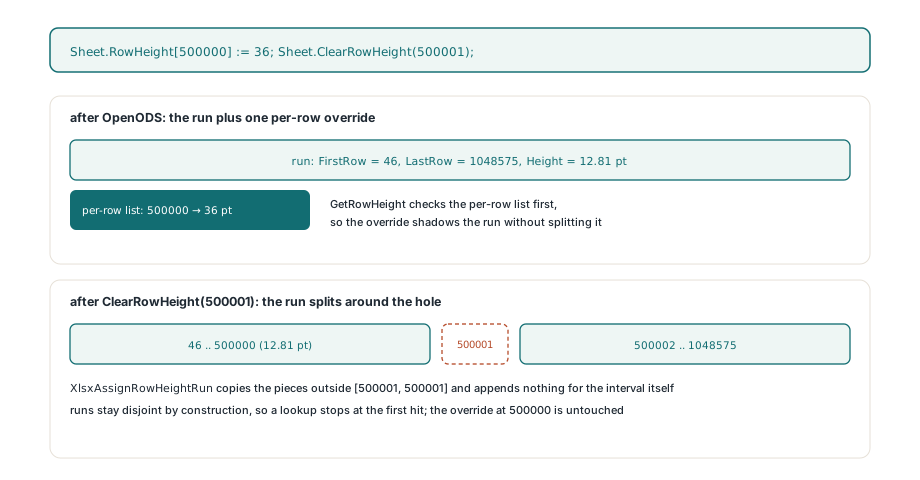
XlsxAssignRowHeightRun is the only writer of the array, and it keeps the runs disjoint by construction. Given a new interval it copies every existing run that lies entirely outside it, splits any run that overlaps it into the piece before and the piece after, then appends the new interval when Present is true — or appends nothing when Present is false, which is how ClearRowHeight punches a one-row hole. Two things follow. The array never contains overlapping intervals, so a lookup can stop at the first hit. And the array is never mutated in place; a fresh copy is built on every call, which costs nothing at the sizes involved and removes an entire class of aliasing bugs
var
  Workbook: TXLSXWorkbook;
  Sheet: TXLSXWorksheet;
begin
  Workbook := TXLSXWorkbook.Create;
  try
    // A sheet whose tail row repeats 1,048,530 times under one row style
    Workbook.OpenODS('conditional-formatting.ods');
    Sheet := Workbook.Sheets[1];
    // Both reads resolve through the same run; nothing was expanded
    Writeln(Sheet.RowHeight[46]:0:2, ' pt');
    Writeln(Sheet.RowHeight[1048575]:0:2, ' pt');
    // A single-row override shadows the run without splitting it
    Sheet.RowHeight[500000] := 36;
    // Clearing one row inside the run cuts the run into two pieces
    Sheet.ClearRowHeight(500001);
    Writeln(Sheet.HasRowHeight(500001)); // False
    Writeln(Sheet.RowHeight[500002]:0:2, ' pt'); // still the run height
  finally
    Workbook.Free;
  end;
end;
The lookup order is the part worth memorising. TXLSXWorksheet.GetRowHeight checks the per-row list first and consults the runs only when the row has no explicit entry, and HasRowHeight does the same. So Sheet.RowHeight[500000] := 36 does not touch the run at all — it adds one entry to the per-row list, and that entry wins because it is looked up first. ClearRowHeight is the opposite: it removes any per-row entry and then calls XlsxAssignRowHeightRun with Present = False, because a cleared row must read as "no height" even if a run covers it. ClearRowHeights empties both structures at once
Where do the inherited blank-cell styles go?
Into one interval style overlay per column, not into cell objects. OdsCommitRow decides per column value whether it is a compact blank: the row repeats more than once, the cell has no value, no formula and no rich text. For a compact blank it creates a real cell only on the first row of the run, applies the inherited style to it, then registers the same six style indexes — font, fill, border, number format, alignment, protection — as a StyleOverlays.Add covering rows two through the end of the run in that column. Rows after the first are skipped entirely in the materialisation loop
The regression test makes the shape concrete. After opening a sheet whose second row repeats 1,048,575 times under a bold column default style, Sheet.Cells.Count is asserted to be under 10, and Sheet.Cells[700000, 1].FontIndex still resolves to the bold font — the overlay supplies the style the moment that coordinate is touched. This is the same mechanism that keeps a formatted-but-empty column from costing a million cells on the XLSX side; the notes on row-block cell storage and interval style overlays cover how overlays layer and resolve. What is new here is that the ODS importer creates them on its own, from the repeat count, rather than waiting for an application to format a range
How does SaveAsODS write the repeat count back?
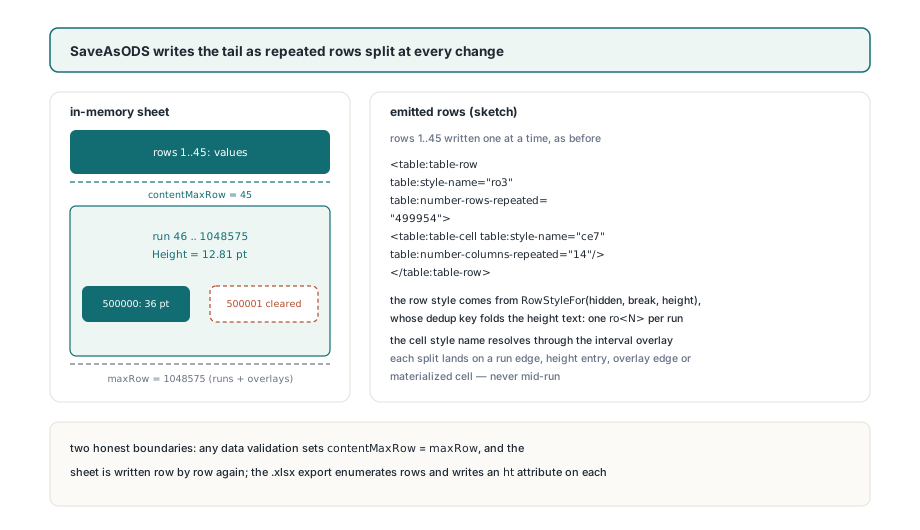
By splitting the empty tail of the sheet only where something actually changes. OdsBuildTableXml now tracks two bounds: contentMaxRow, the last row that holds a value, formula, hyperlink or manual row break, and maxRow, which additionally extends through style-only blank cells, single-row heights, every run's LastRow and every overlay's bottom edge. A style-only blank cell no longer counts as content — TXLSXCells.IsStyleOnlyBlank is what excludes it — so the trailing styled row in the LibreOffice file stops dragging the content bound to the bottom of the sheet
Above contentMaxRow rows are written one at a time exactly as before. Below it the writer computes nextRow as the smallest of: the next run's FirstRow, the current run's LastRow + 1, the next single-row height entry, the next overlay edge, and the next materialised cell. Everything from the current row up to nextRow - 1 is then emitted as one <table:table-row> with table:number-rows-repeated set to the difference, carrying one <table:table-cell/> per column with the overlay-resolved style name when an overlay covers that column. The row style itself comes from TOdsAutoStylePool.RowStyleFor(AHidden, ABreakBefore, AHeightSpec), which now folds the height text — 12.81pt, say — into its deduplication key alongside the hidden and page-break flags, so every row in the run shares one ro<N> style with a single style:row-height property
var
  Workbook, Reopened: TXLSXWorkbook;
  Saved: TMemoryStream;
begin
  Workbook := TXLSXWorkbook.Create;
  Reopened := TXLSXWorkbook.Create;
  Saved := TMemoryStream.Create;
  try
    Workbook.OpenODS('conditional-formatting.ods');
    Workbook.Sheets[1].RowHeight[500000] := 36;
    Workbook.Sheets[1].ClearRowHeight(500001);
    // The empty tail is written as a handful of repeated rows, not a million
    Workbook.SaveAsODS(Saved);
    Writeln('ODS size: ', Saved.Size, ' bytes');
    Saved.Position := 0;
    Reopened.Open(Saved);
    // Override, hole and run all survive the round trip
    Writeln(Reopened.Sheets[1].RowHeight[500000]:0:2);   // 36.00
    Writeln(Reopened.Sheets[1].HasRowHeight(500001));    // False
    Writeln(Reopened.Sheets[1].RowHeight[500002]:0:2);   // run height
  finally
    Saved.Free;
    Reopened.Free;
    Workbook.Free;
  end;
end;
The test that pins this down asserts the saved stream is under 64 KB for a sheet whose height run spans 1,048,575 rows with an override and a hole punched into the middle. Two honest boundaries belong next to that number. First, a worksheet with any data validations sets contentMaxRow to maxRow, so validations disable tail compaction on that sheet and it is written row by row again. Second, XLSX has no repeat attribute — a SpreadsheetML <row> describes one row — so exporting a run-backed sheet to .xlsx enumerates the rows the run covers and writes an ht attribute on each. The model stays compact in memory; the file format decides what the file looks like
What does every row-renumbering edit now owe the runs?
Maintenance. A new representation of row metadata is only correct if every operation that changes row numbers moves it along with the per-row lists it sits beside, and the commit touches each of those operations. InsertRows and DeleteRows go through XlsxShiftRowHeightRuns, which rebuilds the array by keeping the part of each run that lies before the edit point, dropping whatever falls inside a delete window, and re-adding the remainder shifted by the delta — so a run that straddles an insertion becomes two runs with a gap, and a run that straddles a deletion shrinks. TileRangeAxisMetadata clears the runs across the whole tiled span, then re-registers each source run once per copy at its offset. TXLSXWorksheet.CopyFrom and TXLSXSheets.AddCopy take a Copy() of the array rather than assigning it, which is why the test can clear all heights on a clone and still find the original sheet intact at row 1,048,576
var
  Sheet: TXLSXWorksheet;
begin
  Sheet := Workbook.Sheets[1];
  Sheet.RowHeight[500000] := 36;
  Sheet.ClearRowHeight(500001);
  // Insert two rows at 500000: the override moves to 500002, the hole to 500003
  Sheet.InsertRows(500000, 2);
  Writeln(Sheet.RowHeight[500002]:0:2);   // 36.00
  Writeln(Sheet.HasRowHeight(500003));    // False
  // Delete them again: everything shifts back
  Sheet.DeleteRows(500000, 2);
  Writeln(Sheet.RowHeight[500000]:0:2);   // 36.00
  // Tile rows 2..4 twice down the sheet; run heights follow each copy
  Sheet.TileRangeAxisMetadata(2, 1, 3, 1, 2, 1);
  Writeln(Sheet.RowHeight[7]:0:2);        // the run height
end;
The read-side bounds have the same obligation. GetUsedRange bumps its bottom edge to each run's FirstRow and LastRow, and BuildRowMajorCellOrder extends its metadata-inclusive maximum row through every run so the XLSX writer still visits height-only rows. If you ever add a row-keyed structure of your own on top of the HotXLS object model, this is the checklist: insert, delete, tile, copy, used range, and every serialiser. Miss one and the failure is silent — heights drift by the insert count, and nothing throws
What stays per-row, and what the numbers look like now
Hidden flags, outline levels and collapsed state still expand. The row finisher loops SetRowHidden and SetRowOutlineLevel once per repeated row, so a sheet that hides a million-row tail, or nests it inside a table:table-row-group, pays a per-row entry for each of those attributes. The 2.382.2 change is scoped to the two things HXLS-005 actually measured — heights and inherited blank styles — and the same run technique would apply to the others if a file ever demanded it. The ODS reader also does not act on style:use-optimal-row-height; a row style that says "optimal" and gives a height is imported with that height
Against the corpus, conditional-formatting.ods now completes the open, assert, save, reopen and re-assert cycle in 0.178 seconds on Win32 and 0.158 seconds on Win64, with the open stage itself at 0.020 seconds, inside a 60-second budget it previously exhausted. The workbook-level interfaces the format flows through are described in the walkthrough of opening and saving ODS files, and the wider set of levers for big files in large workbook performance; the ODF row element itself, with its repeat and style attributes, is specified in ODF 1.3 Part 3 §9.1.4
HotXLS reads and writes XLS, XLSX and ODS from native Delphi and C++Builder code without Excel or LibreOffice installed, which is why a million-row repeat is something the library has to model well rather than hand to an external process — the HotXLS Delphi spreadsheet component page lists the supported formats and RAD Studio versions