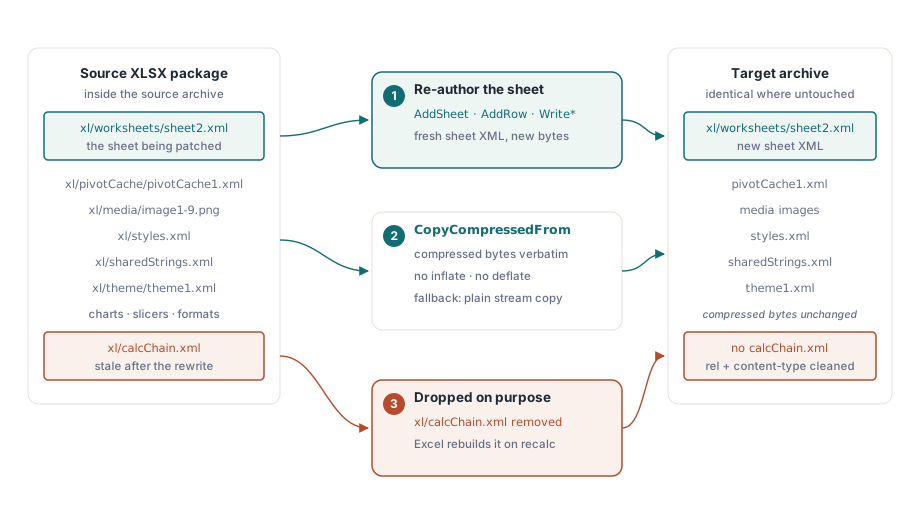
HotXLS can rewrite one worksheet inside an existing XLSX package without parsing or re-compressing the rest of the file. TXLSDirectWriter.BeginPatch opens a source package, copies every entry except the target sheet across with its compressed bytes verbatim, and lets you re-author that single sheet through the ordinary AddSheet, AddRow and Write* calls. Charts, pivot caches, themes, styles and shared strings never get decompressed at all
The workflow this solves shows up in reporting and data refresh. A workbook arrives from a business team carrying pivot tables, slicers, conditional formats and a decade of accumulated formatting. Each night one data sheet has to be replaced with fresh numbers. Loading and re-saving the whole workbook costs minutes per file and, more importantly, risks fidelity on features the loading engine has to reconstruct. Patching sidesteps both problems by not touching what it does not need to touch
Why is copying compressed bytes the interesting part?
A zip entry that is copied at the compressed level costs a stream copy. The same entry passed through a normal write path costs an inflate on the way in and a deflate on the way out, and deflate is the expensive half. On a workbook with a large pivot cache and a few dozen embedded images, that difference is the difference between a patch that finishes in the time it takes to write the new sheet and one that spends most of its time recompressing bytes it never examined
HotXLS uses CopyCompressedFrom for this, which writes the source entry's compressed bytes straight into the target archive. When an entry cannot be copied that way, because it uses a different compression method or weak encryption, the writer falls back to a decompressed stream copy rather than failing. Directory marker entries are skipped, since the writer produces its own
Replace in place, or write to a new file
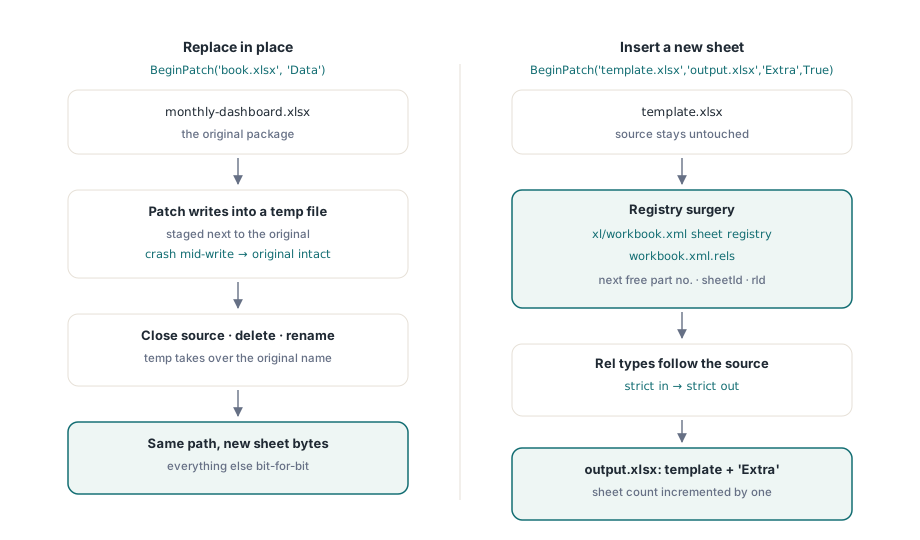
Two overloads cover the two shapes this task takes. The in-place form stages the result in a temporary file next to the original, closes the source handle, then deletes and renames, so a crash mid-write leaves the original intact. The explicit-target form leaves the source untouched and can either replace a sheet or append a new one:
var
  W: TXLSDirectWriter;
begin
  W := TXLSDirectWriter.Create;
  try
    W.BeginPatch('monthly-dashboard.xlsx', 'Data');   // in place
    W.AddSheet('Data');
    W.AddRow(1);
    W.WriteString(1, 'Region');
    W.WriteString(2, 'Revenue');
    W.AddRow(2);
    W.WriteString(1, 'North');
    W.WriteNumber(2, 184320.55);
    W.AddRow(3);
    W.WriteFormula(1, '=SUM(B2:B2)');
    W.Close;
  finally
    W.Free;
  end;
end;
The insert variant takes a source and a target path plus InsertSheet:
  // Source stays untouched; target gets an extra worksheet named Extra
  W.BeginPatch('template.xlsx', 'output.xlsx', 'Extra', True);
  W.AddSheet('Extra');
  W.AddRow(1);
  W.WriteString(1, 'appended by the nightly job');
  W.Close;
Insertion is the part that requires real bookkeeping surgery. The writer parses the sheet registry in xl/workbook.xml and the relationship map that binds each sheet to its part, then chooses the next free part number, sheet identifier and relationship identifier. Relationship types follow the conventions of the source package, so patching a strict ISO 29500 workbook emits strict relationship types and patching a transitional one emits transitional types
What the patch deliberately drops and constrains
The calculation chain is discarded in both modes. In replace mode its entries describe cells in a sheet that no longer exists in that form; in insert mode the sheet index shift invalidates it outright. Excel rebuilds the chain on the next recalculation, so dropping it is correct rather than lossy. The part is left out of the copy, and its relationship entry and content-type override are removed surgically
Two authoring semantics change inside a patch, and both follow from the same principle: the patch must not disturb parts it did not rewrite. Strings are written inline into the sheet rather than added to the shared string table, because the source table crosses over untouched. And StyleIndex refers to entries in the source package's cellXfs, not to a style table the writer builds. That means you can reference formats the original workbook already defines, which is usually exactly what a data refresh wants, but it also means you have to know which index carries which format
// Inside a patch, StyleIndex indexes the SOURCE package cellXfs.
// A date needs an explicit index that maps to a date format there:
W.WriteDateTime(3, EncodeDate(2026, 8, 22), DateStyleIndexFromTemplate);

// The style-free WriteDateTime overload is rejected in patch mode,
// because it assumes the writer's own style table, which a patch
// never creates
Six authoring entry points are gated: adding tables, charts, images, comments, defined names and cell styles all raise an exception in patch mode, with a second safety net at close time that fails if any of their counters is non-zero. Each of those features would require editing parts that the patch copies verbatim, and a half-edited package is worse than a refused operation. Exactly one sheet may be patched per operation
When to patch and when to load
Patching is the right tool when the workbook is large, the change is confined to one sheet, and the rest of the file must survive bit for bit. It is the wrong tool when the change spans several sheets, when new formatting or new objects are needed, or when the file is small enough that a normal load and save costs nothing. For bulk generation from scratch, the streaming path described in the streaming direct writer remains the better fit, and it shares the same AddRow and Write* API, so moving between the two is mechanical
Sheet-level manipulation inside a loaded workbook, when you do want the full object model, is covered in duplicating worksheets in XLSX packages. And if the reason you are considering a patch is that whole-workbook processing has become slow, the measurements and memory behaviour in large workbook performance are worth reading before choosing an approach
Verifying a patch actually did what you think
Three checks catch nearly every mistake. Confirm that the parts you expected to survive are still in the archive, that xl/calcChain.xml is gone, and that reopening the file through TXLSXWorkbook reports the sheet count you expect, unchanged for a replace and incremented by one for an insert. Reading the patched sheet back and comparing a few values and formulas closes the loop
One implementation detail from the development of this feature deserves repeating, because it can bite anyone who writes similar zip-level code. Worksheet part names are matched by prefix, and an off-by-one in the prefix length means the predicate never matches, so a newly written part collides with an existing name and readers that take the last entry with a given name silently pick the wrong sheet. If a patch appears to swap the contents of two sheets, look at name matching before looking at the XML
In-place patching, streaming writes and the full workbook object model ship in the same library for Delphi and C++Builder; the feature list is on the HotXLS Delphi spreadsheet component page