Chinese city names exported to .dbf on a Western PC can come back as question marks from an export that reported success, because dBASE, SYLK and DIF files have nowhere to record an encoding. A safe writer uses the host ANSI code page and checks every name and value against it before the first byte; HotXLS refuses whatever that page cannot hold
The host code page is the only encoding these files have
All three formats come from the early PC years: dBASE from Ashton-Tate, SYLK from Microsoft's Multiplan era, DIF from Software Arts, the VisiCalc company. Each stores text as single bytes and assumes the reader shares the writer's code page — a fair bet when every machine in the office ran the same DOS setup. On Windows today that page is whatever GetACP returns: 1252 on a Western European install, 936 on Simplified Chinese, 1251 on Cyrillic. dBASE IV and FoxPro later put a language-driver mark at byte 29 of the table header, but the dBASE III layout HotXLS writes leaves that byte at zero, and SYLK, DIF and the space-aligned .prn text have no header field for it at all. So the code page is agreed outside the file. HotXLS uses the host ANSI code page on write and on read, and checks before writing whether every character has a byte in that page
| Format | Extension on SaveAs / Open | Encoding declared in the file | Text the host page cannot hold |
|---|---|---|---|
| dBASE III table | .dbf, plus a .dbt memo file when needed | No (byte 29 stays zero) | EXlsDbf is raised before writing, and the .dbf / .dbt just created are deleted |
| SYLK | .slk, .sylk | No | SaveAs returns -1 and creates no file |
| DIF | .dif | No | SaveAs returns -1 and creates no file |
| Formatted text | .prn | No | SaveAs returns -1 and creates no file |
Ten bytes for a dBASE field name, counted in the code page
Every size limit in a dBASE table is a byte count. That is where multibyte code pages hurt. A field descriptor keeps the name in eleven bytes — ten for the name, one for its terminating NUL — and puts the type letter right behind it at offset 11, the width at 16 and the decimal count at 17. Under code page 936 a Chinese character is two bytes, so a ten-character Chinese name is twenty. Copy those bytes in without measuring them and they run straight through the NUL, the type letter and the width; no reader can recover that descriptor afterwards, even though the name passed a ten-character check. Keep dBASE field names ASCII even on a CJK workstation. xBase tools, ODBC drivers and GIS software reading shapefile attribute tables all key on those names, and a name that only decodes under 936 turns into different bytes on every machine running another page
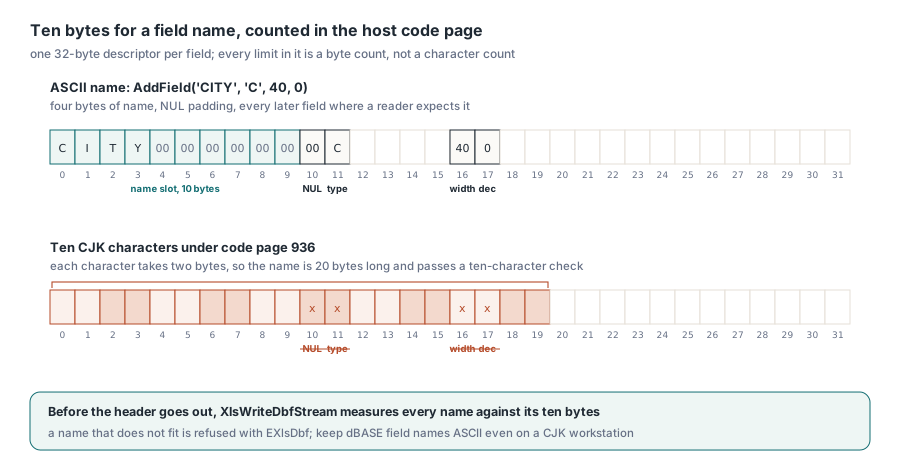
| Bytes | dBASE III content |
|---|---|
| 0 | Version: 0x03, or 0x83 when a .dbt memo file accompanies the table |
| 1–3 | Last update: year since 1900, month, day |
| 4–7 | Record count, 32-bit little-endian |
| 8–11 | Header length and record length, 16-bit words |
| 32 onward | One 32-byte descriptor per field, then 0x0D; records follow, each behind a deletion flag |
Widths are bytes too. A character field (C) tops out at 254 bytes, N values are right-aligned text with the declared decimals, D values are eight characters in YYYYMMDD form, and a value too wide for its field becomes a row of asterisks, the convention dBASE itself uses. Longer text goes into a memo (M) field holding a block number into the .dbt companion: a 512-byte header, then 512-byte blocks, each memo ended by 0x1A 0x1A. TXLSXWorkbook.SaveAs with a .dbf name turns the first used row of the active sheet into field names, infers C, N, L or D per column, falls back to C for mixed columns and moves text longer than 254 characters into M. When the widths need to be controlled in bytes, build the table yourself with TXlsDbfTable and size each C field for the encoded length of its longest value
uses
  Windows, SysUtils, Variants, lxDbf;

procedure WriteCustomerTable(const FileName: string);
var
  Table: TXlsDbfTable;
  Row: Integer;
begin
  Table := TXlsDbfTable.Create;
  try
    // ASCII names of at most ten bytes; widths are bytes in the host code page
    Table.AddField('CUSTNO', 'N', 6, 0);
    Table.AddField('CITY', 'C', 40, 0);
    Table.AddField('BALANCE', 'N', 12, 2);
    Table.AddField('OPENED', 'D', 8, 0);

    Row := Table.AddRow;
    Table.SetValue(Row, 0, 1001);
    Table.SetValue(Row, 1, WideString(#$5317#$4EAC#$5E02));  // 北京市, 6 bytes in CP936
    Table.SetValue(Row, 2, 1234.5);
    Table.SetValue(Row, 3, EncodeDate(2026, 11, 12));

    try
      XlsWriteDbfFile(FileName, Table);
    except
      on E: EXlsDbf do
        // Expected on a 1252 host: the message names field "CITY" and row 1,
        // and no .dbf is left on disk
        raise Exception.CreateFmt('DBF export refused under code page %d: %s',
          [GetACP, E.Message]);
    end;
  finally
    Table.Free;
  end;
end;
Expected: on a 936 host the table is written and reopens with all four fields. On a 1252 host XlsWriteDbfFile raises EXlsDbf naming the field and the one-based row. XlsWriteDbfStream converts every field name and every C or M value to the host page and back, compares, and measures each name against its ten bytes before the header goes out, so a refused table leaves the stream untouched. The file form goes one step further and deletes the .dbf, and any .dbt, it had already created
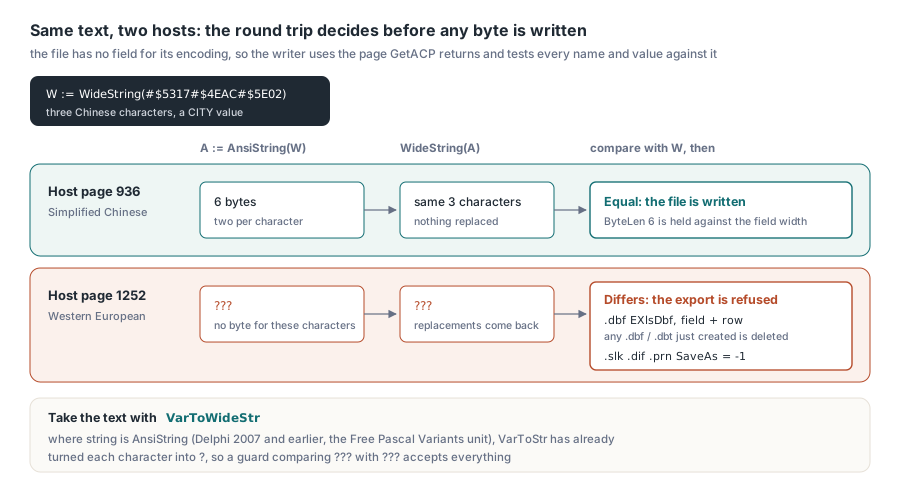
How do you test whether a string survives the host code page?
Convert it to AnsiString, convert that back to WideString, and compare with the original. A character the page lacks comes back as a replacement, usually ?, so the comparison fails precisely when the export would lose data. The writers use the same conversion, so the check and the writer cannot disagree about the code page. Keep the byte length too: it is the number to hold against a ten-byte name slot or a field width
uses
  Variants;

// True when every character of V survives the host ANSI code page;
// ByteLen is the encoded length to compare with a field width
function FitsHostCodePage(const V: Variant; out ByteLen: Integer): Boolean;
var
  W: WideString;
  A: AnsiString;
begin
  W := VarToWideStr(V);   // VarToStr can convert before this check sees the text
  A := AnsiString(W);
  ByteLen := Length(A);
  Result := WideString(A) = W;
end;
The comment on VarToWideStr carries the real lesson. In Delphi 2007 and earlier string is AnsiString everywhere, and under Free Pascal the Variants unit is compiled with the RTL's own string type, AnsiString, whatever mode your unit uses. On those compilers VarToStr has already put a ? where each Chinese character was. A guard built on AnsiString(VarToStr(V)) then compares question marks with question marks and accepts everything. TStringList has the same shape of problem there: assign wide text to its Text property to split lines and every character goes through the host code page on the way in. XlsParseSlk, XlsParseDifText and XlsParsePrnText take WideString input and keep every character of it on any host. If you also build with Lazarus, see which string type the HotXLS units compile with under Free Pascal
SYLK and DIF records, line by line
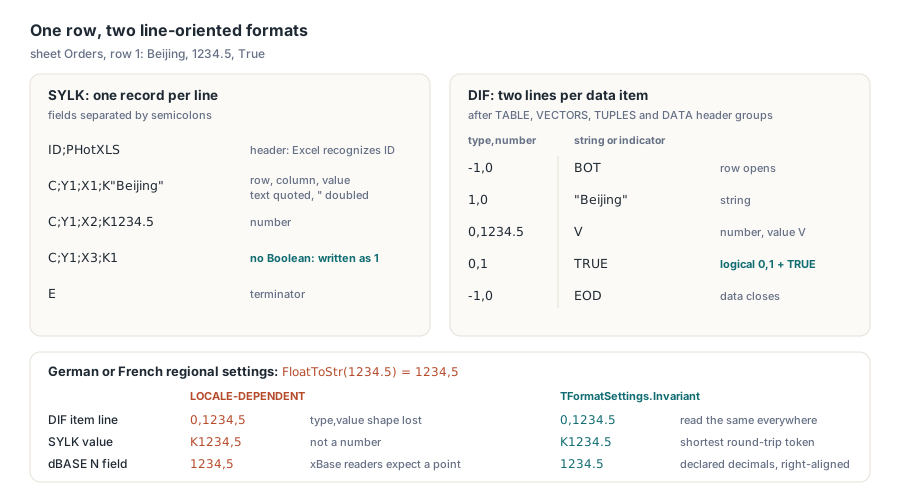
SYLK is one record per line, fields separated by semicolons. HotXLS writes an ID;PHotXLS header, one C;Yrow;Xcol;Kvalue record per cell and an E terminator. Text is quoted with embedded quotes doubled, which also protects a semicolon inside a value, and the reader accepts the ;; escape some producers use instead. There is no Boolean. The format's own writers send 1 and 0, so that is what SaveAs writes; errors go out as text such as #N/A, dates as serial numbers. Those two letters at the top are how Excel recognises SYLK — and why it mistakes a CSV whose first cell reads ID for a SYLK file. Build and parse both work on WideString, so the in-memory round trip below gives the same answer on any host
uses
  SysUtils, lxSlk;

function SylkRoundTripsInMemory: Boolean;
var
  Cells, Back: TXLSSlkCells;
  Text: WideString;
  I: Integer;
begin
  SetLength(Cells, 3);
  Cells[0].Row := 1; Cells[0].Col := 1; Cells[0].Kind := slkText;
  Cells[0].Text := WideString(#$4E0A#$6D77'; Pudong');   // 上海; Pudong
  Cells[1].Row := 1; Cells[1].Col := 2; Cells[1].Kind := slkText;
  Cells[1].Text := 'Pipe 12" steel';
  Cells[2].Row := 2; Cells[2].Col := 1; Cells[2].Kind := slkNumber;
  Cells[2].Number := 1234.5;

  Text := XlsBuildSlk(Cells);           // K"上海; Pudong", K"Pipe 12"" steel", K1234.5
  Result := XlsParseSlk(Text, Back) = Length(Cells);
  for I := 0 to High(Cells) do
    if Result then
      Result := (Back[I].Row = Cells[I].Row) and (Back[I].Col = Cells[I].Col) and
        (Back[I].Kind = Cells[I].Kind) and (Back[I].Text = Cells[I].Text) and
        ((Cells[I].Kind <> slkNumber) or (Back[I].Number = Cells[I].Number));
end;
DIF is wordier. Four header groups, TABLE, VECTORS (column count), TUPLES (row count) and DATA, take three lines each; every data item then takes two, a type,number line and a line holding the quoted string or a value indicator. A row opens with -1,0 and BOT, and -1,0 with EOD closes the data. A number is 0,value plus V, a logical 0,1 plus TRUE or 0,0 plus FALSE, a string 1,0 plus its quoted text. On reading, HotXLS maps the NA and ERROR indicators to #N/A and #VALUE! and treats NULL as blank. A sheet named Orders whose only row holds Beijing, 1234.5 and True exports as:
TABLE
0,1
"Orders"
VECTORS
0,3
""
TUPLES
0,1
""
DATA
0,0
""
-1,0
BOT
1,0
"Beijing"
0,1234.5
V
0,1
TRUE
-1,0
EOD
A decimal comma breaks all three formats
The code page is not the only machine setting that leaks into these files. On a workstation with German or French regional settings, FloatToStr turns 1234.5 into 1234,5. In DIF the item line becomes 0,1234,5 and loses its type,value shape. In SYLK, K1234,5 is not a number. In a dBASE N field, xBase readers expect a point. HotXLS writes and reads all three with TFormatSettings.Invariant: SYLK gets the shortest token that reads back to the same double, DIF an invariant FloatToStr with .0 appended to whole numbers, dBASE numeric fields their declared decimals, right-aligned. Parsing ignores the locale as well, so a file from a decimal-comma machine reads the same everywhere
Reading tables other programs wrote
Opening someone else's table puts the code page question on the reading machine instead. XlsReadDbfFile, and TXLSXWorkbook.Open on a .dbf name, accept version bytes 0x03, 0x83, 0x8B, 0x30, 0x31 and 0x32, covering dBASE III and IV and Visual FoxPro tables, including FoxPro's binary types I (32-bit integer), B (double), Y (currency scaled by 10,000) and T (Julian day plus milliseconds). Memo text comes from a .dbt beside the table, or from an .fpt with FoxPro's block layout when no .dbt exists; the extension decides, so neither companion is misread as the other. Character data is decoded in the host page. A dBASE III table written by a DOS program under code page 866, with byte 29 left at zero, therefore shows the wrong letters on a 1252 machine. When you know the producer, run the import where its code page is the system page. SYLK, DIF and .prn files follow the same rule, because Open decodes their bytes in the host page before the wide-text parser sees them
Which format should carry non-ASCII text between locales?
None of these four, given the choice. Use them when the receiving system insists — an ERP import screen, an xBase application, a GIS pipeline — and when the data is ASCII or both ends share a code page. Everything else should travel in a format that declares its encoding: XLSX, SpreadsheetML 2003, or CSV, which HotXLS writes as UTF-8 with a byte order mark (the CSV and TSV export has its own transport pitfalls). Since SaveAs picks the format from the extension, your code has to handle both refusal styles from the first table: an exception for .dbf, a result of -1 for the text formats
uses
  SysUtils, lxHandleX, lxDbf;

function SaveForLegacyImport(const BaseName: string): string;
var
  Book: TXLSXWorkbook;
  Sheet: TXLSXWorksheet;
begin
  Book := TXLSXWorkbook.Create;
  try
    Sheet := Book.Sheets.Add('Orders');   // first sheet added becomes active
    Sheet.Cells[1, 1].Value := 'CUSTNO';
    Sheet.Cells[1, 2].Value := 'CITY';
    Sheet.Cells[2, 1].Value := 1001;
    Sheet.Cells[2, 2].Value := WideString(#$5317#$4EAC);  // 北京

    Result := BaseName + '.slk';
    if Book.SaveAs(Result) <> 1 then
    begin
      // The active code page cannot hold the text: no .slk was created
      Result := BaseName + '.xlsx';
      Book.SaveAs(Result);
    end;

    try
      Book.SaveAs(BaseName + '.dbf');
    except
      on E: EXlsDbf do
        Result := Result + ' (no .dbf: ' + E.Message + ')';
    end;
  finally
    Book.Free;
  end;
end;
On a 936 host this function produces a .slk and a .dbf that both hold 北京; on a 1252 host it produces an .xlsx and reports why the .dbf was refused. RTF, HTML and ZIP entry names in the HotXLS Delphi spreadsheet component follow encoding rules of their own