A save that dies halfway through, whether from a forced reboot, a killed process, or a disk that fills up mid-write, has traditionally meant one thing for a format built around in-place writes: whatever bytes reached disk before the interruption are what you get back, and a truncated workbook does not open again. HotXLS closes that failure mode with a crash-safe save path used for every XLSX, ODS, and classic XLS file it writes. Each SaveAs call writes the complete new file to a temporary file created beside the destination, then commits it with a single atomic MoveFileExW rename from the Windows API, so an interrupted save can only fail to produce the new file, it never damages the one you already had. The same stage-then-swap discipline runs uniformly across both of HotXLS's save engines, the BIFF8 writer behind classic XLS and the OOXML writer behind XLSX and ODS, and it is a pattern worth borrowing for any file your own Delphi code overwrites directly, spreadsheets or not
What happens if a workbook save is interrupted halfway through?
The direct answer is that it depends entirely on how the writer touches the destination file, and the common implementation, opening the target file and streaming new content directly into it, is fine for as long as nothing ever goes wrong. The moment something does, a crash, a forced process kill, a network share that drops mid-write, the file on disk is left in whatever intermediate state the writer had reached: a ZIP central directory that never got appended for XLSX or ODS, or a BIFF stream missing records a reader expects for classic XLS. Excel does not repair that gracefully, and neither does any other consumer expecting a complete file, so the practical result is a workbook that opened fine yesterday and refuses to open today
How HotXLS stages every save behind one atomic swap
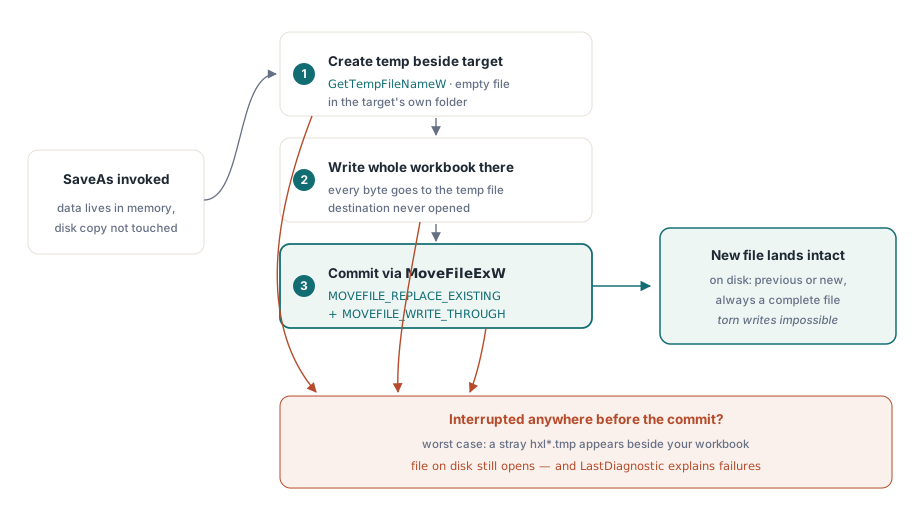
HotXLS never opens the destination file for writing directly, for any of the three formats it saves. The sequence is the same shape every time: build the complete output somewhere that is not the file the user already has on disk, and only move it into place once that build has fully succeeded. Concretely, SaveAs creates an empty temporary file in the same folder as the target path, writes the entire new workbook into that temporary file, and only after that write returns without error does it commit the temporary file over the destination with a single rename. None of this requires a property to opt into; it is simply what SaveAs does for a plain file path, on every call
var
  Book: TXLSXWorkbook;
  Sheet: TXLSXWorksheet;
begin
  Book := TXLSXWorkbook.Create;
  try
    Sheet := Book.Sheets.Add('Report');
    Sheet.Cells[1, 1].Value := 'Nothing special to enable here';
    // If this call is interrupted, monthly-report.xlsx on disk stays
    // either the old version, complete, or the new version, complete
    if Book.SaveAs('monthly-report.xlsx', xlsxOpenXMLWorkbook) <> 1 then
      raise Exception.Create('Save failed, see Book.LastDiagnostic');
  finally
    Book.Free;
  end;
end;
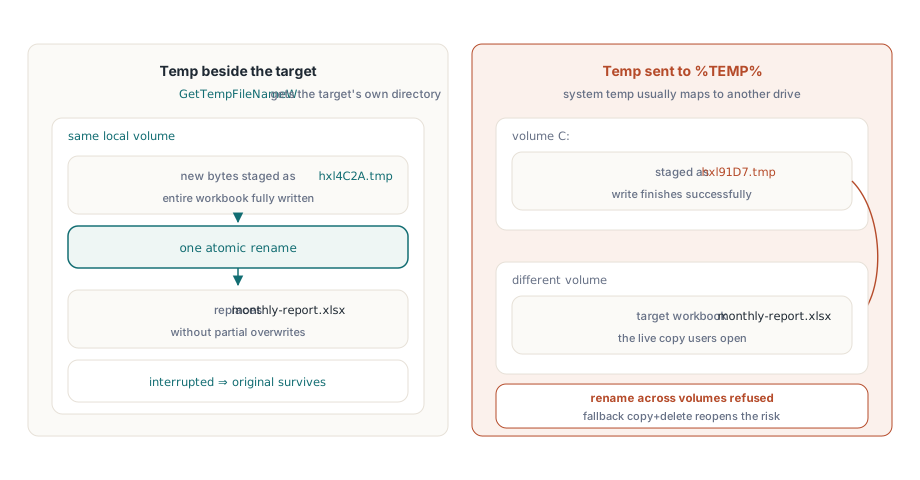
The same discipline applies to the classic XLS writer, not only the OOXML one, and the two temporary files even share a naming convention: both call the Windows GetTempFileNameW API with the hxl prefix, so a save interrupted before cleanup can leave behind a stray file with a name like hxl4C2A.tmp sitting next to your workbook. That file is not corruption, it is evidence the mechanism worked exactly as designed: the incomplete write stopped there, and your actual workbook was never opened for writing in the first place. Seeing one after a crash is safe to delete and nothing to investigate
Why stage the temp file next to the workbook instead of in %TEMP%?
The short answer is that MoveFileExW's rename is only atomic when the source and destination sit on the same volume, and the surest way to guarantee that without asking the caller to configure anything is to derive the temporary file's location from the destination path itself. HotXLS computes the target's own folder and hands that directory straight to GetTempFileNameW, so the temporary file is always created on the same drive, the same volume, as the file it is about to replace, automatically, for every save. Had the library instead staged writes in the system temp folder, a target path on a different drive or a mapped network volume would turn the final step into a cross-volume operation, which the Windows API either refuses outright or, if a caller explicitly opts in with an extra flag HotXLS does not set here, silently degrades into a non-atomic copy followed by a delete, reopening exactly the interruption window this whole mechanism exists to close
The commit step: MoveFileExW, write-through, and what happens on failure
The final step of every save is exactly one Windows API call, MoveFileExW, carrying two flags that each do distinct work. MOVEFILE_REPLACE_EXISTING is what allows the rename to land on a file that already exists; without it, a rename that targets an existing path simply fails, which would defeat the entire point of a save meant to replace a workbook you already have. MOVEFILE_WRITE_THROUGH covers durability: it tells the function not to return until the move has actually completed on disk, rather than returning as soon as the rename is merely queued, closing a narrower but real race where a crash immediately after SaveAs returns could still catch the swap in flight. If the temporary file cannot be created, or the final rename fails for any reason (a permission problem, a locked destination, a volume mismatch), HotXLS deletes the temporary file itself rather than leaving litter behind, and the destination file is left exactly as it was before the call
Result := Book.SaveAs(TargetPath, xlsxOpenXMLWorkbook);
if Result <> 1 then
begin
  // TargetPath on disk is unchanged; safe to retry, alert, or
  // fall back to a different path without touching prior output
  LogWriter.Write(Format('SaveAs failed (%d): %s',
    [Book.LastDiagnostic.Code, Book.LastDiagnostic.Message]));
  Exit(False);
end;
SaveAs itself keeps the return convention shared across HotXLS, one on success, a negative number on failure, but a bare integer does not say why a save failed, and treating every negative result the same way throws away information a retry policy could actually use. The LastDiagnostic property, and the fuller Diagnostics collection behind it, carries the message HotXLS generated internally, distinguishing a temp file that could not be created from a rename that Windows refused. A batch job that logs Code and Message on every failed SaveAs builds up exactly the evidence you want the one time a customer reports a save that silently did nothing
Classic XLS pays with memory, XLSX and ODS pay with disk
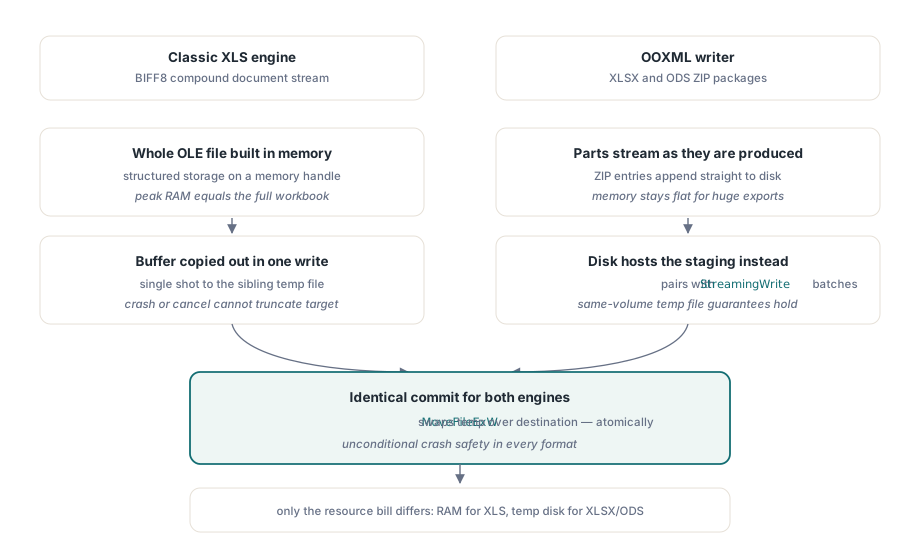
The two save engines reach the same crash-safe outcome by different routes, and the difference matters if you are already tuning either one for a large batch job. The classic XLS writer builds the entire OLE compound document in memory first, using structured storage backed by a memory handle, and only copies that finished buffer out to the sibling temporary file in one write; the reasoning in HotXLS's own source is direct: building the whole file in memory first is what stops a failed or cancelled save from ever truncating the destination. The XLSX and ODS writer instead streams its ZIP entries into the temporary file as they are produced, the same file-level staging with a different memory profile. If you are already leaning on StreamingWrite to keep large XLSX exports inside a container's memory limit, know that the equivalent lever for classic XLS export does not exist in the same form: the crash-safe guarantee is unconditional either way, but a very large legacy .xls export holds its complete output in RAM regardless, a trade-off covered in more depth in our article on streaming writes for server batch jobs
Applying the same pattern outside HotXLS, and where the guarantee ends
Borrowing the pattern is mostly a matter of wiring up the same two Windows API calls HotXLS relies on internally. GetTempFileNameW hands you a uniquely named, empty file in a folder you choose, and MoveFileExW commits your finished write over the real destination in one step; a minimal version of the same routine HotXLS runs before every SaveAs looks like this
function SaveFileAtomically(const Path: WideString; const Contents: TBytes): Boolean;
var
  Dir, TempName: WideString;
  Buffer: array[0..MAX_PATH] of WideChar;
  FS: TFileStream;
begin
  Result := False;
  Dir := ExtractFilePath(ExpandFileName(Path));
  FillChar(Buffer, SizeOf(Buffer), 0);
  if GetTempFileNameW(PWideChar(Dir), 'app', 0, @Buffer[0]) = 0 then
    Exit;
  TempName := PWideChar(@Buffer[0]);
  try
    FS := TFileStream.Create(TempName, fmCreate or fmShareExclusive);
    try
      FS.WriteBuffer(Contents[0], Length(Contents));
    finally
      FS.Free;
    end;
    Result := MoveFileExW(PWideChar(TempName), PWideChar(ExpandFileName(Path)),
      MOVEFILE_REPLACE_EXISTING or MOVEFILE_WRITE_THROUGH);
  finally
    if not Result then
      DeleteFileW(PWideChar(TempName));
  end;
end;
The guarantee has real edges worth knowing before you rely on it blindly. Staging a full copy before replacing the original means a save briefly needs disk space for both the old file and the new one, roughly double the workbook's size for the duration of the write, which is fine for a report and worth checking for a multi-gigabyte export running against a nearly full volume. The temporary file also has to land in the same folder as the destination, so whatever account HotXLS is running under needs create-file permission on that folder specifically, not merely permission to overwrite the one file it already knows about; a deployment that locks a destination folder down to in-place edits of specific existing filenames, rather than folder-level write access, will see SaveAs fail on the temp-file step even though the equivalent direct write would have succeeded
Two more boundaries are worth flagging plainly. A destination on a network share or inside a folder synced by OneDrive or a similar client can behave differently from local NTFS even though Windows still reports it as a single volume, since the filesystem driver in front of it may not implement rename the same way; if your deployment target saves across a network path, it is worth testing a forced interruption there specifically rather than assuming local-disk behaviour carries over. And the whole mechanism is scoped to saving into a named file. Call SaveAs against a TStream instead, and HotXLS writes into whatever stream you handed it directly, with no destination file to stage or protect, because the durability of that stream (a memory buffer, a network upload, a database blob) is entirely your code's responsibility from that point on
A verification pass gets to rely on exactly this guarantee afterward, including the kind built into a workbook audit and conversion workbench: a reopened file that comes back short or missing is a real conversion problem to chase down, never a save that got interrupted halfway and left something ambiguous on disk. Crash-safe staged writes are built into SaveAs for every XLSX, ODS, and classic XLS workbook produced by the HotXLS Delphi Component for Delphi and C++Builder, with no configuration required to turn it on