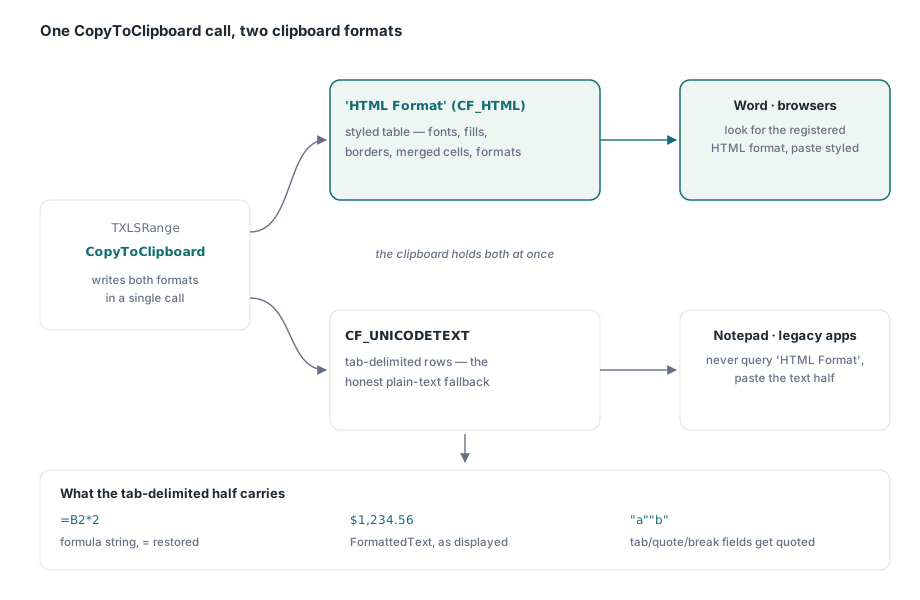
Copy a range out of a Delphi grid and paste it into Word, and the formatting usually vanishes: plain text, no bold headers, no borders, no fills. HotXLS closes that gap with TXLSRange.CopyToClipboard, which puts a CF_HTML clipboard payload — the Windows format for styled HTML with byte-exact fragment markers — on the clipboard next to plain Unicode text
That sounds simple until you look at what a CF_HTML payload actually requires. The format needs a short text header naming exactly where the fragment begins and ends inside the larger clipboard buffer, and those positions are byte offsets, counted through whatever multi-byte encoding the HTML ends up in. Get the arithmetic wrong by even one byte and the target application either grabs the wrong slice of markup or gives up and falls back to plain text, and neither failure looks like a bug in your code — it looks like Word being Word
Why copy-paste from a Delphi grid usually loses its formatting
The default Windows clipboard call most Delphi code reaches for, SetClipboardData with CF_TEXT or CF_UNICODETEXT, only ever carries plain characters, so any styling applied in the source grid has nowhere to go. Word, Outlook, and every Chromium-based browser look for a richer format when you paste: an HTML representation of the selection, complete with inline styles, table structure, and links. Excel itself relies on exactly this trick — copy a range in Excel and the clipboard quietly receives several formats at once, HTML among them, so whichever application you paste into picks the richest one it understands. A component that only ever writes CF_UNICODETEXT hands every one of those richer consumers nothing to work with, and the visual richness the user just copied simply is not there to paste
What exactly is the CF_HTML clipboard format?
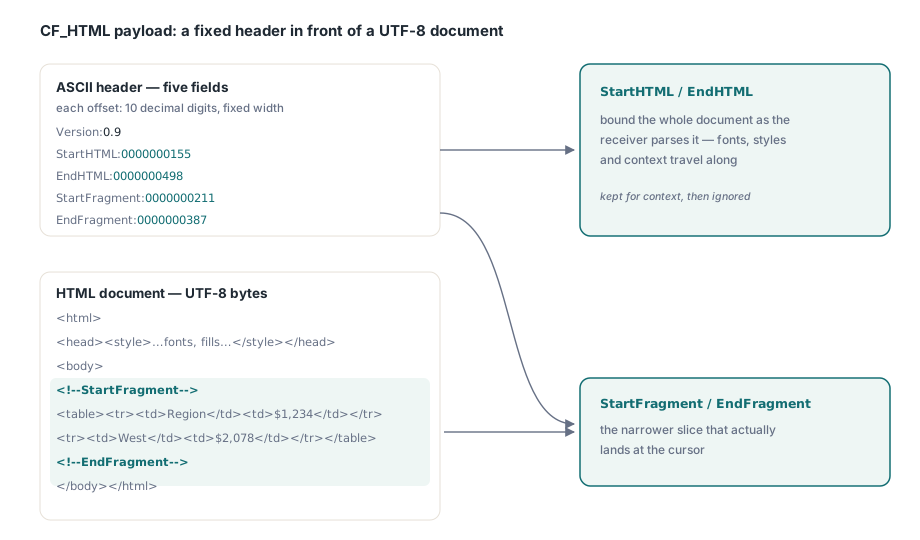
CF_HTML is not a fixed system clipboard format like CF_TEXT; it is a dynamically registered one, requested by name through RegisterClipboardFormat('HTML Format'), and its payload is a short ASCII header followed by an HTML document or fragment. The header carries five fields — Version, StartHTML, EndHTML, StartFragment, EndFragment — where Version is always 0.9 and the other four are decimal numbers written out as ASCII digits. StartHTML and EndHTML bound the whole document as the receiving application should parse it for context, fonts and styles included, while StartFragment and EndFragment bound the narrower slice that actually lands at the cursor, conventionally marked in the markup itself with <!--StartFragment--> and <!--EndFragment--> comments so the boundaries survive naive re-serialisation
Byte offsets, not character counts: the classic CF_HTML trap
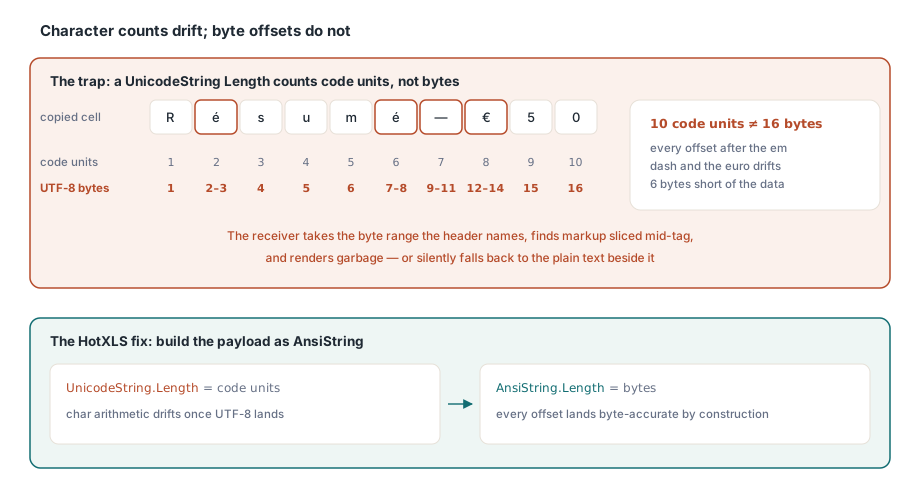
CF_HTML's four numeric header fields are byte offsets into the exact sequence of bytes sitting on the clipboard, counted from the very first character of the header itself — not character counts, not Unicode code points, and not offsets relative to the fragment or the <body> tag. That distinction is where hand-rolled CF_HTML implementations quietly go wrong: a Delphi UnicodeString's Length reports UTF-16 code units, which happens to equal the byte count for plain ASCII text, so the bug ships clean through any test written with English sample data and only shows up once a copied cell holds an em dash, a currency symbol, or an accented character — a euro sign is one UTF-16 code unit but three bytes in UTF-8, and every offset computed after that point drifts by however many extra bytes the encoding added. The failure that follows is not a crash; it is the receiving application seizing the exact byte range the header pointed to, finding a slice of markup that starts or ends mid-tag, and either rendering garbage or giving up and falling back to whatever plain text sits next to it on the clipboard, silently, with nothing in your code to explain why — here is the shape of code that produces exactly that failure:
// Fragile: Length() on a UnicodeString counts UTF-16 code units, not bytes
var
  Header: string;
  Fragment: string;
  StartFragmentOfs: Integer;
begin
  Header := 'Version:0.9'#13#10 + 'StartHTML:0000000000'#13#10 + '...';
  StartFragmentOfs := Length(Header) + Pos('<!--StartFragment-->', Fragment);
  // A currency symbol, an em dash, or any accented character placed
  // before this point costs one character here but two or three bytes
  // once the document is UTF-8 encoded, so StartFragmentOfs now points
  // short of where the fragment actually begins on the real clipboard
end;
How HotXLS keeps the header byte-accurate
HotXLS avoids this class of bug structurally: TXLSRange.CopyToClipboard and the lxClipboard unit underneath it build the CF_HTML document and its header entirely as AnsiString, Delphi's byte-string type, so Length and Pos already return byte positions everywhere in the calculation — there is no separate step, and therefore no step to forget, where a Unicode character count would need converting into a byte count before it goes into the header
There is a second, smaller trick worth knowing if you ever build a CF_HTML header by hand. The header gets written twice: once with ten zero digits standing in for each of the four offsets, so its own byte length can be measured, and once more with the real offsets patched in. Because every real offset is formatted to that same fixed ten-digit width, the second header comes out byte-for-byte the same length as the placeholder version, which is exactly why the earlier measurement stays valid after the rewrite. Skip the fixed width, format a number with a plain IntToStr instead, and the header can shrink or grow by a digit between the two passes, quietly invalidating every offset that follows it:
const
  Placeholder = '0000000000';   // 10 ASCII digits: fixed width in, fixed width out
var
  Header: AnsiString;           // AnsiString.Length is a byte count, not a char count
  StartHtmlOfs: Integer;
begin
  Header := 'Version:0.9'#13#10 +
    'StartHTML:' + Placeholder + #13#10 +
    'EndHTML:' + Placeholder + #13#10 +
    'StartFragment:' + Placeholder + #13#10 +
    'EndFragment:' + Placeholder + #13#10;
  StartHtmlOfs := Length(Header);   // safe to measure once, up front
  // ...compute the real offsets against the AnsiString document...
  // then rebuild Header with the real numbers formatted to the same
  // 10-digit width, so its byte length -- and therefore StartHtmlOfs --
  // never moves between the placeholder pass and the final one
end;
Why the plain-text payload still has to ride along
TXLSRange.CopyToClipboard never places CF_HTML on the clipboard alone; it always writes CF_UNICODETEXT in the same call, because CF_HTML is a registered format rather than one of the fixed CF_* constants every Windows application already knows to look for — a plain text editor, a legacy grid, or anything that never checked for 'HTML Format' will not see it at all, and the range you copied either arrives as tab-delimited text or it does not arrive. That tab-delimited text is not a rough approximation, either: formula cells copy as their formula string with a leading = restored if the stored text dropped it, matching how Excel's own clipboard text behaves, ordinary cells copy their FormattedText — the string as displayed, so a currency cell copies as $1,234.56, not the underlying 1234.56 — and any field containing a tab, a quote, or a line break gets quoted with embedded quotes doubled, the same convention CSV uses
SaveAsHTML is not a separate rendering path bolted on just for the clipboard case. CopyToClipboard calls the very same HTML writer described in HotXLS's CSV, TSV, and HTML export, then wraps whatever that writer produces in the CF_HTML envelope instead of saving it as a standalone file, so anything true of that HTML carries straight through to what lands on the clipboard. Pulling a worksheet range together as both formats in one call looks like this:
var
  Book: TXLSXWorkbook;
begin
  Book := TXLSXWorkbook.Create;
  try
    Book.Open('quarterly-report.xlsx');
    // Classic TXLSWorkbook ranges expose the identical method as
    // Workbook.Sheets[1].Range['A1', 'F40'].CopyToClipboard
    if Book.Sheets[1].Range['A1:F40'].CopyToClipboard then
      ShowMessage('Range copied - press Ctrl+V in Word or a browser')
    else
      ShowMessage('Clipboard was busy; see the retry pattern below');
  finally
    Book.Free;
  end;
end;
Does the pasted range keep its fonts, colours, and merged cells?
Yes, because the HTML half of the payload is a full rendering of the range, not a bare data dump: fonts, fill colours, borders, number formats, and merged cells all come through as inline styles and table structure, the same styling machinery covered in HotXLS's guide to conditional formatting and rich text, since a cell's rich text runs and conditional formatting result both feed the same rendering CopyToClipboard reads from. What does not survive the trip is live-formula behaviour: a formula cell's plain-text form carries the formula string, so a spreadsheet-aware paste target could in principle recompute it, but the HTML form only ever carries the last computed result, because HTML has no concept of a formula for a browser or a word processor to evaluate
Verifying the paste, and handling a busy clipboard
Two habits catch most clipboard problems before a customer does. Paste into Notepad first to confirm the CF_UNICODETEXT fallback is sane tab-delimited text, then paste the same copy into Word or a browser to confirm the styled version shows up — a payload that looks right in one and wrong in the other usually means the fragment markers landed in the wrong place. Then treat the Boolean result CopyToClipboard returns as meaningful, not decorative: OpenClipboard can fail when another process is holding the clipboard open, common enough on a busy desktop that one unchecked call eventually pastes nothing with no error to explain why, which is what the retry below guards against:
function TryCopyRangeToClipboard(Workbook: TXLSXWorkbook): Boolean;
var
  Attempt: Integer;
begin
  Result := False;
  for Attempt := 1 to 5 do
  begin
    Result := Workbook.Sheets[1].Range['A1:F40'].CopyToClipboard;
    if Result then
      Break;
    Sleep(50);   // give whichever app is holding the clipboard a moment
  end;
  if not Result then
    raise Exception.Create('Could not take ownership of the clipboard');
end;
The format itself is not exotic once the header is byte-accurate and the plain-text fallback is honest about what it contains — it has existed largely unchanged since Internet Explorer first defined it, and every major Windows application still reads it the same way. CopyToClipboard sits alongside PasteFromClipboard, the read side of the same exchange, in the wider clipboard and export surface documented on the HotXLS Delphi Component product page