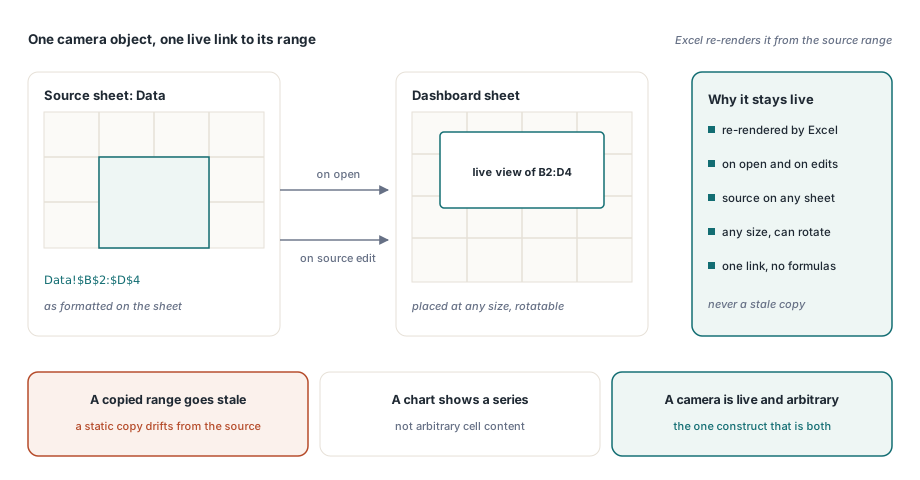
HotXLS creates Excel camera objects on XLSX worksheets from Delphi through AddCamera. A camera object is a picture that is permanently linked to a range of cells: Excel re-renders it from the source range every time the workbook opens or the source changes, so a dashboard can show a live view of a table that lives on another sheet, at any size, rotated if you like
The feature exists in Excel as the Camera tool, a button most users have never seen because it is not on the ribbon by default. It solves a real dashboard problem better than the alternatives: a copied range goes stale, a chart cannot show arbitrary cell content, and a linked picture pasted by hand cannot be generated by code. A camera object is the one construct that is both live and arbitrary
Where is this documented, and why does that matter?
The main spreadsheet specification does not describe camera objects; they are treated as an implementation detail. The authoritative description lives in the drawing-markup documentation, under the Camera Tool heading, and knowing that saves an afternoon of searching the wrong document
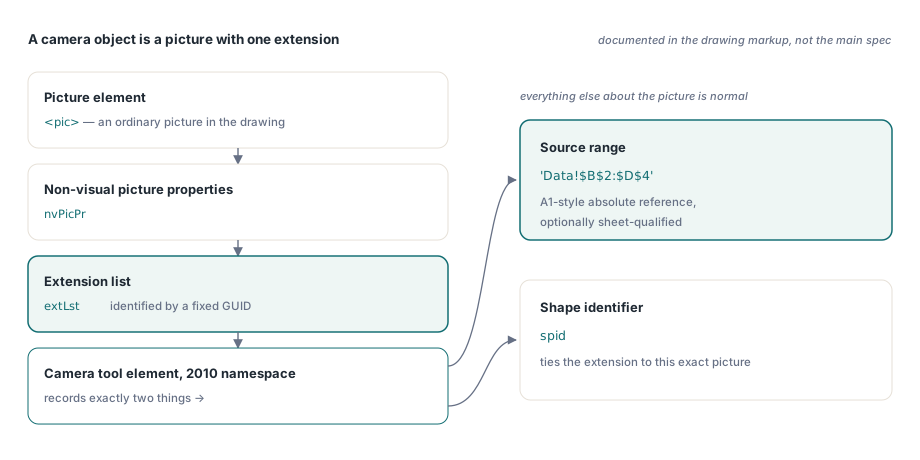
Structurally, a camera object is an ordinary picture element whose non-visual picture properties carry an extension list. The extension is identified by a fixed GUID, and inside it an element from the 2010 drawing namespace records two things: the source range as an A1-style absolute reference, optionally sheet-qualified, and a shape identifier. Everything else about the picture is normal
Creating one
Two overloads exist because two ways of naming a range are convenient. The text form takes the reference exactly as it will be stored, which is what you want for a cross-sheet source. The coordinate form takes four cell coordinates on the same sheet and builds the absolute reference for you:
uses
  lxHandleX;

var
  Book: TXLSXWorkbook;
  Dashboard: TXLSXWorksheet;
  Cam: TXLSXImage;
begin
  Book := TXLSXWorkbook.Create;
  try
    if Book.Open('reporting.xlsx') <> 1 then
      Exit;
    Dashboard := Book.Sheets[0];

    // Live view of Data!$B$2:$D$4, placed over B10:F20 on the dashboard
    Cam := Dashboard.AddCamera('Data!$B$2:$D$4', 10, 2, 20, 6);

    // The placement box defaults to Excel's own 64 px columns and
    // 20 px rows; adjust the drawn size in EMU afterwards if needed
    Cam.WidthEMU := Round(12.5 * 914400 / 2.54);   // 12.5 cm
    Cam.HeightEMU := Round(6.0 * 914400 / 2.54);

    Book.SaveAs('reporting-dashboard.xlsx');
  finally
    Book.Free;
  end;
end;
The returned object is a normal picture object with one extra property, CameraRange, which is non-empty exactly when the picture is a camera. That is also how you detect cameras in a workbook you did not create: enumerate the pictures and check the property
Why does the placeholder image not need to be real?
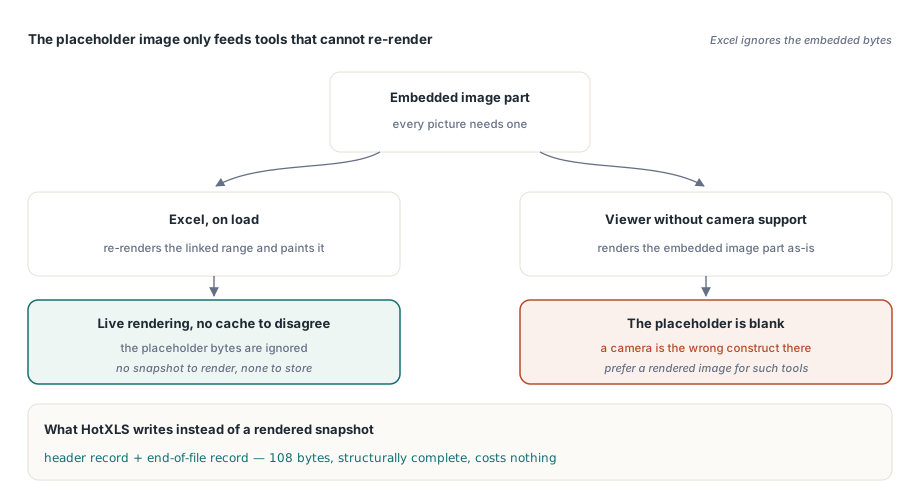
Every picture in an XLSX package needs an image part, and a camera object is no exception. But Excel ignores that image: on load it re-renders the linked range and paints the result. The embedded bytes exist purely as a display cache for tools that do not implement the camera behaviour
That fact removes an entire subsystem from the implementation. There is no need to rasterise the source range, no need for a rendering engine to produce the snapshot, and no risk of the cached image disagreeing with the live one in Excel. HotXLS writes a minimal placeholder metafile — a header record and an end-of-file record, 108 bytes in total — which keeps the package structurally complete and costs nothing
One consequence to plan for: a viewer that renders XLSX without implementing camera objects shows the placeholder, which is blank. If your workbooks are consumed by such a tool, a camera object is the wrong construct and a rendered image of the range is the right one
The unit conversion that is easy to get wrong
Drawing geometry in Open XML is measured in English Metric Units, where one inch is 914,400 EMU and one centimetre is 360,000. Metafile headers, however, record their frame in units of 0.01 millimetre. The conversion between them is a division by 360
It is worth naming this because the mistake is silent. Converting through pixels at 96 DPI instead — multiplying by 2540 and dividing by 9525 — produces a value 96 times too large, and nothing rejects it: the package is valid, the picture is placed correctly by the anchor, and only the metafile's declared frame is nonsense. The EMU model and its rounding behaviour are covered in image geometry, EMU units and scaling
Round-tripping a workbook that already has cameras
Opening and saving a workbook preserves camera objects, including the extension element and its range reference. This matters more than creating them: most workbooks with camera objects were made in Excel by an analyst, and a library that silently converts them into ordinary pictures on save has destroyed the live behaviour the analyst relied on
// Audit which pictures are cameras and where they point
for I := 0 to Sheet.Images.Count - 1 do
  if Sheet.Images[I].CameraRange <> '' then
    Writeln(Format('camera %d -> %s',
      [I, Sheet.Images[I].CameraRange]));
When you generate dashboards programmatically, the audit is also the regression test: after a save-and-reopen cycle, the same number of cameras must point at the same ranges. General picture and drawing handling, including the anchoring model that positions them, is covered in charts, images and drawings
When a camera beats the alternatives
Use a camera object when the same live table must appear on several sheets at different sizes, when a print layout needs a region of one sheet composed alongside regions of others, or when a summary block should follow edits made elsewhere without a formula linking every cell individually
Prefer ordinary formulas when the target is a handful of cells, because a cross-sheet formula is simpler and every tool understands it. Prefer a chart when the data is genuinely a series rather than a formatted block. And prefer a rendered image when the workbook will be consumed by tools other than Excel, or when the snapshot must not change after delivery — an archived report should not be live
One layout note from practice: a camera shows the source range exactly as formatted, including merged cells, conditional formats and column widths. Getting a clean-looking dashboard block therefore starts with formatting the source range as if it were the finished output, which is the same discipline described in merged cells and report template layout
Camera objects, drawings and the XLSX package writer behind them ship in one library for Delphi and C++Builder; the complete feature list is on the HotXLS Delphi spreadsheet component page