An Excel workbook can carry EMF and WMF pictures, and the conventional way to draw one is to hand the byte stream to the operating system metafile player. That is a decision worth looking at directly: a metafile is a serialised command stream for a graphics API, and playing one back means letting a file that arrived over email drive the graphics driver. HotXLS takes the other route. XLSDecodeVectorScene parses the metafile itself, validates the header, every record size, the declared record total and the exact placement of the end-of-file record, rejects escape records outright, and returns a TXLSVectorScene of primitive drawing commands that the Canvas and SVG backends replay through their own code. No driver playback is involved at any point
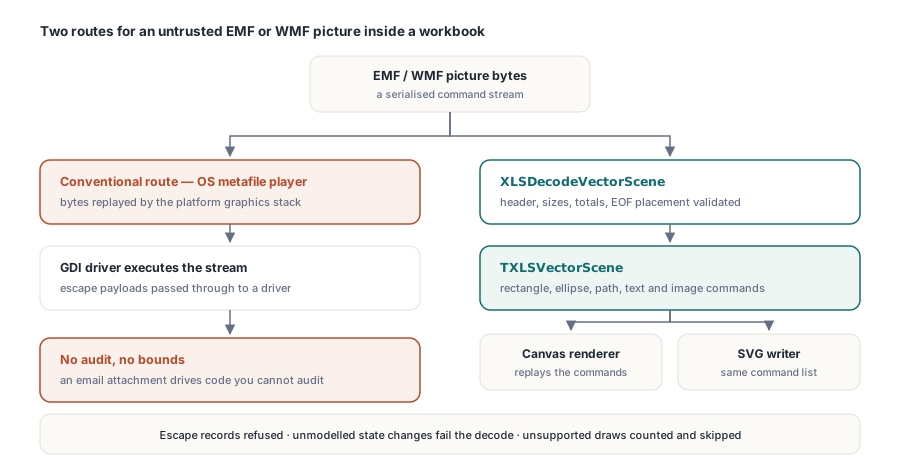
The trade is coverage for containment. A rectangle-oriented command whitelist will not reproduce every metafile a designer can create, so the scene reports how many drawing records it could not represent and the caller decides what to do about it. For a server process rendering documents it did not create, that trade is the right way round
Why is metafile playback a poor fit for untrusted input?
Because the format is not a picture, it is a program. An EMF record stream manipulates a device-context state stack, allocates and selects objects from a handle table, and can carry escape records whose payload is passed through to a device driver. Replaying it exercises paths in the platform graphics stack that were written on the assumption that the metafile came from a cooperating application on the same machine. When the input is a spreadsheet attachment, that assumption is gone, and no amount of care inside the spreadsheet library helps because the library is not the component doing the parsing
This is the same reasoning that governs the container layer. A workbook is a ZIP archive, and HotXLS validates its central directory rather than trusting declared offsets, as described in the ZIP end-of-central-directory validation article. Metafile payloads are the next layer of the same problem
What the decoder checks before it draws anything
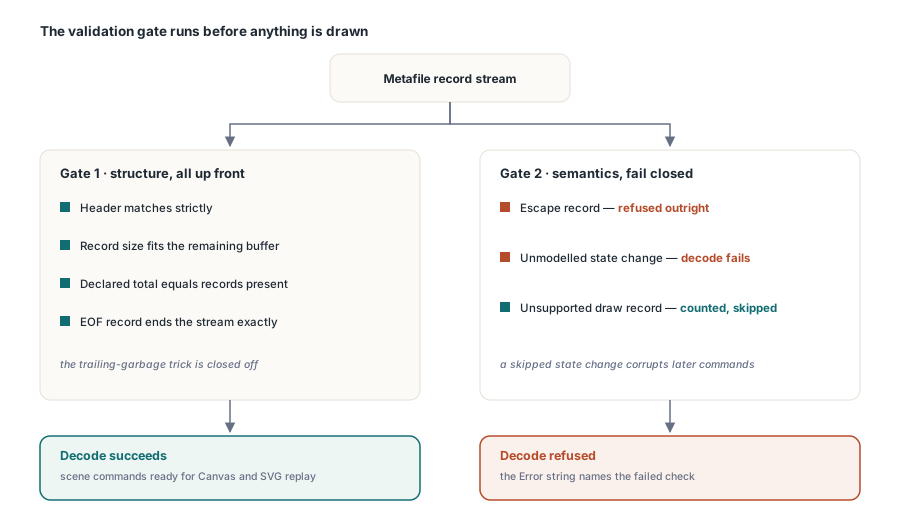
The validation is structural and it happens up front, because a parser that starts drawing and validates as it goes has already acted on data it has not verified. The header must match strictly rather than plausibly. Every record must declare a size that fits inside the remaining buffer and is large enough for its own fixed fields. The record count the header declares must match the records actually present. The end-of-file record must sit exactly where the stream ends, not merely somewhere near it, which closes off the trailing-garbage trick that hides a second payload behind a valid picture
Beyond structure, the decoder is fail-closed on semantics. Escape records are refused, not skipped. A state-changing record the decoder does not model causes the decode to fail rather than being ignored, because ignoring a state change means every subsequent drawing command is executed in a state the file did not ask for, and the result is a picture that is wrong in a way no one can predict. Drawing records outside the supported command set are a different matter: those are counted and skipped, because a missing shape is a visible, reportable gap rather than a silent corruption
Budgets are part of the format contract
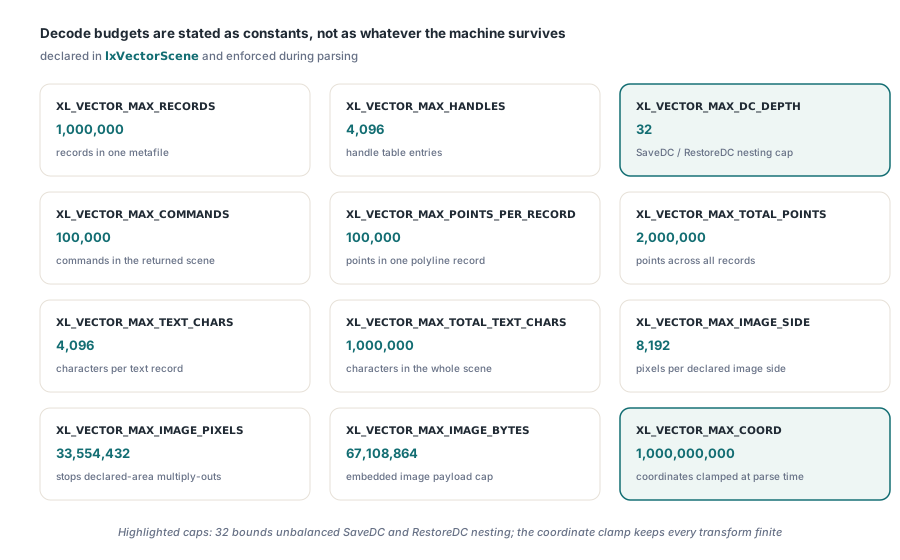
Vector formats have their own version of the decompression bomb. A few kilobytes of records can declare polylines with hundreds of millions of points, or an image whose declared dimensions multiply into terabytes. Bounds therefore have to be explicit constants rather than whatever the machine happens to survive
// From lxVectorScene: the decode budget, stated rather than implied
XL_VECTOR_MAX_RECORDS           = 1000000;
XL_VECTOR_MAX_HANDLES           = 4096;
XL_VECTOR_MAX_DC_DEPTH          = 32;
XL_VECTOR_MAX_COMMANDS          = 100000;
XL_VECTOR_MAX_POINTS_PER_RECORD = 100000;
XL_VECTOR_MAX_TOTAL_POINTS      = 2000000;
XL_VECTOR_MAX_TEXT_CHARS        = 4096;
XL_VECTOR_MAX_TOTAL_TEXT_CHARS  = 1000000;
XL_VECTOR_MAX_IMAGE_SIDE        = 8192;
XL_VECTOR_MAX_IMAGE_PIXELS      = 32 * 1024 * 1024;
XL_VECTOR_MAX_IMAGE_BYTES       = 64 * 1024 * 1024;
XL_VECTOR_MAX_COORD             = 1000000000;
Two of these deserve a note. The device-context depth cap of 32 exists because SaveDC and RestoreDC records nest, and an unbalanced stream can push forever; 32 is generous for real metafiles and cheap to enforce. The coordinate cap exists because coordinates feed a transform, and a value near the limits of the integer range produces a transformed result that is either infinite or wraps, after which every bounding-box computation downstream is nonsense. Clamping coordinates at parse time is much easier to reason about than defending every consumer of the geometry
Using the scene
The decoder hands back an object you own, a command count, a nominal size, and a count of drawing records it chose not to represent
uses
  lxVectorScene;

var
  Scene: TXLSVectorScene;
  Error: WideString;
  I: Integer;
begin
  // Data holds the raw picture payload taken from the workbook
  if not XLSDecodeVectorScene(Data, xlsvfEmf, Scene, Error) then
  begin
    // Refused: header, bounds, totals, EOF placement or a budget
    LogReject('metafile rejected: ' + Error);
    Exit;
  end;
  try
    if Scene.SkippedDrawRecords > 0 then
      LogWarning(Format('%d drawing records outside the safe subset',
        [Scene.SkippedDrawRecords]));
    for I := 0 to Scene.Count - 1 do
      case Scene.Commands[I].Kind of
        xlsvcRectangle: DrawRect(Scene.Commands[I]);
        xlsvcEllipse:   DrawEllipse(Scene.Commands[I]);
        xlsvcPolyline,
        xlsvcPolygon,
        xlsvcBezier:    DrawPath(Scene.Commands[I]);
        xlsvcText:      DrawText(Scene.Commands[I]);
        xlsvcImage:     DrawImage(Scene.Commands[I]);
      end;
  finally
    Scene.Free;
  end;
end;
The command record carries everything a backend needs and nothing that requires a device: pen presence, colour, width and style; brush presence and colour; the geometry; and for text the string, font name, size, styles and alignment. That is what makes the same scene usable by both the on-screen canvas renderer and the SVG writer, and it is why the vector path does not diverge between preview and export. Screen rendering of worksheet content generally is covered in the custom VCL grid rendering article
Rejecting a picture does not damage the workbook
An important property of this design is that a refused decode affects rendering only. The original payload stays in the model, so a workbook that is opened and saved again carries its metafile pictures out byte for byte, whether or not the safe decoder could draw them. The existing bounded raster path also remains available as a fallback. In other words, the strict parser gates what gets executed, not what gets preserved, which is the distinction that lets a security-motivated change ship without turning into a data-loss change
Drawing-object handling in general, including the parts of the object model that survive round-trips untouched, is covered in the charts, images and drawings article
Where this leaves a server deployment
If you render user-uploaded workbooks in a service, the practical position is now defensible: metafile pictures are parsed by code you can audit, bounded by constants you can read, and never handed to a graphics driver. The honest caveat is coverage. Complex metafiles produced by drawing tools will hit the skipped-record counter, and the answer to that is to surface the counter rather than to widen the whitelist quietly. A picture that renders partially and says so is a support conversation; a picture that renders wrongly and says nothing is a bug report from a customer
HotXLS handles XLS, XLSX, ODS and CSV natively in Delphi and C++Builder without Excel installed, and the same bounded-parse philosophy runs through its container, formula and drawing layers. Format and security details are listed on the HotXLS Delphi spreadsheet component product page