HotXLS stores worksheet selections and scroll positions per pane through one pane-aware API on both TXLSWorksheet and TXLSXWorksheet: SelectAreas, GetSelectedAreas, ScrollWindow, and TryGetWindowScroll. For classic .xls files, HotXLS writes BIFF8 Selection records (0x001D) of at most 1369 areas each, converts logical pane names into the pane bytes the format defines, and keeps each scroll axis on the Window2 or Pane record where Excel expects it
The problem usually shows up in a reconciliation or audit tool. The tool opens a ledger export, finds every cell that disagrees with the source system, and saves the workbook with those cells already selected under a frozen header row, so the reviewer lands on the differences instead of scrolling for them. With forty differences it works fine. The month-end file has 3,000, and a single Selection record holding 3,000 areas cannot exist: its body would need 18,009 bytes, more than twice what one BIFF8 record can carry. Scroll position has a similar trap. On a sheet with frozen panes, "where the user was looking" is four panes sharing two row positions and two column positions, not one coordinate
Why does a large selection need more than one Selection record?
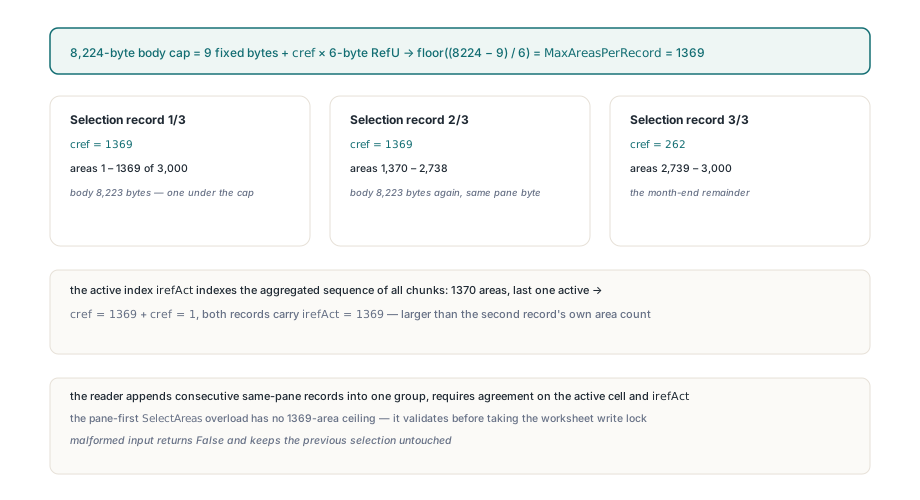
A large selection needs several records because a BIFF8 record body is capped at 8224 bytes and every selected area costs a fixed six bytes. [MS-XLS] §2.4.248 lays out the Selection record as a 9-byte fixed part (the pane byte, rwAct and colAct for the active cell, irefAct for the active area, and cref for the area count) followed by cref RefU structures, each holding two 16-bit rows and two 8-bit columns. The largest count that fits is (8224 − 9) / 6 rounded down, which is 1369, and that produces an 8223-byte body, one byte under the limit. TXLSWorksheet.StoreSelectionGroup uses that constant as MaxAreasPerRecord and writes a larger group as consecutive Selection records for the same pane, 1369 areas at a time
The detail that bites is irefAct. Each chunk repeats the same active row, active column, and active area index, and irefAct indexes the aggregated sequence of all chunks, not the areas inside the record that carries it. A selection one area past the limit makes this concrete: 1370 areas with the last one active become two records, the first with cref 1369 and the second with cref 1, and both carry irefAct 1369. That value is larger than the second record's own area count. A reader that checks irefAct against cref in each record rejects a valid file, and a reader that replaces its state on every record drops the first 1369 areas. The HotXLS reader appends consecutive same-pane records into one group, requires every chunk to agree on the active cell and index, and runs the range check only at the worksheet's EOF record, once the full sequence is known. The pane-first SelectAreas overload therefore has no 1369-area ceiling. It validates every A1 reference and the active index before it takes the worksheet write lock, and it returns False with the previous selection unchanged if anything is malformed
var
  Book: TXLSWorkbook;
  Sheet: TXLSWorksheet;
  Diffs: TXLSSelectedAreas;
  I: Integer;
begin
  Book := TXLSWorkbook.Create;
  try
    Sheet := Book.Sheets.Add;
    Sheet.FreezePanes(1, 1);           // header row and column A stay put

    SetLength(Diffs, 3000);
    for I := 0 to High(Diffs) do
      Diffs[I] := Format('C%d', [I + 2]);

    // Freezing resets the stored selection, so select after freezing.
    // 3000 areas are saved as three Selection records: 1369 + 1369 + 262
    if not Sheet.SelectAreas(xlspBottomRight, Diffs, 0) then
      raise Exception.Create('Selection rejected');

    Book.SaveAs('reconciliation.xls');
  finally
    Book.Free;
  end;
end;
Which pane byte does a Selection record use?
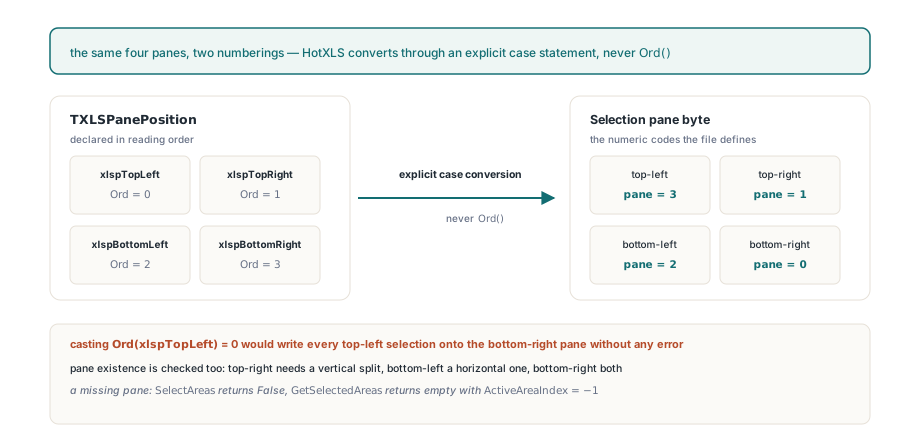
A Selection record identifies its pane by the numeric code the format defines: 0 for bottom-right, 1 for top-right, 2 for bottom-left, and 3 for top-left. The public enumeration TXLSPanePosition is declared in reading order, xlspTopLeft, xlspTopRight, xlspBottomLeft, xlspBottomRight, so Ord(xlspTopLeft) is 0, which is the bottom-right pane in the file. Casting the enum straight into the pane byte would write every top-left selection onto the bottom-right pane without any error. Every pane-aware HotXLS entry point converts the enum through an explicit case statement instead, so callers never deal with the numeric codes at all. Pane existence is checked as well: the top-right pane exists only with a vertical split, the bottom-left only with a horizontal one, and the bottom-right only with both. For a pane the current split or freeze geometry does not have, SelectAreas returns False, and GetSelectedAreas returns an empty array with ActiveAreaIndex set to -1, without creating a pane, a selection object, or a cell in the workbook
Where does each pane's scroll position live?
The scroll position of each pane is split across two records, because four panes share only two row positions and two column positions. In a classic workbook, the upper panes' first visible row and the left panes' first visible column are Window2.rwTop and Window2.colLeft, while the lower panes' row and the right panes' column are Pane.rwTop and Pane.colLeft. ScrollWindow(xlspTopRight, R, C) therefore writes Window2.rwTop and Pane.colLeft, and setting the column of the top-right pane also moves the bottom-right pane, just as the two share one horizontal scrollbar in Excel. The public methods use 1-based row and column numbers. A missing pane returns False and sets both query outputs to zero, and an out-of-range coordinate is rejected before either axis changes. Nothing here depends on how a viewer paints the grid. A rendering control keeps its own TopRow and LeftCol, as the article on rendering workbooks in a custom VCL grid describes, and those are runtime state, not what gets saved
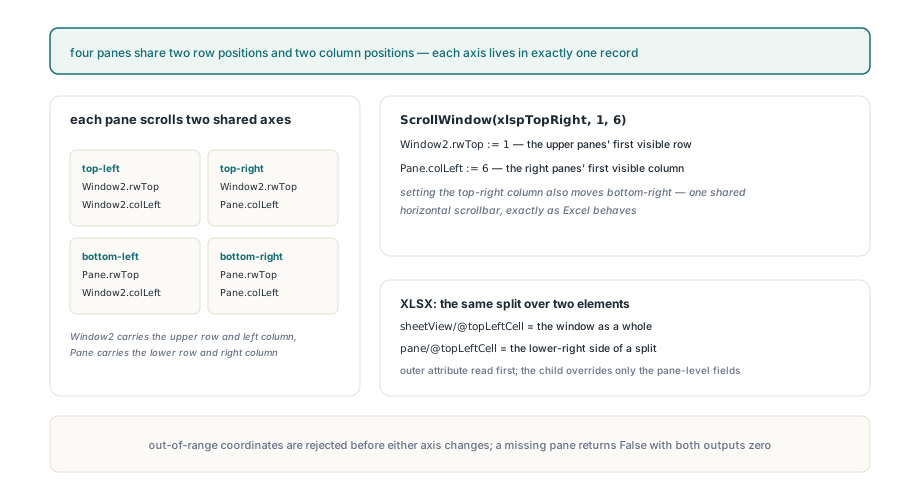
XLSX spreads the same data over two elements: sheetView/@topLeftCell (ECMA-376 Part 1, §18.3.1.87) for the window as a whole and the child pane/@topLeftCell (§18.3.1.66) for the lower-right side of a split. Both attributes can be present at once. HotXLS reads the outer attribute first into the window-level fields, lets the pane child override only the pane-level fields, and writes both back separately. Collapsing the two layers into one is exactly how an upper or left scroll position silently disappears on load. Worksheet copies carry both layers in both engines. The older entry points keep their original behaviour: the classic ScrollRow and ScrollColumn properties, and the zero-based XLSX SetPaneScroll and GetPaneScroll. Freeze and split geometry itself is configured with the sheet-level settings covered in sheet protection, page setup, and printing
var
  Row, Col: Integer;
begin
  Sheet.FreezePanes(1, 1);

  // Bottom-right: lower row axis (Pane.rwTop) and right column axis (Pane.colLeft)
  Sheet.ScrollWindow(xlspBottomRight, 500, 3);

  // Top-right shares the right column axis, so this also moves bottom-right to column 6
  Sheet.ScrollWindow(xlspTopRight, 1, 6);

  if Sheet.TryGetWindowScroll(xlspBottomRight, Row, Col) then
    Memo1.Lines.Add(Format('Bottom-right starts at row %d, column %d', [Row, Col]));
    // Bottom-right starts at row 500, column 6
end;
What happens when a Selection record is corrupt?
When a Selection record is corrupt, HotXLS keeps it as opaque bytes, reports diagnostic code 1304 (xlsDiagnosticSelectionRecordInvalid), and writes the original body back byte for byte on save. Before a record joins its pane's group, the reader checks it in order. The pane byte must be 3 or less. Records for one pane must be contiguous in the stream. The 9 fixed bytes must be present. cref must be between 1 and 1369, and the body must be exactly 9 + cref × 6 bytes long. Every chunk in a group must agree on the active cell and irefAct, irefAct must not have its sign bit set, the active column must be on the grid, and no area may have reversed bounds. Problems in a single physical record are reported once per record. Contradictions that only appear after aggregation, such as irefAct pointing past the total area count or an active cell outside the indexed area, are reported once per group at EOF. An invalid group stays invisible to the typed API: GetSelectedAreas returns an empty array with index -1 for that pane, while every other pane keeps working
var
  I: Integer;
  D: TXLSDiagnostic;
begin
  if Book.Open('supplier-upload.xls') <> 1 then
    Exit;
  for I := 0 to Book.Diagnostics.Count - 1 do
  begin
    D := Book.Diagnostics[I];
    if D.Code = xlsDiagnosticSelectionRecordInvalid then
      Log.Add(Format('%s: record $%.4x kept opaque (%s)',
        [D.SheetName, D.RecordId, D.Message]));
  end;
end;
How do selections survive row and column inserts?
Selections survive structural edits because inserting or deleting whole rows or columns remaps every represented pane group in both the classic and XLSX engines through one shared remapper. Surviving areas keep their order and the active area keeps its identity. If the active area is deleted, the first surviving successor becomes active, then the last surviving predecessor if nothing follows it. If every area is deleted, the group collapses to one cell at the deletion boundary, and an active cell that no longer falls inside the chosen area moves to that area's top-left corner, so the index and the coordinate never contradict each other. The limits are deliberate. Invalid classic groups are skipped by the remapper rather than rewritten into a made-up selection, so their original bytes still round-trip. Editing one pane replaces only that pane's records and leaves the others byte-identical. ODS gets no pane selection state at all, because ODF has no equivalent worksheet view structure to carry it
If your application writes .xls files that users open and need to navigate, whether to review flagged cells, resume where they stopped, or share a frozen dashboard, the pane-aware selection and scroll API is part of the HotXLS Delphi spreadsheet component, and it works the same way for XLS and XLSX