HotXLS numbers every BIFF8 font reference the way [MS-XLS] §2.5.129 FontIndex defines it: values 0 to 3 are zero-based, values above 4 are one-based, and 4 never appears, so the fifth FONT record is ifnt 5 and the largest valid ifnt equals the number of FONT records. Since HotXLS 2.384.4 the XF writer, the XF reader, rich text string runs and cross-workbook run migration all follow that rule, and 2.384.5 and 2.384.6 extend it to comment and text box runs, including through copies and row inserts
The rule looks like a typo until you hit it. Someone opens a workbook with eight FONT records, finds an XF pointing at font 8, and concludes the writer produced an out-of-range index. That exact reasoning shipped in HotXLS 2.384.1 as a "fix", and it turned a correct implementation into one where every custom font in an Excel-opened file landed one slot early. The interesting part is not the off-by-one itself, it is how many places in a BIFF8 library carry the same convention, and how a font binding can survive one save and break on the second. If you have already fought the length and encoding quirks covered in decoding BIFF8 XLUnicodeString cch and fHigh, this is the same family of bug: the file is fine, the arithmetic is not
What does the [MS-XLS] FontIndex rule actually say?
[MS-XLS] §2.5.129 says a FontIndex below 4 is a zero-based record position, a FontIndex above 4 is a one-based record position, and the value 4 MUST NOT be used. The same FontIndex type is used by XF records, SST formatting runs and TXO formatting runs, so one misread rule corrupts all three. The evidence is easy to reproduce with Excel-authored files: SOLVSAMP.XLS shipped with Office has 19 FONT records and a maximum XF ifnt of 19, a 43-record workbook tops out at 43, and a file saved by Excel 16 with 30 FONT records points its Courier New cells at ifnt 22, the 22nd record. None of them ever contains a 4. If you need to analyse the mapping yourself in a diagnostic tool, the conversion is two short functions
// [MS-XLS] 2.5.129 FontIndex: 0..3 zero-based, > 4 one-based, 4 invalid
function FontIndexToRecordNo(Ifnt: Word): Integer;  // 1-based FONT record
begin
  if Ifnt < 4 then
    Result := Ifnt + 1
  else if Ifnt > 4 then
    Result := Ifnt
  else
    Result := -1;  // 4 must not occur
end;

function RecordNoToFontIndex(RecordNo: Integer): Word;
begin
  if RecordNo <= 4 then
    Result := RecordNo - 1
  else
    Result := RecordNo;
end;
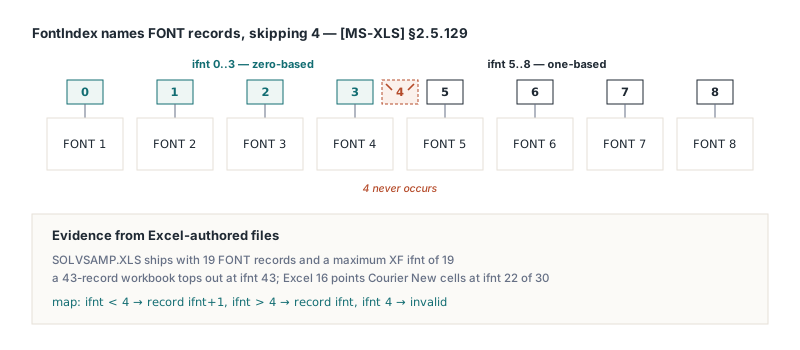
Inside HotXLS the same rule lives in two mirrored spots. TXLSFontList.GetSaveIndex takes the 1-based position of a font in the referred list and decrements only positions 1 to 4, so position 5 is written as ifnt 5. TXLSReader.ParseXF does the inverse on load: any ifnt of 5 or more is decremented to a zero-based font-list slot, and anything below stays put. The SST rich-run remap and CountRichRunFontRefs apply the same ifnt >= 5 conversion, which is the point: one convention, every consumer
// TXLSFontList.GetSaveIndex (writer side)
Result := inherited GetSaveIndex(Index);   // 1-based referred position
if (Result > 0) and (Result < 5) then
  Dec(Result);                             // 1..4 become 0..3, 5+ unchanged

// TXLSReader.ParseXF (reader side)
fnti := Data.GetWord(0);
if fnti >= 5 then
  Dec(fnti);                               // ifnt 5 is font-list slot 4
Why did a zero-based "fix" shift every custom font by one?
The zero-based rewrite in HotXLS 2.384.1 shifted every custom font because it read a one-based index as a zero-based one and then changed four call sites to match that misreading: GetSaveIndex, ParseXF, the SST run remap and the cross-workbook run migration in Sheets.AddCopy. HotXLS round trips still looked fine, because writer and reader agreed with each other. Excel did not agree. A file written by 2.384.1 put the first custom font at ifnt 4, which Excel treats as the default font, and every later custom font one record early; opening an Excel file went the other way, binding each font one record late
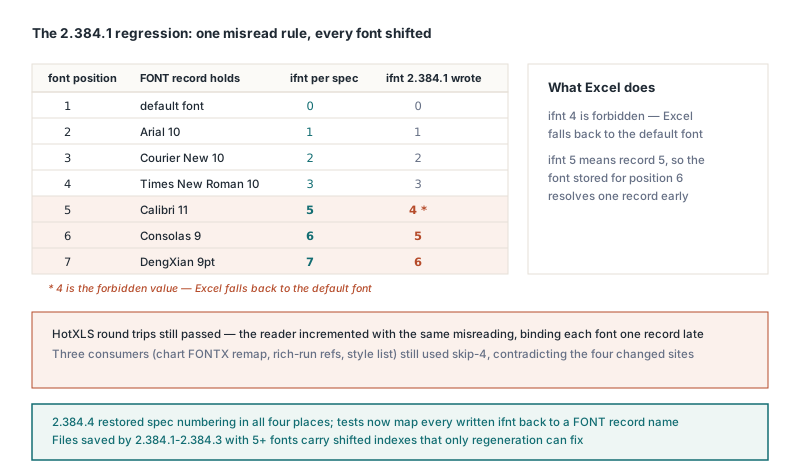
The tell that should have stopped the change was sitting in the same codebase. CountRichRunFontRefs, the chart FONTX and FBI remap, and the style engine font list were never touched and still used skip-4, so the library contradicted itself the moment 2.384.1 landed, and only the coincidence that rich-text fonts were usually also referenced by some XF kept the contradiction hidden. When one convention appears in seven places and you are changing four, suspect your change before you suspect the other three. Version 2.384.4 restored the spec numbering in all four places, and the old regression test, which asserted ifnt < FontCount and therefore encoded the misreading, was replaced by tests that map every written ifnt back to a FONT record name through the spec formula. One honest limitation remains: files saved by 2.384.1 through 2.384.3 with five or more fonts carry shifted indexes that a reader cannot tell apart from valid data, so the only cure is to regenerate them
Why do comment font runs break only on the second save?
Comment and text box runs broke on the second save because HotXLS kept the first N-1 FONT records unconditionally and dropped only the last one when no XF referenced it, while the TXO formatting runs ([MS-XLS] §2.4.329) were written back byte for byte without renumbering. Excel-authored .xls files always end with an unreferenced trailing font (a 9pt DengXian on a Chinese-locale system), so on the first save the font used only by a comment run was never last, and nothing visibly moved. That first save dropped the trailing font, though, and promoted the comment-only font to the last position. The second save then discarded it as unreferenced, the run's ifnt pointed past the end, and Excel fell back to the default font; if the workbook had gained a new font in between, the run quietly bound to that one instead, which in testing turned a styled text box run into Arial. Comment-heavy files like the ones described in building a comments and hyperlinks review workflow are exactly where this bites, because they get opened, annotated and saved repeatedly
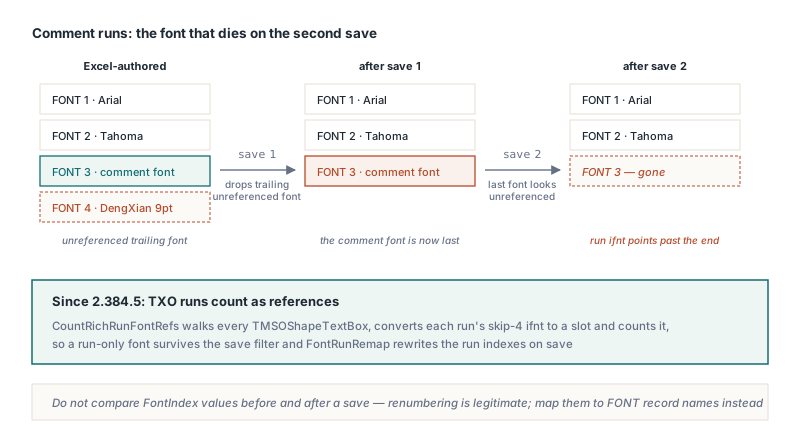
HotXLS 2.384.5 treats TXO runs like SST runs. CountRichRunFontRefs now walks every TMSOShapeTextBox on every worksheet, converts each run's skip-4 ifnt to a slot, and counts it as a reference, so a run-only font survives the save filter. The resulting slot-to-save-index table goes into each drawing's FontRunRemap, and TMSOShapeTextBox.Store rewrites the run indexes on a private copy of the raw run bytes, leaving the trailing TxOLastRun alone because it carries no font. For application code the contract is simple: TXLSComment.TextRuns.FontIndex and TXLSTextBox.TextRuns.FontIndex use the file numbering, 4 skipped, exactly as read; run indexes are 1-based and CharIndex is the character offset where the run starts. After a save the stored number may differ from the one you set, but it still points at the same font
var
  Book: IXLSWorkbook;
  Note: TXLSComment;
  I: Integer;
  Ifnt: Word;
begin
  Book := TXLSWorkbook.Create;
  if Book.Open('review-notes.xls') <> 1 then
    raise Exception.Create('Cannot open review-notes.xls');
  Note := Book.Sheets[1].Range['C2', 'C2'].Comment;
  if Note <> nil then
    for I := 1 to Note.TextRuns.Count do
    begin
      Ifnt := Note.TextRuns.FontIndex[I];   // file numbering, 4 skipped
      if Ifnt = 4 then
        raise Exception.CreateFmt('Run %d uses invalid ifnt 4', [I]);
      Writeln(Format('run %d at char %d: ifnt %d = FONT record #%d',
        [I, Note.TextRuns.CharIndex[I], Ifnt, FontIndexToRecordNo(Ifnt)]));
    end;
end;
Copies, row inserts and cross-workbook run migration
Since HotXLS 2.384.6, every classic-engine copy path keeps comment formatting runs, because Range.Copy, CopyRange, Sheets.AddCopy and the cell shifts behind Range.Insert and Range.Delete all go through TXLSRange.CopyCell, and CopyCell used to copy only the comment text and author. A shift is a copy plus a clear, so inserting a single row above a two-run note left it with zero runs and one font. The fix copies each run and moves its font through TXLSWorkbook.MigrateRunFontIndex, which converts the skip-4 index to a slot, migrates the font by value into the destination font table, and converts back to file numbering; the SST rich-text migration in Sheets.AddCopy now calls the same function instead of carrying its own copy of the arithmetic. Two edge cases came along: an in-place paste where source and destination are the same comment must not clear its runs before reading them, and Sheets.AddCopy now makes a second pass for comments attached to cells with no stored cell record, which it previously skipped entirely. The font-table side of cross-workbook copying follows the same by-value logic as the formula side covered in cross-workbook copy and formula rebinding. On the XLSX engine the copy paths already cloned runs by value; the gap was in the comments part itself, where the reader ignored rFont, strike, u and vertAlign and the writer never emitted u or vertAlign, so the runs now survive save and reopen symmetrically
How should you test font indexes in BIFF8 files?
Test font indexes by saving and reopening, ideally across more than one generation, and by mapping each ifnt back to a FONT record rather than asserting a numeric range. Every bug in this story passed an in-memory test: the 2.384.1 regression lived in a matched writer and reader pair, the TXO drift needed two saves with a font table change in between, and the lost comment runs on XLSX only showed up after a reopen. A useful harness opens an Excel-authored sample, saves it twice through HotXLS, adds or removes a font between saves, and then checks run positions plus, at the byte level, the font names behind each ifnt. Do not compare FontIndex values before and after a save, since renumbering is legitimate
procedure CheckNoteSurvivesShiftAndSave(const SrcFile, OutFile: string);
var
  Book: IXLSWorkbook;
  Note: TXLSComment;
  RunCount: Integer;
  SecondRunAt: Word;
begin
  Book := TXLSWorkbook.Create;
  Assert(Book.Open(SrcFile) = 1);          // Excel-authored, C2 has two runs
  Note := Book.Sheets[1].Range['C2', 'C2'].Comment;
  RunCount := Note.TextRuns.Count;
  SecondRunAt := Note.TextRuns.CharIndex[2];

  Book.Sheets[1].Range['C2', 'C2'].Copy(Book.Sheets[1].Range['E5', 'E5']);
  Book.Sheets[1].Range['C1', 'C1'].Insert(xlShiftDown);   // C2 moves to C3
  Assert(Book.SaveAs(OutFile) = 1);

  Book := TXLSWorkbook.Create;               // reopen, never trust memory
  Assert(Book.Open(OutFile) = 1);
  Note := Book.Sheets[1].Range['C3', 'C3'].Comment;
  Assert((Note <> nil) and (Note.TextRuns.Count = RunCount));
  Assert(Note.TextRuns.CharIndex[2] = SecondRunAt);
  Note := Book.Sheets[1].Range['E5', 'E5'].Comment;
  Assert((Note <> nil) and (Note.TextRuns.Count = RunCount));
end;
If you read and write classic XLS from Delphi or C++Builder and would rather not track which of a library's many font consumers still agrees with [MS-XLS] §2.5.129, the skip-4 numbering, run renumbering on save and by-value run migration described here are built into the HotXLS Delphi spreadsheet component, which reads and writes XLS and XLSX without Excel or OLE automation