HotXLS writes a conformant dataIntegrity block into Agile-encrypted XLSX packages and verifies it on open. The HMAC-SHA-512 covers the complete EncryptedPackage stream, including its eight-byte StreamSize prefix, and is checked over the ciphertext before any segment is decrypted, so a wrong password or a modified package is detected rather than decrypted into garbage
Encryption without integrity is a half-answer, and Office file formats make that gap easy to overlook because the encryption looks so thorough from the outside. Understanding what each layer promises is what keeps a security review short
What does an encrypted workbook actually promise?
Agile encryption, defined in [MS-OFFCRYPTO], gives you confidentiality through AES in CBC mode with a key derived from an iterated SHA-512 password hash. Confidentiality is the whole promise of that construction. CBC is not an authenticated mode: it says nothing about whether the ciphertext you are decrypting is the ciphertext that was written
The practical consequence is specific. Flip bits in an encrypted package and CBC will happily decrypt them into different plaintext. You will usually get a ZIP parse error somewhere downstream, because a corrupted deflate stream rarely survives, but "usually" is carrying a great deal of weight in that sentence, and a downstream parser error is a terrible place to learn that a file was modified. The dataIntegrity element exists to answer the question directly, before decryption, with a MAC over the exact bytes
How the check runs, and in what order
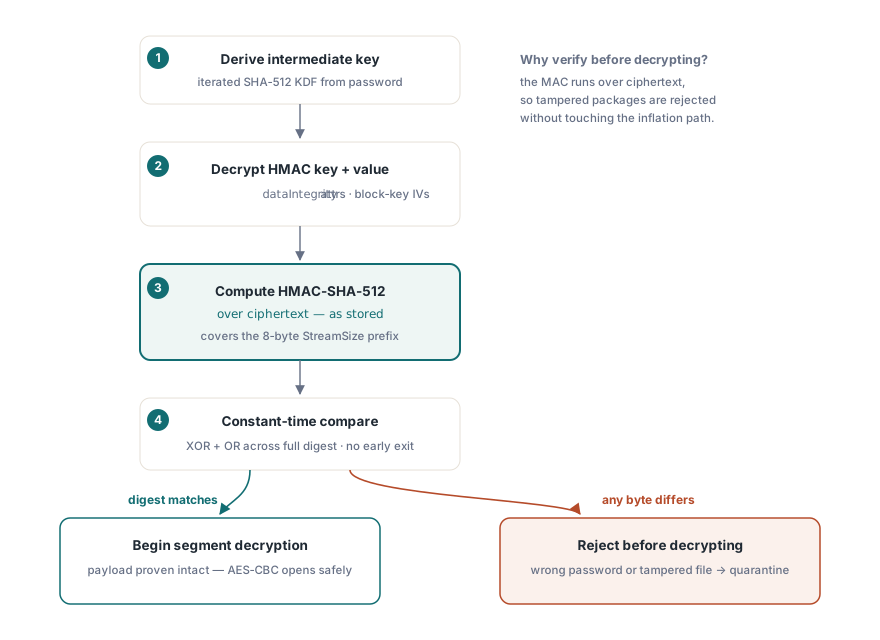
The order is the interesting part. HotXLS derives the intermediate key from the password, decrypts the encrypted HMAC key and HMAC value from the dataIntegrity attributes using block-key-derived IVs, computes HMAC-SHA-512 over the encrypted package as stored, and compares. Only then does segment decryption begin
Checking the MAC over ciphertext rather than plaintext is the standard encrypt-then-MAC discipline, and it is what makes the check meaningful: a tampered package is rejected without any attacker-controlled bytes having been run through the decryption and inflation path. Both comparisons in the open path, the password verifier hash and the HMAC value, accumulate differences with XOR and OR across the full digest rather than returning early on the first mismatched byte, so neither leaks a byte position through timing
var
  Book: TXLSXWorkbook;
begin
  Book := TXLSXWorkbook.Create;
  try
    // Works for plain, Standard-encrypted and Agile-encrypted files
    if Book.OpenEncrypted('incoming.xlsx', PasswordFromVault) = 1 then
      ProcessWorkbook(Book)
    else
      // Wrong password, or a package whose dataIntegrity HMAC did not match
      Quarantine('incoming.xlsx');
  except
    on E: Exception do
      Quarantine('incoming.xlsx: ' + E.Message);
  end;
  Book.Free;
end;
On the writing side nothing changes in your code. SaveAsEncrypted emits the block automatically, and the salts, verifier input and HMAC key come from CryptGenRandom. If that call fails, HotXLS raises rather than falling back to a weaker source. A fail-closed CSPRNG is not paranoia; a silent downgrade to a predictable random source produces files that look encrypted, pass every functional test, and are worthless
Why do files without the block still open?
Because a great many Agile-encrypted workbooks in circulation were written by producers that omit dataIntegrity entirely, and rejecting them would break far more legitimate work than it would protect. HotXLS treats integrity as present only when both attributes, the encrypted HMAC key and the encrypted HMAC value, are there and well-formed. Otherwise verification is skipped and the file opens as before
This is a compatibility decision with a security consequence you should name explicitly in your own threat model: the absence of the block cannot be distinguished from an attacker removing it, because the attributes are outside the MAC they would carry. If you control both ends of a pipeline, treat a missing block as a policy failure at the application level. If you are accepting files from the world, treat the check as what it is, a valuable signal when present and no signal at all when absent
Password to modify is a convention, not a boundary
Classic XLS workbooks support a separate mechanism that is routinely confused with encryption: the write reservation, Excel's "password to modify" prompt. HotXLS exposes it through SetModifyPassword, which takes the password, a recommend-read-only flag and the reserving user name, and reports state through IsWriteReserved. Passing an empty password clears the reservation
What gets written is a WRITEPROT and FILESHARING record pair carrying the recommend-read-only flag, a legacy 16-bit password hash and the user name as a BIFF8 Unicode string. That 16-bit hash is a checksum, not a cryptographic digest, and the document content is not encrypted at all. Anyone who opens the file with any other tool reads everything. The feature's real job is coordination: it tells the next person that someone considers this file theirs to edit, in the same category as the sheet-level controls covered in XLSX sheet protection and allow options
var
  Book: IXLSWorkbook;   // interface-counted: do not Free
begin
  Book := TXLSWorkbook.Create;
  if Book.Open('shared-model.xls') = 1 then
  begin
    // Recommend read-only, reserved by the reporting service
    Book.SetModifyPassword('edit-me', True, 'Reporting Service');

    if Book.IsWriteReserved then
      Book.SaveAs('shared-model.xls', xlExcel97);
  end;
end;
Use both layers for what each is good at. Real confidentiality comes from SaveAsEncrypted with a password nobody outside the audience holds, which produces the AES-256 output described in AES-protected XLSX output. The write reservation goes on top when the workbook is a shared editing artefact and you want Excel to ask before someone overwrites it
What to check on an untrusted intake path
Integrity verification protects the encrypted payload, not the container around it. An XLSX file is a ZIP archive, and the archive structure is parsed before any encryption logic runs, so container-level validation belongs first in the chain; the specific failure modes are covered in ZIP end-of-central-directory validation for untrusted XLSX. After that, treat an integrity failure and a wrong password as the same operational event, because from your side they are indistinguishable by design, and both mean the file cannot be trusted to be what the sender thinks it is
Log which files carried a dataIntegrity block at all. Over a few thousand documents that statistic tells you something useful about your senders' tooling, and it turns a per-file check into a fleet-level observation you can act on
HotXLS reads and writes XLS, XLSX and ODS from Delphi and C++Builder with no Excel installation, implementing the [MS-OFFCRYPTO] Standard and Agile encryption paths in Pascal. The encryption, protection and workbook APIs are documented on the HotXLS Delphi spreadsheet component page