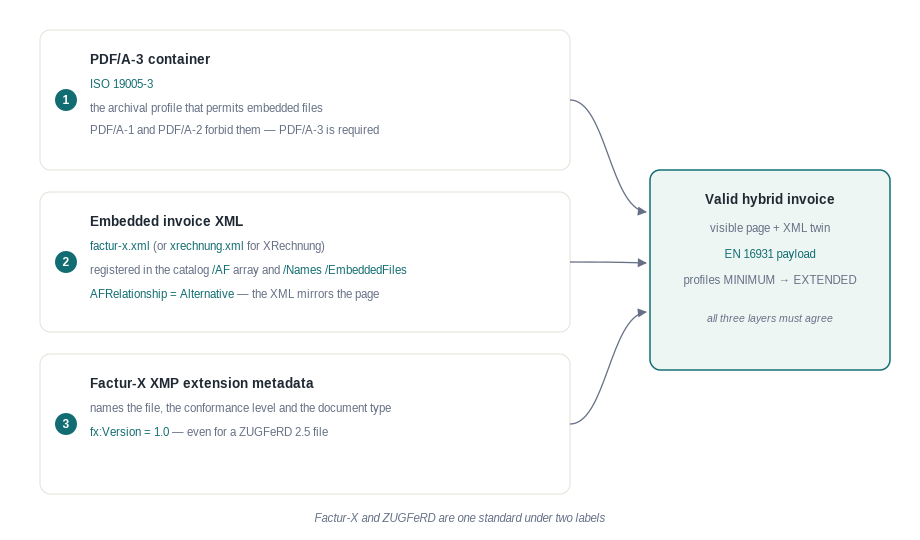
Every invoice in the official ZUGFeRD 2.5 sample set declares fx:Version 1.0 in its XMP metadata and carries its XML in a file called factur-x.xml. Nothing inside the PDF says 2.5. That looks like a stale sample until you reach the Factur-X 1.09 specification, which states that the version number in the URI of the PDF/A extension schema has nothing whatever to do with the version of the XML data specification, and that invoice instances stay at version 1.0 both in XMP and in BT-24 of the XML. The standard moved; the container did not
That matters because the pressure to ship hybrid invoices is regulatory. Germany and France are both phasing in mandatory structured e-invoicing for domestic B2B trade, and both land on the same model: the PDF invoice your ERP already prints has to carry a machine-readable XML twin inside it. Factur-X and ZUGFeRD are a single Franco-German standard published under two labels, so a Delphi accounting application needs one implementation, three container layers agreeing with one another, and an XML payload whose numbers add up
Three layers that have to agree
A Factur-X invoice is a PDF/A-3 file (ISO 19005-3) embedding exactly one structured invoice XML as an associated file and describing it in XMP. The container has to be part 3, because PDF/A-1 forbids embedded files outright whilst PDF/A-2 accepts only attachments that are themselves PDF/A documents — which an XML file never is. The attachment layer registers the XML, named factur-x.xml for the standard profiles or xrechnung.xml for the German XRechnung variant, in the catalog /AF array and in the /Names /EmbeddedFiles tree, with an AFRelationship entry stating what the file is to the visible page. The metadata layer is the Factur-X XMP extension schema: document file name, conformance level, version and a document type of INVOICE — enough for a receiving system to route the file without ever opening the XML
The XML itself follows the EN 16931 semantic model: buyer, seller, lines, VAT breakdown and payable amount, each tagged with a business term number such as BT-1 for the invoice number or BT-5 for the currency. Checking that XML happens on two levels people tend to merge. XML Schema validation asks whether the document is well-formed CII carrying the right element names. The Schematron business rules ask whether the content is coherent — whether, for instance, BR-CO-15 holds and the invoice total with VAT really equals the total without VAT plus the VAT amount. A file can pass the schema and still fail BR-CO-15 by a single cent
Why does a ZUGFeRD 2.5 invoice still say version 1.0?
ZUGFeRD 2.5 changes the XML data model, not the PDF container. New elements such as sub-invoice lines and batch identifiers live in the CII payload your business layer builds; the guideline URNs, the XMP schema and the version token in the PDF remain the ones Factur-X 1.0 introduced. An older container is still in circulation, too: the ZUGFeRD 2.0 legacy form names the attachment zugferd-invoice.xml, uses the zf XMP prefix and writes the version as 2p0. Factur-X 1.09 section 6.3.2 allows that legacy schema to be reused, and its version token stays 2p0 even for 2.5 content
THotPDF.AddFacturXAssociatedFile supports both forms through its Version argument. The default '1.0' produces the Factur-X container with factur-x.xml and the urn:factur-x:pdfa:CrossIndustryDocument:invoice:1p0# namespace. '2p0' produces the legacy ZUGFeRD container, and '2p5' is accepted as an alias for it so that code can name the standard it targets — but the XMP still receives 2p0, that being the only token the legacy schema defines. Leave Version at '1.0' for new 2.5 invoices: that is what the official samples do, and the legacy path exists for receivers built against ZUGFeRD 2.0 that still look for zugferd-invoice.xml
Embedding factur-x.xml with HotPDF
THotPDF.AddFacturXAssociatedFile turns an ordinary PDF/A-3 generation run into a Factur-X invoice: it embeds the XML bytes as an associated file, registers them in /AF and the embedded-files name tree, and switches on the matching XMP extension metadata. PDFACompliance has to name a PDF/A-3 level such as '3B' or '3U' before BeginDoc: a plain PDF makes the associated-file call raise, and the Factur-X container check on the receiving side expects PDF/A-3 metadata. The visible invoice page is drawn with the usual canvas calls; the container work amounts to one line between BeginDoc and EndDoc
var
  Pdf: THotPDF;
  InvoiceXML, UBLXML: TBytes;
begin
  InvoiceXML := BuildInvoiceXML;   // your own function: EN 16931 CII as UTF-8 bytes
  Pdf := THotPDF.Create(nil);
  try
    Pdf.AutoLaunch := False;
    Pdf.FileName := 'invoice-2026-0042.pdf';
    Pdf.PDFACompliance := '3B';    // PDF/A-3b container
    Pdf.BeginDoc;
    // add the PDF/A OutputIntent here (AddPDFAOutputIntent)
    // primary invoice: factur-x.xml, Alternative, XMP version 1.0
    Pdf.AddFacturXAssociatedFile(InvoiceXML, 'EN 16931');
    // optional UBL view of the same invoice, registered after the CII master
    UBLXML := BuildUBLXML;         // your own function
    Pdf.AddUBLSupplementaryFile(UBLXML);
    // ... draw the visible invoice page here ...
    Pdf.EndDoc;
  finally
    Pdf.Free;
  end;
end;
The defaults follow the specification: file name factur-x.xml, MIME type text/xml, relationship Alternative, version 1.0. AddUBLSupplementaryFile implements section 6.4 of Factur-X 1.09, which lets a UBL rendering of the same invoice travel as factur-xubl.xml with MIME type application/xml and the Alternative relationship; AddEDIFACTSupplementaryFile does the same for an EDIFACT message as factur-xedifact.edi in text/plain. Both are secondary views, so call them after the CII master has been registered. OutputIntent, font embedding and the rest of the PDF/A-3 side are covered in the companion article on PDF/A, PDF/X, and PDF/UA validation in Delphi
Argument checks that fire before anything is written
AddFacturXAssociatedFile refuses combinations the specification rules out, and it does so with an exception at the call site. The guideline URN inside the XML must match the ConformanceLevel you pass, so an XML generated for BASIC but declared as 'EN 16931' stops right there. The file name must fit the version (factur-x.xml with '1.0', zugferd-invoice.xml with '2p0' or '2p5', xrechnung.xml with XRECHNUNG); only one primary invoice can be registered, because the XMP holds a single document file name; and a non-empty CustomXMP is rejected, since it would overwrite the generated invoice metadata
The relationship rule catches most people once. MINIMUM and BASIC WL carry too little data to stand in for the visible invoice, so the specification gives them the relationship Data, and the default 'Alternative' raises for those two profiles. A MINIMUM invoice therefore needs the full argument list: Pdf.AddFacturXAssociatedFile(XML, 'MINIMUM', 'factur-x.xml', 'Factur-X invoice XML', 'Data'). With CountryCode set to 'DE', the German main profiles accept only Alternative; XRECHNUNG accepts Source or Alternative; generic and French main profiles accept Data, Source or Alternative
How do you detect a Factur-X invoice in an incoming PDF?
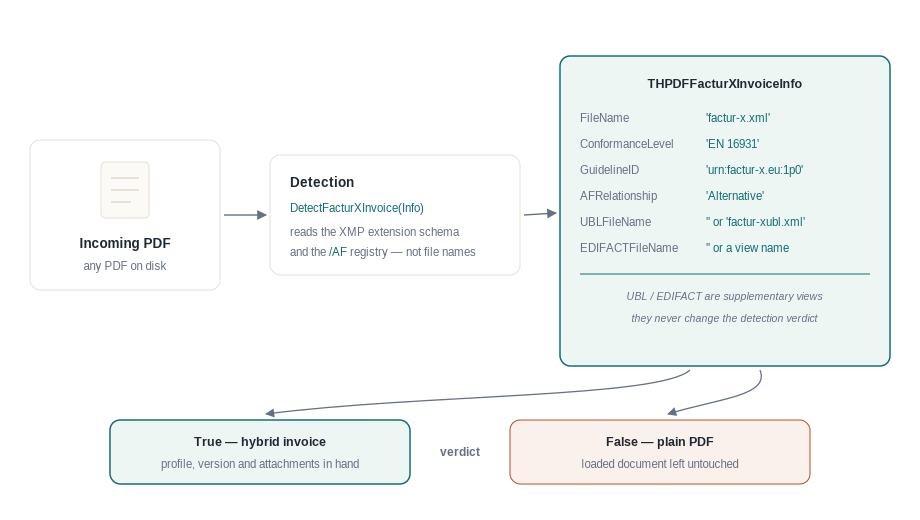
THotPDF.DetectFacturXInvoice answers the receiving side: load any PDF and learn in one call whether it is a hybrid invoice. It reads the XMP DocumentFileName first, falls back to the four standard attachment names, and fills a THPDFFacturXInvoiceInfo record with the file name, XMP namespace, document type, version, conformance level, the guideline URN parsed from the XML, the AFRelationship value and the attachment MIME type. The function returns True when the XML could be extracted and either the XMP declares INVOICE or the XML carries a guideline URN. UBLFileName and EDIFACTFileName report supplementary views without touching that verdict
var
  Reader: THotPDF;
  Info: THPDFFacturXInvoiceInfo;
  Missing: THPDFAnsiStringArray;
  I: Integer;
begin
  Reader := THotPDF.Create(nil);
  try
    if Reader.LoadFromFile('incoming-invoice.pdf') <= 0 then
      raise Exception.Create('No pages loaded');
    if not Reader.DetectFacturXInvoice(Info) then
    begin
      Writeln('Plain PDF without an embedded invoice XML');
      Exit;
    end;
    Writeln('Invoice XML:  ', string(Info.FileName));
    Writeln('Profile:      ', string(Info.ConformanceLevel),
      ', XMP version ', string(Info.Version));
    Writeln('Guideline:    ', string(Info.GuidelineID));
    Writeln('Relationship: ', string(Info.AFRelationship));
    if Info.UBLFileName <> '' then
      Writeln('UBL view:     ', string(Info.UBLFileName));

    // invoice number, seller, buyer and grand total must appear on the page
    if Reader.ValidateVisualXmlConsistency(Missing) > 0 then
      for I := 0 to High(Missing) do
        Writeln('Warning: not found in page text: ', string(Missing[I]));

    // PDF/A conformance is asked for on its own
    if fxviMissingOutputIntent in Reader.GetLoadedPDFAIssues then
      Writeln('Hybrid invoice, but no PDF/A OutputIntent');
  finally
    Reader.Free;
  end;
end;
Two extra calls in that listing answer questions the detection verdict deliberately leaves alone. ValidateVisualXmlConsistency covers principle 4 of Factur-X 1.09 section 5.1, which says any value in the XML must also appear in the human-readable PDF: it extracts the text of every page and looks for the invoice number, seller name, buyer name and grand total from the XML. The match is an exact substring search, so a total printed as 1.234,50 on a German layout whilst the XML holds 1234.50 shows up as missing — report the count as a warning. GetLoadedPDFAIssues returns the PDF/A-3 problems (fxviFontsNotEmbedded, fxviMissingOutputIntent, fxviEncryptedDocument); a hybrid invoice without an OutputIntent is still a correctly built Factur-X container, just not a conforming PDF/A-3 file. The same loaded document also exposes its XMP and Info dictionary for inspection or repair, as described in the article on editing metadata in loaded PDF documents
Running the EN 16931 business rules
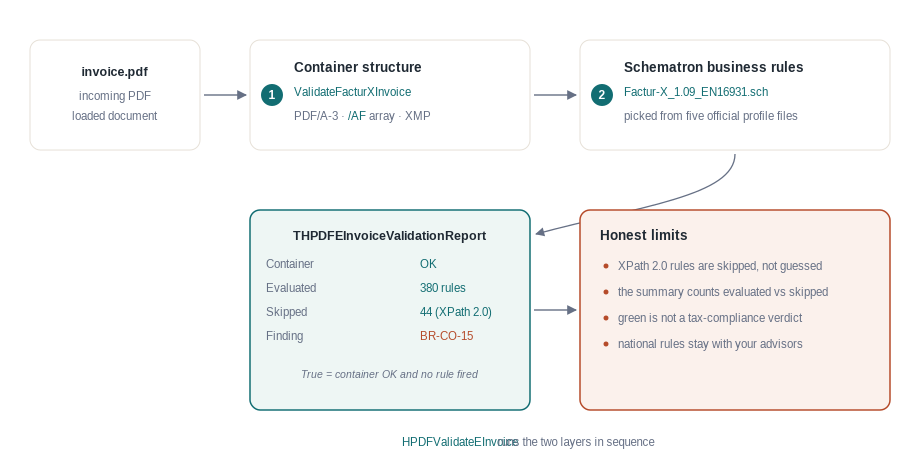
HPDFValidateEInvoice, a standalone function in the HPDFEInvoiceValidator unit of the Small Business and Enterprise editions, runs both layers in sequence. It calls ValidateFacturXInvoice for the container, extracts the embedded XML, and loads the Schematron file for the detected conformance level from the folder you pass. The library ships the five official Factur-X 1.09 rule files — MINIMUM, BASIC WL, BASIC, EN 16931 and EXTENDED — each paired with its external code-list database under Lib/resources/Schematron/; HPDFSchematronFileForProfile maps 'EN 16931' to Factur-X_1.09_EN16931.sch, which alone holds 618 assert and report checks. The function returns True only when the container is valid, every required rule set has been evaluated in full, and no rule has fired
uses
  HPDFDoc, HPDFEInvoiceValidator;

var
  Reader: THotPDF;
  Report: THPDFEInvoiceValidationReport;
  RulesDir: string;
  I: Integer;
begin
  // copy Lib\resources\Schematron next to your executable
  RulesDir := ExtractFilePath(ParamStr(0)) + 'Schematron';
  Reader := THotPDF.Create(nil);
  try
    Reader.LoadFromFile('incoming-invoice.pdf');
    if HPDFValidateEInvoice(Reader, RulesDir, Report) then
      Writeln('Container and business rules: OK')
    else
      Writeln('Rejected: ', string(Report.ValidationNote));
    Writeln(Report.BusinessSummary.Evaluated, ' of ',
      Report.BusinessSummary.TotalRules, ' checks evaluated, ',
      Report.BusinessSummary.EvaluationErrors, ' evaluation errors');
    for I := 0 to High(Report.BusinessRules) do
      if Report.BusinessRules[I].Severity = stsError then
        Writeln(string(Report.BusinessRules[I].RuleID), ': ',
          string(Report.BusinessRules[I].Message));
  finally
    Reader.Free;
  end;
end;
Each entry in BusinessRules carries the rule identifier parsed from the assertion text, such as BR-45 or BR-CO-17, along with the rule context XPath, the test expression, a severity taken from the Schematron flag attribute, and IsReport to tell a failed assert from a fired report. When a customer asks why an invoice bounced, that is the line support needs: the exact business term that disagrees, together with the XPath pointing at it. Teams already producing conformance reports for archival PDFs can fold these results into the pipeline from the article on automating PDF preflight reports
The rule files declare queryBinding="xslt2", whilst MSXML evaluates XPath 1.0. On Delphi XE2 and later the validator closes that gap itself: it rewrites the XPath 2.0 constructs the official files use — casts, quantified expressions, FLWOR sums and external code-list lookups — into operations MSXML can run. An expression it cannot execute comes back as an evaluation error and is counted as a violation, so a rule never passes by being left out. On Delphi 7 the unit compiles with the same result types and a stub engine reporting itself unavailable, which leaves ValidationComplete False
What a passing report covers
A True from HPDFValidateEInvoice means the container conforms and every registered business-rule set and required country-rule set ran to completion without a violation. ValidationNote tells you which case you are in. XRECHNUNG and the French EXTENDED-CTC-FR and EXTENDED-B2B-FR profiles need a national rule layer atop the EN 16931 core, and the default registry has no XRechnung rule set at all — it never falls back to the EXTENDED file. A perfectly good XRechnung invoice therefore comes back False with a note saying that no business-rule set is registered for the profile. That is the right default: a False naming its reason is worth more than a True computed against the wrong rule file
The official XRechnung CII rules and the French FNFE-MPE CTC packages ship as compiled XSLT under the same resource folder, and they run through a Saxon HE engine that you install and point at; the library installs neither Java nor Saxon for you
uses
  HPDFDoc, HPDFEInvoiceValidator, HPDFEInvoiceSaxon;

var
  Reader: THotPDF;
  Registry: THPDFEInvoiceRuleRegistry;
  Engine: IHPDFESchematronEngine;
  Report: THPDFEInvoiceValidationReport;
  RulesDir: string;
begin
  RulesDir := ExtractFilePath(ParamStr(0)) + 'Schematron';   // XRechnung\ lives inside it
  Reader := THotPDF.Create(nil);
  Registry := THPDFEInvoiceRuleRegistry.Create;   // one registry per thread
  try
    Reader.LoadFromFile('xrechnung-invoice.pdf');
    Engine := HPDFCreateSaxonSchematronEngine(
      'C:\Java\bin\java.exe', 'C:\Saxon\saxon-he.jar', 60000);
    HPDFRegisterXRechnungRules(Registry, Engine);   // EN 16931 core + German CIUS
    if HPDFValidateEInvoiceWithRegistry(Reader, RulesDir, Registry, Report) then
      Writeln('XRechnung: container, core and country rules OK')
    else
      Writeln(string(Report.ValidationNote));
  finally
    Registry.Free;
    Reader.Free;
  end;
end;
French invoices follow the same pattern with HPDFRegisterFrenchCTCRules, which takes the profile name and selects the matching Factur-X rule file together with the BR-FR-Flux2 checks. Two things sit above every rule set the validator runs. XML Schema validation and transport-level rules are separate checks, and the note on a fully passing report says so in as many words. Tax compliance, receiver-specific requirements and the legal obligations around invoice content belong to your tax advisers. Put the validator at the gate where it pays off most: before an invoice leaves your outbox, and as soon as one lands in your inbox
Generation, detection and the container check are part of every edition of the HotPDF Delphi Component for Delphi and C++Builder, and the E-Invoice sample project builds seven profiles from BASIC to XRechnung 3.0, including the legacy ZUGFeRD 1.0 and 2.0 forms