HotPDF converts XPS and OpenXPS packages to PDF inside Delphi and C++Builder without a print driver, mapping every 96-DPI fixed-page coordinate through one 0.75-scale Y-flipping page matrix, publishing each VisualBrush as a shared Form XObject, and turning ImageBrush tile modes into native PDF tiling patterns instead of repeated image draws
The scenario that drags most Windows shops into this is dull and unavoidable. Something already prints to the Microsoft XPS Document Writer — a legacy ERP report, a signed form, a batch of statements — and the archive policy says PDF. XPS is a perfectly good capture format and a terrible one to hand a records system a decade from now. So the spool file has to become a page-for-page PDF, and the moment you start writing that converter you discover the interesting part is not the XML. It is that XPS and PDF disagree about where the origin is, what a unit is worth, and what a brush is allowed to be
From package to PDF in one pass
The entry point is the document handler registry, not a special XPS class. THPDFDocumentHandlerRegistry.RegisterStandardHandlers installs the XPS, EPUB and CBZ handlers; recognition is content-based, so a package carrying [Content_Types].xml plus at least one .fpage part scores 95 even when the file extension lies, while a bare .xps or .oxps extension only scores 10. That ordering matters when you accept uploads, because an attacker renaming an EPUB to .xps should not steer the pipeline
var
  Handled: IHPDFHandledDocument;
  Info: THPDFDocumentHandlerInfo;
  Options: THPDFDocumentHandlerOptions;
  Registry: THPDFDocumentHandlerRegistry;
  Output: TFileStream;
begin
  Registry := THPDFDocumentHandlerRegistry.Create;
  Output := TFileStream.Create('spool.pdf', fmCreate);
  try
    Registry.RegisterStandardHandlers;
    Options := THPDFDocumentHandlerOptions.Default;
    if not Registry.OpenFromFile('spool.xps', '', Options, Handled, Info) then
      raise Exception.Create('no registered handler recognised the package');
    if Handled.Format = hdfXPS then
      Handled.WritePDF(Output, Options, Info);
    // Info.UnsupportedFeatureCount is the honest score for this conversion
  finally
    Output.Free;
    Registry.Free;
  end;
end;
Everything about the conversion is budgeted before it is attempted. THPDFDocumentHandlerOptions.Default caps archive entries at 10,000, expanded archive bytes at 1 GiB, the compression ratio at 200, resources at 4,096, and pages at 10,000, and it carries an optional CancellationToken so a server-side job can be stopped mid-package. Read Info.UnsupportedFeatureCount afterwards and treat a non-zero value as a real finding: HotPDF deliberately counts what it could not map rather than drawing an approximation and staying quiet about it
Why does an XPS page need a matrix instead of rewritten coordinates?
Because rewriting coordinates loses the transform stack. An XPS FixedPage is specified in 96-DPI units with the origin at the top left and Y growing downwards; PDF user space is 72-DPI with the origin at the bottom left and Y growing upwards. The naive fix is to multiply every number by 0.75 and subtract each Y from the page height as you emit it. That works for one flat path and falls apart the instant a RenderTransform, a nested Canvas, or a brush-local matrix enters, because those transforms are defined in XPS space and your per-coordinate rewrite has already left it. HotPDF therefore keeps the projection as a matrix and composes it. HPDFXPSPageMatrix returns the fixed constants once per page, HPDFMultiplyXPSMatrix concatenates it with the accumulated path transform, and the result is emitted as a single cm operator before the geometry. Path data is then written in unmodified XPS numbers, which is also why the abbreviated geometry syntax can share the same bounded parser used for SVG path data — only the leading F0 or F1 fill-rule token is handled by the XPS adapter. If you have followed the same reasoning for EMF and WMF vector import, the shape of the argument is familiar: import formats are converted by matrix, never by arithmetic on leaf coordinates
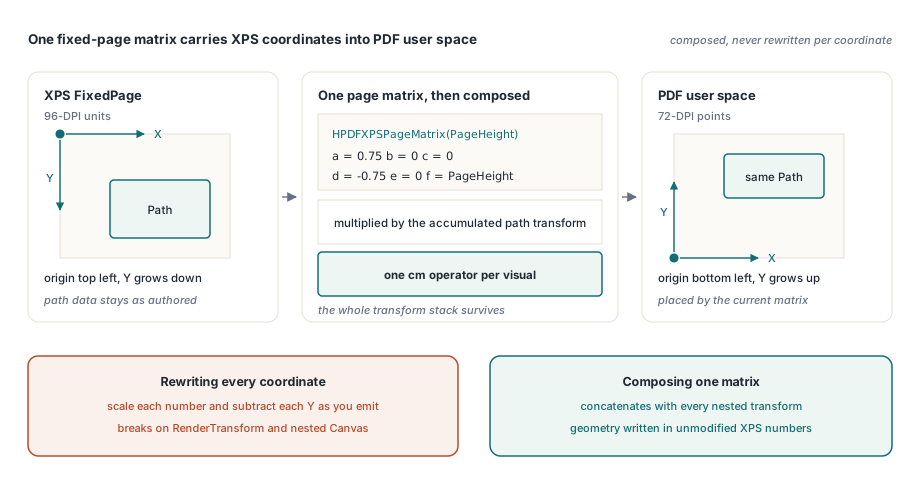
function HPDFXPSPageMatrix(PageHeight: Double): THPDFXPSMatrix;
begin
  Result.A :=  0.75;       // 96-DPI XPS unit to 72-DPI PDF point
  Result.B :=  0;
  Result.C :=  0;
  Result.D := -0.75;       // XPS Y grows down, PDF Y grows up
  Result.E :=  0;
  Result.F := PageHeight;  // PDF page height, in points
end;

// One composed CTM per visual, emitted before any path operator
Effective := HPDFMultiplyXPSMatrix(HPDFXPSPageMatrix(PageHeightPDF), PathMatrix);
Page.AppendRawContent(HPDFXPSMatrixOperator(Effective));
How do you reuse a VisualBrush without drawing it twice?
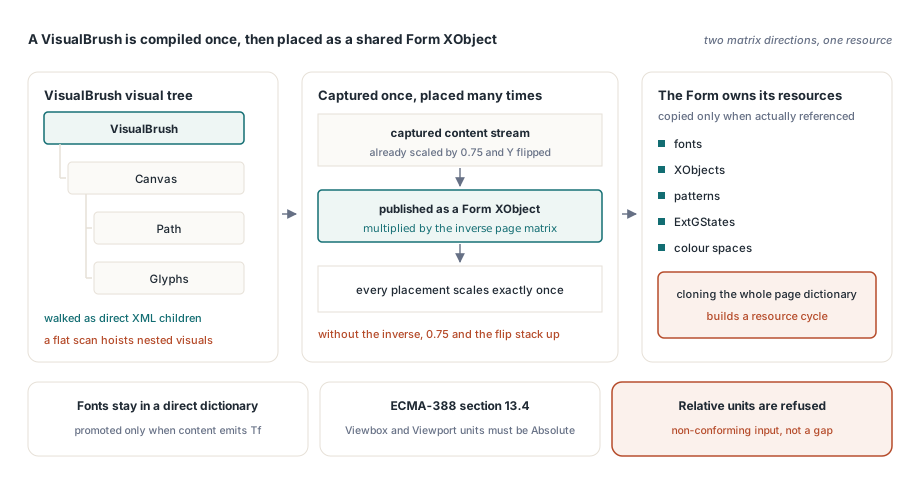
A VisualBrush paints an arbitrary visual tree — Canvas, Path and Glyphs children — into a region, possibly repeated across it. HotPDF compiles that visual once into a PDF Form XObject and then places it, which is the same resource strategy described in SVG import via Form XObjects. Two details decide whether it works. First, the visual has to be walked as direct XML children: a flat scan for tile-worthy elements pulls nested visuals up to the page top level and destroys both resource scoping and painting order. Second, content is captured with the XPS-to-PDF page matrix already applied, so publishing the Form requires multiplying by the inverse of that matrix, otherwise every placement re-applies the 0.75 scale and the Y flip. The Form also has to own its resources: HotPDF copies only the fonts, XObjects, patterns, ExtGStates and colour spaces that the captured content stream actually references; cloning the whole page resource dictionary would drag the Form being registered into its own resource graph and build a cycle. Fonts stay in a direct dictionary on ordinary pages and are promoted to a shared indirect dictionary only when captured content really contains a Tf, so a document with no reusable visuals does not pay for the machinery. Note one specification boundary worth knowing before you file a bug: ECMA-388 section 13.4 requires both ViewboxUnits and ViewportUnits on a VisualBrush to be Absolute, so relative units are not a missing feature — they are non-conforming input, and HotPDF refuses to invent coordinate semantics for them
ImageBrush tiling: four modes, four cell sizes
XPS tile modes map onto PDF tiling patterns from ISO 32000-1 section 8.7.3 rather than being expanded into repeated image placements across the covered area, which keeps output size and conversion time independent of how much of the page the brush covers. The mapping is mechanical once you see it: reflection is expressed by putting mirrored placements inside one pattern cell and enlarging the cell to match
Tile— one placement, cell stays 1×1 viewportFlipX— two placements, cell widened to 2×1FlipY— two placements, cell heightened to 1×2FlipXY— four placements, cell expanded to 2×2
Each placement carries its own clip rectangle, because a Viewbox mapping that overruns its sub-cell would bleed into the neighbouring reflection. The pattern /Matrix is the part that catches people. A tiling pattern is anchored to the default user space of its parent content stream, not to the graphics state current when the pattern is selected, so the matrix has to compose all three layers explicitly — the fixed-page projection, the Path transform, and the brush-local Transform — instead of relying on an ambient CTM. HotPDF also validates before it allocates: RegisterImageTilingPattern limits a pattern to 1,024 placements and rejects degenerate clips, non-invertible matrices and invalid image indices. If you want the general PDF-side model behind this, tiling patterns and the Pattern colour space covers the underlying operators
// Fixed-page projection folded into the pattern matrix, then the brush-local one
PatternMatrix := HPDFMatFromOps( 0.75 * PathMatrix.A, -0.75 * PathMatrix.B,
                                 0.75 * PathMatrix.C, -0.75 * PathMatrix.D,
                                 0.75 * PathMatrix.E,
                                 PageHeight - 0.75 * PathMatrix.F);
if Brush.HasTransform then
  PatternMatrix := HPDFMatMul(PatternMatrix, BrushMatrix);

PatternName := Document.RegisterImageTilingPattern(Resource.ImageIndex,
  Brush.Viewport.Left, Brush.Viewport.Top,
  Brush.Viewport.Left + CellWidth, Brush.Viewport.Top + CellHeight,
  CellWidth, CellHeight, Placements, pttNoDistortion, PatternMatrix);
What happens when a radial gradient is not a circle?
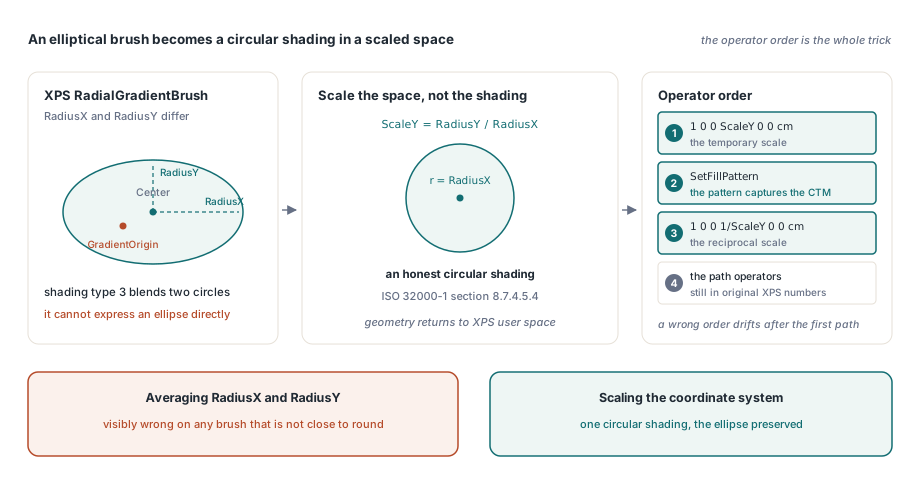
XPS defines a RadialGradientBrush with GradientOrigin, Center, RadiusX and RadiusY, so the brush is an ellipse. PDF shading type 3, in ISO 32000-1 section 8.7.4.5.4, blends between two circles and has no way to express an ellipse directly. Averaging the two radii into one number is the tempting shortcut and it is visibly wrong on any brush that is not close to round. HotPDF instead moves the problem into the coordinate system: it scales Y by RadiusY / RadiusX, registers an honest circular shading in that scaled space, selects the pattern, and immediately emits the reciprocal scale so the path geometry written next is still in original XPS user space
ScaleY := Brush.RadiusY / Brush.RadiusX;
PatternName := Document.RegisterMultiStopRadialGradient(
  Brush.StartX, Brush.StartY / ScaleY, 0,
  Brush.EndX,   Brush.EndY   / ScaleY, Brush.RadiusX,
  StopPositions, StopColours, 3);

if Abs(ScaleY - 1) > 0.000001 then
  Page.AppendRawContent('1 0 0 ' + HPDFPDFNumber(ScaleY) + ' 0 0 cm'#10);
Page.SetFillPattern(PatternName);   // the pattern captures the CTM right here
if Abs(ScaleY - 1) > 0.000001 then
  Page.AppendRawContent('1 0 0 ' + HPDFPDFNumber(1 / ScaleY) + ' 0 0 cm'#10);
The ordering in that snippet is the whole trick, and it is not stylistic. A PDF shading pattern captures the current transformation matrix at the moment it is chosen as the current colour, so the temporary scale must be emitted before SetFillPattern or SetStrokePattern, and the reciprocal must follow the selection but precede the path operators. Get the order wrong in either direction and you have a gradient that renders correctly on the first path and drifts on every subsequent one. A related constraint applies to relative coordinate mode: RadiusX and RadiusY must be resolved against the path width and height separately, since scaling both by a single edge length silently changes the aspect ratio of the ellipse on any non-square path
Where the conversion is honest about its limits
Some XPS constructs are converted approximately and some are not converted at all, and the design choice throughout is to count them rather than fake them. TIFF and JPEG XR parts are rasterised through WIC and carry no promise about preserved alpha, while PNG with a valid alpha channel is split into a base image plus an /SMask. Image intrinsic size is derived as pixel * 96 / DPI, reading PNG pHYs or JPEG JFIF density first and falling back to 96 DPI, so a bad density header lands at a predictable size rather than an arbitrary one. Unresolved matrix resources, non-standard relative transforms, ColorConvertedBitmap, unsupported gradient spread modes and malformed geometry all increment UnsupportedFeatureCount, and malformed input fails closed instead of degrading to a silently different drawing
That is the useful posture for an archival converter: a conversion that quietly approximates is worse than one that tells you which four elements it could not represent, because only the second gives you something to check before the document is sealed into a records system. If you are evaluating XPS and OpenXPS conversion alongside the rest of the document pipeline — page composition, fonts, signing, PDF/A output — the HotPDF Delphi PDF component page lists the full feature set and the supported Delphi and C++Builder versions